How we make this list: we compare pricing pages, product documentation and public user reviews. Ratings come from G2, Capterra or Trustpilot, with the date we checked them.
Direct answer
Sourcetree is the closest free replacement for most GitHub Desktop users on Windows and Mac, with visual history, line staging, and Git LFS at no cost. Teams that need Linux should look at GitKraken instead, because its free Community plan covers local and public repositories, while private work needs a paid plan.
Key takeaways
- Windows and Mac users who want a free client should start with Sourcetree, listed by Atlassian as free for Windows and Mac.
- Linux teams should check GitKraken first. Community is free for local and public repos, with a 14-day Advanced trial.
- Mac and Windows developers who dislike subscriptions should compare Fork. Its license covers 1 user on up to 3 machines.
- Teams that need undo and in-client pull requests should price Tower Basic at $48.30 per user for the first sale year, then $69 annually.
- Commercial cross-platform teams should check SmartGit, from $5 per user per month, with free licenses only for qualifying non-commercial use.
Quick comparison
| Tool | Best for | Starting price | Free plan |
|---|
 Sourcetree | Free Git and Mercurial work | Free | Free Git client for Windows and Mac |
 GitKraken | Teams that need Linux support | See website | Community Free for local repos and public remotes, plus a free 14-day trial of Advanced |
 Fork | Focused Mac and Windows Git work | See website | None found on vendor page |
 Tower | Professionals who want undo built in | Basic $48.30 per user annually for the first year, then $69 per user annually | Free 30-day trial of Pro, no credit card required |
 SmartGit | Commercial cross-platform Git teams | From $5/user/month | Free for qualifying non-commercial use, registration required |
 Sublime Merge | Fast line and hunk staging | See website | Free evaluation; license required for continued use |
 TortoiseGit | Git inside Windows File Explorer | Free | Free, per the vendor manual |
 Git Extensions | Windows Explorer and Visual Studio users | See website | None found on vendor page |
 Gittyup | Open source history-focused Git work | Free | Open source software developed by volunteers |
 Git Cola | Keyboard-focused hunk staging | See website | None found on vendor page |
Is your product missing or out of date?
We review this list regularly. Vendors can request a listing, send updated pricing or ask about featured placement.
The best github desktop alternatives
GitHub Desktop covers the basic loop of clone, branch, commit, push, and pull, but many teams outgrow it when they need Linux support, Mercurial repositories, line-level staging, worktrees, or pull request work inside the client. This list ranks 10 clients by platform fit, staging and history tools, hosting integrations, and license terms from vendor pages. Paid clients earn their place when they add undo, stacked branches, enterprise sign-in, or a perpetual option. Every tool below had a live official site on the check date.
Starting priceFree
Free planFree Git client for Windows and Mac
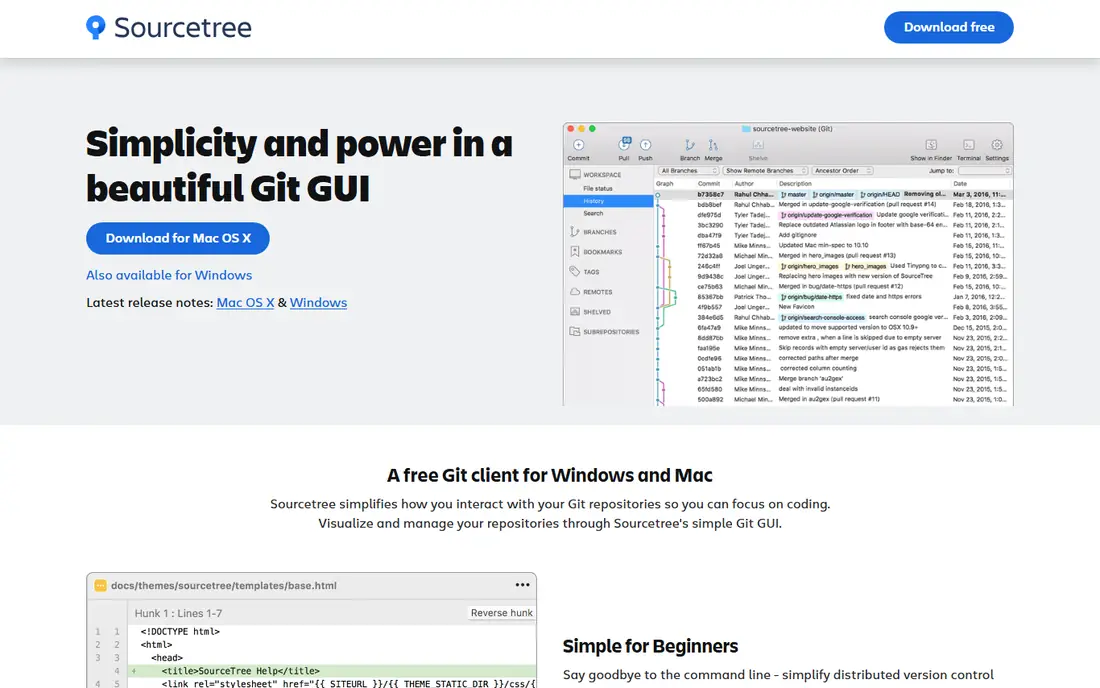
Sourcetree is Atlassian's desktop client for Git and Mercurial on Windows and Mac. It shows branch and commit history in a visual interface, lets users stage or discard changes by file, hunk, or line, and includes stash, cherry-pick, local commit search, and a remote repository manager. Git LFS support helps teams that track large assets in one place. The Git-flow support and submodule handling suit teams that keep a structured branching model. For a GitHub Desktop user, the move is familiar: clone a repository, review changes, commit, and push without learning a new hosting service first.
The catch is platform coverage. Atlassian lists Sourcetree for Windows and Mac, so Linux developers cannot standardize on it across a mixed team. Managed Windows installs use a separate Enterprise edition. Choose Sourcetree for free Windows and Mac work with Mercurial support. Look elsewhere if Linux is required. Teams that also keep Mercurial repositories gain the most from this free choice.
What we like- Free for Windows and Mac
- Stages changes by file, hunk, or line
- Supports Git LFS, Git-flow, submodules, and interactive rebase
Watch out for- Vendor page lists Windows and Mac only, with no Linux build
- Windows Enterprise management is a separate edition
Starting priceSee website
Free planCommunity Free for local repos and public remotes, plus a free 14-day trial of Advanced
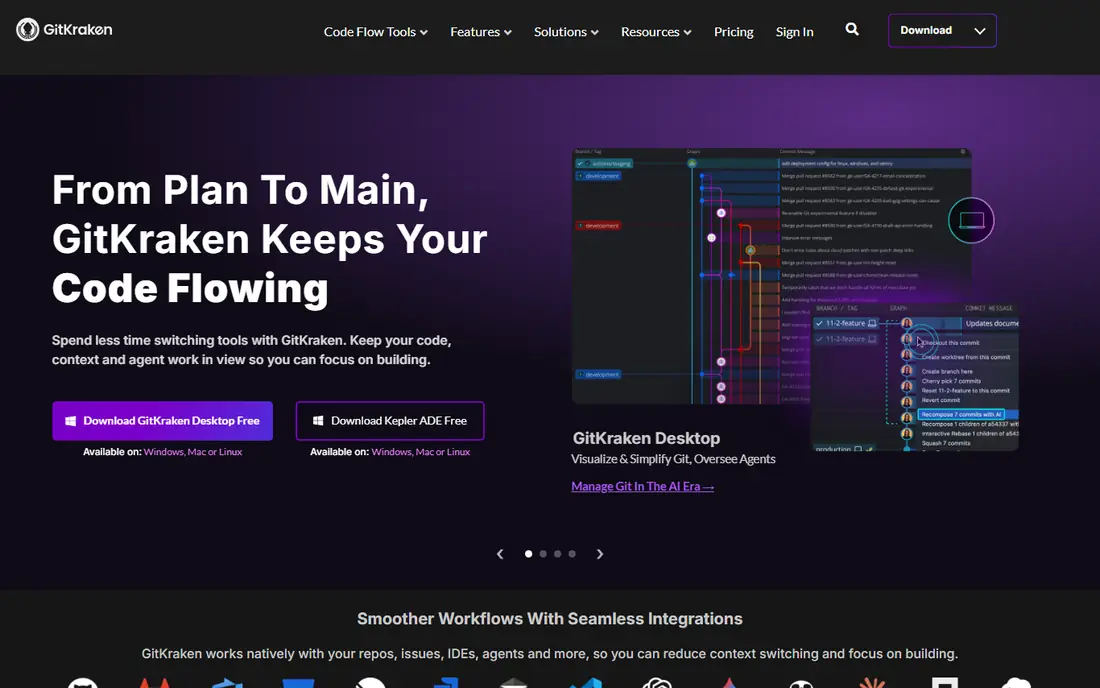
GitKraken Desktop is a visual Git client that presents branches, commits, and conflicts in a single view. The vendor pricing page lists Community as free basic GitKraken Desktop, CLI, and GitLens for open source development, with unlimited cloud Git integrations for services such as GitHub, GitLab, and Bitbucket. Pro adds private repository access, cloud issue tracker integrations, conflict detection, shared cloud workspaces, and AI commit features. Advanced adds self-hosted and enterprise integrations and single domain SSO. For teams leaving GitHub Desktop because they also use GitLab or Bitbucket, that hosting breadth is the main draw.
The catch is the free plan limit. Community covers only local and public repos, so private work needs a paid plan. The pricing text checked showed no readable Pro numbers, hence See website. Pro caps at 2 seats. Choose GitKraken for Linux and several hosting services. Look elsewhere for free private work. Confirm the current seat price before you budget for a growing team.
What we like- Visual view of branches, commits, and conflicts
- Cloud integrations for GitHub, GitLab, and Bitbucket
- Pro adds private repo access and conflict detection
Watch out for- Community plan covers only local repos and public remotes
- Pro allows up to 2 seats, so larger teams must move to a higher plan
Starting priceSee website
Free planNone found on vendor page
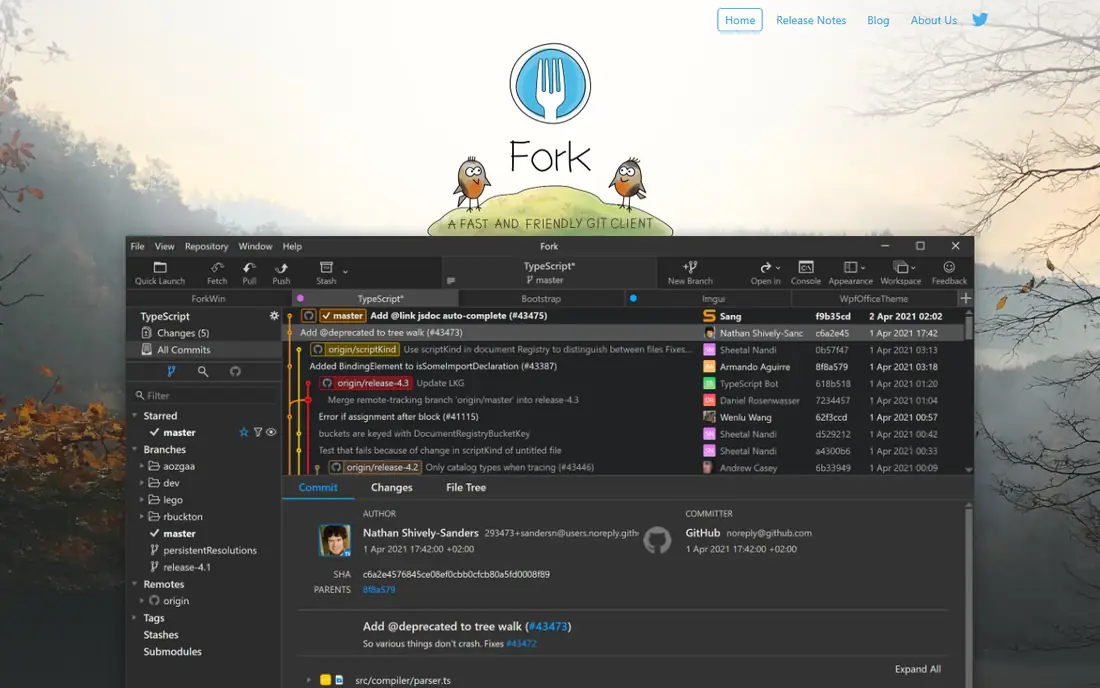
Fork is a Git client for Mac and Windows built around a commit list, working directory changes, and side by side diffs. The vendor site lists line by line staging, visual interactive rebase, a merge conflict helper and resolver, image diffs for common formats, blame view, file history, and reflog access to restore lost commits. It also covers fetch, pull, push, cherry-pick, revert, merge, rebase, stashes, submodules, Git-flow, Git LFS, and GPG. Repository manager summaries help users who keep several projects open. For GitHub Desktop users who want more staging control without a team platform, Fork keeps the scope narrow.
The catch is licensing and platform scope. A key covers one user on up to 3 Mac or Windows machines, and the pages checked stated no free plan, so confirm terms before rollout. Choose Fork for focused rebase and conflict tools. Look elsewhere for Linux or central license management. That machine limit matters for developers who switch between desktop and laptop.
What we like- Stages changes line by line
- Visual interactive rebase edits, reorders, and squashes commits
- Merge conflict resolver and image diffs are built in
Watch out for- Mac and Windows only, with no Linux version listed
- License key covers one user on up to 3 machines at a time
Starting priceBasic $48.30 per user annually for the first year, then $69 per user annually
Free planFree 30-day trial of Pro, no credit card required
Tower is a native Git client for Mac and Windows with pull requests and a services manager for cloud code hosting in every plan. The vendor blog and pricing page list undo for Git operations, drag and drop for merging branches and cherry-picking commits, interactive rebase, a merge conflict wizard, Git worktrees, native Git LFS support, commit templates, and branch comparison. Pro adds stacked branches, advanced custom workflows, Graphite workflow, self-hosted services, and basic team management. Enterprise adds advanced team management, invoicing and wire transfer, priority support, and SAML-based SSO. The trial starts on Pro, so evaluators see the full feature set first.
The catch is recurring cost. There is no free plan, and access ends when the paid period ends. Pro is $64.50 for the first sale year, then $129 annually, with 10% off at 10 or more seats. Choose Tower if undo and stacked branches save real time. Look elsewhere for Linux. The sale price should not be used as the renewal budget figure.
What we like- Undo covers commits, merges, and stash deletions
- Drag and drop supports merging, cherry-picking, and interactive rebase
- All plans include Mac and Windows versions
Watch out for- No free plan, only a 30-day trial
- Mac and Windows only, with stacked branches and self-hosted services in Pro
Starting priceFrom $5/user/month
Free planFree for qualifying non-commercial use, registration required
SmartGit is a cross-platform Git client from syntevo for professional and commercial use. The pricing page lists commercial use from $5 per user per month or perpetual licensing, with optional add-ons. Perpetual licenses are valid for an unlimited time for versions covered by the update period, and the starting price includes 1 year of updates and 90 days of email support. Enterprise licensing adds a license server, centralized license management, volume pricing, and individual quotes. Free licenses exist for hobby projects, students and employees of public educational institutions, and qualifying open source and charity work, each with registration rules.
The catch is license fit. The free license excludes enterprise integrations for self-hosted services and does not cover paid work. Subscriptions need internet access for renewed license files and stop at period end without renewal. Choose SmartGit for three-system coverage with a perpetual option. Perpetual terms and update years need a closer read before any long term rollout decision for larger teams.
What we like- Commercial use starts from $5 per user per month with perpetual licensing also offered
- Each user can use a license on up to five machines
- Subscription includes updates and email support during the paid period
Watch out for- Free licenses exclude commercial use and enterprise integrations for self-hosted services
- SmartGit stops working when a subscription period ends without renewal
Starting priceSee website
Free planFree evaluation; license required for continued use
Sublime Merge is a cross-platform Git client from the makers of Sublime Text. The vendor page emphasizes precise staging: users can commit files, hunks, and lines, and select lines to split hunks into multiple changes. It uses Sublime Text syntax highlighting with over 40 supported languages out of the box, plus automatic loading of installed third-party syntaxes. A custom Git reading library and cross-platform GUI toolkit support fast history browsing. The page also lists a command palette, commit editing, blame and file history, submodule management, command line integration, and Git Flow integration. Users can view the exact Git commands being run.
The catch is that the vendor buy page checked for this guide states free evaluation and license terms, but the fetched page text does not show a price amount, so the price is listed as See website. The page also focuses on local repository work rather than hosting features such as pull request management. Choose Sublime Merge if precise staging, search, and a Sublime Text style interface matter most. Look elsewhere if your team needs in-client pull requests, issue tracker links, or a permanent free tier.
What we like- Stages files, hunks, and lines with line by line selection
- Syntax highlighting covers over 40 supported languages out of the box
- Find-as-you-type search locates commits quickly
Watch out for- Vendor page checked states no free plan terms
- Homepage centers on local Git work and lists no hosting pull request features
Starting priceFree
Free planFree, per the vendor manual
TortoiseGit is a Windows shell interface to Git, so repository work starts from File Explorer rather than a separate dashboard. The vendor manual describes icon overlays, context menus, drag and drop, a commit dialog, change lists, and options to commit only parts of files. It covers clone, checkout, status, diffs, pull, fetch, push, sync, submodules, log dialogs, revision graphs, branching, merging, cherry picking, rebase, conflict resolution, patches, and blame. The download page lists stable version 2.19.0, with 32-bit, 64-bit, and ARM64 Windows installers. For Windows users who live in Explorer, that placement can feel closer to daily file work than GitHub Desktop.
The catch is setup and scope. It runs on Windows only and requires a separate Git client providing git.exe, with Git for Windows recommended. Choose TortoiseGit for free right-click Git actions in Explorer. Look elsewhere for cross-platform coverage. Explorer overlays also help users spot modified files before they open a commit dialog at all. That daily visibility is the main reason to pick it.
What we like- Free, per the vendor manual
- Icon overlays and context menus put Git status inside Explorer
- Commit dialog can commit only parts of files
Watch out for- Windows only
- Requires a command line Git client that provides git.exe, with Git for Windows recommended
Starting priceSee website
Free planNone found on vendor page
Git Extensions is a standalone UI tool for managing Git repositories. The official site lists Windows Explorer integration, a Visual Studio plugin, and a feature rich user interface for Git. Its commit log browses full history and shows branches as a graph that highlights commits in the current revision. File history follows single files across renames and moves without manual marking, because the system detects renamed files automatically. Blame view finds the last person who edited a specific part of a file and links to the related commit. For Windows developers who move between Explorer, Visual Studio, and a repository view, those links reduce context switching.
The catch is platform and pricing clarity. Explorer and Visual Studio links are the headline features, and the multi-platform note refers to version 2.x using Mono. The site states no price terms, hence See website. Choose Git Extensions for Windows file history and blame. Look elsewhere for Mac or Linux. Windows teams with Visual Studio workflows will feel that fit most clearly.
What we like- Windows Explorer integration for Git
- Visual Studio plugin is available
- File history matches renamed and moved files in a single history
Watch out for- Official site centers on Windows Explorer and Visual Studio integration
- Multi-platform note on the site refers to version 2.x using Mono
Starting priceFree
Free planOpen source software developed by volunteers
Gittyup is a graphical Git client designed to help users understand and manage source code history. The project site lists pre-built options for Linux flatpak, 32 and 64 bit Windows binaries, and macOS, with source builds also available. Features include a single branch view, tabs for switching between repositories, diff view staging and unstaging, tree view, blame view with an integrated timeline, dynamic line wrapping, single line staging, commit amending, rebase conflict solving, starred commits, tag selection, and commit message templates. The site lists support in English, German, Spanish, Japanese, Portuguese, Chinese, and Russian.
The catch is project support and pace. Help runs through Stack Overflow, the issue tracker, and Matrix, not a paid support desk. The latest changelog entry is v2.0.0 dated 2025-11-30, so check release activity first. Choose Gittyup for open source cross-platform use. Look elsewhere for vendor support. Small teams can accept that support model more easily than regulated product organizations today.
What we like- Open source software developed by volunteers
- Single line staging uses checkboxes or keyboard shortcuts
- Builds are listed for Linux flatpak, Windows, and macOS
Watch out for- Support runs through Stack Overflow, an issue tracker, and a Matrix channel
- Latest changelog entry on the site is v2.0.0 dated 2025-11-30
Starting priceSee website
Free planNone found on vendor page
Git Cola is a Git GUI built around cooperating tools for status, diff, commit, branches, and history. The documentation describes a status tool that mirrors git status categories, a diff editor that stages selected lines or hunks, and a commit message editor with subject and extended description fields. Sub-commands cover archive, branch, browse, dag, diff, fetch, grep, merge, pull, push, rebase, remote, search, stash, and tag. Release notes list v4.20.1 as the latest stable release and note undo and redo support in v4.20.0. Keyboard shortcuts include vim-style navigation in several widgets.
The catch is learning curve and buying clarity. Docs lean on sub-commands, hotkeys, and editor configuration, so new users need settling time. Pages checked state no price terms, hence See website. Choose Git Cola for keyboard control and hunk staging. Look elsewhere for guided hosting workflows. Users who already like vim style navigation will learn the shortcuts faster than mouse first users.
What we like- Diff editor stages selected lines or the current hunk with the s shortcut
- Version 4.20.0 added undo and redo for staging and revert edits
- Git DAG provides a history browser with an inline graph
Watch out for- Documentation centers on sub-commands and keyboard shortcuts, which takes learning
- Vendor pages checked state no price or free plan terms
Should you pay for a Git client or stay with a free one?
Stay free if your daily work is clone, branch, commit, push, and pull on Windows and Mac, because Sourcetree covers that loop at no cost and TortoiseGit covers Windows Explorer work for free. Pay when a missing feature costs time every week. Tower charges $69 per user annually for Basic after the first sale year, and the return is undo, drag and drop rebase, and pull requests inside the client. SmartGit starts from $5 per user per month for commercial use, which suits teams that need Linux and a perpetual option. GitKraken makes sense when private repositories and several hosting services matter, but buyers should confirm current seat prices on the vendor page because Pro stops at 2 seats. A simple test helps: count how often your team opens a browser for pull requests, fixes a bad rebase by hand, or switches operating systems. If those moments happen daily, a paid client can pay for itself. If they happen monthly, a free client is usually enough.
Which GitHub Desktop alternative works on Linux?
Check GitKraken, SmartGit, Sublime Merge, Gittyup, and Git Cola first. GitKraken Community is free for local and public work. SmartGit starts from $5 per user per month. Gittyup lists a Linux flatpak. Sourcetree, Fork, and Tower cover Windows and Mac only.
Which client is easiest for beginners who rarely use the command line?
Sourcetree is the easiest start on Windows and Mac. It is free and shows history, staging, stash, and cherry-pick in one interface. Tower suits beginners who want undo, with a 30-day Pro trial. Git Cola and Git Extensions expose more commands and settings.
What should Windows teams check before they replace GitHub Desktop?
Check Explorer fit, Git installation needs, and license scope. TortoiseGit requires a separate Git client providing git.exe. Git Extensions adds Explorer and Visual Studio links. SmartGit allows each user up to five machines. Confirm limits against your device count.
Frequently asked questions
Is there a free GitHub Desktop alternative for private repositories?
Yes. Sourcetree is free for Windows and Mac, with no public-only limit on the vendor page. TortoiseGit is free for Windows. GitKraken Community covers only local and public repos, so private teams should compare paid GitKraken plans too. Check seat limits too.
Which Git client should a Linux team choose first?
Check GitKraken and SmartGit first. GitKraken Community is free for local and public work, with paid plans for private repos. SmartGit starts from $5 per user per month with perpetual licensing. Gittyup fits teams that accept volunteer support. Confirm Linux packaging first.
Does Fork work on Linux?
No. Fork is a Mac and Windows client, and its license covers those systems. Linux users should check GitKraken, SmartGit, Sublime Merge, Gittyup, or Git Cola. Fork suits Mac and Windows users who want line staging and visual rebase. Check current terms.
How much does Tower cost for a small team?
Basic is $48.30 per user for the first sale year, then $69 annually. Pro is $64.50 for the first year, then $129 annually, with 10% off at 10 or more seats. Five Pro users pay $645 per year at the regular rate.
Can SmartGit be used free at work?
Only if the use qualifies. Free licenses cover unpaid hobby projects, education, and qualifying open source and charity work, with registration required. Paid work needs a commercial license from $5 per user per month. The hobby license excludes enterprise integrations.
What to look for before you buy
First, check operating system coverage, because Sourcetree, Fork, and Tower stop at Windows and Mac. Second, test staging, rebase, and conflict repair on a real change set. Third, confirm hosting needs, including private repos and self-hosted services. Fourth, read seat caps, machine counts, and subscription end behavior. Fifth, confirm price on the vendor page before buying.
How we chose
Tools had live official sites checked on 2026-11-28. Prices, limits, and features came from vendor pricing pages, product pages, license pages, manuals, and release notes. Where no readable price appeared, entries list See website. No hands-on testing is claimed.
Sources we checked (15)
- https://www.atlassian.com/software/sourcetree
- https://www.gitkraken.com/pricing
- https://git-fork.com/
- https://git-fork.com/license
- https://www.git-tower.com/pricing
- https://www.git-tower.com/blog/best-git-client/
- https://www.smartgit.dev/pricing/
- https://www.sublimemerge.com/
- https://www.sublimehq.com/store/merge
- https://tortoisegit.org/download/
- https://tortoisegit.org/docs/TortoiseGit.pdf
- https://gitextensions.github.io/
- https://murmele.github.io/Gittyup/
- https://git-cola.github.io/share/doc/git-cola/html/git-cola.html
- https://git-cola.github.io/share/doc/git-cola/html/relnotes.html
Is your product missing or out of date?
We review this list regularly. Vendors can request a listing, send updated pricing or ask about featured placement.

Shihab Mia · Founder, Rankite
Shihab has 5+ years in B2B and SaaS SEO. He writes Rankite's software buying guides from pricing pages, documentation and public user reviews. More about Shihab.