How we make this list: we compare pricing pages, product documentation and public user reviews. Ratings come from G2, Capterra or Trustpilot, with the date we checked them.
Direct answer
Captivate is the top pick for podcasters who want detailed analytics without an enterprise sales process, because its vendor page lists IAB Certified Analytics, episode comparison and CSV export. Transistor is the better alternative for networks that need advanced analytics across private feeds and multiple shows.
Key takeaways
- Independent shows should start with Captivate Personal at $17 USD per month paid yearly for IAB Certified Analytics and episode comparison.
- Networks should compare Transistor Starter at $19 monthly when 40,000 monthly downloads and private subscriber reporting matter.
- Budget shows should test RSS.com Free at $0 for analytics, then check Plus geomap and download-time heatmap.
- Enterprise shows should review Megaphone for audience insights and marketing attribution measurement before a sales call.
- Ad sellers should check Spreaker for impression and revenue reports by time frame, geolocation and IAB category.
Quick comparison
| Tool | Best for | Starting price | Free plan |
|---|
 Captivate | Episode comparison and exports | Personal $17 USD / month, paid yearly | 30-day free trial with full access |
 Transistor | Network and private feed analytics | Starter $19 monthly | None found on vendor page |
 Buzzsprout | Simple stats for growing shows | Audio $15 / month billed annually | 2 hours of uploads each month; episodes hosted for 90 days |
 Simplecast | IAB analytics with ad controls | See website | None found on vendor page |
 Megaphone | Enterprise audience insights | See website | None found on vendor page |
 Libsyn | Verified analytics on all plans | See website | First 30 days free on every plan |
 Podbean | Episode and location stats | Unlimited Audio $12/mo billed annually | 14-day trial for $1; no free plan stated |
 RSS.com | Free analytics with maps | $0 Free | Free plan with no expiration; unlimited episodes and audio; card asked to verify account |
 Spreaker | Ad impression and revenue reports | See website | None found on vendor page |
 Acast | Free analytics with marketplace path | $0 Starter | Starter free; one show, up to five episodes, credit card required |
Is your product missing or out of date?
We review this list regularly. Vendors can request a listing, send updated pricing or ask about featured placement.
Detailed podcast analytics should answer practical questions. Which episodes hold listeners, where downloads come from, which apps matter and whether a sponsor report can be trusted. Download counts alone are not enough for a show that sells ads, plans topics or manages a network. This list ranks platforms by IAB measurement, episode comparison, location and app data, export options, private feed reporting and price clarity. It favors hosts that name analytics features on vendor pages and marks See website when dollar amounts were not present in opened vendor text.
Starting pricePersonal $17 USD / month, paid yearly
Free plan30-day free trial with full access
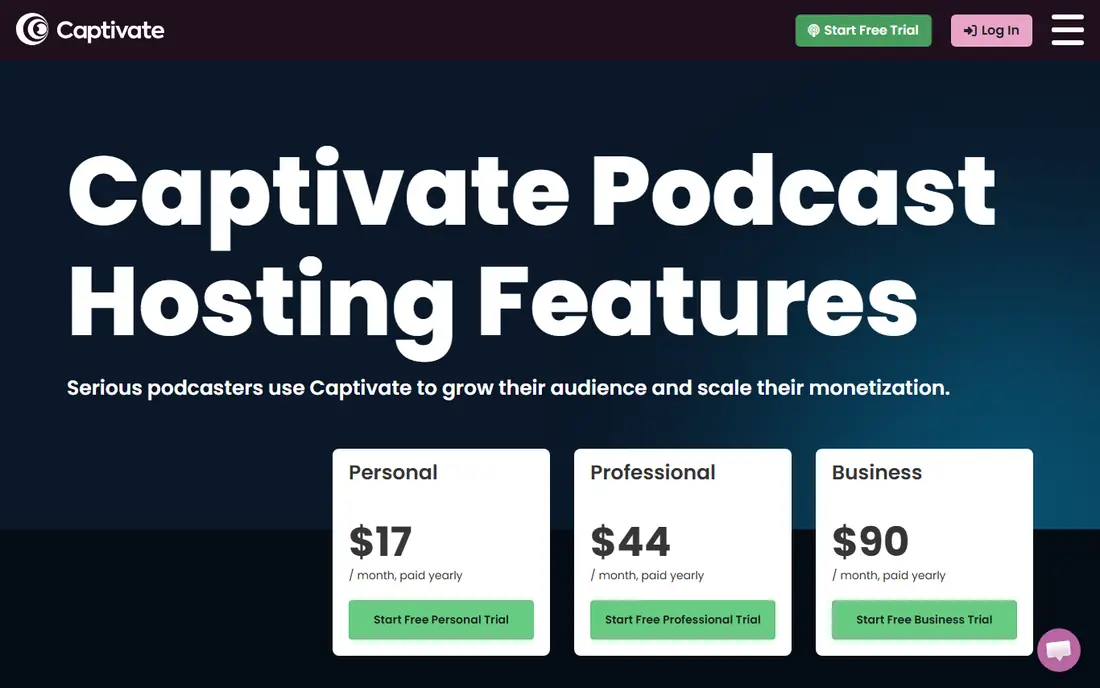
Captivate fits podcasters who want detailed analytics in the same host used for growth work. The vendor features page lists IAB Certified Analytics, link analytics, network analytics, episode performance comparison, download location, device and listening tool data, web player analytics and CSV export. Personal is $17 USD per month paid yearly for up to 30,000 downloads per month, Professional is $44 for up to 150,000 downloads and Business is $90 for up to 300,000 downloads. The signup page states a 30-day free trial with full access. The trial can test exports before payment.
The catch is that Captivate analytics value still depends on download caps and yearly billing. Pick Captivate when episode comparison, location data and exports drive weekly decisions. Look elsewhere when the show needs enterprise attribution, private subscriber scale beyond the plan caps or a permanent free host. The weekly review should use the same date range each time. Export tests matter.
What we like- IAB Certified Analytics listed
- Episode performance comparison and CSV export
- Download location and listening tool data
Watch out for- Download caps rise by plan, from 30,000 to 300,000 per month
- Listed prices are paid yearly
Starting priceStarter $19 monthly
Free planNone found on vendor page
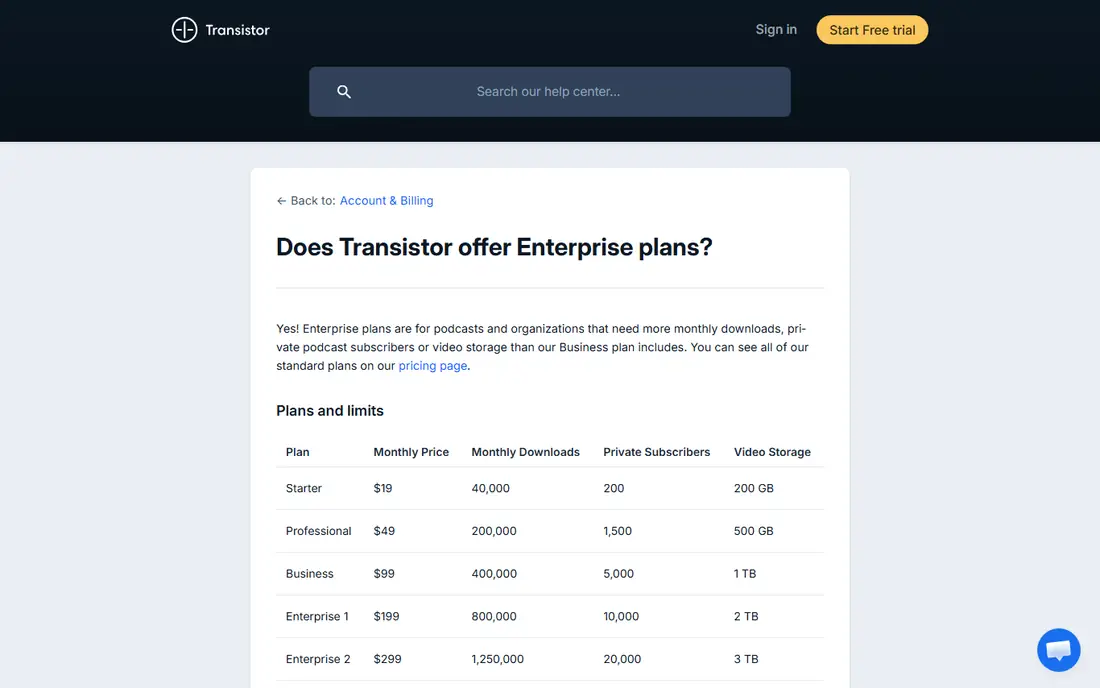
Transistor fits networks and private podcast sellers that need analytics across more than one feed. Vendor material lists advanced analytics with episode comparisons, location data, app and browser analytics and listener reports. The support page lists Starter at $19 monthly with 40,000 monthly downloads, 200 private subscribers and 200 GB video storage. Professional is $49 with 200,000 downloads and 1,500 private subscribers, while Business is $99 with 400,000 downloads and 5,000 private subscribers. Enterprise includes third-party tracking pixels. The reporting view should be tested with one private feed before launch.
The catch is that the most advanced tracking options sit at Enterprise level, and Starter has clear download and private subscriber caps. Pick Transistor when network reporting and private feeds matter together. Look elsewhere when a single public show only needs simple download charts at the lowest public price. The network owner should confirm reporting access before migration starts today.
What we like- Advanced analytics listed in vendor material
- Episode comparisons and location data
- Third-party tracking pixels on Enterprise
Watch out for- Starter caps downloads at 40,000 per month
- Tracking pixels are an Enterprise feature on the opened support page
Starting priceAudio $15 / month billed annually
Free plan2 hours of uploads each month; episodes hosted for 90 days
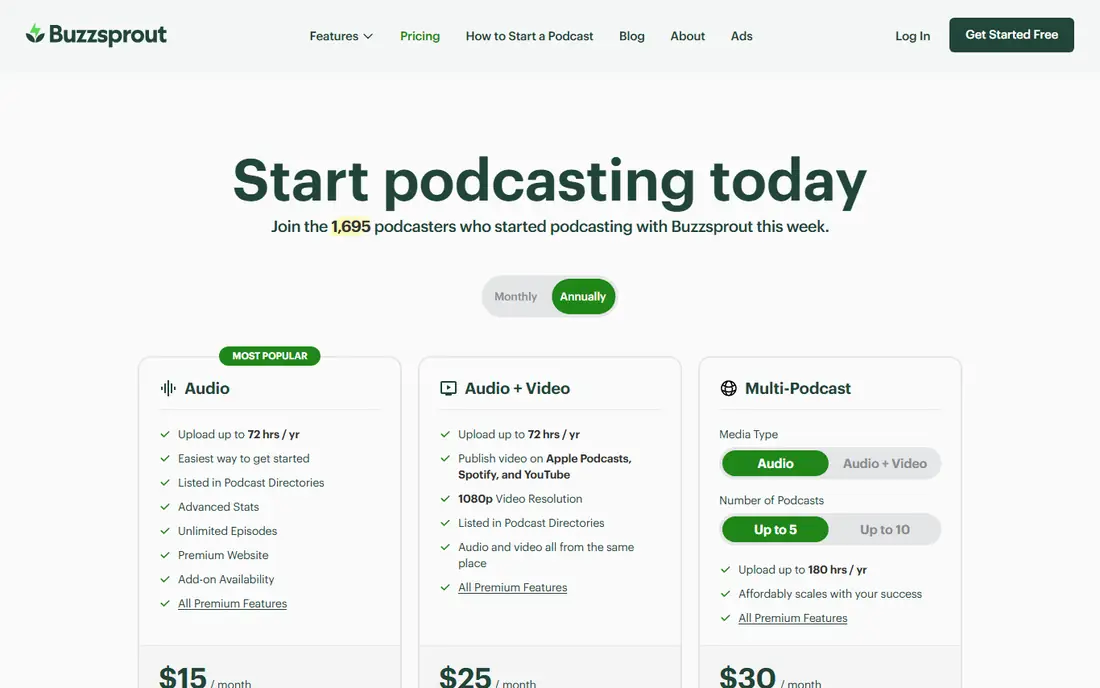
Buzzsprout fits growing shows that need clear stats without a complex reporting stack. The pricing page lists Audio at $15 per month billed annually with 72 hours per year of upload time, advanced stats, unlimited episodes and a premium website. Vendor material states that IAB-certified stats are included with every plan. That helps a podcaster compare episodes, watch download trends and prepare simple sponsor updates. The free plan includes 2 hours of uploads each month, but episodes are hosted for 90 days, so long-term analytics need a paid plan first.
The catch is that Buzzsprout is built for clear show stats, not enterprise attribution or deep network reporting. Pick Buzzsprout when a small team needs trusted download data and simple episode comparisons. Look elsewhere when sponsor reporting needs ad impression exports, private subscriber analytics or marketing attribution measurement. The sponsor update should state the download date range clearly every month.
What we like- Advanced Stats listed on pricing page
- IAB-certified stats stated in vendor material
- Unlimited episodes on Audio plan
Watch out for- Free episodes are hosted for 90 days
- Analytics depth is lighter than enterprise attribution tools
Starting priceSee website
Free planNone found on vendor page
Simplecast fits shows that want analytics beside ad operations. The pricing page states that all plans distribute to listening apps and include unlimited audio storage. It also states that the Professional premium ad marketplace controls ad markers and timestamps, IAB category and domain blocks, and that AdsWizz is included in Professional and Enterprise. Vendor material describes IAB 2.0 compliant analytics with where, what, how and when listening data, episode comparison and exportable reports. Because dollar amounts were omitted in the opened text, this guide marks price See website. The export fields should be checked first. The export format should be checked first.
The catch is that Simplecast analytics and ad controls need plan confirmation before a buyer can compare cost. Pick Simplecast when IAB analytics, episode comparison and ad controls belong in one workflow. Look elsewhere when a small show needs a public monthly price and a free trial before moving a catalog. The plan quote should name reporting exports clearly today.
What we like- Distribution to listening apps on all plans
- Unlimited audio storage
- AdsWizz included in Professional and Enterprise
Watch out for- Dollar amounts were omitted in the opened pricing text
- Premium ad marketplace controls sit on Professional
Starting priceSee website
Free planNone found on vendor page
Megaphone fits larger podcast businesses that need audience insight beside ad sales. The vendor platform page lists enterprise publishing, dynamic ad insertion, an audio advertising marketplace, audience insights, marketing attribution measurement and Spotify Audience Network. That mix suits networks and publishers that report to sponsors, compare campaigns and manage many shows. It is less direct for a solo podcaster who only needs download charts and episode comparisons. Buyers should ask which analytics views are included, how attribution is measured and what onboarding requires before a sales process starts. The sales call should name reporting owners first.
The catch is that Megaphone is an enterprise platform, so price and package fit require a sales conversation. Pick Megaphone when audience insights and attribution measurement support sponsor revenue at scale. Look elsewhere when the show needs a $15 to $19 monthly host with public pricing and a short trial. The attribution method should be explained before contract signature today.
What we like- Audience insights listed
- Marketing attribution measurement listed
- Dynamic ad insertion and Spotify Audience Network access
Watch out for- Enterprise sales path is not a self-serve starting price
- No free plan found on the opened page
Starting priceSee website
Free planFirst 30 days free on every plan
Libsyn fits podcasters who want verified analytics from an established host. The pricing page states that the first 30 days are free on every plan and that all plans include audio and video hosting, multi-user access, IAB Verified Analytics, a customizable website and monetization options. The opened table shows IAB Analytics Basic on the entry tier and Advanced on higher tiers, with audio hosting up to 3 hours per month, 10 hours per month and 55 hours per month. Because dollar amounts were omitted, this guide marks the starting price See website.
The catch is that Libsyn analytics tiers need a price check before a buyer can judge value. Pick Libsyn when verified analytics, multi-user access and an established host matter. Look elsewhere when the decision needs a public monthly price, CSV export details and episode comparison terms before signup. The analytics tier should be named in the quote clearly before signup.
What we like- IAB Verified Analytics on all plans
- First 30 days free
- Multi-user access included
Watch out for- Dollar amounts were omitted in the opened pricing text
- Entry analytics are Basic while higher tiers list Advanced
Starting priceUnlimited Audio $12/mo billed annually
Free plan14-day trial for $1; no free plan stated
Podbean fits shows that want advanced stats at a lower public price. The vendor page lists Unlimited Audio at $12 per month billed annually with 1GB uploads per month, unlimited total storage, unmetered bandwidth, 600 AI Credits and advanced podcast stats. Vendor material describes podcast-level and episode-level statistics, episode comparisons, location data, audience activity patterns and IAB certified statistics. Unlimited Plus is $29 per month billed annually with 2 audio or video podcasts, 10GB uploads per month and 2,400 AI Credits. The trial is 14 days for $1. The stats view should be checked first.
The catch is that Podbean analytics start on paid plans, and the $1 trial is not a free plan. Pick Podbean when episode comparisons and location data matter at a $12 monthly starting point. Look elsewhere when the show needs a permanent free plan or enterprise attribution reporting for sponsor campaigns. The upload forecast should include video episodes too today.
What we like- Advanced podcast stats on paid plans
- Episode comparisons and location data in vendor material
- Unlimited total storage on Unlimited Audio
Watch out for- Trial costs $1 and is not a free plan
- Upload limits rise by plan, from 1GB to 10GB per month
Starting priceSee website
Free planNone found on vendor page
Spreaker fits shows that report on ad impressions and revenue, not only downloads. Vendor material describes Ad Exchange Statistics with impressions and revenue by time frame, geolocation, top IAB categories and CSV download at organization, network and podcast levels. Vendor material also states that all plans come with IAB Certified Stats. The monetization help page lists pre-roll, mid-roll and post-roll ads, a PayPal payout threshold of $10 and CPM typically from $2 to $15 or more. Because pricing amounts were not opened, this guide marks price See website. The export fields should be checked first.
The catch is that Spreaker analytics are most useful when ad monetization is active, and the starting price needs a current check. Pick Spreaker when sponsor reporting needs impressions, revenue, geolocation and CSV exports. Look elsewhere when a new show only needs simple download trends and a public $0 or $15 starting price. The sponsor report should state date ranges clearly.
What we like- Impression and revenue reports by time frame
- Geolocation and top IAB categories
- CSV download at organization, network and podcast levels
Watch out for- Pricing amounts were not opened
- Ad reporting is strongest when monetization is active
Starting price$0 Starter
Free planStarter free; one show, up to five episodes, credit card required
Acast fits shows that want free analytics and a path to marketplace advertising. The vendor blog states that Starter is free for one show with up to five episodes, unlimited listener downloads, a free RSS feed, a basic website or embed player and full analytics. It also states that the five-episode cap lifts to unlimited if the show opens to Acast Marketplace advertising. Acast requires a valid credit card to create an account, including the free plan. Marketplace application starts at 1,000 or more monthly listeners. The analytics view should be tested first.
The catch is that Acast free analytics come with a five-episode Starter cap and a credit card requirement. Pick Acast when a show can use full analytics now and may reach Marketplace eligibility later. Look elsewhere when the catalog already has many episodes and the team needs a permanent free host with no card step. The card step needs owner approval.
What we like- Full analytics stated for Starter
- IAB 2.2 certified in vendor material
- Unlimited listener downloads on Starter
Watch out for- Starter caps one show at five episodes unless Marketplace advertising opens
- Credit card is required for the free plan
Which analytics should a podcast check every week?
Check downloads, episode comparison, listening apps, location and completion signals every week. Captivate lists episode performance comparison, download location and device or listening tool data. RSS.com Plus adds countries, cities, geomap and download-time heatmap. A weekly review should name the top episode, the weakest episode, the main listening app and one topic change for the next recording. Sponsors need IAB measurement and clear exports, so Captivate, Libsyn, Podbean, Spreaker and Acast should be checked for IAB wording before a media kit is sent. Networks should also check private subscriber and multi-show reporting in Transistor. The goal is not more charts. The goal is a short set of numbers that changes titles, topics, release timing or sponsor pricing.
Sponsor ready analytics need IAB measurement, episode comparison, location, listening app data and exportable reports. Captivate lists IAB Certified Analytics and CSV export. Libsyn lists IAB Verified Analytics on all plans. Spreaker describes impressions and revenue by time frame, geolocation and top IAB categories with CSV download. A sponsor report should state the date range, download definition and whether numbers are IAB measured.
Transistor fits a network with private podcasts because plan limits state monthly downloads and private subscribers together. Starter includes 40,000 monthly downloads and 200 private subscribers for $19 monthly. Professional raises those limits to 200,000 downloads and 1,500 private subscribers. Captivate lists network analytics, but Transistor gives clearer private subscriber caps for paid access planning.
Can free podcast analytics be trusted?
Free podcast analytics can be trusted when the host states the measurement standard and limits clearly. RSS.com Free includes analytics at $0, and Plus adds geomap and download-time heatmap. Acast Starter states full analytics, but it caps one show at five episodes and requires a credit card. Buzzsprout free hosting keeps episodes for 90 days, so long-term trend work needs a paid plan.
Frequently asked questions
What are the best podcast platforms with detailed analytics?
Captivate is the best first pick for detailed analytics because it lists IAB Certified Analytics, episode comparison, download location and CSV export. Transistor fits networks and private feeds. RSS.com fits budget shows that want free analytics and paid maps. Megaphone fits enterprise teams that need audience insights and attribution measurement. Choose by reporting depth, not download count alone.
Do I need IAB certified podcast analytics?
IAB certified analytics matter when sponsors, networks or agencies compare your numbers with other shows. Captivate lists IAB Certified Analytics, Libsyn lists IAB Verified Analytics and Acast material states IAB 2.2 certified. A hobby show may not need IAB reporting on day one. A show selling ads should ask how downloads are filtered and exported.
Which platform has the best free podcast analytics?
RSS.com has the clearest free analytics path because Free is $0 with analytics and no expiration. Acast Starter states full analytics, but it caps one show at five episodes and requires a credit card. Buzzsprout free hosting keeps episodes for 90 days. For long-term trends, paid plans give cleaner history and fewer catalog limits.
How often should podcasters review analytics?
Podcasters should review analytics weekly for episode performance and monthly for sponsor or topic decisions. Captivate episode comparison helps weekly topic choices. RSS.com download-time heatmap can guide release timing. Transistor network reporting helps monthly planning across shows. A weekly review should end with one change, such as a title test, topic shift or sponsor report update.
What analytics should a media kit include?
A media kit should include download range, episode comparison, top locations, main listening apps and IAB measurement wording. Captivate lists a one-click media kit in its monetization material and IAB Certified Analytics in analytics material. Spreaker can support ad reporting with impressions, revenue, geolocation and CSV exports. Keep the date range clear so sponsors can compare shows fairly.
What to look for before you buy
First, confirm whether downloads are IAB measured and how invalid traffic is filtered. Second, check episode comparison, location, listening app and device reports. Third, test CSV export and date range controls before a sponsor asks for proof. Fourth, compare download caps, private subscriber limits and catalog limits. Fifth, review payout and ad reporting terms if analytics will support sponsor pricing.
How we chose
We compared podcast platforms by IAB measurement, episode comparison, location and app data, export options, private feed reporting and price clarity. Prices and facts were checked on vendor pages and vendor help pages on 2026-11-29. Platforms are marked See website when dollar amounts were not present in the opened vendor text. We did not claim hands-on testing. The ranking favors hosts that name analytics features clearly enough for weekly decisions.
Sources we checked (11)
- https://www.captivate.fm/features
- https://www.captivate.fm/signup-now?ref=insights
- https://support.transistor.fm/en/article/does-transistor-offer-enterprise-plans-1nqp02y/
- https://www.buzzsprout.com/pricing
- https://www.simplecast.com/pricing?ref=podcastle.ai
- https://megaphone.spotify.com/platform
- https://libsyn.com/plans-and-pricing/
- https://www.podbean.com/create-a-podcast-for-apple-podcasts
- https://help.rss.com/en/support/solutions/articles/44002828140-plans-compared-free-plus-pro-and-max
- https://help.spreaker.com/en/articles/3884533-how-can-i-monetize-my-podcast
- https://www.acast.com/en/blog/cheapest-podcast-hosting-platforms
Is your product missing or out of date?
We review this list regularly. Vendors can request a listing, send updated pricing or ask about featured placement.

Shihab Mia · Founder, Rankite
Shihab has 5+ years in B2B and SaaS SEO. He writes Rankite's software buying guides from pricing pages, documentation and public user reviews. More about Shihab.