How we make this list: we compare pricing pages, product documentation and public user reviews. Rankite is independent; if a vendor ever pays for a featured spot, that listing is clearly labeled Partner.
Key takeaways
- Neat Video remains the plugin most editors reach for when footage is badly noisy, with a one-time license from $99.90 and versions for Premiere Pro, DaVinci Resolve, Final Cut Pro and more.
- DaVinci Resolve Studio is the best value if you also need an editor: $295 once gets you the full noise reduction panel plus a complete NLE, and the free version covers everything else.
- Topaz Video AI switched to subscription pricing in October 2025 ($299/year), so buyers who want a one-time license should look elsewhere.
- If your footage is only mildly noisy, the built-in denoisers in Premiere Pro, Final Cut Pro or Filmora are usually enough, and they cost nothing extra.
- VSDC is the only genuinely free option on this list, and its noise filter is basic but usable for simple cleanup jobs.
Quick comparison
| Tool | Best for | Starting price | Free plan |
|---|
 Neat Video Neat Video | Maximum control over tough noise | $99.90 one-time (Home plug-in) | Free trial (Demo plug-in) |
 DaVinci Resolve Studio DaVinci Resolve Studio | Editors who want it all in one app | $295 one-time | Yes (free version) |
 Topaz Video AI Topaz Video AI | AI restoration of old footage | $299/year (Personal) | Free trial (watermarked) |
 Magic Bullet Denoiser III Magic Bullet Denoiser III | Fast drag-and-drop cleanup | See website | Free trial |
 Filmora Filmora | Creators who want simple denoise | $79.99 one-time (Perpetual) | Yes (watermarked exports) |
 PowerDirector PowerDirector | Quick denoise on a budget | $139.99 one-time (Ultimate) | Free trial (watermarked) |
 Adobe Premiere Pro Adobe Premiere Pro | Pro editors in the Adobe ecosystem | $22.99/month (annual plan, billed monthly) | Free trial (7 days) |
 Final Cut Pro Final Cut Pro | Mac editors who want it built in | $299.99 one-time | Free trial (90 days) |
 VSDC Free Video Editor VSDC Free Video Editor | Free cleanup for simple projects | Free | Yes |
Is your product missing or out of date?
We review this list regularly. Vendors can request a listing, send updated pricing or ask about featured placement.
The best video noise reduction software
Starting price$99.90 one-time (Home plug-in)
Free planFree trial (Demo plug-in)

Noisy footage usually shows up at the worst possible time: a client interview shot in a dim room, wedding footage pushed two stops in post, archive clips that looked fine on a small monitor. Neat Video is the plugin editors reach for when the built-in tools are not enough. It builds a noise profile from a flat area of your actual clip, then filters the noise while trying to keep fine detail intact. Version 6 added a faster render engine and smarter memory handling, which matters because temporal noise reduction is one of the most compute-heavy effects you can run.
The licensing is per host application, which is the part buyers should read carefully. The Home plug-in starts at $99.90, handles up to 1080p, uses one GPU and is for non-commercial use. The Pro plug-in starts at $149.90, has no resolution limit, uses multiple GPUs and can be used commercially. If you cut in two editors, you buy two plug-ins. A free Demo is available so you can test it on your own footage before spending anything.
What we like- Automatic noise profiling
- GPU acceleration
- Works inside most major editors
Watch out for- Learning curve for the settings
- Home edition is non-commercial and capped at 1080p
Starting price$295 one-time
Free planYes (free version)
DaVinci Resolve takes a different approach: instead of a plugin, you get dedicated temporal and spatial noise reduction panels inside the Color page. They are genuinely good, especially the temporal mode, which compares frames to separate grain from real detail. The catch is that they only exist in the paid Studio version. If you are cutting in the free Resolve, there is no noise reduction at all, and that is the single most common reason hobbyists upgrade.
The $295 license is a one-time purchase with no subscription and free updates, which makes the math easy against subscription editors. You also get the full NLE, Fusion effects, Fairlight audio and the Neural Engine tools in the same box. On modest hardware the noise reduction can be slow to preview, so this is a better fit for machines with a discrete GPU. For small teams that already grade in Resolve, buying Studio is almost always cheaper than buying Neat Video for every seat.
What we like- Built-in temporal and spatial noise reduction
- $295 covers the whole suite
- Generous free tier
Watch out for- Noise reduction is Studio-only
- Heavy on GPU hardware
Starting price$299/year (Personal)
Free planFree trial (watermarked)
Topaz Video AI is built for a specific job: rescuing bad footage. Its Nyx and Artemis models handle noise, while Proteus and others cover upscaling and sharpening, so one app can take a noisy 720p clip and deliver something presentable at 1080p or higher. Everything renders locally on your GPU, which suits teams with confidentiality requirements that cannot upload client footage to a cloud service. It also works as a plugin inside Premiere Pro for shorter jobs.
The pricing change is the thing to know. Topaz ended perpetual licenses in October 2025, so the old $299 one-time deal is gone for new buyers. The Personal plan is now $299 per year, and there is a Pro tier at $699 per year for commercial use without revenue limits. The free trial watermarks exports, which is fine for testing quality but useless for delivery. Buy this for restoration projects, not as a general denoiser for everyday editing.
What we like- Specialized models for denoise, deblur and upscale
- Runs fully locally
- Premiere Pro plugin
Watch out for- Subscription-only since October 2025
- Needs a strong GPU
- Slow renders on laptops
#4
Magic Bullet Denoiser III
Best for: Fast drag-and-drop cleanup
Visit maxon.net
Starting priceSee website
Free planFree trial

Denoiser III is the opposite of Neat Video in philosophy. You drop it on a clip, and its AI-driven defaults usually get you most of the way there with five simple sliders for fine tuning. For editors who denoise rarely and need something fast on a deadline, that simplicity is the whole selling point. It runs on the GPU, so previews are quick, and it ships with Renoiser, a companion tool that adds consistent grain back after cleanup, which is handy when footage needs to match other shots or go through VFX.
The business side needs a note. Red Giant was acquired by Maxon, and Denoiser III is now sold as part of the Magic Bullet Suite through Maxon's subscription bundles rather than as the old $199 standalone perpetual license. Check the current Maxon buy page for what is actually on sale today, because the suite structure has changed more than once. The free trial still lets you test it on your own footage before committing.
What we like- Nearly automatic results
- GPU accelerated
- Includes a grain-adding Renoiser tool
Watch out for- Fewer fine-tuning controls
- Licensing changed under Maxon ownership
Starting price$79.99 one-time (Perpetual)
Free planYes (watermarked exports)
Filmora is aimed at creators who edit marketing videos, courses and social content, and its noise reduction fits that audience: an AI-powered denoise you can apply without learning profiles or thresholds. It will not rescue severely underexposed footage the way Neat Video can, but for the mild sensor noise and compression grain that show up in screen recordings and indoor talking-head videos, it is usually enough. The editor around it is fast to learn, with templates and stock media built in.
Pricing is where Filmora stands out in 2026. The Perpetual plan is $79.99 as a one-time payment for the current version, which is rare among mid-range editors. The tradeoff is that major version upgrades cost extra, and the 1,000 AI credits that come with the perpetual license never refresh, so heavy AI users are better served by the $49.99 per year plan. The free version exports with a watermark, which rules it out for client work.
What we like- One-time purchase option
- Gentle learning curve
- AI denoise included
Watch out for- Perpetual license excludes major upgrades
- Free version watermarks exports
Starting price$139.99 one-time (Ultimate)
Free planFree trial (watermarked)

PowerDirector has offered noise reduction for years, and it treats denoise as one more checkbox in a long feature list rather than a specialty. You get a straightforward video denoise effect plus audio denoise for hiss and hum, both adjustable with a few sliders. For YouTubers and educators cleaning up webcam and screen-capture footage, that is often all that is needed, and the 64-bit engine renders quickly even on mid-range PCs.
CyberLink still sells perpetual licenses, which keeps PowerDirector on this list. PowerDirector 2026 Ultimate is a one-time $139.99 purchase, while PowerDirector 365 is the $74.99 per year subscription with stock media and monthly AI credits. The perpetual license does not include the subscription-only stock library or the monthly credit refills. A free trial is available but watermarks exports, so test performance on your own machine rather than judging the denoise from the trial output.
What we like- Perpetual license still available
- Fast rendering
- Good for 4K workflows
Watch out for- Denoise controls are basic
- Mac version lags behind Windows
#7
Adobe Premiere Pro
Best for: Pro editors in the Adobe ecosystem
Visit adobe.com
Starting price$22.99/month (annual plan, billed monthly)
Free planFree trial (7 days)
Premiere Pro is on this list with an asterisk. It has no dedicated video noise reduction effect that competes with the specialists; editors here almost always add Neat Video or Denoiser III as a plugin. What Premiere offers is the ecosystem those plugins live in: excellent masking and tracking to isolate noisy regions, Lumetri color to fix the exposure problems that cause noise, and Dynamic Link to After Effects for the hardest shots. If your team already lives in Creative Cloud, that workflow matters more than a built-in filter.
The price is $22.99 per month on the annual plan billed monthly, or $34.49 month to month, and there is a 7-day trial. Adobe dropped "Pro" from the product name in early 2026, though most editors still call it Premiere Pro. Factor the plugin cost into your budget: Premiere plus Neat Video Pro lands near $450 in year one before any other plugins. For teams that denoise constantly, DaVinci Resolve Studio usually works out cheaper.
What we like- Deep plugin ecosystem
- Strong color and masking tools
- Team review via Frame.io
Watch out for- No real built-in video denoiser
- Subscription only
Starting price$299.99 one-time
Free planFree trial (90 days)
Final Cut Pro includes a noise reduction effect out of the box, which is more than Premiere Pro can say. It is a single effect with a few controls, aimed at mild to moderate noise rather than disaster recovery. On Apple Silicon it previews and renders fast, and it plays well with the magnetic timeline workflow that makes FCP quick for straightforward projects. For the talking-head and event videos that make up most small-business work, the built-in effect plus good exposure usually gets you there.
The $299.99 Mac App Store purchase is one-time, and Apple confirmed in 2026 that the one-time version continues to get updates, though some premium content is reserved for Apple Creator Studio subscribers ($129 per year). The 90-day free trial is generous and gives you real time to test the denoiser on your own footage. Mac-only is the obvious limitation; mixed-platform teams need to look elsewhere.
What we like- Built-in noise reduction effect
- One-time purchase
- Very fast on Apple Silicon
Watch out for- Mac only
- Effect is simpler than dedicated plugins
Starting priceFree
Free planYes
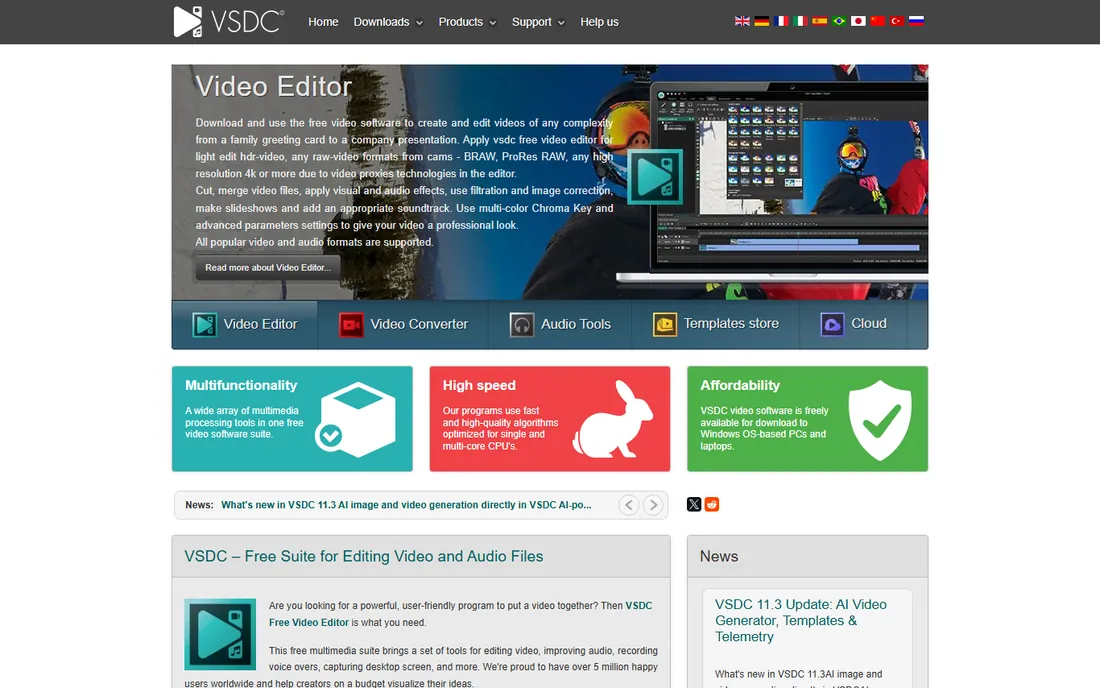
VSDC is the budget pick in the most literal sense: the free version costs nothing and exports without a watermark. Its noise reduction filter lives in the video effects menu and handles light grain and compression artifacts acceptably. Nobody will mistake it for Neat Video, and the interface takes real getting used to, but for a volunteer project, a school video or a first-pass cleanup before a better tool, it does the job.
The $19.99 per year Pro version adds hardware acceleration, motion tracking and masking, which speed up exports noticeably. The free version is fully usable without it. Windows-only is the main constraint, and the company is small, so do not expect the polish or support of the bigger names. Still, as a free starting point for noise reduction, there is nothing else on this list at this price.
What we like- Completely free with no watermark
- Includes a denoise filter
- Runs on old hardware
Watch out for- Dated interface
- Windows only
- Basic controls
How we chose
We compared dedicated denoisers, plugins and editors with built-in noise reduction by reading current pricing pages, documentation and public reviews on G2, Capterra and Reddit. We checked what each tool actually does about noise, not just what the marketing claims: whether it profiles your footage or applies a fixed filter, whether it runs on the GPU, and what the license really costs over two years. We favored tools that exist today and fit small and mid-size teams, mixing category leaders with affordable options, and we noted where pricing recently changed, as with Topaz and Magic Bullet.
What to check before you buy
Start with the severity of your noise. Mild grain from a decent camera in good light is a different problem from underexposed ISO 6400 footage, and the two need different tools. Built-in denoisers in Filmora, PowerDirector, Final Cut Pro and DaVinci Resolve Studio handle the first case well. The second case is where Neat Video and Topaz Video AI earn their keep, and it is worth testing the free trials on your worst clip before buying anything.
Next, check the license terms against how you actually work. Plugin licenses like Neat Video are sold per host application, so running two editors doubles the cost. Subscription tools need a yearly budget line; perpetual licenses need a plan for paid upgrades. Also confirm GPU support on your machines, because temporal noise reduction is punishing on integrated graphics, and a tool that previews slowly will cost you more in editor time than the license ever did.
Getting the cleanest result from any denoiser
The biggest quality gains come from technique, not from which tool you buy. Denoise before you sharpen, since sharpening amplifies grain. Fix exposure first if the footage is dark, because lifting shadows after denoising brings the noise back. When a tool offers profiling, like Neat Video does, profile a flat, featureless area of the frame and avoid edges and fine detail. And always check your result at full resolution on a still frame; noise reduction that looks clean in a small preview window can turn faces waxy when viewed at 100 percent.
Frequently asked questions
Can free software really reduce video noise?
Yes, within limits. DaVinci Resolve's free version does not include noise reduction, but VSDC is free and includes a basic denoise filter, and Filmora's free version includes its AI denoise with a watermark on export. For mild noise these are fine. Severe noise from high ISO or heavy underexposure usually needs a paid tool like Neat Video or Topaz Video AI.
What is the difference between temporal and spatial noise reduction?
Spatial noise reduction looks at a single frame and smooths grain based on neighboring pixels, which is fast but can soften detail. Temporal noise reduction compares several frames over time to tell the difference between random grain and real detail, which preserves sharpness better but needs more processing power and can struggle with fast motion. The best tools let you combine both.
Does noise reduction work on old VHS or archive footage?
It helps, but archive footage usually needs more than denoise alone: deinterlacing, stabilization and upscaling. Topaz Video AI is built for exactly this combination, with models trained on degraded sources. Neat Video can clean the grain, but you will still need other tools for the rest of the restoration.
Why does my denoised video look soft or waxy?
That is the classic sign of too much noise reduction. The filter cannot tell fine detail from fine grain, so aggressive settings blur both. Back off the strength, use a noise profile built from your actual footage, and consider denoising in two light passes instead of one heavy pass. Checking faces and fabric textures at full resolution is the fastest way to catch it.
Is a plugin or a standalone app better for noise reduction?
Plugins win for most editors because you stay on your timeline and can adjust the denoise alongside your grade. Standalone apps like Topaz Video AI make sense for batch restoration work, where you process many clips before editing begins. If you denoise occasionally inside normal projects, a plugin for your editor is the simpler buy.
Sources we checked (9)
- https://www.neatvideo.com/news/neat-video-6
- https://toolradar.com/tools/davinci-resolve
- https://www.toolworthy.ai/tool/topaz-video-ai
- https://www.shootonline.com/spw/maxon-announces-maintenance-release-magic-bullet-suite/?qt-recent_and_tags_duplicate=0
- https://toolradar.com/tools/filmora
- https://unifab.ai/resource/cyberlink-powerdirector-review
- https://josephnilo.com/blog/adobe-premiere-pro-cost/
- https://www.macrumors.com/2026/01/14/final-cut-pro-one-time-vs-creator-studio/
- https://www.filehorse.com/download-vsdc-video-editor-64/
Is your product missing or out of date?
We review this list regularly. Vendors can request a listing, send updated pricing or ask about featured placement.

Shihab Mia · Founder, Rankite
Shihab has spent more than a decade helping SaaS and e-commerce brands grow through search. He writes Rankite's software buying guides from pricing pages, documentation and public user reviews. More about Shihab.