How we make this list: we compare pricing pages, product documentation and public user reviews. Ratings come from G2, Capterra or Trustpilot, with the date we checked them.
Key takeaways
- DaVinci Resolve is the best free professional editor for PC, with editing, color, effects, and audio in one app and a 295 dollar one time Studio upgrade.
- Adobe Premiere, renamed from Premiere Pro in 2026, is the industry default for agency and team work, at 22.99 dollars a month on an annual plan.
- PowerDirector 365 is PCMag's Best Overall video editor for 2026 with a 5.0 rating, offering pro output without a pro learning curve at 79.99 dollars a year.
- CapCut is the short form social pick, Filmora is the beginner friendly template pick, and Clipchamp is the free browser based pick on Windows.
- Shotcut and Lightworks are the free open and film heritage options, with Shotcut fully free and Lightworks free up to 1080p export.
Quick comparison
| Tool | Best for | Starting price | Free plan |
|---|
 Adobe Premiere Adobe Premiere | Professional client and team editing | $22.99/month | No |
 DaVinci Resolve DaVinci Resolve | Free pro editing and color | Free | Yes |
 PowerDirector PowerDirector | Feature rich enthusiast editing | $79.99/year | Yes |
 CapCut CapCut | Short form social video | Free | Yes |
 Filmora Filmora | Beginners, templates, AI help | $49.99/year | Yes |
 Clipchamp Clipchamp | Quick browser based edits | Free | Yes |
 Lightworks Lightworks | Film style precision editing | Free | Yes |
 Shotcut Shotcut | Free open source editing | Free | Yes |
Is your product missing or out of date?
We review this list regularly. Vendors can request a listing, send updated pricing or ask about featured placement.
The best video editing software for PC
#1Adobe Premiere
Best for: Professional client and team editing4.5/5 on
G2 (1,675 reviews, checked Oct 2026)
Visit adobe.com
Starting price$22.99/month
Free planNo
Adobe Premiere, renamed from Premiere Pro in 2026, is still the editor you are most likely to find in agencies, newsrooms, and freelance teams. Its main advantage is the ecosystem: projects move easily between After Effects, Audition, and Photoshop, Creative Cloud Libraries keep assets in one place, and project files open on any collaborator's machine.
The timeline handles multicam work, captions, audio mixing, and a wide range of camera formats, with recent AI additions including auto captioning, text based editing, and generative clip extension. The Lumetri Color panel gives detailed grading control, though DaVinci Resolve still leads on pure color tools.
Premiere fits editors who earn from video regularly and share projects with clients and teams. Occasional editors will usually do better with DaVinci Resolve free or PowerDirector, since Premiere's subscription totals far more than a one time purchase over three years and stopping payment ends access to the app.
What we like- Industry standard timeline and format support
- Deep After Effects and Audition integration
- Multicam, captions, and audio mixing
- Frame.io client review
- Largest tutorial and preset community
Watch out for- Subscription only, no one time purchase
- 7 day trial only
- Demanding on hardware
- Occasional stability issues on major updates
Starting priceFree
Free planYes
DaVinci Resolve is the world's only solution that combines editing, color correction, visual effects, motion graphics, audio post production, and now photo editing in one software tool. Its elegant modern interface is fast to learn for new users yet powerful for professionals, and you work with camera original quality images throughout the entire process.
Pages divide the work: cut and edit for timelines, color for grading with PowerWindows, qualifiers, tracking, and HDR tools, Fusion for node based effects and motion graphics, Fairlight for audio up to 2,000 tracks with real time effects, and media and deliver for organization and output. Version 21 adds a Photo page, more than 100 new motion graphic effects, and AI tools including IntelliSearch and CineFocus.
DaVinci Resolve fits everyone from beginners to Hollywood colorists, and it is the obvious first download for any PC editor. Pay for Studio at 295 dollars one time only when you need AI noise reduction, multi GPU support, or advanced HDR tools.
What we like- Full professional editing suite free with no watermark
- Hollywood's number 1 post solution
- Editing, color, Fusion effects, and Fairlight audio in one app
- 32 bit float processing and wide gamut HDR
- Multi user collaboration
- Studio 295 dollars one time
Watch out for- Steep learning curve
- GPU heavy
- AI noise reduction, multi GPU, and HDR tools sit in Studio
- Hardware demands high for 4K work
#3PowerDirector
Best for: Feature rich enthusiast editing4.4/5 on
G2 (57 reviews, checked Oct 2026)
Visit cyberlink.com
Starting price$79.99/year
Free planYes
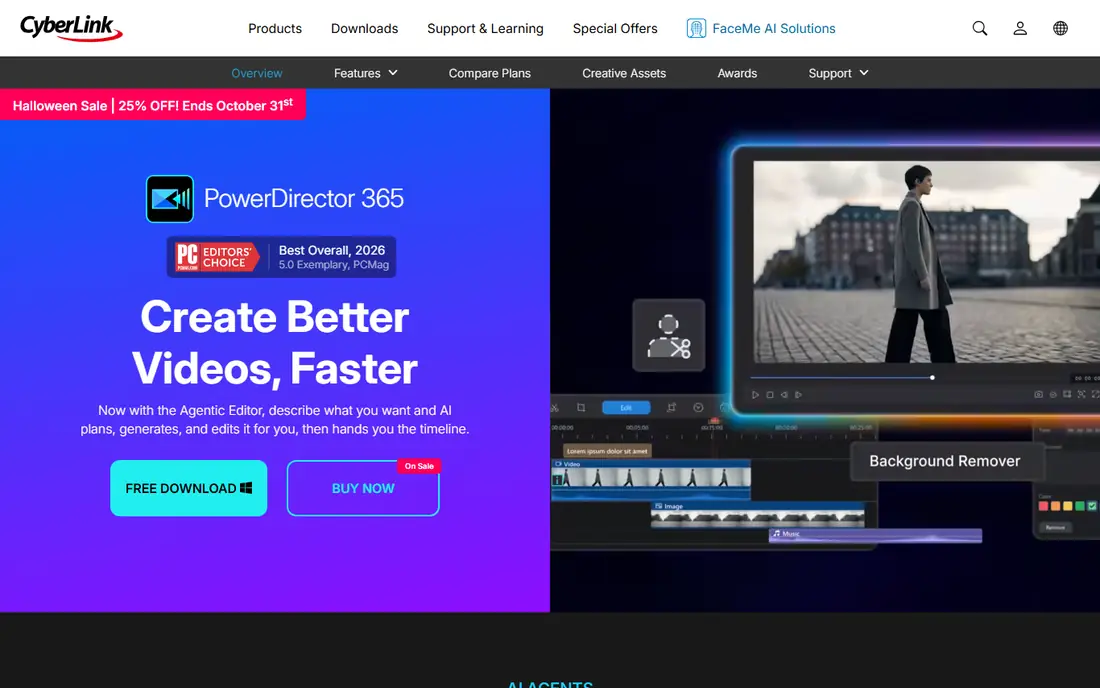
PowerDirector 365 earns its spot with a feature rich timeline and fast rendering, giving pro level output without a pro level learning curve. The new Agentic Editor describes what you want in plain language, then AI plans the cut, picks the best clips, writes narration, and syncs music automatically, handing you a finished timeline to refine.
AI tools cover object removal, background removal without a green screen, video enhancement, audio denoise, and auto reframe for YouTube, TikTok, and Instagram. Precision timeline editing offers frame accurate control, keyframes, motion and effects, multicam sync, and color matching, with 650 plus transitions and a royalty free stock library from Getty Images and Meta.
PowerDirector fits Windows enthusiasts and creators who want maximum features without Premiere's subscription or Resolve's learning curve. Film purists should compare Lightworks or Resolve, and social only creators should compare CapCut.
What we like- PCMag Best Overall 2026 with a 5.0 exemplary rating
- Agentic Editor that edits from chat prompts
- 360 degree and 4K footage, multicam, and motion tracking
- Proxy editing
- 130 million plus stock assets
- Free Essential version with no time limits
Watch out for- Crowded interface with many options
- Advanced AI tools and select exports sit behind the subscription
- One time 2027 version lacks ongoing AI updates
Starting priceFree
Free planYes
CapCut has everything needed to create trending content for YouTube, Instagram, and beyond, with AI powered photo and video editing for everyone. The online editor cuts, trims, adds transitions and subtitles, and exports HD videos, while the desktop app brings the same workflow to PC.
AI tools include a video studio that builds a video from scratch from a chat prompt, an AI image generator, background removal in one click, text to speech with natural voices, and auto subtitle generation in multiple languages. Templates for Reels, TikTok, social media, and business give one click starts, and the app is loved worldwide for easy and powerful editing that produces content quickly.
CapCut fits social creators, short form editors, and beginners who publish daily. Long form filmmakers and colorists should choose DaVinci Resolve or Premiere, and Windows users who want a free browser editor should compare Clipchamp.
What we like- Free with auto captions, templates, and no watermark on many exports
- AI video studio that builds a video from a chat
- Background remover, enhancer, and text to speech
- 100 million downloads
- 4.7 App Store rating
Watch out for- Basic color and audio tools compared to Resolve or Premiere
- Pro at 19.99 dollars a month or 9.99 dollars a month by some comparisons for full features
- Template heavy workflow suits social more than film
Starting price$49.99/year
Free planYes
Filmora is an AI powered video editor that takes creators from footage to final in one connected workflow. AI media analysis understands footage before editing begins, identifying people, scenes, actions, speech, and key moments, then generating tags, summaries, and edit suggestions so the right shots surface faster.
The timeline brings fast rough cut tools and precise motion controls together, with camera tracking, dual timelines, custom motion paths, color masks with HSL and curves, voiceovers, subtitle generation with dynamic caption styles, and 360 degree reframing. Creative assets number more than 2.9 million templates, effects, titles, transitions, music, and stock media.
Filmora fits beginners and vloggers who want templates and AI helpers without a steep learning curve. Professional colorists should choose Resolve, and agency teams should choose Premiere for ecosystem compatibility.
What we like- AI media analysis that tags people, scenes, and actions
- Rough cut tools including remove pauses and edit from text
- Camera tracking and dual timelines
- 2.9 million plus creative assets
- 4.5 out of 5 across review platforms
- Screen recorder built in
Watch out for- Free exports watermarked
- Paid from 49.99 dollars a year by some comparisons and 61.99 dollars a year by others
- AI generated resources partly restricted for commercial use
- Less deep than Resolve for color
#6Clipchamp
Best for: Quick browser based edits4.1/5 on
G2 (49 reviews, checked Oct 2026)
Visit clipchamp.com
Starting priceFree
Free planYes
Clipchamp is Microsoft's online video editor, letting users record, edit, and share HD videos online with AI tools and no expertise required. It runs in the browser without downloading software, appears in the Windows 11 Start menu, and downloads for Windows 10 from the Microsoft Store.
AI tools include a natural voiceover generator with global languages and pitch and pace control, a smart subtitle generator in more than 80 languages, and audio editing that removes background noise, pauses, silences, and filler words. Stock assets cover videos, images, music, stickers, GIFs, and sound effects, all royalty free.
Clipchamp fits Windows users who want quick edits without installing software, plus work and school creators who need simple, safe sharing. Serious filmmakers should choose Resolve or Premiere, and social creators should compare CapCut for templates.
What we like- Free
- No download needed, runs in the browser
- Built into Windows 11 Start menu
- AI voiceover generator
- AI subtitles in 80 plus languages
- Screen, webcam, and voice recorder
- Royalty free stock assets
- Unlimited HD exports without watermarks on free
Watch out for- 4K export requires a subscription
- Premium features sit behind Microsoft 365
- Browser based performance depends on machine and connection
- Less deep than desktop editors
#7Lightworks
Best for: Film style precision editing3.6/5 on
G2 (31 reviews, checked Oct 2026)
Visit lwks.com
Starting priceFree
Free planYes
Lightworks is a professional video editor for Windows, macOS, and Linux, made for storytellers. For over thirty years filmmakers have used it to shape Oscar winning films, and today it brings together a community of more than one million editors and content creators.
The timeline is built for purpose, with an intuitive and intelligent trim engine that keeps everything perfectly in sync, plus a redesigned interface in fixed or floating layouts. Workflow covers import from phone clips to RAW, organization with bins, tags, and search, editing on a creator focused timeline, finishing with color, sound, effects, and graphics, and export for social, broadcast, or film.
Lightworks fits editors who value film style precision and a proven cutting room heritage. Free users export up to 1080p including portrait video, while Create and Pro add higher resolutions and formats. Beginners who want templates should compare Filmora, and free purists should compare Shotcut.
What we like- Professional editor free to download
- Over thirty years of film heritage including Pulp Fiction, Braveheart, and The Departed
- Two Emmy awards for editing innovation
- Intelligent trim engine that keeps everything in sync
- Community of over one million editors
Watch out for- Free export capped at 1080p
- Higher resolutions and formats sit on Create and Pro plans
- Interface differs from mainstream editors
- Smaller template library than Filmora or PowerDirector
#8Shotcut
Best for: Free open source editing4.2/5 on
G2 (42 reviews, checked Oct 2026)
Visit shotcut.org
Starting priceFree
Free planYes
Shotcut is a free, open source, cross platform video editor, originally conceived in November 2004 by an MLT co founder and completely rewritten by its current lead. It supports hundreds of audio and video formats and codecs through FFmpeg, with native editing, multi format timelines, and frame accurate seeking for many formats.
Device support covers Blackmagic Design SDI and HDMI input and preview, screen, webcam, and audio capture, network stream playback, and resolutions up to 4K. The interface offers multiple dockable panels including media properties, playlist with thumbnails, filter panel, history view, encoding panel, and jobs queue, with drag and drop from the file manager.
Shotcut fits Linux users, open source advocates, and budget editors who want a full editor with no watermark and no limits. Commercial polish seekers should compare PowerDirector or Filmora, and professional colorists should choose DaVinci Resolve.
What we like- Completely free and open source
- Cross platform on Windows, Mac, and Linux
- Wide format support through FFmpeg with no import required
- Multi format timelines
- Up to 4K
- No watermark and no limits
- New versions every two months
Watch out for- Interface less polished than commercial editors
- Fewer AI tools than Filmora or PowerDirector
- Smaller template and stock library
- Learning curve for advanced filters
How we chose
We compared PC video editing software by editing depth, color tools, AI features, platform support, export quality, free tier value, and price. We opened every vendor homepage to confirm it loads and belongs to the product described. We favored editors with a real PC desktop or browser version, and we excluded Mac only editors like Final Cut Pro and iMovie from this PC focused list, noting them only where relevant.
What to check before you choose a PC video editor
First, match the editor to your hardware. DaVinci Resolve and Premiere demand a strong GPU and plenty of RAM for 4K multicam work, while Clipchamp and CapCut run lighter. Check system requirements before buying, and use proxy editing if your machine struggles with high resolution footage.
Next, decide between subscription and one time cost. Premiere at 22.99 dollars a month and PowerDirector 365 at 79.99 dollars a year keep costing money, while Resolve Studio at 295 dollars one time and PowerDirector 2027 as a lifetime license stop at purchase. Over three years, the difference is hundreds of dollars.
Finally, test export early. Edit a short project, export at your delivery resolution, and check quality, file size, and watermark status. Free tiers differ sharply: Resolve exports free with no watermark, Filmora watermarks free exports, Lightworks free caps at 1080p, and Clipchamp reserves 4K for subscribers.
Frequently asked questions
What is the best video editing software for PC?
DaVinci Resolve is the best free professional editor, Adobe Premiere is the industry default for client and team work, PowerDirector 365 is PCMag's Best Overall for 2026, CapCut is the best short form social editor, and Filmora is the best beginner friendly editor. The best choice depends on budget, skill, and output type.
Is there free video editing software for PC?
Yes. DaVinci Resolve is free with no watermark, Shotcut is completely free and open source, Lightworks is free up to 1080p export, Clipchamp is free in the browser, CapCut is free for social editing, and PowerDirector offers a free Essential version with no time limits.
Should I choose Premiere Pro or DaVinci Resolve?
Choose Premiere if you share projects with agencies, studios, or other freelancers and need After Effects and Audition integration. Choose DaVinci Resolve if you want the best free editor, the best color tools, or a one time Studio purchase instead of a subscription.
Does Final Cut Pro work on PC?
No. Final Cut Pro is Mac only, as is iMovie. PC editors should choose DaVinci Resolve, Premiere, PowerDirector, or another Windows editor from this list instead.
What PC specs do I need for video editing?
For 4K work, aim for a fast multi core CPU, a dedicated GPU, at least 32 GB of RAM for large multicam timelines, and fast SSD storage. Lighter editors like Clipchamp and CapCut run on modest hardware, while Resolve and Premiere benefit most from a strong GPU.
Sources we checked (11)
- https://www.adobe.com/products/premiere.html
- https://www.blackmagicdesign.com/products/davinciresolve
- https://www.cyberlink.com/products/powerdirector-video-editing-software
- https://www.capcut.com
- https://filmora.wondershare.com
- https://clipchamp.com
- https://lwks.com
- https://www.shotcut.org
- https://cloudinary.com/guides/video-effects/best-video-editing-software
- https://toolradar.com/guides/best-video-editing-software
- https://rankite.com/blog/best-video-editing-software
Is your product missing or out of date?
We review this list regularly. Vendors can request a listing, send updated pricing or ask about featured placement.

Shihab Mia · Founder, Rankite
Shihab has 5+ years in B2B and SaaS SEO. He writes Rankite's software buying guides from pricing pages, documentation and public user reviews. More about Shihab.