How we make this list: we compare pricing pages, product documentation and public user reviews. Rankite is independent; if a vendor ever pays for a featured spot, that listing is clearly labeled Partner.
Key takeaways
- VanceAI Photo Restorer ($15 per month Starter) is the cheapest way to batch-restore a whole shoebox of photos with AI.
- MyHeritage enhances and colorizes 10 photos free, which covers most family projects without spending anything.
- Topaz Photo AI ($199 per year) is the quality pick for badly damaged or low-resolution originals that need serious reconstruction.
- PhotoGlory (free trial) and AKVIS Retoucher (free 10-day trial) suit Windows users who prefer a one-time desktop purchase over subscriptions.
Quick comparison
| Tool | Best for | Starting price | Free plan |
|---|
 VanceAI Photo Restorer VanceAI Photo Restorer | Restoring large batches of old photos affordably with AI | $15/month (Starter plan, 260 credits per month) | Yes (free tier with monthly limits and queues) |
 MyHeritage MyHeritage | Families who want fast enhance-and-colorize with no learning curve | See website | Yes (10 free photo enhancements, watermarked) |
 Adobe Photoshop Adobe Photoshop | Anyone who needs total manual control over difficult repairs | See website | Free trial |
 Topaz Photo AI Topaz Photo AI | Maximum reconstruction quality on damaged, blurry or tiny originals | $199/year | No (no free trial advertised) |
 Retouch4me Retouch4me | Photographers who want AI restoration inside their existing editor | See website | No (no free trial advertised) |
 PhotoGlory PhotoGlory | Windows users who want a one-time purchase for home restoration | See website | Free trial |
 AKVIS Retoucher AKVIS Retoucher | Rebuilding torn areas, scratches and missing fragments precisely | See website | Free trial (10 days, full features) |
 SoftOrbits Photo Retoucher SoftOrbits Photo Retoucher | Simple, guided removal of scratches, spots and stains | See website | No (free tier not confirmed on the product page) |
Is your product missing or out of date?
We review this list regularly. Vendors can request a listing, send updated pricing or ask about featured placement.
The best software for restoring old photos
Picture the box in the closet: fifty years of family photos, some faded to yellow, some creased down the middle, a few torn at the corners. A decade ago, fixing them meant Photoshop skills and hours per image. Today, AI restoration tools rebuild faces, remove scratches and add color in seconds, and the manual tools have gotten friendlier too. The eight below cover both approaches, from one-click web apps to the deep manual control of Photoshop.
#1
VanceAI Photo Restorer
Best for: Restoring large batches of old photos affordably with AI
Visit vanceai.com
Starting price$15/month (Starter plan, 260 credits per month)
Free planYes (free tier with monthly limits and queues)
VanceAI is the value play for volume. Upload a stack of scanned family photos and the AI restorer sharpens faces, fills in damage and corrects fading without manual masking. The separate colorizer handles black-and-white originals. At 4 credits per restoration, the $15 Starter plan covers about 65 photos a month, which finishes most family archives in one billing cycle.
The desktop app changes the math for big jobs: it processes unlimited images locally on your PC for a flat license, so a thousand-photo archive costs the same as ten. The free tier works for testing on a handful of images. If your project is a shoebox, start here.
What we like- Credit-based pricing makes small batches cheap
- The restorer fixes blur, scratches and fading in one pass, with a separate colorizer
- A desktop app processes files locally with no credits per image
Watch out for- Credit math takes attention: each restoration costs 4 credits, so heavy users outgrow Starter fast
- Free-tier jobs wait in a processing queue
#2
MyHeritage
Best for: Families who want fast enhance-and-colorize with no learning curve
Visit myheritage.com
Starting priceSee website
Free planYes (10 free photo enhancements, watermarked)
MyHeritage turned photo restoration into a consumer feature. Upload a faded grandparent portrait, and the enhancer sharpens it, the colorizer adds plausible color, and the repair tool fixes creases, each in seconds. Ten free enhancements is genuinely enough to test every tool on your best photos, and the results download with a small watermark.
The paywall arrives fast for bigger projects. Unlimited use requires a MyHeritage subscription, and the vendor does not publish the price on its pricing page, so check your account page before committing. For a dozen meaningful photos, the free tier plus patience is all most families need.
What we like- Ten free enhancements cover most casual projects
- The enhancer, colorizer and repair tools work in the browser with one click each
- Built for family historians, with easy sharing to relatives
Watch out for- Free results carry a watermark and the cap is strict
- Unlimited, watermark-free use needs a subscription, and pricing is not published on the pricing page
#3
Adobe Photoshop
Best for: Anyone who needs total manual control over difficult repairs
Visit adobe.com
Starting priceSee website
Free planFree trial
Photoshop remains the ceiling of what photo restoration can achieve. Where AI tools guess, Photoshop lets you rebuild: clone out stains precisely, reconstruct a torn corner from surrounding texture, and colorize with careful layer work that looks hand-done because it is. The neural filters add AI assistance (photo restoration, colorize, super zoom) inside the manual workflow.
The cost is time and money. Pricing is subscription-only and not shown on the product page, so expect a monthly commitment. And a one-click restorer will finish a mildly faded photo in the time Photoshop takes to open. Choose Photoshop when photos are badly damaged, historically important, or destined for print at large sizes.
What we like- No AI tool matches a skilled hand for torn, stained or partially missing photos
- Content-aware fill, the spot healing brush and neural filters combine automation with control
- The industry standard, so tutorials exist for every repair scenario
Watch out for- Subscription pricing with no published price on the product page
- The learning curve is real, and simple restorations take longer than one-click tools
#4
Topaz Photo AI
Best for: Maximum reconstruction quality on damaged, blurry or tiny originals
Visit topazlabs.com
Starting price$199/year
Free planNo (no free trial advertised)
Topaz Photo AI exists for the worst-case photo: the tiny, blurry, badly scanned portrait where every other tool gives up. Its face recovery model reconstructs facial detail that genuinely is not visible in the original, and the sharpening and upscaling turn postage-stamp scans into printable images. For genealogists working from low-quality copies of copies, it produces results nothing else matches.
It is not a complete restoration studio. Torn areas, stains and missing pieces still need manual repair elsewhere, and colorization is not its job. At $199 per year with no free trial advertised, it is a specialist purchase: buy it for the five impossible photos, not the five hundred easy ones.
What we like- The strongest AI models here for sharpening faces and recovering detail from poor scans
- Face recovery specifically targets the blurred faces that ruin old photos
- One purchase covers denoise, sharpen and upscale in a single app
Watch out for- $199 per year is the steepest price on this list
- It enhances and sharpens but does not do manual tear repair or colorization workflows
#5
Retouch4me
Best for: Photographers who want AI restoration inside their existing editor
Visit retouch4me.com
Starting priceSee website
Free planNo (no free trial advertised)
Retouch4me takes the opposite approach from the web apps: instead of uploading photos to a service, you install AI plugins into the editor you already use. The plugins handle the repetitive work, dust and scratch removal, skin smoothing, wrinkle cleanup, while you keep full control in Photoshop. For photographers restoring client photos, staying in one app matters.
The catch is the pricing model. Each plugin is licensed separately, prices are not on the pricing page, and assembling the full set costs real money. It is also tuned for portrait retouching rather than the torn-and-faded family photo. Buy it when you already live in Photoshop and want AI to handle the boring parts.
What we like- Works as plugins inside Photoshop and Lightroom, so restoration fits an existing workflow
- Each plugin does one job well (skin, dust, fabric, backgrounds)
- Perpetual licenses with no subscription
Watch out for- Pricing is per plugin and not published on the pricing page, so a full set adds up
- Aimed at portrait retouching more than torn-photo reconstruction
#6
PhotoGlory
Best for: Windows users who want a one-time purchase for home restoration
Visit photoglory.net
Starting priceSee website
Free planFree trial
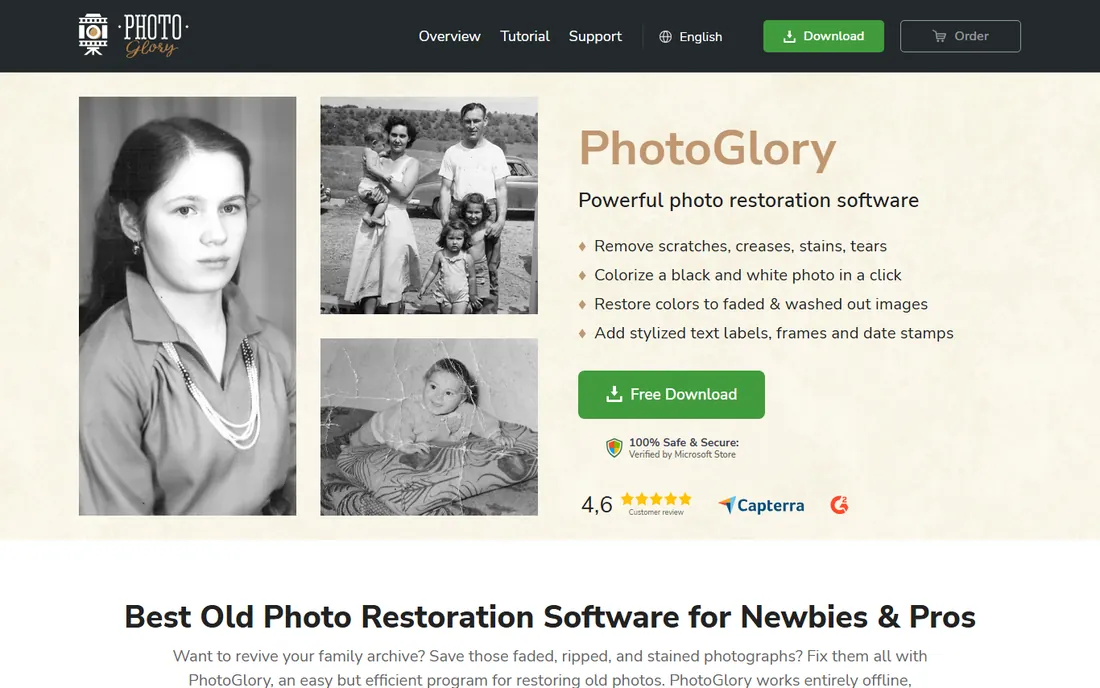
PhotoGlory is the rare tool designed from scratch for this exact job. The workflow walks you through restoration in order: fix geometry and cropping, remove scratches and dust, repair tears, correct faded color, then colorize. The higher editions add manual colorization and automatic one-click restoration. Because it is a desktop app, your family photos never upload anywhere.
The vendor sells it as a one-time license in Standard, Deluxe and PRO editions, with a free trial download on the homepage. The trade is platform: Windows only, and the interface prioritizes function over polish. For a home archivist on Windows who dislikes subscriptions, it is the most focused option here.
What we like- Built specifically for old-photo restoration: tear repair, scratch removal, colorization and color correction in one guided workflow
- One-time license with no subscription
- Works fully offline once installed
Watch out for- Windows only
- Pricing sits on the vendor's order page rather than a public pricing page
#7
AKVIS Retoucher
Best for: Rebuilding torn areas, scratches and missing fragments precisely
Visit akvis.com
Starting priceSee website
Free planFree trial (10 days, full features)

AKVIS Retoucher specializes in the hardest manual task: making damaged areas disappear. Select a scratch, tear or stain, and the software rebuilds the area from surrounding pixels with control over the fill behavior. For photos with physical damage, creases, spots, torn edges, it outperforms general editors at this specific job. It runs standalone or plugs into Photoshop.
AKVIS sells perpetual licenses in Home and Business editions, but prices appear only in the store, not on the product page. The generous 10-day full trial means you can finish a real project before paying. The dated design is cosmetic; the reconstruction engine is the point.
What we like- The reconstruction tools are genuinely good at filling scratches, tears and missing pieces from surrounding texture
- Works standalone or as a plugin in Photoshop and other editors
- A full-featured 10-day trial with no registration
Watch out for- The interface and website feel dated
- Pricing is not shown on the product page, so you discover the cost at checkout
#8
SoftOrbits Photo Retoucher
Best for: Simple, guided removal of scratches, spots and stains
Visit softorbits.net
Starting priceSee website
Free planNo (free tier not confirmed on the product page)

SoftOrbits Photo Retoucher is the simple choice for simple damage. The workflow could not be more direct: mark the scratch or spot with the brush, and the software fills it. For the common case, dust spots from scanning, small scratches, minor stains, it is fast and undemanding. Batch mode walks through a folder of scans without babysitting.
It is not the tool for torn-in-half photos or major reconstruction; AKVIS and Photoshop handle those. Pricing is not on the product page, so confirm in the store. Buy it when your damage is light, your volume is moderate, and you want the shortest path from scan to clean image.
What we like- A straightforward marker-based workflow: paint over the defect, and it is gone
- Batch processing handles folders of scanned photos
- Lightweight install for older Windows PCs
Watch out for- Less capable than AKVIS on large missing areas
- Pricing is not published on the product page
What to check before you buy
Start by sorting your photos into two piles: lightly damaged (faded, dusty, slightly blurry) and badly damaged (torn, stained, missing pieces). AI one-click tools handle the first pile brilliantly and the second pile poorly. If ninety percent of your photos are lightly damaged, a month of VanceAI or the MyHeritage free tier finishes the job. If the important photos are torn, budget for manual tools and the time they demand.
Second, check the watermark and export policy before you invest hours. Free tiers watermark results, which is fine for testing and unacceptable for prints or gifts. Third, consider privacy: desktop tools (PhotoGlory, AKVIS, SoftOrbits, Photoshop, Topaz) process locally, while web tools upload your family photos to someone else's servers. For most families that is fine, but it is worth a conscious choice.
How we chose
We started with the searches buyers actually run: restore old photos software, photo restoration app, fix scratched photos, colorize old photos. For each candidate we opened the vendor's homepage, read the pricing or store page, and noted the free tier's real limits. We compared restoration features against public reviews on G2, Capterra and Reddit, and kept tools with verifiable, distinct strengths for old-photo work specifically. Where a price could not be verified on the vendor's own page, we wrote "See website" instead of guessing.
AI restoration vs manual repair: which your photos need
AI restoration and manual repair fail at opposite things, and knowing which you need saves money. AI excels at global problems: fading, blur, noise, and plausible colorization. It fails at specific damage: a tear across a face, a water stain, a missing corner. Those need a human deciding what should be there, using clone, heal and reconstruction tools.
The practical workflow uses both. Run the batch through an AI tool first (VanceAI for volume, MyHeritage for a handful), then open only the problem photos in a manual tool for the damage AI could not fix. Most archives need AI for eighty percent of photos and manual work for twenty percent. Buying only one kind of tool either wastes hours on easy photos or leaves hard photos half-fixed.
Frequently asked questions
What is the best software for restoring old photos?
For most people, VanceAI Photo Restorer: it handles fading, scratches and blur in bulk at $15 per month, with a free tier for testing. For the highest quality on badly damaged originals, Topaz Photo AI at $199 per year reconstructs detail other tools cannot.
Can I restore old photos for free?
Yes, within limits. MyHeritage enhances and colorizes 10 photos free (with a watermark), VanceAI has a free tier, and PhotoGlory and AKVIS offer free trials. For a small family project, the free options may be all you need.
Can software fix torn or creased photos?
AI tools handle light creases and small tears, but large tears and missing areas need manual repair in Photoshop, AKVIS Retoucher or PhotoGlory, where you control the reconstruction. No one-click tool reliably rebuilds a photo torn in half.
Is it safe to upload family photos to restoration websites?
Web tools process your photos on their servers, which is how the AI works. Desktop tools (PhotoGlory, AKVIS, SoftOrbits, Photoshop, Topaz) keep everything on your computer. Read the vendor's privacy policy if the photos are sensitive, and prefer local processing for anything you would not post publicly.
How much does photo restoration software cost?
From free (MyHeritage's 10 free photos) to $15 per month (VanceAI) to $199 per year (Topaz Photo AI), with one-time desktop licenses in between. Most family archives can be restored for under $50 total by using free tiers and a single month of a paid tool.
Sources we checked (10)
- https://vanceai.com/pricing/
- https://www.myheritage.com/pricing
- https://www.adobe.com/products/photoshop.html
- https://www.topazlabs.com/topaz-photo-ai
- https://retouch4me.com
- https://photoglory.net/
- https://akvis.com/en/retoucher/index.php
- https://www.softorbits.net/
- https://www.g2.com/categories/photo-editing
- https://www.capterra.com/photo-editing-software/
Is your product missing or out of date?
We review this list regularly. Vendors can request a listing, send updated pricing or ask about featured placement.

Shihab Mia · Founder, Rankite
Shihab has spent more than a decade helping SaaS and e-commerce brands grow through search. He writes Rankite's software buying guides from pricing pages, documentation and public user reviews. More about Shihab.