How we make this list: we compare pricing pages, product documentation and public user reviews. Rankite is independent; if a vendor ever pays for a featured spot, that listing is clearly labeled Partner.

Key takeaways
- Boldin and MaxiFi are the depth picks: full tax modeling, Social Security optimization, and what-if scenarios for people who want the complete picture.
- ProjectionLab is the favorite of the FIRE community, and its free Basic tier handles Monte Carlo simulations without costing a cent.
- OnTrajectory is the simplest paid option at $80 a year, best for people who think in goals rather than spreadsheets.
- Empower and Fidelity cost nothing and are genuinely useful, but they are account dashboards with planning features, not dedicated planning engines.
- Pralana is the specialist choice for tax nerds who want to see every calculation, including mock IRS forms.
Quick comparison
| Tool | Best for | Starting price | Free plan |
|---|
 Boldin Boldin | DIY planners wanting depth without an advisor | $144/year | Yes |
 ProjectionLab ProjectionLab | FIRE followers and scenario tinkerers | $129/year | Yes |
 MaxiFi MaxiFi | An economist-grade lifetime spending plan | See website | Free trial |
 Pralana Pralana | Spreadsheet people wanting total control | See website | No |
 OnTrajectory OnTrajectory | Goal-setters who think in plain English | $80/year | Yes |
 WealthTrace WealthTrace | Hands-on investors who want planning plus portfolio tracking | See website | Free trial |
 Empower Personal Dashboard Empower Personal Dashboard | Investors who want free net-worth and retirement tracking together | Free | Yes |
 Fidelity Fidelity | Fidelity customers planning where their money already sits | Free | Yes |
Is your product missing or out of date?
We review this list regularly. Vendors can request a listing, send updated pricing or ask about featured placement.
The best retirement planning software for individuals
#1
Boldin
Best for: DIY planners wanting depth without an advisor
Visit boldin.com
Starting price$144/year
Free planYes
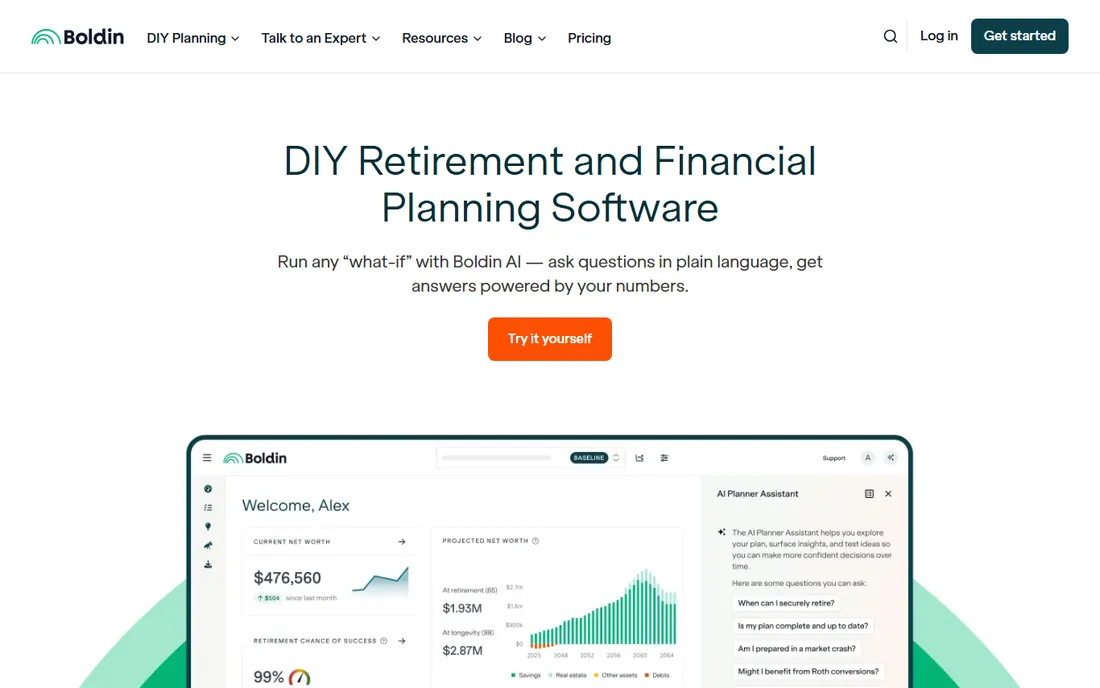
Boldin is the closest thing to hiring a planning-obsessed analyst who works for $144 a year. It goes well beyond the standard retirement calculator, factoring in state taxes, itemized deductions, Social Security timing, real estate moves, debt payoff, Medicare, and long-term care in one connected model. The what-if engine lets you test retiring three years early, relocating, or changing spending, and see the ripple effects across decades.
The pricing note matters right now. Boldin announced on October 1 that PlannerPlus costs $144 a year until October 15, 2026, then rises to $168 for new subscribers, so anyone on the fence should decide before the increase. Beyond price, the honest caveat is complexity: this much modeling power means more inputs and more screens than a casual planner expects. If you want guidance without doing homework, the coaching add-ons help, but they cost extra.
What we like- Models taxes, Social Security, real estate, healthcare, and long-term care together
- Classes, groups, and 1:1 coaching available
- AI assistant answers questions from your actual plan data
Watch out for- PlannerPlus rises from $144 to $168 a year for new subscribers on October 15, 2026
- The depth can overwhelm casual users
- Full features require the paid tier
Starting price$129/year
Free planYes

Nobody enjoys modeling alternate futures more than the financial independence community, and ProjectionLab was built for exactly that audience. You enter income, expenses, and accounts manually, then project your net worth year by year for the rest of your life, stress-testing the plan with Monte Carlo simulations and historical backtests. The visual timeline makes abstract decades feel concrete, which is why FIRE bloggers recommend it so often.
The pricing is refreshingly simple: Basic is free and genuinely useful, Premium is $129 a year on the vendor's own pricing page, and the $549 Pro tier is for advisors. Privacy-minded users get a real benefit here, since nothing requires linking bank or brokerage accounts. The cost of that privacy is effort. With many accounts, manual updates become a chore, and the deeper tax tools sit behind the paywall. For scenario-obsessed planners who like control, it is the sweet spot.
What we like- Free Basic tier includes Monte Carlo simulations and historical backtesting
- No bank account linking required, all manual entry
- Compare mode tests multiple plans side by side
Watch out for- Manual data entry gets tedious with many accounts
- Tax optimization and Roth tools need the $129 Premium tier
- It analyzes but does not advise
Starting priceSee website
Free planFree trial
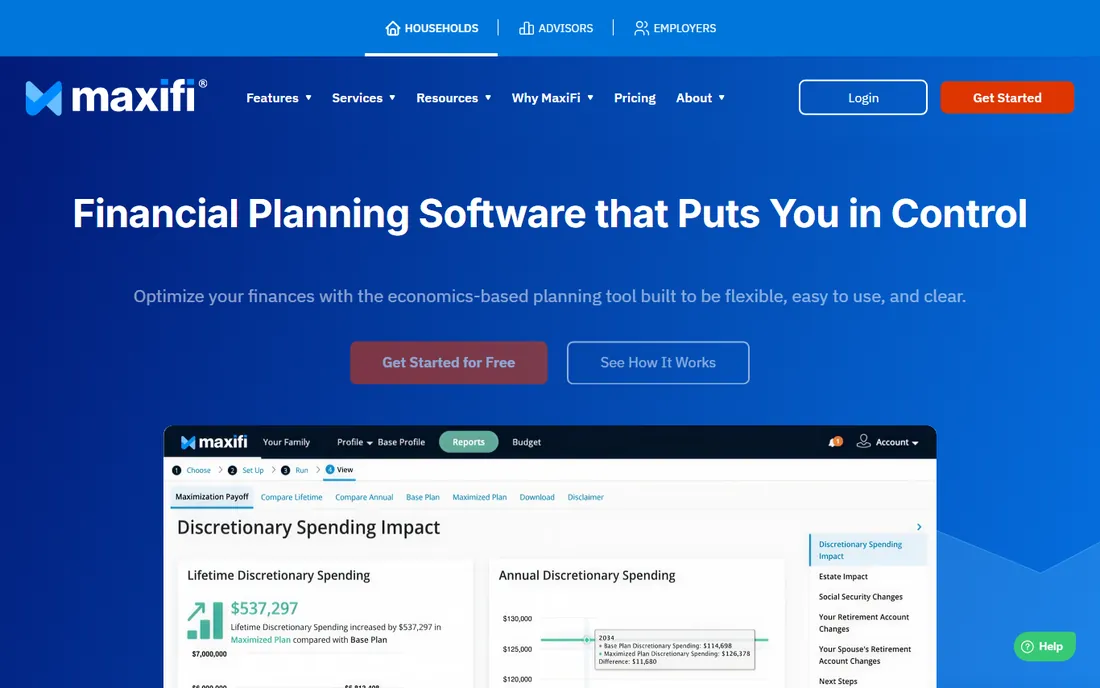
MaxiFi comes from academia, and it shows in the best way. Developed by Boston University economist Laurence Kotlikoff, it takes a different starting point from most planners: instead of asking you to guess your retirement spending, it calculates how much you can afford to spend each year for life while preserving your living standard. That inversion is powerful, because spending guesses are where most DIY plans quietly go wrong.
The engine then hunts for improvements: better Social Security timing, smarter Roth conversions, tax-efficient withdrawal order. Reviewers consistently praise the economics underneath. The friction is everything around the engine. Pricing is not published, the design lags behind Boldin and ProjectionLab, and getting value from it requires engaging with concepts like consumption smoothing. If you want the most rigorous answer to "what can I spend," this is it. If you want pretty charts in ten minutes, look elsewhere.
What we like- Built on economist Laurence Kotlikoff's research with a 30-year track record
- Calculates sustainable lifetime spending instead of asking you to guess
- Strong Social Security and Roth conversion optimization
Watch out for- Pricing is not published on the site, so expect a sales conversation
- The interface feels dated next to newer rivals
- The learning curve is real
Starting priceSee website
Free planNo

Pralana is the tool for people who distrust black boxes. Where most planners show you a result, Pralana shows you the machinery: detailed federal and state tax calculations, Roth conversion amounts constrained by the IRMAA and capital gains brackets you set, Social Security optimization inside the full plan, and deterministic, Monte Carlo, and historical analyses. The online version even renders mock IRS tax forms so you can trace exactly how a number was derived.
That transparency comes in a package only a certain personality will love. It grew out of a downloadable Excel model, and while the web version is more polished, the experience still assumes you enjoy variables, brackets, and trade-off tables. There is no free tier, so commitment precedes evaluation. For engineers, accountants, and early retirees managing ACA subsidies alongside Roth conversions, nothing else offers this much control. For everyone else, it is more microscope than necessary.
What we like- Extraordinary tax detail, including ACA subsidy math and IRMAA bracket control
- Online version generates IRS tax form mock-ups
- Models three scenarios side by side
Watch out for- No free tier, so you buy on faith or reputation
- The Excel roots show in the learning curve
- Overkill for anyone with a simple situation
Starting price$80/year
Free planYes

OnTrajectory starts from the opposite end of Pralana: instead of variables, it starts with goals. You describe what you want, funding college, retiring at 57, buying the lake house, and the software builds lifetime models around those aims with plain-English guidance throughout. For people who find traditional planners intimidating, that framing is the difference between having a plan and having another abandoned login.
The price is the other headline: $80 a year for Unlimited, confirmed on the company's homepage, with a free Basic tier for simpler needs. You get Monte Carlo analysis, scenario comparison, and withdrawal optimization at that price, which is remarkable value. The compromise is depth. Tax modeling, estate planning, and intricate Roth strategies are thinner here than in the premium tools. If your situation is complex enough to need those, pay more. If it is not, OnTrajectory may be all the software you ever need.
What we like- Goals-based approach is the gentlest on-ramp in the category
- $80 a year undercuts every serious rival
- Free Basic tier covers income, expenses, and one alternate scenario
Watch out for- Less analytical depth than Boldin or MaxiFi
- A smaller company with fewer integrations
- Advanced tax planning is not its strength
Starting priceSee website
Free planFree trial

WealthTrace earns its place by doing two jobs most planners split apart: retirement projection and investment tracking. You can link your accounts and watch balances, holdings, performance, fund fees, and asset allocation feed directly into the retirement model, or enter everything manually if you prefer. The company claims its holding-level projections beat generic calculators on accuracy, and the Monte Carlo, Roth conversion, and RMD tools are genuinely professional grade.
That combination suits the hands-on investor who already manages a portfolio and wants the plan and the holdings in one view. The AI plan insights, which answer questions about your projections in plain English, are a thoughtful addition for people drowning in data. Two caveats: pricing is not published, so budget certainty requires contacting them, and the tool assumes a comfort with investing concepts that true beginners may not have. For the DIY investor crowd, though, it is one of the strongest options here.
What we like- Links brokerage, IRA, and 401(k) accounts for live balances and holdings
- Projections use holding-level data for sharper accuracy
- AI assistant explains your plan in plain English
Watch out for- Pricing is not published on the homepage
- Getting full value means linking accounts
- The professional-grade depth can intimidate beginners
#7
Empower Personal Dashboard
Best for: Investors who want free net-worth and retirement tracking together
Visit empower.com
Starting priceFree
Free planYes

Empower Personal Dashboard, the former Personal Capital, is the free heavyweight of this list. Link your accounts and you get net-worth tracking, cash-flow analysis, investment allocation checks, and a retirement planner that projects whether your current savings reach your goals. For zero dollars, that bundle is hard to argue with, and it is the reason so many investors start here.
Understand the business model and the limits together. Empower makes its money when dashboard users with $100,000-plus hire its advisory service, so expect the occasional nudge toward a human advisor. The planning tools are also broader than they are deep: fine for tracking progress and spotting allocation drift, not a substitute for detailed tax and withdrawal strategy. Use it as your free financial home base, and add a dedicated planner if your situation needs serious modeling.
What we like- Completely free with no paid tier for the dashboard
- Aggregates bank, investment, and credit accounts into one net-worth view
- Retirement planner shows whether you are on track
Watch out for- The free tools exist partly to sell advisory services
- Planning depth trails the paid specialists
- Requires linking accounts to be useful
#8
Fidelity
Best for: Fidelity customers planning where their money already sits
Visit fidelity.com
Starting priceFree
Free planYes
Fidelity is not really software you buy. It is a financial ecosystem whose planning tools come free with the accounts many Americans already hold. The retirement planning resources, calculators, and the Planning and Guidance Center draw directly on your Fidelity balances, with no account fees and no minimums. For a Fidelity customer, that integration removes the data-entry burden every standalone planner imposes.
The honest framing is that Fidelity's tools serve Fidelity's business. They are good, well-maintained, and genuinely free, but the planning experience is spread across calculators and guidance centers rather than one coherent engine like Boldin. Non-customers get less value, since the magic is the account integration. If your retirement money already lives at Fidelity, start with their tools before paying for anything. If it lives elsewhere, the standalone planners above will serve you better.
What we like- Planning tools are free with no account minimums
- Integrates directly with your Fidelity accounts and holdings
- Deep educational resources and retirement research
Watch out for- Most valuable inside the Fidelity ecosystem
- Planning depth varies by tool
- Guidance can shade into product sales
Free vs paid: where the line actually sits
The free tier in this category is unusually generous, which makes the buying decision simpler than it looks. Empower and Fidelity give you account aggregation, net-worth tracking, and basic retirement projections for nothing. ProjectionLab's free Basic tier adds Monte Carlo simulation and backtesting, and OnTrajectory's free tier covers a full basic plan. If your finances are straightforward, a salary, a 401(k), some savings, you may never need to pay.
Paid software earns its fee in three places: taxes, scenarios, and confidence. Tools like Boldin, MaxiFi, and Pralana model federal and state taxes year by year, optimize Social Security timing and Roth conversions, and let you compare whole alternate lives side by side. That depth matters most in the five to ten years before retirement, when withdrawal order and tax bracket management can swing outcomes by six figures. A reasonable rule: use the free tools in your thirties and forties, and pay for depth when the decisions get expensive.
How we chose
We evaluated each tool from public pricing pages, official documentation, and reviews from individual users on Reddit, G2, and personal finance publications. Every product here is available to individuals today. Prices shown come only from the vendor's own site as of October 14, 2026, including Boldin's announced October 15 price change and the figures on ProjectionLab's and OnTrajectory's own pages. Where a vendor does not publish pricing, the table says so rather than repeating third-party estimates. We did not test-drive accounts or claim hands-on use.
What to look for in a retirement planner
Start with tax modeling, because taxes are the largest controllable variable in most retirements. A serious planner models federal and state brackets year by year, handles Roth conversions and required minimum distributions, and shows the tax cost of each scenario. If a tool only projects portfolio growth without taxes, it is a savings calculator wearing a costume.
Next, check Social Security and withdrawal sequencing. The difference between good and bad Social Security timing can exceed $100,000 over a lifetime, and the order you tap taxable, tax-deferred, and Roth accounts matters enormously. Then look at how the tool handles uncertainty: Monte Carlo simulation, which runs your plan through thousands of randomized market histories, tells you far more than a single assumed return. Finally, decide how much work you will do. Account linking saves effort but raises privacy questions, while manual entry keeps your data local at the cost of your time. Match the tool's demands to the effort you will actually sustain, because the best planner is the one you keep updated.
Frequently asked questions
Is retirement planning software worth paying for?
It is worth paying for when your situation has moving parts: multiple account types, a pension decision, Roth conversion opportunities, or retirement within ten years. In those cases, the tax and sequencing optimization in tools like Boldin or MaxiFi can be worth many times the subscription. With simple finances and decades to go, the free tools cover you.
Can I plan retirement without linking my accounts?
Yes. ProjectionLab is built around manual entry as a privacy feature, and Pralana, MaxiFi, and OnTrajectory all work with typed-in numbers. Linking accounts, as Empower and WealthTrace encourage, saves updating effort and keeps projections current. Choose based on your comfort with sharing financial credentials.
What is Monte Carlo analysis and do I need it?
Monte Carlo analysis runs your retirement plan through thousands of simulated market histories to estimate the probability your money lasts. A plan that survives 90 percent of simulated histories is meaningfully safer than one built on a single assumed return. Most serious planners include it, and ProjectionLab even offers it free.
How accurate are these projections?
They are precise about math and honest about uncertainty, which is not the same as accurate. Every projection depends on your inputs and assumptions about returns, inflation, and longevity. Treat the output as a range of likely outcomes, revisit the plan yearly, and be skeptical of any tool that gives you a single confident number.
Should I use software instead of a financial advisor?
For most DIY-capable individuals, software plus occasional professional input beats either alone. These tools handle the math better than most humans; an advisor adds judgment about insurance, estate documents, and behavioral discipline. Boldin even bundles coaching access. If your situation involves stock options, business ownership, or complex estates, talk to a human too.
Sources we checked (10)
- https://boldin.com/
- https://www.boldin.com/retirement/plannerplus-price-increase-october-2026/
- https://projectionlab.com/
- https://ProjectionLab.com/pricing
- https://maxifiplanner.com
- https://pralanaretirementcalculator.com/
- https://www.ontrajectory.com
- https://www.mywealthtrace.com
- https://www.empower.com
- https://www.fidelity.com
Is your product missing or out of date?
We review this list regularly. Vendors can request a listing, send updated pricing or ask about featured placement.

Shihab Mia · Founder, Rankite
Shihab has spent more than a decade helping SaaS and e-commerce brands grow through search. He writes Rankite's software buying guides from pricing pages, documentation and public user reviews. More about Shihab.