How we make this list: we compare pricing pages, product documentation and public user reviews. Ratings come from G2, Capterra or Trustpilot, with the date we checked them.
The short answer
Descript is the best remove retakes video editing software for most creators in 2026. Its Remove Retakes feature keeps only the best take, and Remove Filler Words clears ums, uhs, and pauses from the transcript in one pass. Riverside suits remote shows, and Kapwing suits fast browser edits. Prices were checked on vendor pricing pages on 12 Nov 2026.
Key takeaways
- Descript leads on retake removal, with a named Remove Retakes feature that keeps only your best take.
- Riverside pairs remote recording with transcript editing, so bad takes never reach your timeline.
- Kapwing, VEED, and OpusClip work in the browser, which suits fast social and marketing edits.
- Pictory turns long talks into short clips, with silence and filler cleanup built in.
- Adobe Premiere Pro and Final Cut Pro add transcript tools to a full pro timeline.
- Starting prices run from $15 a month to $299.99 once.
What does remove retakes software actually do?
Remove retakes software finds the repeated attempts in a recording and keeps only the best version of each line. You record a talking head video, a course lesson, or a podcast, and you repeat a sentence three times until it sounds right. The software reads the transcript, groups the repeated lines, and cuts the weaker takes for you. The result is a clean cut without hours of manual trimming. A normal editor shows a timeline you scrub by hand, while a retake tool works from the words.
How does automatic filler removal work?
Automatic filler removal starts with a transcript of your recording. The software detects filler words such as um, uh, like, and you know, plus repeated words and long silent gaps. It highlights each one in the transcript, and you remove them with one click or one command. Some tools also shorten word gaps, so pauses shrink to a natural length. Review the filler list before it cuts, because some ums are part of a natural pause. Run the automatic pass first, read the transcript once, then export.
YouTubers who record solo to camera get the most from Descript or Kapwing. Descript handles long talking head videos, and its text editing makes a 20 minute video easy to tighten. Kapwing works in the browser, so you can clean a video on any machine and publish the same day. Both export captions, which helps retention on YouTube and social feeds. Podcasters who publish video should start with Riverside or Descript, because Riverside records each guest separately, and Descript edits from the transcript.
How much should you pay to remove retakes?
Most creators pay between $15 and $29 a month for a tool that removes retakes and filler words. OpusClip starts at $15 a month, Descript and Kapwing start at $16 a month on annual billing, and Riverside Pro starts at $24 a month on annual billing. Those entry plans cover a solo creator who publishes weekly. Teams that publish daily, or that need 4K export and shared workspaces, usually land on a mid tier between $24 and $59 a month. Final Cut Pro costs $299.99 once for Mac, while Adobe Premiere Pro costs $22.99 a month and never converts to ownership.
Start with where you record. If you record remote guests, pick a tool that records and edits in one place, such as Riverside. If you record solo to camera, pick a transcript editor such as Descript. If you edit on a shared or locked down machine, pick a browser tool such as Kapwing or VEED, because there is nothing to install. Next, check the export you need. Short social clips need 9:16 reframing, which OpusClip and Kapwing handle well. Long YouTube videos need 4K export, which Descript and Premiere Pro handle well. Try the free plan first and time one real recording.
Every tool in this list has a real retake or filler removal capability, stated in its section. We checked each vendor pricing page on 12 Nov 2026 and recorded the starting price from that page. Where a vendor page did not render its price cards in a text fetch, we say so and name the third party source. We did not include general video editors with no transcript or filler cleanup. Last verified 12 Nov 2026.
Comparison table
| Tool | Best for | Starting price | Free plan |
| Descript | Transcript editing with Remove Retakes | $16 per person per month, billed annually | Yes, 60 media minutes a month |
| Riverside | Remote recording with transcript cleanup | $24 per month, billed annually | Limited free tier listed on the pricing page |
| Kapwing | Fast browser edits and Smart Cut | $16 per member per month, billed annually | Yes, 10 credits |
| VEED | Browser editing with silence removal | $25 per seat per month, billed monthly | Yes, watermarked 720p exports |
| OpusClip | Short clips with filler and bad take removal | $15 per month | Yes, 60 credits a month |
| Pictory | Turning long talks into clean short videos | $25 per month, billed annually | 14-day free trial, no free plan |
| Adobe Premiere Pro | Pro timeline with text-based editing | $22.99 per month, annual plan billed monthly | 7-day free trial, no free plan |
| Final Cut Pro | Mac editing with transcript search | $299.99 one-time purchase | 30-day Apple Creator Studio trial |
Quick comparison
| Tool | Best for | Starting price | Free plan |
|---|
 Descript | Creators who want the strongest retake and filler removal in one transcript editor | $16 per person per month, billed annually ($24 billed monthly) | Yes, free plan with 60 media minutes a month and 100 one-time AI credits |
 Riverside | Podcasters and remote interview shows that need clean takes before editing | $24 per month, billed annually ($29 billed monthly) | Limited free tier listed on the pricing page, with 2 hours of multi-track recording |
 Kapwing | Small teams that need fast browser edits with automatic silence removal | $16 per member per month, billed annually ($24 billed monthly) | Yes, free plan with 10 credits, watermarked exports at 720p, and 4 minute exports |
 VEED | Marketing teams that clean talking head videos in the browser | $25 per seat per month, billed monthly ($12.25 billed annually) | Yes, free plan with watermarked 720p exports up to 10 minutes |
 OpusClip | Creators who turn long videos into short clips with filler and bad takes removed | $15 per month | Yes, free plan with 60 credits a month, 1080p clips, and a watermark |
 Pictory | Course creators and marketers who turn long talks into clean short videos | $25 per month, billed annually ($29 billed monthly) | No free plan, 14-day free trial with 300 credits and up to 10 minutes of video |
 Adobe Premiere Pro | Professional editors who want text-based editing inside a full pro timeline | $22.99 per month, annual plan billed monthly | No free plan, 7-day free trial with full app access |
 Final Cut Pro | Mac creators who want fast timeline editing with transcript search | $299.99 one-time purchase for Mac | No free plan, 30-day free trial of Apple Creator Studio |
Is your product missing or out of date?
We review this list regularly. Vendors can request a listing, send updated pricing or ask about featured placement.
#1Descript
Best for: Creators who want the strongest retake and filler removal in one transcript editor4.6/5 on
G2 (928 reviews, checked Oct 2026)
Visit descript.com
Starting price$16 per person per month, billed annually ($24 billed monthly)
Free planYes, free plan with 60 media minutes a month and 100 one-time AI credits
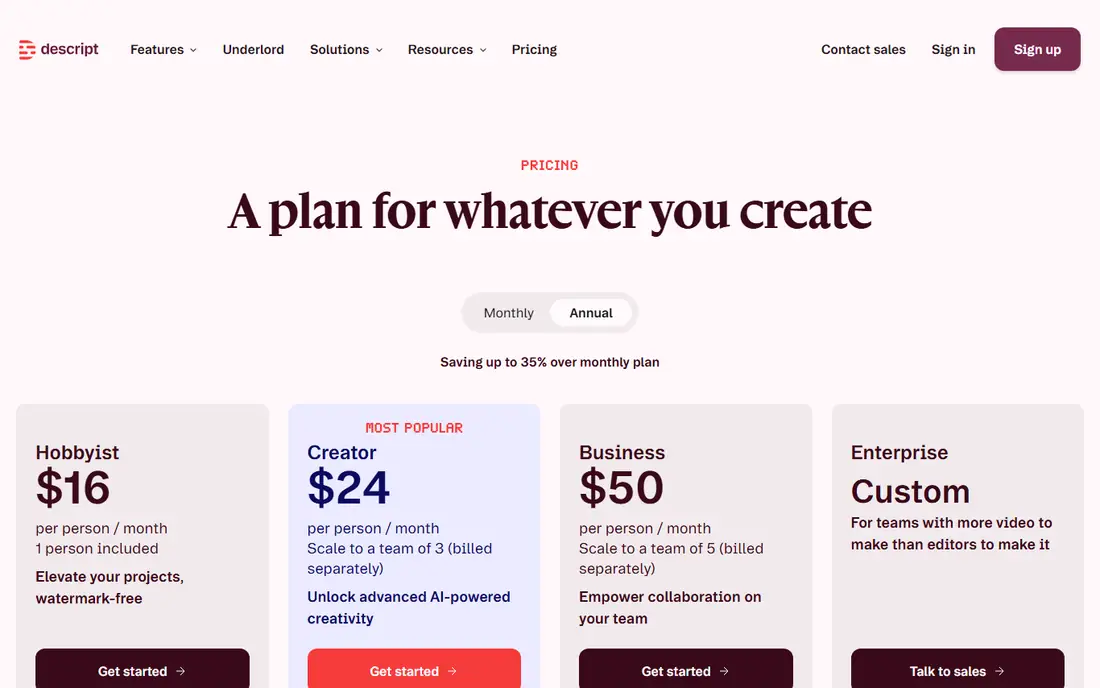
Descript is the clearest match for this guide, because retake removal is a named feature, not a side effect of cutting silences. Its pricing page lists Remove Retakes, Remove Filler Words, Shorten Word Gaps, and Edit for Clarity. You open the transcript, run the filler and retake passes, and delete weak lines as text, and the video follows each edit. Hobbyist starts at $16 per person per month billed annually, with 10 media hours, 400 AI credits, and 1080p export. Creator at $24 adds 4K export.
What we like- Named Remove Retakes feature that keeps only the best take, Remove Filler Words, Shorten Word Gaps, and Edit for Clarity all listed on the pricing page
Watch out for- Media minutes and AI credits are capped each month, and the Hobbyist plan cannot buy top-ups, so heavy users must move to Creator or Business
#2Riverside
Best for: Podcasters and remote interview shows that need clean takes before editing4.8/5 on
G2 (1,754 reviews, checked Oct 2026)
Visit riverside.com
Starting price$24 per month, billed annually ($29 billed monthly)
Free planLimited free tier listed on the pricing page, with 2 hours of multi-track recording
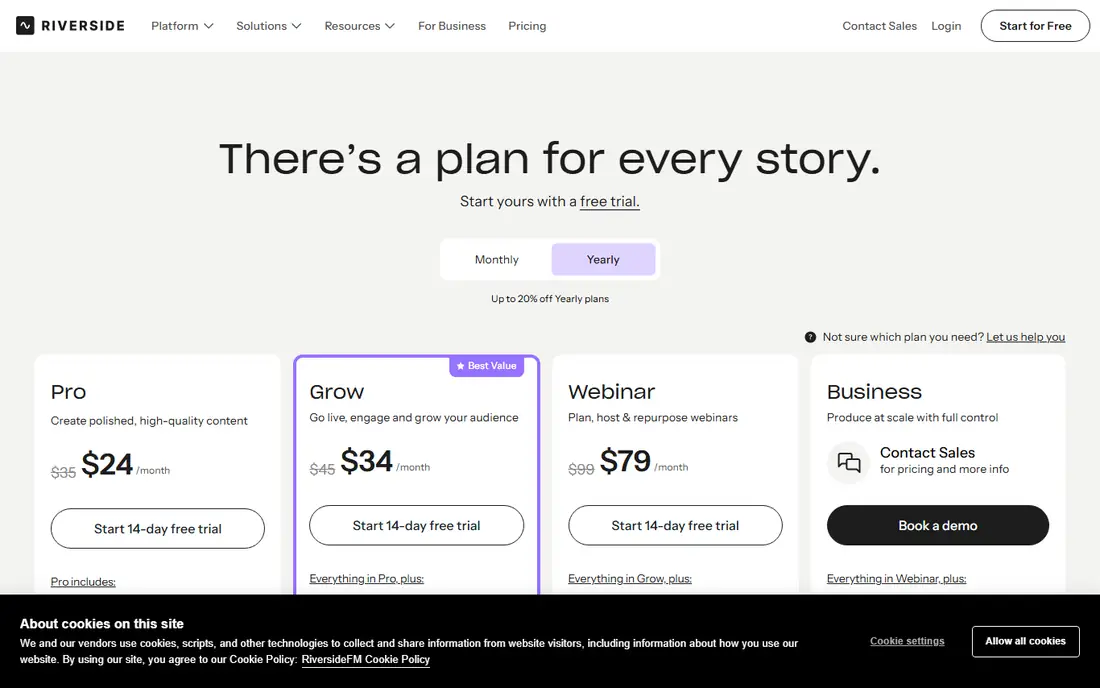
Riverside starts before the edit, which is why it earns a place here. It records each guest on a separate audio and video track in the browser, so a retake from one speaker never damages the others. After recording, you edit from the transcript, delete bad takes and filler words as text, and export a clean cut. Its pricing page FAQ confirms Pro at $24 a month billed annually, down from $29 billed monthly. Pro includes 15 hours of separate track downloads a month, 4K video, and unlimited transcription.
What we like- Separate track recording for each guest, transcript editing with filler removal, Magic Clips, and 4K video on Pro
Watch out for- Separate track downloads are capped at 15 hours a month on Pro, and the free tier status has been unclear across Riverside pages
#3Kapwing
Best for: Small teams that need fast browser edits with automatic silence removal3.9/5 on
G2 (40 reviews, checked Oct 2026)
Visit kapwing.com
Starting price$16 per member per month, billed annually ($24 billed monthly)
Free planYes, free plan with 10 credits, watermarked exports at 720p, and 4 minute exports
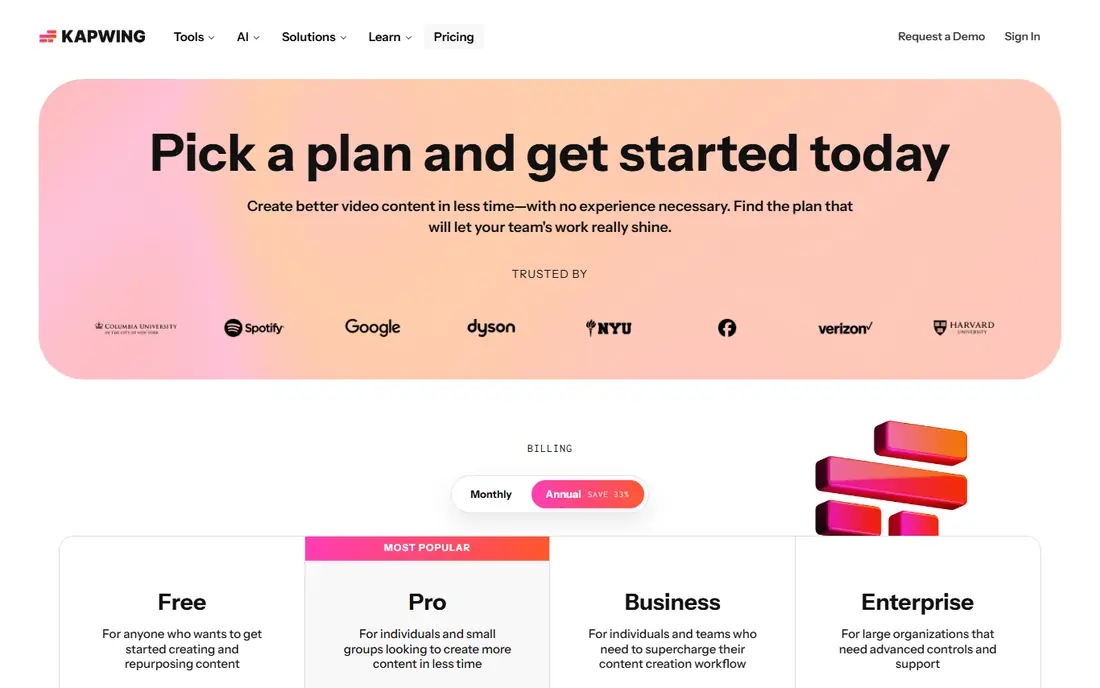
Kapwing is a browser editor, so there is nothing to install and the whole team can open the same project. Its Smart Cut feature removes silences from videos automatically, which is the closest browser equivalent to a retake pass for short content. You upload a recording, run Smart Cut and Clean Audio, then trim the remaining weak takes by hand. The pricing page, opened on 12 Nov 2026, shows Pro at $16 a month on annual billing, with 1,000 credits a month, 4K export, and 200 GB of storage.
What we like- Smart Cut removes silences automatically, Clean Audio removes background noise, auto subtitling, and 4K export on Pro
Watch out for- AI work runs on a credit pool, with 1,000 credits a month on Pro, and Pro cannot buy extra credits, so heavy AI use hits a hard cap
#4VEED
Best for: Marketing teams that clean talking head videos in the browser4.6/5 on
G2 (2,175 reviews, checked Oct 2026)
Visit veed.io
Starting price$25 per seat per month, billed monthly ($12.25 billed annually)
Free planYes, free plan with watermarked 720p exports up to 10 minutes
VEED is a browser editor aimed at marketing teams that publish talking head videos weekly. Its silence removal cuts dead air from a recording, and its Clean Audio tool reduces background noise, together removing the most common reasons to re-record a line. You can also generate subtitles and reframe a video for social feeds without leaving the browser. The VEED pricing page was opened on 12 Nov 2026, but its price cards did not render, so the $25 a month Creator figure is third party reported, checked 29 Oct 2026.
What we like- Silence removal and Clean Audio, auto subtitles in many languages, and a simple browser timeline with no install
Watch out for- Prices are charged per seat, so a three person team pays three times the listed price, and the pricing page serves different plan versions to different visitors
#5OpusClip
Best for: Creators who turn long videos into short clips with filler and bad takes removed4.6/5 on
G2 (123 reviews, checked Oct 2026)
Visit opus.pro
Starting price$15 per month
Free planYes, free plan with 60 credits a month, 1080p clips, and a watermark
OpusClip is built for repurposing. Its pricing page lists Speech cleanup for pause and filler removal on Starter, and adds bad takes removal on Pro. You upload a long video, OpusClip finds the strongest moments, removes filler and bad takes, adds captions, and reframes for vertical video. The pricing page, opened on 12 Nov 2026, shows Free at $0, Starter at $15 a month, and Pro at $29 a month. One credit equals one minute of source video, so Starter covers 150 minutes a month.
What we like- Speech cleanup removes pauses, filler, and bad takes, plus AI clipping, virality scores, and captions
Watch out for- One credit equals one minute of source video, so a 60 minute podcast costs 60 credits before a single clip is made, and Starter exports 9:16 only
#6Pictory
Best for: Course creators and marketers who turn long talks into clean short videos4.6/5 on
G2 (81 reviews, checked Oct 2026)
Visit pictory.ai
Starting price$25 per month, billed annually ($29 billed monthly)
Free planNo free plan, 14-day free trial with 300 credits and up to 10 minutes of video
Pictory turns long recordings into short videos, and its AI editor cleans the result as it goes. You upload a talk or a lesson, and Pictory creates a summary, cuts the weakest sections, adds subtitles, and removes silences and filler. Its pricing page, opened on 12 Nov 2026, shows Starter at $25 a month billed annually, or $29 billed monthly, with up to 360 video minutes a year, 24,000 credits, and 5 GB of storage. Professional is listed at $29.50 a month billed annually under a Black Friday offer.
What we like- Automatic video summary, automatic subtitles, silence and filler cleanup in the AI editor, and a large stock library
Watch out for- No free plan, downloads are blocked during the trial until you subscribe, and the credit model makes long videos costly on Starter
#7Adobe Premiere Pro
Best for: Professional editors who want text-based editing inside a full pro timeline4.5/5 on
G2 (1,675 reviews, checked Oct 2026)
Visit adobe.com
Starting price$22.99 per month, annual plan billed monthly
Free planNo free plan, 7-day free trial with full app access
Adobe Premiere Pro, now called Adobe Premiere, brings transcript editing into a professional timeline. Its Text-Based Editing feature transcribes your footage, and you delete a sentence in the transcript to remove that take from the sequence. Speech to Text then creates captions, and you can refine the cut with pro color, audio, and effects tools. The single app plan costs $22.99 a month on an annual plan billed monthly in the US, confirmed on Adobe checkout pages in October 2026, with a 7-day free trial.
What we like- Text-Based Editing lets you cut bad takes by deleting transcript text, plus Speech to Text captions, a full pro timeline, and Frame.io review
Watch out for- Subscription only with no ownership, an annual commitment with a cancellation fee after 14 days, and a steep learning curve for new editors
#8Final Cut Pro
Best for: Mac creators who want fast timeline editing with transcript search4.4/5 on
G2 (87 reviews, checked Oct 2026)
Visit apple.com
Starting price$299.99 one-time purchase for Mac
Free planNo free plan, 30-day free trial of Apple Creator Studio
Final Cut Pro is the one-time purchase option in this list. Transcript Search finds spoken phrases by exact match or related words, so you can jump to every repeated take in seconds and cut the weak ones by hand. The Magnetic Timeline then closes the gaps as you cut, which keeps a talking head video tight. Apple page, opened on 12 Nov 2026, states Final Cut Pro is $299.99 once on Mac, or inside Apple Creator Studio at $12.99 a month or $129 a year.
What we like- Transcript Search finds spoken phrases fast, Magnetic Timeline closes gaps as you cut, and a one-time purchase beats subscriptions after about two years
Watch out for- Mac only with no Windows version, transcript search finds phrases but does not auto remove retakes, and some premium content is limited to Creator Studio subscribers
Frequently asked questions
What is the best software to remove retakes from a video?
Descript is the best software to remove retakes for most creators, because it has a named Remove Retakes feature that keeps only the best take of each repeated line. You run it from the transcript, review the result, and export a clean cut. Riverside suits remote shows, and OpusClip suits short clips. Pick the tool that matches where you record.
Can software remove filler words automatically?
Yes, software can remove filler words automatically by transcribing your recording and detecting ums, uhs, repeated words, and long pauses. Descript, Kapwing, OpusClip, and VEED all offer this in some form, and most let you review the list before the cut is made. Results are best on clear speech recorded in a quiet room, and accuracy drops when speakers overlap or audio is noisy.
Does Descript really remove retakes, or just filler words?
Descript removes both. Its pricing page lists Remove Retakes as a feature that cuts all but your best takes, separate from Remove Filler Words, which clears um, ah, like, and repeated words. It also lists Shorten Word Gaps and Edit for Clarity, which shrink silences and remove digressions. Hobbyist starts at $16 per person per month billed annually, and Creator at $24 adds more media hours and credits.
Is there free software that removes retakes and filler words?
Yes, several tools in this list have free plans that remove filler words and silences. Descript has a free plan with 60 media minutes a month. Kapwing has a free plan with 10 credits and watermarked exports. OpusClip has a free plan with 60 credits a month. VEED has a free plan with watermarked 720p exports. Free plans cap minutes, credits, or export quality, so they suit testing and short videos rather than a full weekly show.
How do I remove retakes without losing my best take?
Record each line more than once, then use a transcript tool to compare the takes side by side. Descript Remove Retakes keeps the best take and cuts the rest, while Riverside and Final Cut Pro let you find each repeated line through transcript search and pick the winner yourself. Always review the transcript before export, and save the raw recording first, so you can restore a line if the tool cuts too much.
Sources we checked (8)
- https://www.descript.com/pricing
- https://riverside.com/pricing
- https://www.kapwing.com/pricing
- https://www.veed.io/pricing
- https://www.opus.pro/pricing
- https://pictory.ai/pricing
- https://www.adobe.com/products/premiere.html
- https://www.apple.com/final-cut-pro/
Is your product missing or out of date?
We review this list regularly. Vendors can request a listing, send updated pricing or ask about featured placement.

Shihab Mia · Founder, Rankite
Shihab has 5+ years in B2B and SaaS SEO. He writes Rankite's software buying guides from pricing pages, documentation and public user reviews. More about Shihab.