How we make this list: we compare pricing pages, product documentation and public user reviews. Ratings come from G2, Capterra or Trustpilot, with the date we checked them.
Key takeaways
- SketchUp Free is the best free starting point for home design, with push-pull modeling in the browser and millions of free models in the 3D Warehouse.
- Sweet Home 3D is the best free room planner for non-technical homeowners, with drag-and-drop furniture and a 3D preview at no cost.
- FreeCAD is the best fully free open source option with no strings, including commercial work, and it is a much better answer since the 1.0 and 1.1 releases than it was two years ago.
- "Free CAD" usually means one of three things: genuinely free and open source, free until you earn money with it, or free until you try to export the file, so check the licence before you commit a weekend to learning.
- For professional paid work, free tools cover learning and light use, while client projects usually justify a paid plan.
Quick comparison
Is your product missing or out of date?
We review this list regularly. Vendors can request a listing, send updated pricing or ask about featured placement.
The best free cad software for home design

#1SketchUp Free
Best for: Home concept modeling4.5/5 on
G2 (1,327 reviews, checked Oct 2026)
Visit sketchup.com
Starting priceFree
Free planYes

SketchUp is the clear answer for beginners in guides: the free web version teaches the basics at no cost, Go at $129 a year adds professional features, and Pro at $399 a year covers real project work. Its push-pull modeling lets homeowners shape rooms, walls, and furniture by dragging faces, which is far easier to learn than Revit or AutoCAD.
The free web version covers 3D concept modeling at no cost, while advanced features such as desktop tools and professional export need a paid plan. For home concept modeling and renovation ideas, SketchUp Free is the best pick.
What we like- Push-pull modeling is the fastest way to learn 3D thinking
- 3D Warehouse offers millions of free models
- Free web version teaches the basics at no cost
Watch out for- Less precise than parametric CAD for engineering
- Advanced features need a paid plan, with Go at $129 a year and Pro at $399 a year in guides
- Not ideal for manufacturing documentation
Starting priceFree
Free planYes
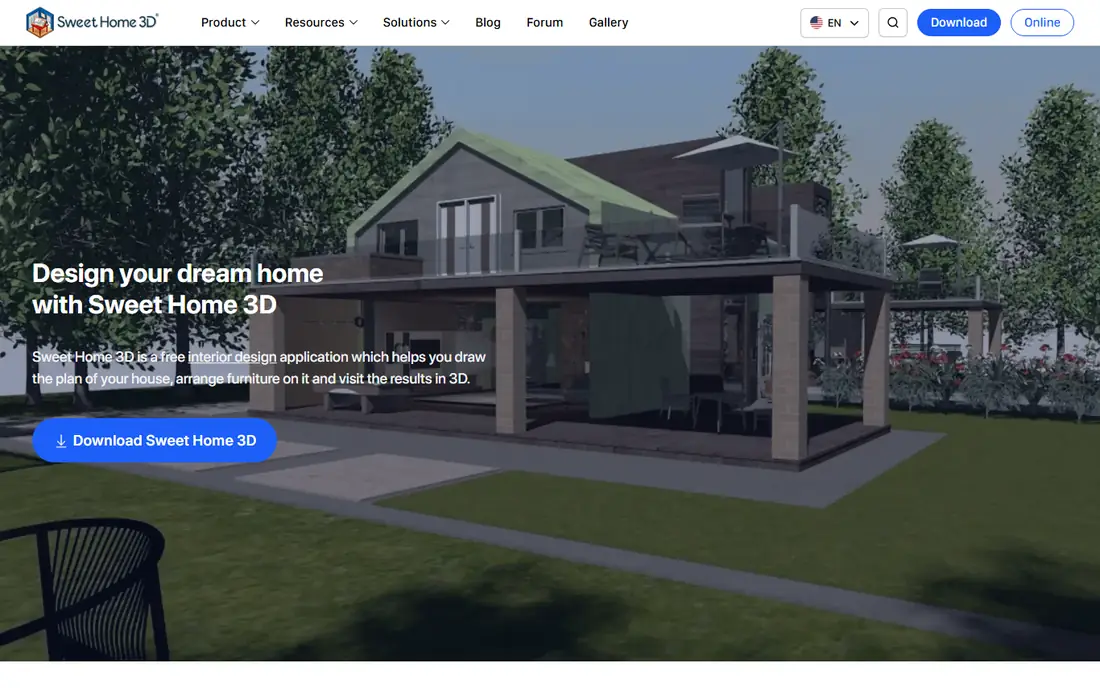
Sweet Home 3D suits homeowners who want a quick floor plan without learning CAD, offering drag-and-drop furniture, wall drawing, and a 3D preview at no cost. Its open source licence means no trial countdown, no watermark, and no forced upgrade for core room planning.
It is less precise than parametric CAD and its furniture library is smaller than commercial interior tools, so detailed construction drawings need another tool. For quick room planning and furniture layouts, Sweet Home 3D is the best pick.
What we like- Free and open source room planner
- Drag-and-drop furniture with a 3D preview
- Suits non-technical homeowners who want a quick floor plan
Watch out for- Less precise than parametric CAD
- Furniture library smaller than commercial interior tools
- Rendering quality trails paid interior design software

#3FreeCAD
Best for: Parametric 3D modeling4.1/5 on
G2 (62 reviews, checked Oct 2026)
Visit freecad.org
Starting priceFree
Free planYes
FreeCAD is proof that professional-grade parametric CAD does not have to cost anything, offering feature-based modeling, assemblies, technical drawing workbenches, and Python scripting, all free and open source. Hobbyists design real 3D-printable parts in it, and small firms use it for work that once required a five-figure licence.
The cost is polish: the interface mixes workbenches with inconsistent design, the learning curve is genuinely steep, and you will lean on community forums and video tutorials. Development moves steadily but not quickly. If your budget is zero and your patience is not, FreeCAD rewards the investment with skills that transfer to any parametric CAD system, and for home design it suits precise custom furniture and built-ins.
What we like- Real parametric modeling free forever
- Python scripting for automation
- Active open source community and workbenches for many disciplines
- Free for commercial work with no strings
Watch out for- Interface mixes workbenches with inconsistent design
- Learning curve is genuinely steep
- Documentation quality varies by workbench
Starting priceFree
Free planYes
LibreCAD does one thing: free 2D drafting. It is the open source answer for floor plans, schematics, and any other work that lives in two dimensions, running on Windows, Mac, and Linux, opening DXF files from other CAD tools, and asking for nothing in return: no account, no trial countdown, no watermark.
Expectations should match the price: the interface is functional rather than beautiful, there is no 3D modeling whatsoever, and the small volunteer team ships updates slowly. For students learning drafting fundamentals and homeowners needing clean 2D floor plans for free, it is entirely sufficient, and it also serves as a free DWG reader on every machine.
What we like- Completely free with no account or trial games
- Lightweight 2D CAD that runs on modest hardware
- Reads and writes DXF
- Runs on Windows, Mac, and Linux
Watch out for- 2D only, no 3D at all
- Interface looks dated
- Small volunteer team ships updates slowly
#5Tinkercad
Best for: Beginner 3D modeling4.5/5 on
G2 (120 reviews, checked Oct 2026)
Visit tinkercad.com
Starting priceFree
Free planYes
Tinkercad suits students and school projects, offering very easy browser 3D modeling that is fully free, with no install needed. Its drag-and-drop shapes suit simple furniture concepts, room layouts, and first 3D models for children and beginners.
It is too simple for precise architectural work, with no parametric history and limited export and detailing options for construction drawings. For first-time 3D modeling and simple home concepts, Tinkercad is the best pick.
What we like- Very easy browser modeling for students and school projects
- Fully free
- No install needed
- Suits simple 3D shapes and furniture concepts
Watch out for- Too simple for precise architectural work
- No parametric history
- Limited export and detailing options for construction drawings
Starting priceFree
Free planYes
Fusion 360 for personal use suits hobbyists who want professional-grade parametric modeling, assemblies, and drawings for custom furniture and built-ins, and guides call it one of the most capable modellers you can get for nothing. Its parametric history lets you revise dimensions later without rebuilding the full design.
The catch is plain: free personal use carries a document limit and export cuts in guides, and it is free until you earn money with it, so commercial work needs a paid licence. For capable hobbyist modeling with professional depth, Fusion 360 Personal Use is the best pick, provided you accept its limits.
What we like- Most capable modeller you can get for nothing as a hobbyist in guides
- Professional-grade parametric modeling, assemblies, and drawings
- Strong for custom furniture and built-ins
Watch out for- Free personal use carries one big string: a document limit and export cuts in guides
- Free until you earn money with it, so commercial work needs a paid licence
- Learning curve steeper than SketchUp
Starting priceFree
Free planYes
Onshape Free suits hobbyists who want full browser CAD with no install, offering professional parametric modeling and assemblies that run entirely in the browser. Guides call it one of the most capable modellers you can get for nothing, alongside Fusion 360 for personal use.
The catch is plain: free documents are public in guides, so private projects need a paid plan, and the browser-only workflow needs reliable internet. For browser CAD with professional depth and no install, Onshape Free is the best pick, provided you accept public documents.
What we like- Most capable modeller you can get for nothing as a hobbyist in guides, alongside Fusion
- Full browser CAD with no install
- Professional parametric modeling and assemblies
Watch out for- Free plan carries one big string: public documents in guides, so private projects need a paid plan
- Browser-only workflow needs reliable internet
- Learning curve steeper than SketchUp
Starting priceFree
Free planYes
Planner 5D suits homeowners who want easy interior design, offering 2D and 3D views, a large furniture catalog, and browser and mobile apps for planning on the go. Its visual approach suits decorating and layout decisions better than technical drafting.
The free tier limits features and catalog access in guides, and advanced rendering and the full catalog need a paid plan, while precision trails CAD tools for construction drawings. For visual interior design and decorating plans, Planner 5D is the best pick.
What we like- Easy interior design with 2D and 3D views
- Large furniture catalog
- Browser and mobile apps for planning on the go
Watch out for- Free tier limits features and catalog access in guides
- Advanced rendering and full catalog need a paid plan
- Less precise than CAD for construction drawings
How we chose
We started from what free home design CAD must do well: model rooms and furniture accurately enough to plan a renovation, export or print a usable plan, and stay free for the intended use. We compared vendor pages and current 2026 guides, and we favored tools with clear licence terms, real home design use, and honest limits. We left out tools that lock core export behind a paywall without saying so, tools with no verifiable free tier, and tools whose home design use could not be traced. Prices here come from 2026 guides and vendor pages, and they vary by plan and billing period, so confirm the licence before you commit. No hands-on testing is claimed. For professional paid work, free tools cover learning and light use, while client projects usually justify a paid plan.
How to pick free CAD software for home design
Start with your deliverable, not the tool list. A decorating plan, a floor plan for a contractor, and a custom furniture design each need a different tool, and the wrong pick wastes a weekend of learning.
Match the tool to the job
For decorating and room layouts, pick Sweet Home 3D or Planner 5D. For 3D concept modeling and renovation ideas, pick SketchUp Free. For precise 2D floor plans, pick LibreCAD. For custom furniture and parametric parts, pick FreeCAD, Fusion 360 Personal Use, or Onshape Free. For first-time 3D modeling, pick Tinkercad.
Check the licence before you commit
Genuinely free and open source tools such as FreeCAD, LibreCAD, and Sweet Home 3D carry no strings, including for commercial work. Fusion 360 Personal Use is free until you earn money with it, with a document limit and export cuts, while Onshape Free makes documents public. If privacy or commercial use matters, start on an open source tool rather than rebuilding later.
Plan for the contractor handoff
Contractors need dimensioned drawings, not just 3D views, so check that your tool exports DXF, DWG, SVG, or PDF at a usable scale. LibreCAD speaks DXF natively, FreeCAD offers technical drawing workbenches, and SketchUp Free covers concept modeling rather than construction documentation. If your project needs permits or contractor pricing, budget for a paid plan or a professional drafter.
Frequently asked questions
What is the best free CAD software for home design?
SketchUp Free for home concept modeling, Sweet Home 3D for room planning, FreeCAD for precise parametric modeling with no strings, and LibreCAD for free 2D floor plans.
Is SketchUp Free really free?
Yes, the free web version teaches the basics at no cost and covers 3D concept modeling. Go at $129 a year adds professional features, and Pro at $399 a year covers real project work in guides.
Is FreeCAD really free for commercial work?
Yes. FreeCAD is open source with no strings, including for commercial work, and it is a much better answer since the 1.0 and 1.1 releases than it was two years ago, though its learning curve is steep.
What is the catch with Fusion 360 and Onshape free plans?
Fusion 360 Personal Use carries a document limit and export cuts and is free until you earn money with it, while Onshape Free makes documents public. Both are capable hobbyist modellers, but check the licence before building private or commercial work on them.
Can free CAD tools replace paid architecture software?
For learning and light use, yes. For professional paid work, free tools cover concept and light drafting, while client projects usually justify a paid plan such as SketchUp Pro, Chief Architect, or Revit, depending on deliverables.
Sources we checked (8)
- https://www.sketchup.com
- https://www.sweethome3d.com
- https://www.freecad.org
- https://librecad.org
- https://www.tinkercad.com
- https://www.autodesk.com
- https://www.onshape.com
- https://planner5d.com
Is your product missing or out of date?
We review this list regularly. Vendors can request a listing, send updated pricing or ask about featured placement.

Shihab Mia · Founder, Rankite
Shihab has 5+ years in B2B and SaaS SEO. He writes Rankite's software buying guides from pricing pages, documentation and public user reviews. More about Shihab.
 Sweet Home 3D
 LibreCAD
 Fusion 360 Personal Use
 Onshape Free
 Planner 5D