How we make this list: we compare pricing pages, product documentation and public user reviews. Ratings come from G2, Capterra or Trustpilot, with the date we checked them.
Key takeaways
- Notion AI is the best all-round pick for notes, docs, and team knowledge, because AI sits inside a workspace you already use for planning.
- Motion and Reclaim suit people whose calendars need constant reshuffling, with automatic scheduling for tasks and focus time.
- Grammarly helps writers and professionals who need clear, correct drafts quickly, across email, docs, and browsers.
- Otter.ai and Fireflies.ai save the most time for meeting-heavy teams, by turning conversations into searchable notes and action items.
- ChatGPT is the most flexible general assistant, but it works best when paired with a specific tool for notes, tasks, or meetings.
Quick comparison
| Tool | Best for | Starting price | Free plan |
|---|
 Notion AI Notion AI | Notes, docs, and team knowledge with AI | See website | Yes |
 ChatGPT ChatGPT | General AI help for writing and research | $20 per user/month (Plus) | Yes |
 Grammarly Grammarly | Writing clarity and correctness | See website | Yes |
 Motion Motion | Automatic calendar and task scheduling | See website | Free trial |
 Reclaim.ai Reclaim.ai | Smart calendar blocking and habits | See website | Yes |
 Todoist Todoist | Simple task lists with AI help | See website | Yes |
 Otter.ai Otter.ai | Meeting transcription and notes | See website | Yes |
 Fireflies.ai Fireflies.ai | Meeting notes for teams | See website | Yes |
 ClickUp ClickUp | All-in-one tasks, docs, and goals | See website | Yes |
Is your product missing or out of date?
We review this list regularly. Vendors can request a listing, send updated pricing or ask about featured placement.
Starting priceSee website
Free planYes
Notion AI works best when your notes are already in Notion, or when you are willing to move them there. Ask it to summarize a long meeting note, draft a project brief from bullet points, or find an answer buried in a team wiki, and it works from your actual content, not just a blank prompt. That context is what makes it more useful than a standalone chatbot for daily work.
The catch is setup and cost. A messy workspace gives messy AI answers, and AI access sits on paid plans, so the free tier alone will not cover it. Notion AI fits best for individuals and teams who already plan in Notion, or who want one place for notes, tasks, and docs with AI help built in.
What we like- AI writing, summaries, and search inside notes and docs
- Flexible databases for tasks, projects, and wikis
- Good for both personal use and teams
Watch out for- AI features require a paid add-on or plan
- Large workspaces can take time to set up well
#2ChatGPT
Best for: General AI help for writing and research4.6/5 on
G2 (3,089 reviews, checked Oct 2026)
Visit chatgpt.com
Starting price$20 per user/month (Plus)
Free planYes
ChatGPT is the most general tool on this list, which is both its strength and its limit. It can draft an email, outline a report, explain a concept, or help debug code in the same session. For a professional who faces many different small tasks each day, that flexibility saves the time of learning a separate tool for each one.
It does not, on its own, manage your tasks, calendar, or notes. You still need to move good output into the system where work lives. ChatGPT fits best as a general assistant alongside a notes or task tool, rather than as a replacement for one.
What we like- Flexible for writing, brainstorming, coding help, and research
- Large model options and integrations on paid plans
- Fast for first drafts and outlines
Watch out for- Answers need checking, especially for facts and figures
- No built-in task, calendar, or meeting system
#3Grammarly
Best for: Writing clarity and correctness4.7/5 on
G2 (14,073 reviews, checked Oct 2026)
Visit grammarly.com
Starting priceSee website
Free planYes
Grammarly helps where work actually happens: in an email draft, a doc, or a browser form. It flags grammar and clarity problems, suggests rewrites, and can adjust tone for a formal or friendly message. That real-time help is different from generating a draft in a separate app and pasting it back.
Grammarly will not plan your week or run your meetings, and its suggestions should be reviewed, not accepted blindly. Grammarly fits best for professionals who write a lot, want cleaner drafts faster, and prefer help inside the apps they already use.
What we like- Works across email, docs, and browsers
- Catches grammar, tone, and clarity issues in real writing
- Useful for non-native English writers and busy professionals
Watch out for- AI writing suggestions need human review for tone and accuracy
- Full features require a paid plan
#4Motion
Best for: Automatic calendar and task scheduling4.1/5 on
G2 (157 reviews, checked Oct 2026)
Visit usemotion.com
Starting priceSee website
Free planFree trial
Motion is built for people whose plans fall apart by mid-morning. Add tasks with deadlines and priorities, and Motion places them on your calendar around existing meetings. When a meeting moves or a task runs long, the schedule reshuffles automatically, instead of leaving you to rebuild the day by hand.
That value depends on commitment. If tasks live in another app and never enter Motion, the calendar will not reflect real work. Motion fits best for managers, founders, and professionals with packed calendars who want tasks and time blocking in one system.
What we like- Automatically schedules tasks around meetings
- Reshuffles the plan when priorities change
- Combines calendar, tasks, and project views
Watch out for- Paid only after the trial, with no free tier
- Works best when you commit to planning inside Motion
#5Reclaim.ai
Best for: Smart calendar blocking and habits4.8/5 on
G2 (144 reviews, checked Oct 2026)
Visit reclaim.ai
Starting priceSee website
Free planYes
Reclaim.ai takes a different angle from Motion: it protects time you already intend to use. Set habits such as lunch, exercise, or focus blocks, add tasks with deadlines, and Reclaim finds and defends slots on your calendar. When a meeting conflicts, it moves the block instead of deleting it.
Reclaim is strongest for Google Calendar users, so Outlook-heavy teams should check compatibility first. Reclaim fits best for professionals who know what they should be doing, but whose calendars get filled by other people's meetings without protection.
What we like- Automatically blocks focus time, habits, and tasks
- Works with Google Calendar
- Good for protecting time for deep work
Watch out for- Google Calendar focus, with less depth for Outlook users
- Advanced features require a paid plan
#6Todoist
Best for: Simple task lists with AI help4.5/5 on
G2 (832 reviews, checked Oct 2026)
Visit todoist.com
Starting priceSee website
Free planYes
Todoist is the simplest tool here, and that is the point. Capture a task in seconds, set a date in plain language, and check it off. For many people, a clear list beats a complex system they never open. AI features on paid plans help with task breakdown and prioritization, without changing the core simplicity.
Todoist will not auto-schedule your whole calendar like Motion, and it is not a full project platform like ClickUp. Todoist fits best for individuals and small teams who want a fast, reliable task list with light AI help, and who do not need heavy project management.
What we like- Fast, simple task capture on any device
- Natural language dates and recurring tasks
- AI features help break down and prioritize tasks on paid plans
Watch out for- Less project and calendar depth than Motion or ClickUp
- AI features are an add-on to a simple list, not a full planner
#7Otter.ai
Best for: Meeting transcription and notes4.4/5 on
G2 (505 reviews, checked Oct 2026)
Visit otter.ai
Starting priceSee website
Free planYes
Otter.ai saves time after meetings, not during them. Instead of writing notes while trying to listen, you get a transcript, a summary, and searchable text you can check later. That is valuable for interviews, classes, and meetings where exact wording matters.
Audio quality matters a lot. A quiet room and a good microphone give far better results than a noisy call with overlapping speech. Otter.ai fits best for individuals and teams who attend many meetings and need reliable, searchable notes without manual typing.
What we like- Live transcription and searchable meeting notes
- Speaker identification and summaries
- Useful for interviews, lectures, and team meetings
Watch out for- Accuracy drops with poor audio, accents, or crosstalk
- Free plan limits transcription minutes
#8Fireflies.ai
Best for: Meeting notes for teams4.7/5 on
G2 (754 reviews, checked Oct 2026)
Visit fireflies.ai
Starting priceSee website
Free planYes
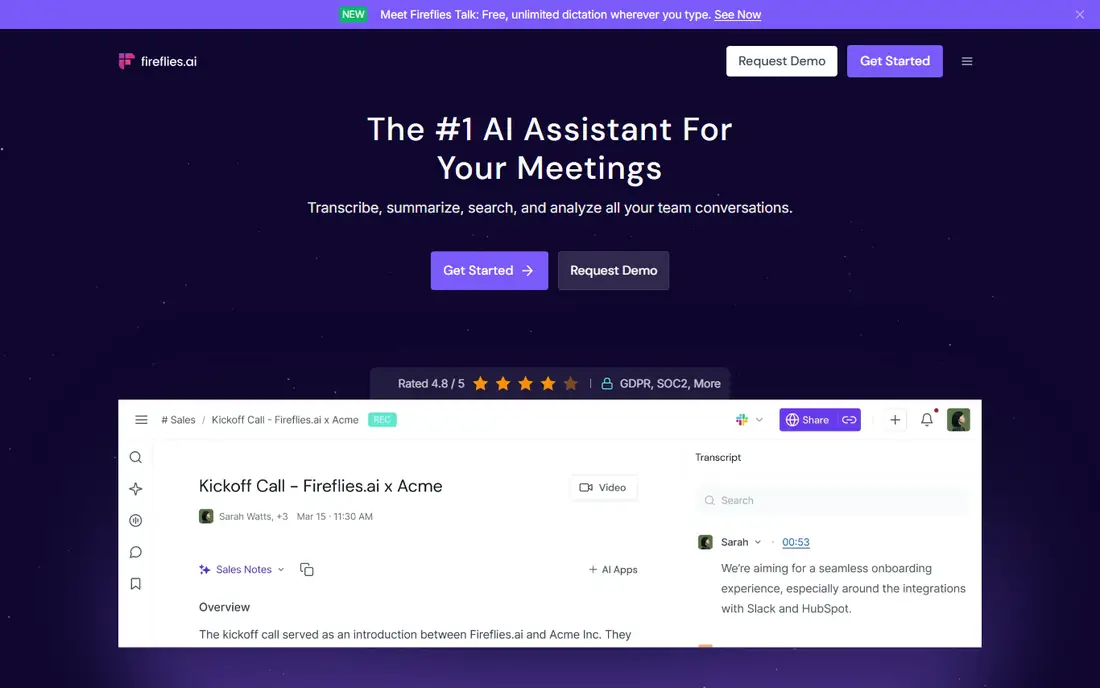
Fireflies.ai is built for team meetings, especially sales and project calls. It can join a call, transcribe it, and produce a summary with action items that go into a CRM or task tool. That removes the usual gap where a good meeting produces no written follow-up.
The bot-joining model needs a clear policy, since not every client or team welcomes an automated note-taker on a call. Fireflies.ai fits best for sales, customer success, and project teams who run many video calls and need consistent, shareable notes.
What we like- Joins video calls and records notes automatically
- Summaries, action items, and searchable transcripts
- Integrates with CRMs and team tools
Watch out for- Some participants may be uncomfortable with a bot joining calls
- Accuracy depends on audio quality, like all transcription tools
#9ClickUp
Best for: All-in-one tasks, docs, and goals4.6/5 on
G2 (14,878 reviews, checked Oct 2026)
Visit clickup.com
Starting priceSee website
Free planYes
ClickUp tries to replace several tools at once: task lists, docs, goals, and dashboards. AI features help draft docs, summarize tasks, and create work from a prompt, inside the same workspace where the work is tracked. For a team that wants one system, that consolidation can reduce tool switching.
For an individual who only needs a task list, ClickUp is more than necessary, and the setup time is real. ClickUp fits best for teams that want an all-in-one work platform with AI help, and that have the time to set up views, permissions, and workflows properly.
What we like- Tasks, docs, goals, and time tracking in one platform
- AI features for writing, summaries, and task creation
- Flexible views for different teams
Watch out for- Breadth can feel overwhelming for a small team
- Setup and permissions take time to get right
How we chose
We checked vendor pricing pages, product documentation, and public reviews on G2, Capterra, and Reddit, and compared each tool on the specific job it does, such as writing, notes, scheduling, transcription, or task management. Tools were kept only if they offer AI features today, are available to US users, and have a clear use case that is not duplicated by a general chatbot alone. Where pricing varied by plan or was not published clearly, we marked it as See website instead of guessing.
We also weighed how much manual work each tool actually removes. A tool that generates a draft you must heavily rewrite scored lower than a tool that quietly saves time every day, such as automatic calendar blocking or searchable meeting notes.
Start with the bottleneck, not the tool category. Use the checks below to avoid buying a second system that you also have to maintain.
Name the time leak first
Track one week and note where time goes: writing, meetings, scheduling, or searching for notes. Pick a tool that attacks the largest leak. If meetings dominate, start with Otter.ai or Fireflies.ai. If scheduling dominates, start with Motion or Reclaim.ai.
Keep the number of systems low
Every new tool needs input to be useful. A notes AI needs your notes, a scheduler needs your tasks, and a transcription tool needs your calls. Choose a tool that fits a system you already use, or commit to moving work into one new system, rather than adding a tool on top of three others.
Test with real work, not demo data
Use the free plan or trial on a real week of emails, meetings, or tasks. Check whether AI drafts need heavy editing, whether summaries miss key decisions, and whether calendar blocks survive a busy day. A tool that works in a demo but fails on your real workload is not a productivity gain.
Check privacy and sharing rules
AI tools that read your notes, emails, or meetings need clear data rules, especially for client or health-related work. Check retention, sharing, and admin controls before rolling a tool out to a team, and tell participants when a meeting is being transcribed.
Frequently asked questions
What is the best AI productivity tool overall?
There is no single winner, because productivity leaks differ. Notion AI is the best all-round pick for notes and docs, Motion is best for calendar scheduling, and Otter.ai is best for meeting notes. Start with your largest time leak, then pick the tool built for that job.
Is ChatGPT enough for productivity?
ChatGPT helps with writing, brainstorming, and research, but it does not manage tasks, calendars, or meetings on its own. It works best alongside a specific tool for notes, tasks, or transcription, where its output can be stored and acted on.
Are AI productivity tools safe for work meetings?
That depends on the tool, your employer policy, and participant consent. Transcription tools record and store conversations, so check data retention and sharing settings, and tell participants when a meeting is recorded. For sensitive work, use a tool with admin controls and a clear privacy policy.
Do I need a paid plan for AI productivity tools?
Not always. Many tools offer free tiers for basic use, including Notion, Todoist, Otter.ai, and Fireflies.ai. Paid plans usually add more AI credits, longer transcription, advanced scheduling, or team features. Start free, measure time saved, and upgrade only when a limit blocks real work.
Can AI tools replace a human assistant?
No, for most work. AI tools handle drafting, transcription, scheduling, and summaries well, but they do not exercise judgment, manage relationships, or handle exceptions the way a person does. Use AI to remove routine work, and keep human review for decisions, client communication, and sensitive topics.
How do I avoid spending more time managing an AI tool?
Keep the system simple, use one tool per job, and set a weekly review to clear tasks, notes, and calendar blocks. If a tool requires daily manual cleanup to stay useful, it is adding work, not removing it, and a simpler tool may fit better.
Sources we checked (9)
- https://www.notion.com/pricing
- https://chatgpt.com/pricing
- https://www.grammarly.com/pricing
- https://www.usemotion.com/pricing
- https://reclaim.ai/pricing
- https://todoist.com/pricing
- https://otter.ai/pricing
- https://fireflies.ai/pricing
- https://clickup.com/pricing
Is your product missing or out of date?
We review this list regularly. Vendors can request a listing, send updated pricing or ask about featured placement.

Shihab Mia · Founder, Rankite
Shihab has 5+ years in B2B and SaaS SEO. He writes Rankite's software buying guides from pricing pages, documentation and public user reviews. More about Shihab.