How we make this list: we compare pricing pages, product documentation and public user reviews. Ratings come from G2, Capterra or Trustpilot, with the date we checked them.
Direct answer
GitHub Actions is the top pick for teams already on GitHub because workflows sit in the repository and standard Linux runners cost $0.006 per minute after included compute. CircleCI suits teams that need more parallel jobs and credit based control. Jenkins fits teams that want a free self hosted server.
Key takeaways
- GitHub teams should start with GitHub Actions, with $12 of included compute per month on Free.
- Teams that queue builds should check CircleCI, where Free includes 30,000 credits and 30 concurrent Docker jobs.
- Self hosting teams should check Jenkins, which is free open source software on your own machines.
- Azure teams should check Azure Pipelines, with 1 free hosted job at 1,800 minutes per month.
- Google Cloud teams should check Cloud Build, with 2,500 free build minutes per month.
Quick comparison
| Tool | Best for | Starting price | Free plan |
|---|
 GitHub Actions | Teams already hosting code on GitHub | $0.006 USD per minute, Linux 2-core x64 standard runner | $12 USD included compute per month on GitHub Free; standard runners free in public repositories |
 CircleCI | Teams that need high parallel concurrency | Performance starting at $15, with $15 for every 25,000 additional credits | Free plan $0 per month with 30,000 free credits per month and up to 5 active users |
 Jenkins | Teams that want full self hosting control | Free open source software, self hosting costs apply | Free open source software, self hosting costs apply |
 Buildkite | Teams with large self hosted agent fleets | $30 per active user per month on Pro | Free Plan $0 with up to 5 users, up to 10 concurrent jobs and up to 2,000 Linux vCPU minutes per month |
 Bitbucket Pipelines | Teams already using Bitbucket and Jira | $3 per user per month on Standard, flat rate $15 per month for 1 to 5 users | Free $0 for up to 5 users with 50 build minutes per month |
 Azure Pipelines | Teams in Microsoft and Azure shops | $40 per extra Microsoft-hosted parallel job per month with unlimited minutes | 1 free Microsoft-hosted job with 1,800 minutes per month and 1 free self-hosted job with unlimited minutes |
 AWS CodeBuild | Teams building inside AWS accounts | $0.005 per build minute for build.general1.small in the vendor pricing example | 100 free build minutes in the vendor EC2 example and 6,000 free build seconds in the Lambda example |
 Google Cloud Build | Teams building inside Google Cloud | $0.003 per minute for e2-medium | 2,500 free build-minutes per month per billing account for e2-standard-2 in the default pool |
 TeamCity | Teams that want JetBrains build tooling | $15.00 per committer per month on TeamCity Cloud | Professional Server License Free with 100 build configurations and 3 build agents included |
 Semaphore | Teams that want simple per minute billing | $0.003 per minute for Ubuntu ARM 2 vCPU | $15 free credits per month, about 2,000 Ubuntu x64 2 vCPU minutes |
Is your product missing or out of date?
We review this list regularly. Vendors can request a listing, send updated pricing or ask about featured placement.
The best alternatives to gitlab ci
Teams leave GitLab CI for different reasons. Some move code to GitHub or Bitbucket. Some need more parallel jobs. Some want builds inside AWS, Azure, or Google Cloud. Some want a server they run themselves. This list ranks hosted services, cloud build services, and self hosted servers by price clarity, free limits, runner choices, and setup work. Prices come from vendor pages checked on 2026-11-28. Each entry names who should pick the tool and who should skip it in practice.
Starting price$0.006 USD per minute, Linux 2-core x64 standard runner
Free plan$12 USD included compute per month on GitHub Free; standard runners free in public repositories
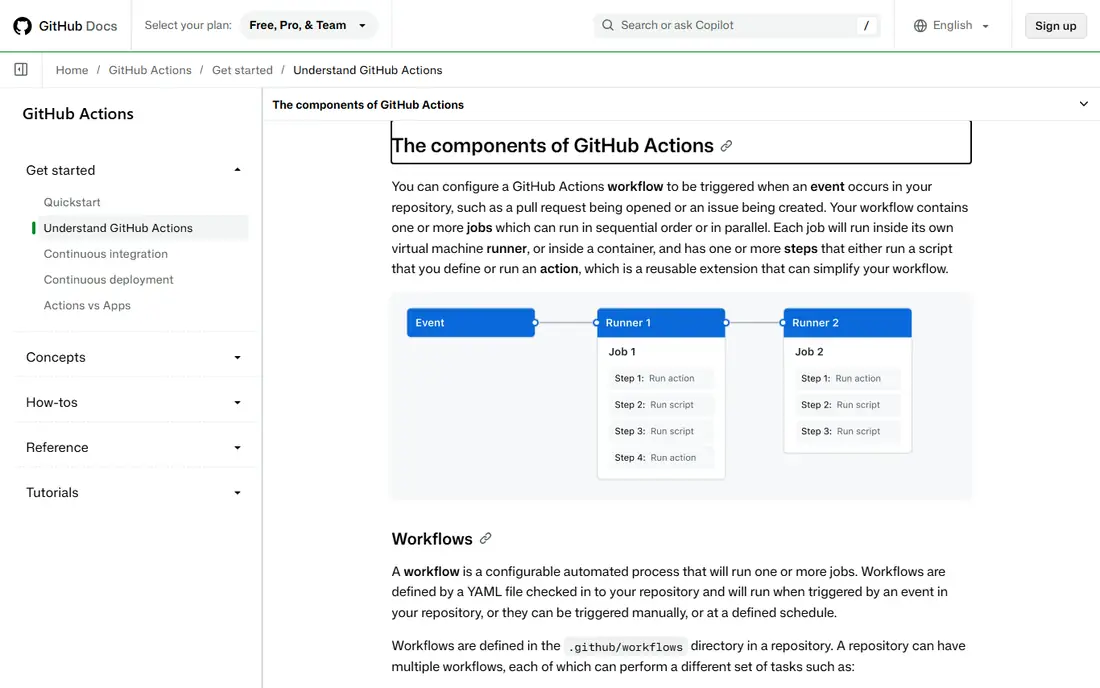
GitHub Actions is a CI and CD platform inside GitHub. Workflows are YAML files in the repository. A workflow contains jobs, and each job runs on a runner with steps that run scripts or reusable actions. GitHub provides Linux, Windows, and macOS virtual machines, and teams can add self hosted runners in their own cloud or data center. That suits teams that already review code in GitHub pull requests. Matrix jobs can run the same job across operating systems or language versions. Included compute is a dollar amount, with $12 per month on Free and $300 on Enterprise Cloud.
The catch is that the cheapest minute is not the whole bill. Windows costs $0.010 per minute and macOS costs $0.062 per minute, so Apple builds spend the included amount fast. Storage has separate allowances and rates. Pick GitHub Actions if your code and reviews already live on GitHub. Look elsewhere if your code stays on GitLab or Bitbucket for now.
What we like- Workflows live in the repository
- Linux, Windows and macOS runners provided
- Self-hosted runners have no GitHub minute charge
Watch out for- MacOS costs $0.062 per minute
- Larger runners need Team or Enterprise Cloud
Starting pricePerformance starting at $15, with $15 for every 25,000 additional credits
Free planFree plan $0 per month with 30,000 free credits per month and up to 5 active users
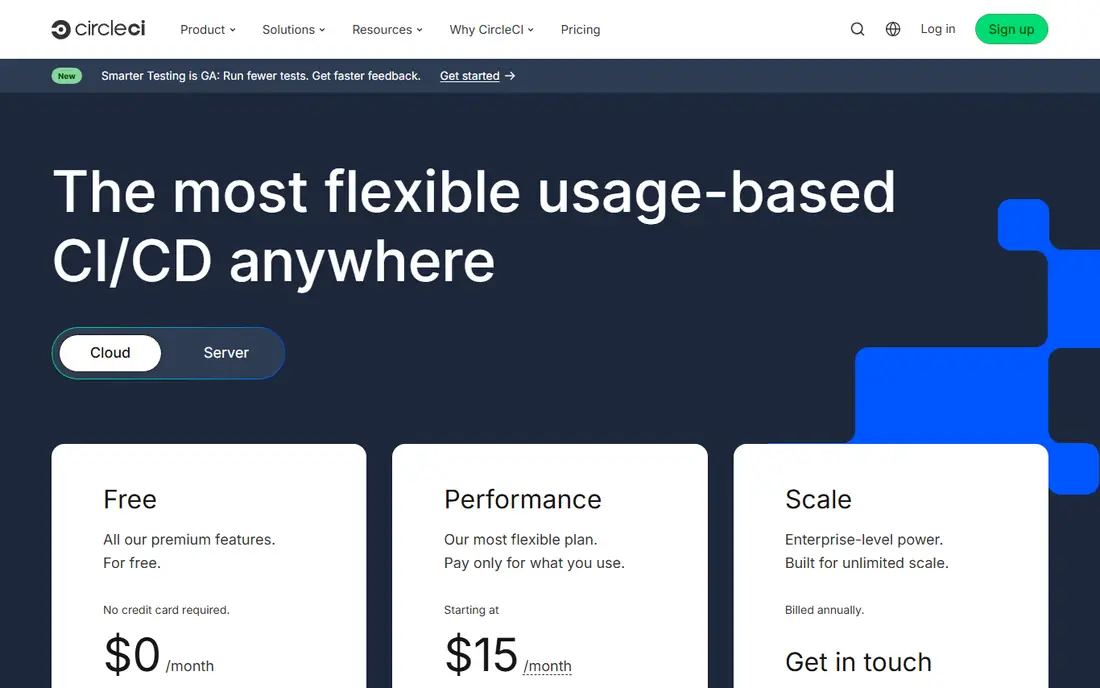
CircleCI is a hosted CI and CD service that runs jobs in Docker, Linux VM, Arm VM, Windows VM, and macOS VM environments. It also supports self hosted runners. The Free plan lists $0 per month, up to 5 active users, 30,000 free credits per month, and 30x concurrency. Performance starts at $15 and raises Docker concurrency to 80. Scale is billed annually through sales and adds enterprise controls. CircleCI fits teams that split tests across many parallel jobs and want one credit balance for compute, users, and add ons.
The catch is that credits hide the final minute price until you map resource classes to your jobs. CircleCI gives one example where 30,000 credits at 10 credits per minute equals 3,000 minutes on Linux Medium. Extra users and storage also spend credits. Pick CircleCI if parallel speed matters most. Look elsewhere if you want minute pricing with no credit conversion.
What we like- 30 concurrent Docker jobs on Free
- Docker, Linux, Arm, Windows and macOS options
- Credits pay for users, compute and add ons
Watch out for- Credit math takes work to forecast
- SSO and config policies sit on Scale
Starting priceFree open source software, self hosting costs apply
Free planFree open source software, self hosting costs apply
Jenkins is an open source automation server for building, deploying, and automating projects. The project site describes it as a self contained Java program with packages for Windows, Linux, macOS, and other Unix like systems. It can work as a simple CI server or as a delivery hub for many projects. Work can spread across multiple machines, which helps teams with special build hardware or private networks. Jenkins fits teams that need control over where builds run and what tools sit on the agents in each build environment they manage.
The catch is that free software still needs paid people and machines. Your team owns installation, backups, plugin updates, security fixes, agent capacity, and uptime. A small team can spend more time on Jenkins care than on product work each month. Pick Jenkins if you have platform staff. Look elsewhere if you want hosted runners and managed updates from a vendor.
What we like- No license fee for the server
- More than 2,300 community plugins listed
- Runs on Windows, Linux and macOS
Watch out for- Your team patches and secures the server
- Plugin choices can create upgrade work
Starting price$30 per active user per month on Pro
Free planFree Plan $0 with up to 5 users, up to 10 concurrent jobs and up to 2,000 Linux vCPU minutes per month
Buildkite is a CI platform with a hosted control plane and agents that can run on your infrastructure or on Buildkite hosted compute. The Free Plan lists $0, up to 5 users, up to 10 concurrent jobs, and up to 2,000 Linux vCPU minutes per month. Pro costs $30 per active user per month, covers up to 50 users, and includes 4,000 Linux AMD64 vCPU minutes per month. Pro plan details list up to 250 concurrent agents with 10 included. Buildkite fits larger teams that need many agents across networks or private build machines.
The catch is that the seat fee arrives before compute savings show up. A team with many active users pays $30 per active user per month on Pro, then pays for hosted compute or runs its own agents. Enterprise terms are custom. Pick Buildkite if agent scale is your main problem. Look elsewhere if your team is small and runs few jobs.
What we like- Agents can run on your infrastructure
- Pro lists up to 250 concurrent agents
- Hosted agents meter per vCPU minute
Watch out for- Pro adds a per active user fee
- Enterprise pricing is custom
Starting price$3 per user per month on Standard, flat rate $15 per month for 1 to 5 users
Free planFree $0 for up to 5 users with 50 build minutes per month
Bitbucket Pipelines is the CI and CD service inside Bitbucket Cloud. Atlassian lists Free at $0 for up to 5 users with 50 build minutes per month and 1 GB of large file storage. Standard lists 2,500 build minutes per month and 5 GB of large file storage. Premium lists 3,500 build minutes per month and 10 GB of large file storage. Additional build minutes cost $10 per 1,000 minutes per month. Bitbucket fits teams that already keep code in Bitbucket and track work in Jira every day of the week.
The catch is that the free minute pool is small for active teams. Fifty minutes can vanish in a few test runs, and paid tiers still pool minutes across the workspace. Premium adds controls such as IP allowlisting. Pick Bitbucket Pipelines if Bitbucket is already your code home today. Look elsewhere if your repositories live on GitHub or GitLab instead. Small teams should compare included minutes with actual monthly build volume before upgrading.
What we like- CI sits inside Bitbucket Cloud
- Standard includes 2,500 build minutes
- Extra minutes cost $10 per 1,000
Watch out for- Free plan includes only 50 build minutes
- Premium controls sit on the higher tier
Starting price$40 per extra Microsoft-hosted parallel job per month with unlimited minutes
Free plan1 free Microsoft-hosted job with 1,800 minutes per month and 1 free self-hosted job with unlimited minutes
Azure Pipelines is the CI and CD service in Azure DevOps. Microsoft lists 1 free Microsoft hosted job with 1,800 minutes per month and 1 free self hosted job with unlimited minutes. Extra Microsoft hosted parallel jobs cost $40 per month with unlimited minutes. Extra self hosted parallel jobs cost $15 per month with unlimited minutes. Azure Pipelines fits teams that build .NET, Windows, or Azure workloads and want release gates and deployment reporting in the same suite as Boards and Repos. YAML and classic pipelines are both supported today.
The catch is that Azure sells concurrency lanes, not a simple pool of minutes. Microsoft notes that buying the first Microsoft hosted pipeline removes the time limit on the free pipeline, and running two jobs at once takes two paid pipelines. Pick Azure Pipelines if you need steady parallel lanes. Look elsewhere if per minute billing fits spiky volume better.
What we like- Parallel job pricing is easy to model
- Self hosted jobs cost $15 per extra job
- Builds target Linux, macOS and Windows
Watch out for- One free hosted job can queue work
- Extra concurrency needs extra paid jobs
Starting price$0.005 per build minute for build.general1.small in the vendor pricing example
Free plan100 free build minutes in the vendor EC2 example and 6,000 free build seconds in the Lambda example
AWS CodeBuild is a fully managed build service that compiles source code, runs tests, and produces artifacts. AWS says teams do not need to provision, manage, or scale build servers. Prepackaged environments cover Java, Python, Node.js, Ruby, Go, Android, .NET Core for Linux, and Docker. Build duration on EC2 compute is rounded up to the nearest minute. The vendor pricing example uses build.general1.small at $0.005 per build minute after 100 free minutes. CodeBuild fits teams that deploy to AWS and want builds close to IAM roles and S3 storage in one account.
The catch is that CodeBuild is a build service, not a full replacement for every GitLab CI feature. Teams often pair it with CodePipeline for approvals and release flow. Rates vary by compute type and region. Pick CodeBuild if AWS is your deployment home today. Look elsewhere if you want pull request checks and stages in one hosted product today. Teams should confirm regional pricing before large migration projects begin in production environments.
What we like- No build servers to provision or patch
- Builds run inside AWS account controls
- Pay as you go by build time
Watch out for- Full pipelines may need CodePipeline
- Region and compute type change the rate
Starting price$0.003 per minute for e2-medium
Free plan2,500 free build-minutes per month per billing account for e2-standard-2 in the default pool
Google Cloud Build charges for build minutes consumed, and partial minutes bill at the actual number of seconds used. Each billing account gets 2,500 free build minutes per month for e2-standard-2 in the default pool, with a note that the limit is subject to change. The e2-standard-2 type lists 2 virtual CPUs, 8 GB of memory, and $0.006 per minute. The e2-medium type lists 1 virtual CPU, 4 GB of memory, and $0.003 per minute. Private pools list larger E2 types up to e2-standard-32 at $0.096 per minute for heavy jobs.
The catch is that the free tier is tied to one machine type and can change. Bigger machines, private pools, extra SSD space, and network egress can raise the bill beyond the headline rate. Pick Cloud Build if Google Cloud is your main platform today. Look elsewhere if you need macOS builds or CI inside your code host today instead. Teams should estimate monthly minutes before choosing default machine sizes for pipelines.
What we like- Partial minutes bill by actual seconds
- E2-standard-2 costs $0.006 per minute
- Private pools list larger machines
Watch out for- Free tier is promotional and subject to change
- Network egress uses standard rates
Starting price$15.00 per committer per month on TeamCity Cloud
Free planProfessional Server License Free with 100 build configurations and 3 build agents included
TeamCity is a CI and CD server from JetBrains with on premises and cloud options. JetBrains lists a Professional Server License as Free, with 100 build configurations, full access to product features, and 3 build agents included. A build agent license lists $359.00 and adds 10 build configurations on Professional. Enterprise Server License lists from $2,399.00 with unlimited build configurations. TeamCity Cloud lists from $15.00 per committer per month, with a 3 committer example at $540.00 per year and 24,000 build credits per month for hosted builds and tests each month. Cloud and on premises options cover different runner control needs for teams.
The catch is that the free edition has hard caps. Teams that pass 100 build configurations or need more agents must buy licenses or move to Cloud credits. Cloud pricing uses committers and build credits, so finance teams need to model both. Pick TeamCity if you already use JetBrains tools. Look elsewhere if you want simple per minute hosted pricing.
What we like- Free Professional edition covers small teams
- Cloud adds JetBrains hosted agents
- Enterprise removes configuration limits
Watch out for- Cloud has a 3 committer minimum
- Extra agents add license cost on premises
Starting price$0.003 per minute for Ubuntu ARM 2 vCPU
Free plan$15 free credits per month, about 2,000 Ubuntu x64 2 vCPU minutes
Semaphore is a hosted CI and CD platform that prices compute by machine minute. The pricing page lists Ubuntu ARM at $0.003 per minute for 2 vCPU, $0.006 for 4 vCPU, and $0.012 for 8 vCPU. Ubuntu x64 lists $0.0075 per minute for 2 vCPU and $0.015 for 4 vCPU. macOS lists $0.09 per minute for 4 vCPU, and self hosted agents list $0.0025 per minute on any machine. Each organization gets $15 of free credits per month, about 2,000 Ubuntu x64 2 vCPU minutes for small teams each month. Hosted agents reduce maintenance work for small engineering teams with limited operations time.
The catch is that support sits outside the compute price. Basic support lists $50 per month, Priority Response lists $250 per month, and SLA plans list $500 and $750 per month. Artifact egress and storage also have overage rates. Pick Semaphore if you want minute pricing without a seat fee today. Look elsewhere if you need bundled enterprise support in the base price.
What we like- No seat fee in the compute price list
- 20 concurrent jobs included by default
- Self hosted agents cost $0.0025 per minute
Watch out for- Paid support starts at $50 per month
- MacOS costs $0.09 per minute
How much will 10,000 Linux build minutes cost each month?
A 10,000 minute Linux month shows why billing units matter. On GitHub Actions, 10,000 standard Linux minutes at $0.006 cost $60 before included compute. GitHub Free includes $12, so the same month costs $48 after that allowance if no storage overage applies. On Google Cloud Build, 10,000 e2-standard-2 minutes cost $60 before the free tier. After 2,500 free minutes, 7,500 paid minutes at $0.006 cost $45. On AWS CodeBuild, the vendor example rate of $0.005 gives $50 before free minutes, or $49.50 after 100 free minutes. CircleCI uses credits, so 10,000 Linux Medium minutes at 10 credits per minute need 100,000 credits. After 30,000 free credits, 70,000 credits at $15 per 25,000 cost $42 for compute credits alone. Azure Pipelines works differently. One paid Microsoft hosted job costs $40 per month with unlimited minutes, but that buys one parallel lane. Compare lanes, credits, and minutes with your own queue time and peak demand during busy release weeks.
Which alternative to GitLab CI is best if you want to self host runners?
Jenkins is the clearest pick when you want a free server that you run yourself. Buildkite and TeamCity also fit teams that want self hosted agents. Jenkins has no server license fee, but your team pays for machines, patching, backups, and plugin care. Buildkite Pro costs $30 per active user per month and lets agents run on your infrastructure. TeamCity Professional is free with 3 build agents and 100 build configurations. Choose Jenkins for full control, Buildkite for agent scale, and TeamCity for JetBrains style build management.
Is GitHub Actions cheaper than CircleCI for a small private repository?
GitHub Actions is often cheaper for a small private repository that stays on Linux. A month with 3,000 Linux minutes costs $18 at $0.006 per minute before included compute. GitHub Free includes $12, which leaves $6 before storage charges. CircleCI gives 30,000 free credits per month. At 10 credits per minute on Linux Medium, those credits cover 3,000 minutes before user credits apply. The answer flips when macOS, Windows, or extra users enter the month.
What should teams check before moving pipelines away from GitLab CI?
Teams should check runner location, secrets handling, artifact storage, and deployment approvals before they move. GitLab CI often sits close to merge requests, environments, and protected variables. A replacement may split those jobs across tools. List each GitLab feature you use, then map it to the new platform. Check whether builds need private network access, macOS, Windows, or GPU machines. Price the month with real minutes and real concurrency. Run one service on the new platform first, then move the rest in small batches.
Frequently asked questions
What is the best alternative to GitLab CI for a team on GitHub?
GitHub Actions is the best first check for a team on GitHub. Workflows live in the repository, standard runners cover Linux, Windows, and macOS, and Linux costs $0.006 per minute after included compute. GitHub Free includes $12 of compute per month. Teams with heavy macOS use should price that $0.062 rate first.
Which GitLab CI alternative is free for self hosting?
Jenkins is the free self hosted option in this list. The server is open source software with packages for Windows, Linux, macOS, and Unix like systems. Your costs move to servers, storage, backups, and staff time. TeamCity Professional is also free, but it caps teams at 100 build configurations.
How do CircleCI credits convert to build minutes?
CircleCI credits convert by resource class, so one rate does not fit every job. CircleCI gives an example where 30,000 credits at 10 credits per minute equals 3,000 minutes on Linux Medium. Performance users can buy more credits at $15 for every 25,000 credits. Users and storage can also spend credits.
Is Azure Pipelines priced by minutes or by parallel jobs?
Azure Pipelines is priced mainly by parallel jobs. Microsoft lists 1 free Microsoft hosted job with 1,800 minutes per month. Extra Microsoft hosted jobs cost $40 per month with unlimited minutes. Extra self hosted jobs cost $15 per month with unlimited minutes. Two hosted jobs at once need two paid jobs.
Should AWS or Google Cloud teams use their cloud build service?
AWS teams should check CodeBuild first, and Google Cloud teams should check Cloud Build first. CodeBuild lists a vendor example rate of $0.005 per build minute for build.general1.small. Cloud Build lists e2-standard-2 at $0.006 per minute with 2,500 free minutes per month. Both keep builds close to cloud controls.
What to look for before you buy
First, map where your code lives, because GitHub Actions, Bitbucket Pipelines, and Azure Pipelines save setup time when the code host and CI tool match. Second, count monthly minutes by operating system, since Linux, Windows, and macOS rates differ by large amounts. Third, count parallel jobs at peak time, because cheap minutes do not help if pull requests queue. Fourth, check secrets, private network access, artifact retention, and deployment approvals. Fifth, run one real service for two weeks and compare build time and the actual invoice.
How we chose
This list was built from vendor pricing pages and vendor documentation checked on 2026-11-28. Candidates included hosted CI services, cloud build services, and self hosted servers. Each pick had to be a live product with an official site and price or free terms on a vendor page. No hands on testing claim is made in this guide.
Sources we checked (15)
- https://docs.github.com/en/billing/concepts/product-billing/github-actions?ref=blog.mergify.com
- https://docs.github.com/en/actions/get-started/understand-github-actions#the-components-of-github-actions
- https://circleci.com/pricing/
- https://jenkins.io
- https://www.jenkins.io/download/
- https://buildkite.com/pricing/
- https://bitbucket.org/product/pricing.git
- https://support.atlassian.com/bitbucket-cloud/docs/limitations-of-bitbucket-pipelines/
- https://azure.microsoft.com/en-us/pricing/details/devops/azure-devops-services/
- https://azure.microsoft.com/en-ca/products/devops/pipelines/
- https://aws.amazon.com/codebuild/pricing/
- https://cloud.google.com/container-builder/pricing
- https://www.jetbrains.com/teamcity/buy/?license=ENTERPRISE
- https://www.jetbrains.com/store/teamware/
- https://semaphore.io/pricing
Is your product missing or out of date?
We review this list regularly. Vendors can request a listing, send updated pricing or ask about featured placement.

Shihab Mia · Founder, Rankite
Shihab has 5+ years in B2B and SaaS SEO. He writes Rankite's software buying guides from pricing pages, documentation and public user reviews. More about Shihab.