How we make this list: we compare pricing pages, product documentation and public user reviews. Ratings come from G2, Capterra or Trustpilot, with the date we checked them.
Key takeaways
- Lucidchart is the most direct SmartDraw replacement for business teams, with strong templates, real-time collaboration, and broad integrations.
- draw.io is the best free option, with no account required for basic diagramming and files stored where the user chooses.
- Microsoft Visio suits teams already inside Microsoft 365, especially where data linking and Office integration matter.
- EdrawMax offers the widest template and symbol library for the price, including floor plans, network diagrams, and many specialist types.
- Miro and Creately suit teams that want diagrams inside a wider whiteboard or process workspace, not a standalone diagram editor.
Quick comparison
| Tool | Best for | Starting price | Free plan |
|---|
 Lucidchart Lucidchart | Business diagrams with collaboration | See website | Yes |
 Microsoft Visio Microsoft Visio | Microsoft 365 teams and data-linked diagrams | $5 per user/month | Free trial |
 draw.io draw.io | Free, privacy-first diagramming | $0 | Yes |
 EdrawMax EdrawMax | Widest template library at a low price | $99 per year | Yes |
 Miro Miro | Whiteboard diagrams with team workshops | $8 per user/month | Yes |
 Creately Creately | Process and org diagrams with data links | See website | Yes |
 Gliffy Gliffy | Diagrams inside Confluence | See website | Free trial |
Is your product missing or out of date?
We review this list regularly. Vendors can request a listing, send updated pricing or ask about featured placement.
The best SmartDraw alternatives
Starting priceSee website
Free planYes

Lucidchart is the closest all-round replacement for SmartDraw for a business team. It covers flowcharts, process maps, org charts, network diagrams, and technical diagrams, with templates that help a new user start from a proven structure rather than a blank canvas. Real-time collaboration, comments, and integrations with Google Workspace, Microsoft 365, Confluence, and Slack keep diagrams inside the tools teams already use. Data linking and AI generation help larger teams keep diagrams current when systems and org structures change.
The free plan is useful for trying the editor, but it limits the number of editable documents, so a team that diagrams weekly will need a paid plan. Third-party summaries list paid entry around $7.95 per user per month, with team plans higher. Lucidchart fits a team that values collaboration, templates, and integrations over a one-time license, and that wants diagrams to stay connected to data and documents. Solo users who diagram rarely may find draw.io or EdrawMax better value.
What we like- Large template library
- Real-time collaboration
- Data linking and AI diagram generation
Watch out for- Advanced features and higher document limits need paid plans
- Free plan limits editable documents
#2Microsoft Visio
Best for: Microsoft 365 teams and data-linked diagrams4.2/5 on
G2 (694 reviews, checked Oct 2026)
Visit microsoft.com
Starting price$5 per user/month
Free planFree trial
Visio is the natural SmartDraw alternative for a Microsoft-centered workplace. It creates flowcharts, org charts, floor plans, network diagrams, and engineering drawings, with shape libraries and data linking that can pull values from Excel workbooks, SharePoint lists, and databases into a diagram. Diagrams save in the standard .vsdx format, store in OneDrive or SharePoint, and open inside Teams and other Microsoft apps, which reduces friction for a team that already works in Office. Plan 1 covers Visio for the web, while Plan 2 adds the desktop app.
Pricing and access need careful checking. Third-party summaries list Visio Plan 1 from $5 per user per month, with Plan 2 higher, and trials are available for first-time users with a work or school account. Some Microsoft 365 commercial plans include the Visio web app, while small business plans with a personal Microsoft account do not. Visio fits an organization that needs precise, data-linked diagrams inside Microsoft 365 and is willing to pay per user. A small team outside Microsoft 365 will find Lucidchart or draw.io simpler to adopt.
What we like- Deep Microsoft 365 and SharePoint integration
- Data linking from Excel and databases
- Familiar Office-style interface
Watch out for- Desktop app is Windows focused
- Web version is included in some Microsoft 365 plans but not all
- No permanent free plan
#3draw.io
Best for: Free, privacy-first diagramming4.4/5 on
G2 (450 reviews, checked Oct 2026)
Visit drawio.com
Starting price$0
Free planYes
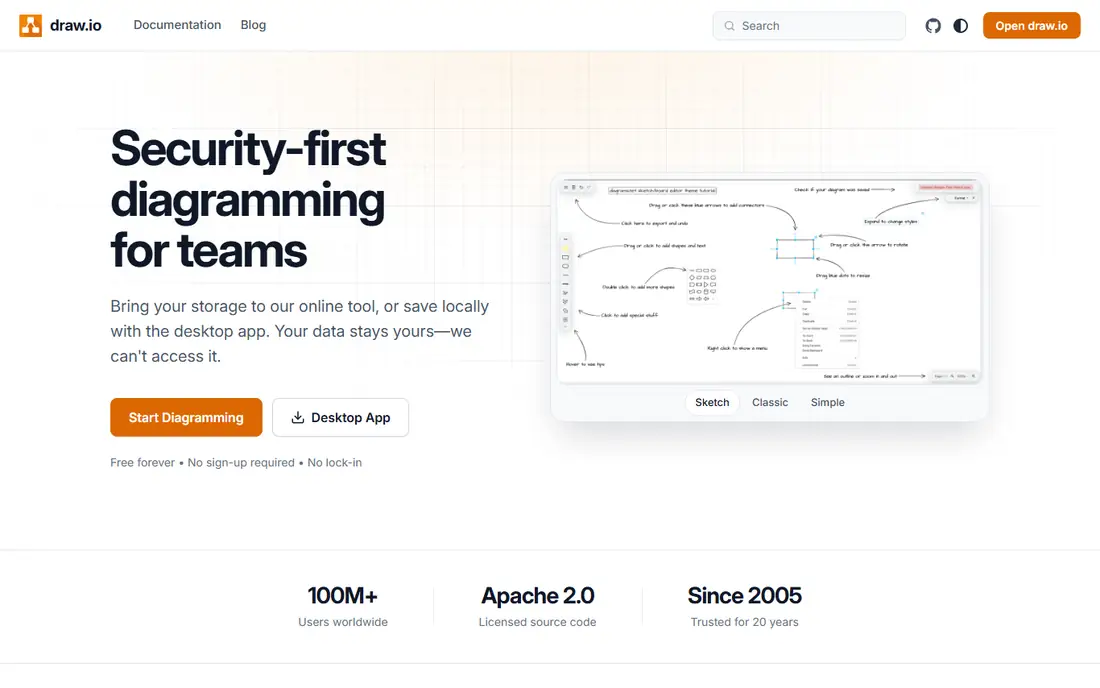
draw.io, also known as diagrams.net, is the best free SmartDraw alternative for a user who wants diagramming without a subscription or a vendor lock-in. It opens in a browser, needs no account for basic use, and lets the user store files in Google Drive, OneDrive, GitHub, Dropbox, or locally. Real-time collaboration, shape libraries for flowcharts, UML, network diagrams, and org charts, and exports to SVG, PNG, and PDF cover the core diagram job. The Apache-licensed source and privacy-first storage model appeal to teams that do not want diagram data held by a vendor by default.
The trade is polish. draw.io templates and collaboration features work well, but they feel less guided than Lucidchart, and there is no large vendor support team behind a free account. For a student, a small team, or an engineer who diagrams occasionally, that trade is easy to accept. For a large team that needs admin controls, advanced data linking, and a managed template library, a paid tool may save time. draw.io proves that a capable diagram editor does not have to cost anything, and it is the first tool to try before paying.
What we like- Free with no account required for basic use
- Files stored in the user's own cloud or device
- Open source core
Watch out for- Interface is plainer than Lucidchart
- Template and collaboration polish are lighter
- Support is community led
#4EdrawMax
Best for: Widest template library at a low price4.5/5 on
G2 (142 reviews, checked Oct 2026)
Visit edrawmax.com
Starting price$99 per year
Free planYes
EdrawMax competes with SmartDraw on breadth. It offers flowcharts, mind maps, org charts, network diagrams, floor plans, electrical diagrams, and many specialist types, with more than 1,500 built-in templates and tens of thousands of symbols on its homepage. AI diagramming, AI analysis, and AI copy features help a user draft a diagram from a prompt or from data, and desktop apps for Windows and Mac suit users who prefer offline work. A free version with limited features lets a buyer test the editor before paying.
Pricing is straightforward for individuals, with third-party summaries listing paid plans from $99 per year, plus team pricing by quote and a lifetime option in some listings. That makes EdrawMax cheaper than many per-user subscriptions for a solo user who diagrams often. Collaboration is present, but it is not as central as in Lucidchart or Miro, so a team that co-edits diagrams daily may prefer a cloud-first tool. EdrawMax fits a user who wants many diagram types, many templates, and a desktop app at a low annual price.
What we like- More than 210 diagram types and thousands of templates
- Desktop and online versions
- Lifetime license option reported
Watch out for- Interface can feel busy
- Team collaboration is lighter than Lucidchart
- Some AI features need credits
#5Miro
Best for: Whiteboard diagrams with team workshops4.6/5 on
G2 (13,631 reviews, checked Oct 2026)
Visit miro.com
Starting price$8 per user/month
Free planYes

Miro is a whiteboard first, and a diagram tool second, which is exactly why some SmartDraw users prefer it. A team can map a process, run a workshop, sketch a user flow, and plan a project on one canvas, with sticky notes, frames, comments, and voting alongside formal shapes. Templates for flowcharts, org charts, customer journey maps, and agile boards help a facilitator start quickly, and integrations with Jira, Slack, Google Workspace, and Microsoft Teams keep the board connected to delivery work. Real-time collaboration is among the best in this guide.
Precision is the compromise. Miro shapes and connectors work well for workshops and early design, but a technical team that needs strict UML, data linking, or engineering symbols will find Lucidchart, Visio, or EdrawMax stronger. Third-party summaries list paid entry at $8 per user per month billed annually, with a free plan limited to a small number of boards. Miro fits a product, design, or consulting team that diagrams as part of collaborative work, not a team that only needs formal diagrams.
What we like- Infinite canvas for diagrams, workshops, and planning
- Large template library
- Strong real-time collaboration
Watch out for- Diagram precision is looser than a dedicated diagram editor
- Free plan limits boards
- Paid cost grows with team size
#6Creately
Best for: Process and org diagrams with data links4.4/5 on
G2 (1,394 reviews, checked Oct 2026)
Visit creately.com
Starting priceSee website
Free planYes
Creately has moved toward connected visual work, where a diagram is not just a picture but a view of people, processes, systems, and evidence linked together. A team can build process maps, org charts, and system diagrams from templates, then connect data from HR, work trackers, cloud accounts, and spreadsheets so the diagram reflects real structure. That model suits operations, compliance, and transformation teams that need to show how work, systems, and controls relate, not just draw a flowchart.
The free plan covers basic diagramming, with paid plans adding fuller collaboration, data connections, and workspace features. Third-party summaries list paid entry around $5 per user per month, but the current product lineup should be checked on the vendor pricing page, because Creately now sells several focused products. Creately fits a team that wants diagrams tied to live data and multiple views of the same work. A solo user who only needs occasional flowcharts may find draw.io or EdrawMax simpler and cheaper.
What we like- Process, org, and system diagrams with connected data
- Multiple views from one model
- Templates for many diagram types
Watch out for- Newer product structure can confuse buyers
- Advanced data features need paid plans
- Smaller community than Lucidchart
#7Gliffy
Best for: Diagrams inside Confluence4.4/5 on
G2 (222 reviews, checked Oct 2026)
Visit gliffy.com
Starting priceSee website
Free planFree trial

Gliffy is the SmartDraw alternative to choose when diagrams live inside Confluence. It is built as a Confluence-native app, so diagrams sit inside Confluence pages, update with the page, and stay in the Atlassian environment, including a Zero Egress option for regulated teams that need diagram data to stay inside that environment. The editor is simple to learn, with drag-and-drop shapes, templates for flowcharts, UML, network diagrams, and org charts, and AI generation for a first draft that can be edited by hand. Security credentials, including SOC 2 Type II and ISO 42001, matter for enterprise buyers.
Outside Confluence, Gliffy is less compelling than a standalone editor, and pricing runs through the Atlassian Marketplace, with a trial rather than a permanent free plan. A team that does not use Confluence should choose Lucidchart, Visio, or draw.io instead. A Confluence-heavy team, especially in a regulated industry, will find Gliffy integration, permissions, and data residency controls hard to match with a separate diagram tool that only embeds images.
What we like- Native Confluence integration
- Simple drag-and-drop editor
- AI diagram generation
- Strong security credentials
Watch out for- Best value only inside Atlassian
- Standalone use is weaker than Lucidchart or draw.io
- Pricing is via Atlassian Marketplace
How we chose
We compared tools on vendor pricing pages, documentation, and public reviews on G2, Capterra, and Reddit, with a focus on diagram types, templates, collaboration, data linking, export formats, and pricing model. A tool made this list only if it is available today, covers core SmartDraw diagram types such as flowcharts and org charts, and has a free plan, a free trial, or a one-time license that a buyer can evaluate. We did not claim hands-on testing, and where a vendor does not publish a simple starting price, we list See website rather than repeating a third-party estimate as a vendor fact.
How to choose a SmartDraw alternative for your team
Start with where the diagram will live. A diagram that must live in Confluence points to Gliffy, a diagram that must live in Microsoft 365 points to Visio, and a diagram that must be shared as a live, collaborative document points to Lucidchart or Miro. Next, check precision needs: formal UML, network, or engineering diagrams need shape libraries and data linking, while workshop diagrams need a flexible canvas and easy collaboration. A tool that is strong on one is often weaker on the other.
Test file handling before committing. Import an existing SmartDraw or Visio file, check whether shapes, text, and connectors survive, and export to PDF, PNG, and SVG for documents and presentations. Confirm who can edit, who can view, and whether version history is available, because diagrams change often and a lost version can cost a day of work. Finally, price the team, not the individual: per-user costs multiply quickly, while a free tool or a one-time license may suit a small team that diagrams rarely.
Frequently asked questions
What is the best free SmartDraw alternative?
draw.io is the best free alternative, because it is free, needs no account for basic use, and stores files where the user chooses. Lucidchart and EdrawMax also offer free tiers, but with document or feature limits. For occasional diagramming, draw.io covers flowcharts, org charts, and network diagrams without a subscription.
Can I import SmartDraw or Visio files into these tools?
Most tools in this guide support Visio file import, and several support SmartDraw migration in some form, but fidelity varies by diagram type. Test with a complex file from your own work before migrating a library, and check shapes, text, connectors, and data links after import. Keep original files until the migrated set has been reviewed.
Is Lucidchart or Visio better for a business team?
Lucidchart is better for cross-platform collaboration, templates, and integrations outside Microsoft 365. Visio is better for a Microsoft 365 team that needs data linking from Excel and SharePoint and diagrams inside Teams and OneDrive. The existing stack usually decides this choice.
Do these tools work offline?
EdrawMax and Visio desktop offer offline work, while Lucidchart, Miro, and Creately are primarily cloud tools with limited offline use. draw.io can work in a browser with local file storage, which suits users who need control over where files live. Check offline needs before choosing a cloud-only editor.
What is the cheapest paid SmartDraw alternative?
For a solo user, draw.io is free, and EdrawMax paid plans from $99 per year are among the cheapest paid options in this guide. Per-user subscriptions from Lucidchart, Miro, and Visio can cost more once a team grows, so compare annual cost for your actual team size, not just the entry price.
Should I choose a whiteboard or a diagram editor?
Choose a diagram editor if precision, shape libraries, and data linking matter most. Choose a whiteboard such as Miro if diagrams are part of workshops, brainstorming, and planning, and if flexible collaboration matters more than formal notation. Some teams use both: Miro for early design and Lucidchart or Visio for final documentation.
Sources we checked (7)
- https://www.lucidchart.com
- https://www.microsoft.com/microsoft-365/visio
- https://www.drawio.com
- https://www.edrawmax.com
- https://miro.com
- https://creately.com
- https://gliffy.com
Is your product missing or out of date?
We review this list regularly. Vendors can request a listing, send updated pricing or ask about featured placement.

Shihab Mia · Founder, Rankite
Shihab has 5+ years in B2B and SaaS SEO. He writes Rankite's software buying guides from pricing pages, documentation and public user reviews. More about Shihab.