How we make this list: we compare pricing pages, product documentation and public user reviews. Ratings come from G2, Capterra or Trustpilot, with the date we checked them.
Notion vs Confluence at a Glance
Notion is the top pick for most teams that need a wiki, because it combines docs, databases and project tracking in one workspace at $10 per member per month on Plus, while Confluence is the better choice for large companies already running Jira and Atlassian tools. Coda is the strongest alternative for teams that want docs with database power.
- Notion wins on flexibility, with pages that can become databases, task boards and wikis without extra tools.
- Confluence wins on scale, with deep Jira integration, granular permissions and enterprise controls.
- Notion Plus costs $10 per member per month billed annually, and Confluence Standard costs $7.15 per user per month for the first 100 users.
- Both tools have free plans, but Confluence free stops at 10 users and Notion free is limited for teams.
- Small teams on a tight budget should also look at Nuclino at $6 per user per month and Slab at $6.67.
Which is better for a team wiki, Notion or Confluence
The answer depends on how your team already works. Notion is better for a team wiki when the team wants one flexible workspace where docs, meeting notes, project trackers and databases live side by side. A page in Notion can start as a simple note and grow into a linked database of projects, owners and due dates, with no extra tool needed. That flexibility is why startups and product teams pick it first.
Confluence is better for a team wiki when the company is large, regulated, or already built on Atlassian software. Its spaces, page trees and permission model are built for hundreds or thousands of users, and its Jira integration links every wiki page to live tickets, sprints and releases. Confluence also offers data residency, audit logs and a 99.9 percent uptime SLA on Premium, which matters to IT and compliance teams.
If your team has fewer than 50 people and no Atlassian stack, Notion is the simpler pick. If your team already uses Jira, or your wiki must serve several hundred people with strict permissions, Confluence is the safer pick. Readers weighing a database-led wiki should also read our Coda vs Notion comparison and our Airtable vs Notion comparison before deciding.
How much do Notion and Confluence cost
Notion Plus costs $10 per member per month billed annually, or $12 billed monthly. Notion Business costs $20 per member per month billed annually, or $24 billed monthly, and it adds full Notion AI, SAML single sign-on, private teamspaces and 90-day page history. The free plan costs nothing for individuals, but a team on the free plan is limited to 1,000 blocks once a second member joins, so most teams pay for Plus.
Confluence Cloud is free for up to 10 users. Standard costs $7.15 per user per month for the first 100 users on monthly billing, or $720 a year for a 1 to 10 user tier on annual billing. Premium costs $14.10 per user per month for the first 100 users, or $1,400 a year for the 1 to 10 user tier. These rates rose on 13 October 2026, from $6.70 on Standard and $13.20 on Premium.
For a 20-person team, Notion Plus costs about $200 a month billed annually, and Confluence Standard costs about $143 a month on monthly billing. Notion Business for the same team costs about $400 a month, while Confluence Premium costs about $282 a month. The cheapest paid option in this guide is Nuclino Starter at $6 per user per month billed annually, followed by Slab Startup at $6.67. All prices in this guide were checked on 18 November 2026.
A small team of 2 to 20 people should pick the tool that gets used every day without admin work. Notion fits most small teams best, because it replaces a wiki, a task tracker and a lightweight database in one place, and its Plus plan is simple to price at $10 per member per month. A small team can set up a wiki in an afternoon, with templates for meeting notes, onboarding and project plans.
For the smallest budgets, Nuclino and Slab deserve a look. Nuclino starts at $6 per user per month and stays simple by design, which suits teams that only need clean docs and a wiki. Slab starts at $6.67 per user per month with a free plan for up to 10 users, and it adds content verification so the team can see which pages are current. Google Docs is the simplest option of all for teams that only need shared documents, and it costs nothing on its own.
Notion vs Confluence Compared Side by Side
| Tool |
Starting price |
Free plan |
Best for |
| Notion |
$10 per member per month, Plus, billed annually |
Yes, limited for teams |
Flexible wikis, docs and databases in one workspace |
| Confluence |
$7.15 per user per month, Standard, first 100 users |
Yes, up to 10 users |
Large teams and companies already on Jira |
| Coda |
$12 per user per month, Pro, billed annually |
Yes, limited |
Docs that work like apps with tables and automations |
| Google Docs |
Free; Google Workspace Starter $7 per user per month |
Yes |
Simple shared documents and real time editing |
| ClickUp |
$9 per user per month, Core, billed annually |
Yes, limited |
Teams that want docs plus tasks and projects |
| Airtable |
$20 per user per month, Team, billed annually |
Yes, limited |
Structured data, trackers and content calendars |
| Slab |
$6.67 per user per month, Startup, billed annually |
Yes, up to 10 users |
Clean team wikis with verified, current pages |
| Nuclino |
$6 per user per month, Starter, billed annually |
Yes, up to 50 items |
Small teams that want a simple, fast wiki |
Quick comparison
| Tool | Best for | Starting price | Free plan |
|---|
 Notion | Teams that want one workspace for wikis, docs, databases and project tracking | $10 per member per month, Plus, billed annually | Yes, limited to 1,000 blocks once a second member joins |
 Confluence | Large teams and companies already using Jira and other Atlassian tools | $7.15 per user per month, Standard, first 100 users, monthly billing | Yes, up to 10 users |
 Coda | Teams that want docs with real tables, formulas and automations | $12 per user per month, Pro, billed annually | Yes, limited |
 Google Docs | Teams that need simple shared documents with fast real time editing | Free; Google Workspace Starter $7 per user per month | Yes |
 ClickUp | Teams that want docs, tasks, goals and projects in one platform | $9 per user per month, Core, billed annually | Yes, limited |
 Airtable | Structured trackers, content calendars and databases presented as docs | $20 per user per month, Team, billed annually | Yes, limited |
 Slab | Clean team wikis where pages must stay current and verified | $6.67 per user per month, Startup, billed annually | Yes, up to 10 users |
 Nuclino | Small teams that want a simple, fast wiki without setup work | $6 per user per month, Starter, billed annually | Yes, up to 50 items and 3 canvases |
Is your product missing or out of date?
We review this list regularly. Vendors can request a listing, send updated pricing or ask about featured placement.
These eight tools cover every way a team stores knowledge, from a simple shared document to a full wiki with databases and automations. Prices below were checked on 18 November 2026.
#1Notion
Best for: Teams that want one workspace for wikis, docs, databases and project tracking4.6/5 on
G2 (13,834 reviews, checked Oct 2026)
Visit notion.com
Starting price$10 per member per month, Plus, billed annually
Free planYes, limited to 1,000 blocks once a second member joins
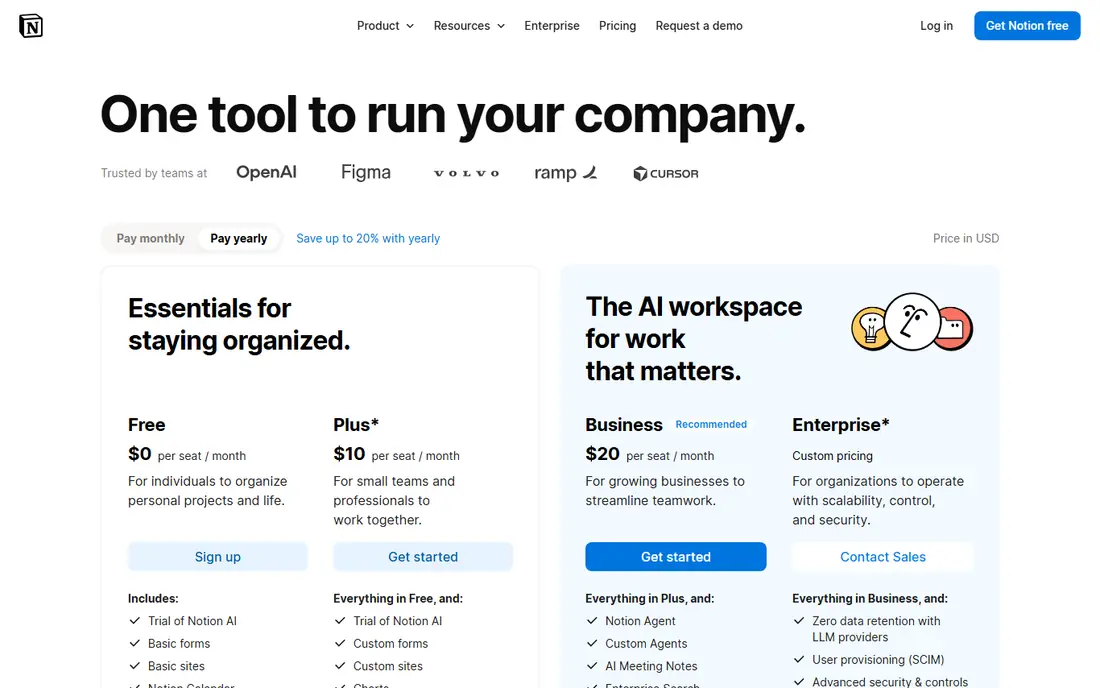
Notion is the most flexible tool in this guide. A single workspace can hold a company wiki, a product roadmap and a meeting notes database, all linked together. Pages can contain tables, boards, timelines and calendars. Plus at $10 per member per month billed annually gives unlimited blocks, unlimited file uploads and 30-day page history. Business at $20 adds full Notion AI, SAML single sign-on and 90-day history.
What we like- Very flexible pages and databases, strong templates, full Notion AI on Business, good mobile and desktop apps
Watch out for- Can become messy at scale without clear ownership, and full AI requires the Business plan at $20 per member per month
#2Confluence
Best for: Large teams and companies already using Jira and other Atlassian tools4.1/5 on
G2 (4,368 reviews, checked Oct 2026)
Visit atlassian.com
Starting price$7.15 per user per month, Standard, first 100 users, monthly billing
Free planYes, up to 10 users
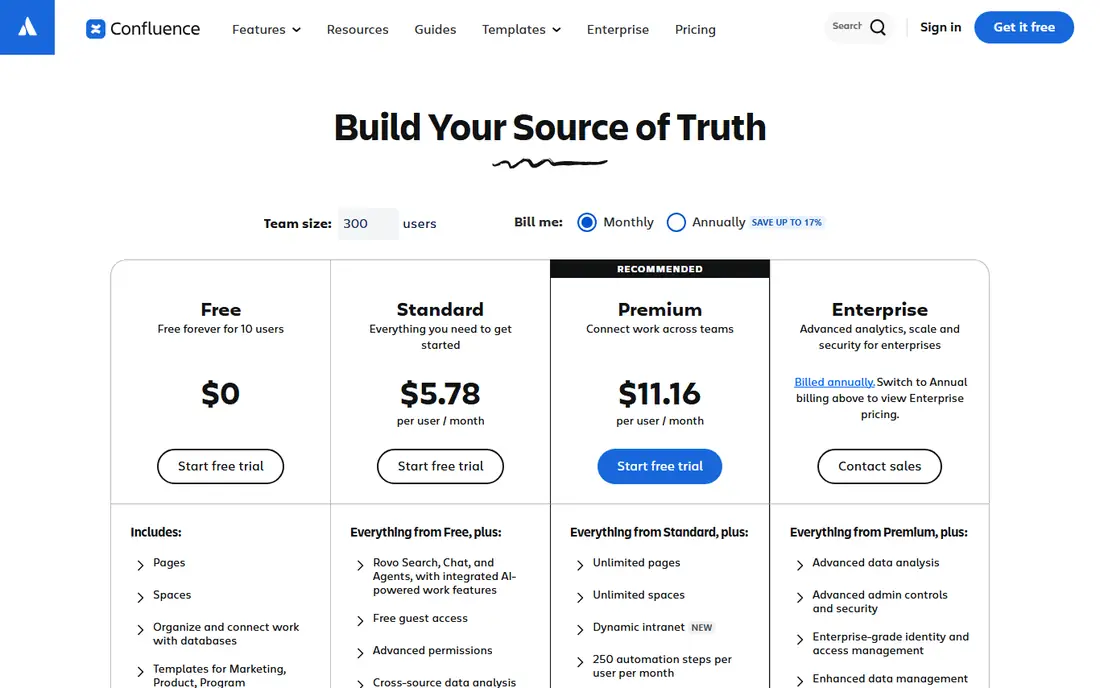
Confluence is Atlassian's wiki and knowledge workspace, built for companies that need structure at scale. Content lives in spaces with page trees, templates and permissions, so a company can run a wiki for hundreds of teams without chaos. The Jira integration is the main reason to choose it, because pages can show live ticket status and sprint progress. Standard at $7.15 per user per month for the first 100 users adds page permissions, guest access and 250 GB of storage. Premium at $14.10 adds unlimited storage, a company hub and a 99.9 percent uptime SLA.
What we like- Deep Jira integration, strong permissions and page trees, 250 GB storage on Standard, enterprise controls on Premium
Watch out for- Setup takes more time than Notion, and the editor is less freeform, so quick notes feel slower to write
#3
Coda
Best for: Teams that want docs with real tables, formulas and automations
Visit coda.io
Starting price$12 per user per month, Pro, billed annually
Free planYes, limited
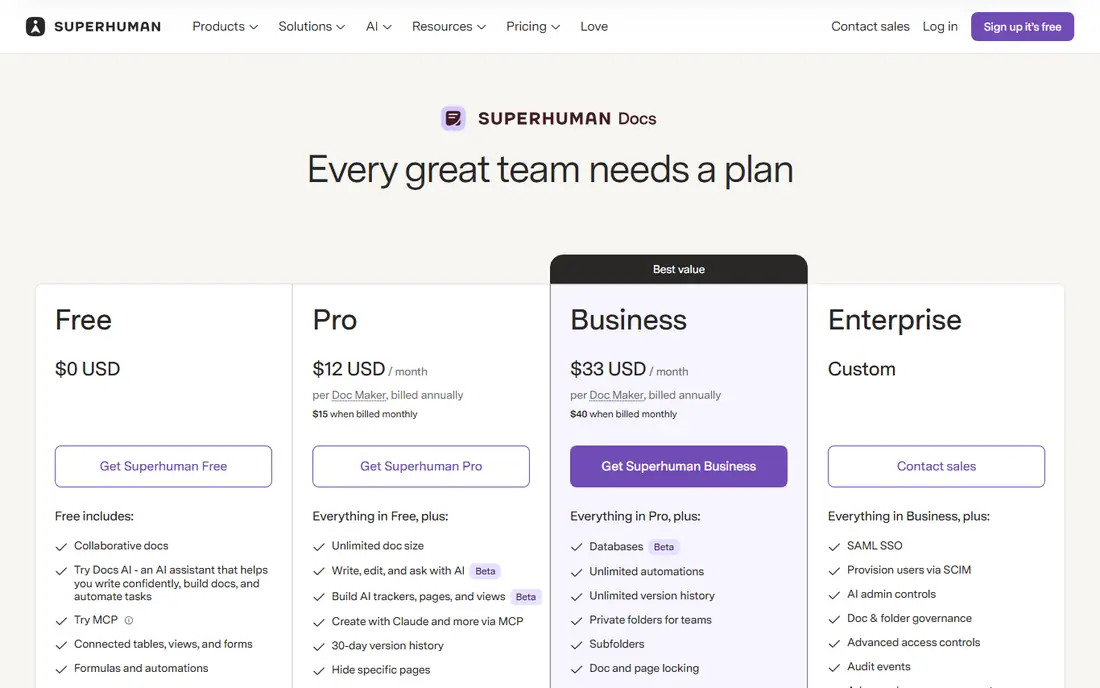
Coda turns documents into working apps. A Coda doc can hold tables with formulas, buttons that trigger actions, and automations that send reminders or update rows, so a team can run a project tracker, a CRM or a content pipeline inside a doc. Packs connect Coda to Slack, Jira and Google Calendar. Pro at $12 per user per month billed annually adds unlimited doc size and automations. Business at $33 adds advanced permissions, single sign-on and admin controls. Our Coda vs Notion comparison goes deeper on the differences.
What we like- Powerful tables and formulas, automations and packs that connect other tools, docs that work like apps
Watch out for- Learning curve is steeper than Notion, and the interface can feel busy for teams that only need simple pages
#4Google Docs
Best for: Teams that need simple shared documents with fast real time editing4.6/5 on
G2 (114 reviews, checked Oct 2026)
Visit workspace.google.com
Starting priceFree; Google Workspace Starter $7 per user per month
Free planYes
Google Docs is the simplest tool in this guide, and for many teams that is enough. It opens fast, several people can edit at once, and comments and suggested edits make review easy. Every document has version history, and sharing is a link or an email address. Google Docs on its own is free with a Google account. Google Workspace Starter at $7 per user per month adds a business email address and 30 GB of pooled storage per user. The weakness is structure. Google Docs has no spaces, no page tree and no database, so a team with hundreds of documents needs Drive folders and strict naming.
What we like- Free to use, excellent real time collaboration, comments and suggested edits, works with the rest of Google Workspace
Watch out for- No real wiki structure or database features, and pages can be hard to organise once a library grows large
#5ClickUp
Best for: Teams that want docs, tasks, goals and projects in one platform4.6/5 on
G2 (14,878 reviews, checked Oct 2026)
Visit clickup.com
Starting price$9 per user per month, Core, billed annually
Free planYes, limited
ClickUp is a work management platform with docs built in, which makes it a good fit for teams that want their wiki next to their task list. A doc can link to tasks, and tasks can link back to docs, so a project plan and its supporting notes stay connected. Core at $9 per user per month billed annually adds unlimited storage, integrations and dashboards. Business at $17 adds advanced automations, time tracking and workload views. Some workspaces still bill on legacy Unlimited at $7 and Business at $12 per user per month.
What we like- Docs sit next to tasks, boards and goals, strong views and automations, good value for the feature set
Watch out for- The interface has a lot of menus and settings, so new users need time to learn it, and some teams find it noisy
#6Airtable
Best for: Structured trackers, content calendars and databases presented as docs4.6/5 on
G2 (3,300 reviews, checked Oct 2026)
Visit airtable.com
Starting price$20 per user per month, Team, billed annually
Free planYes, limited
Airtable is a database with friendly views, and it works well as a wiki companion for teams that track structured work. A team can run a content calendar or a project tracker in Airtable, with grid, calendar, kanban and gallery views over the same data. Team at $20 per user per month billed annually adds more records per base and more automations. Business at $45 adds advanced permissions, single sign-on and admin controls. Airtable is not the best pick as a wiki on its own, because writing long pages is not its strength. Our Smartsheet vs Google Sheets comparison covers a cheaper table option.
What we like- Excellent grid, calendar and kanban views, interfaces for non technical users, strong automations and integrations
Watch out for- Priced at $20 per user per month on Team, which is costly for a wiki alone, and it is a database first, not a docs first, tool
#7Slab
Best for: Clean team wikis where pages must stay current and verified4.6/5 on
G2 (309 reviews, checked Oct 2026)
Visit slab.com
Starting price$6.67 per user per month, Startup, billed annually
Free planYes, up to 10 users
Slab is a focused team wiki with a clean editor and one feature the bigger tools lack, which is content verification. A page owner can set a review date, and Slab reminds them to check the page, so the wiki does not fill up with stale instructions. Unified search covers Slack, Google Drive, GitHub and Jira as well as Slab itself. The free plan covers up to 10 users. Startup at $6.67 per user per month billed annually adds private topics. Business at $12.50 adds SAML single sign-on, SCIM and webhooks.
What we like- Clean editor, content verification with expiry reminders, unified search across Slack, Google Drive, GitHub and Jira
Watch out for- Fewer database and project features than Notion or Coda, so teams that want trackers will need a second tool
#8Nuclino
Best for: Small teams that want a simple, fast wiki without setup work4.7/5 on
G2 (29 reviews, checked Oct 2026)
Visit nuclino.com
Starting price$6 per user per month, Starter, billed annually
Free planYes, up to 50 items and 3 canvases
Nuclino is the simplest wiki in this guide, and that is its appeal. The editor is fast, pages link together with a graph view, and visual canvases give teams a whiteboard for planning. A new team can be writing in minutes with no setup and no admin work. The free plan allows up to 50 items and 3 canvases. Starter at $6 per user per month billed annually removes the item and canvas limits and adds 10 GB of storage per user. Business at $10 adds Sidekick AI, an audit log and SAML single sign-on.
What we like- Very easy to learn, fast editor, graph view and visual canvases, lowest paid starting price in this guide
Watch out for- Limited depth for relational databases and automations, and the free plan caps at 50 items, so growing teams must pay
We picked tools that teams actually use as wikis and documentation hubs, covering flexible workspaces, enterprise wikis, simple docs and database-led options. Each tool had to offer a free plan or trial, a public pricing page, and a real wiki or docs feature, not just a task list. Prices were checked on 18 November 2026 from each vendor pricing page and cross checked against recent independent guides, including the Confluence price rise that took effect on 13 October 2026. Teams that plan work in tables can also read our Airtable vs Smartsheet comparison.
Frequently asked questions
Is Notion better than Confluence for a small team
Yes, for most small teams Notion is the better pick. It is faster to set up, it combines a wiki with databases and task tracking, and its Plus plan is simple to price at $10 per member per month billed annually. Confluence is stronger for large teams or companies already on Jira, but a small team without Jira will find Notion easier to adopt and cheaper to run.
How much does Confluence cost per user in 2026
Confluence Cloud is free for up to 10 users. Standard costs $7.15 per user per month for the first 100 users on monthly billing, and Premium costs $14.10. Annual billing is sold in user tiers, such as $720 a year for 1 to 10 users on Standard. These rates rose on 13 October 2026, and the per-user rate falls for teams above 100 users.
Can I use Notion free for a team wiki
You can start a team wiki on the free plan, but it is limited. Once a second member joins, the free plan is capped at 1,000 blocks, which a busy team will hit quickly. Most teams move to Plus at $10 per member per month billed annually for unlimited blocks, unlimited file uploads and 30-day page history. Guests are not billed, within the plan guest limit.
Does Confluence work without Jira
Yes, Confluence works on its own as a wiki and documentation tool, with spaces, page trees, templates and permissions. But its main advantage over Notion is the Jira integration, so a team that never uses Jira pays for structure it may not need. Teams without Jira should compare Notion, Slab and Nuclino first, and only pick Confluence if they need its permissions and scale.
Which is the cheapest good wiki tool in this guide
Nuclino is the cheapest paid option, with Starter at $6 per user per month billed annually, and Slab follows at $6.67. Both have free plans for small teams, with Nuclino free up to 50 items and Slab free up to 10 users. Google Docs is free on its own, but it is a document editor rather than a wiki, so it suits teams that only need shared documents.
Sources we checked (9)
- https://www.notion.com/pricing
- https://www.atlassian.com/software/confluence/pricing
- https://coda.io/pricing
- https://workspace.google.com/pricing
- https://clickup.com/pricing
- https://www.airtable.com/pricing
- https://slab.com/pricing
- https://www.nuclino.com/pricing
- https://www.gotechpresso.com/blog/confluence-pricing
Is your product missing or out of date?
We review this list regularly. Vendors can request a listing, send updated pricing or ask about featured placement.

Shihab Mia · Founder, Rankite
Shihab has 5+ years in B2B and SaaS SEO. He writes Rankite's software buying guides from pricing pages, documentation and public user reviews. More about Shihab.