How we make this list: we compare pricing pages, product documentation and public user reviews. Ratings come from G2, Capterra or Trustpilot, with the date we checked them.
Which Is Better, Notion or Asana?
The better tool depends on how your team works. Asana is built around tasks, deadlines and owners, so a project manager can see exactly who is doing what and when it is due. Notion is built around pages and databases, so a team can keep notes, specs, wikis and task lists in one flexible workspace. If your main problem is missed deadlines and unclear ownership, Asana gives you that structure on day one, with Timeline, Gantt, dashboards and portfolios ready to use. If your main problem is scattered documents and knowledge that lives in chat threads, Notion solves that first and adds project tracking on top. Notion asks more of you at setup, since you design your own views, while Asana asks more of your budget as you add seats. Teams that run client work, product launches or marketing campaigns usually get more from Asana.
How Much Do Notion and Asana Cost in 2026?
Notion and Asana start at almost the same price, but the full feature set costs more. Notion Plus costs 10 dollars per user per month billed annually, and Business costs 20 dollars, which is the tier that includes full Notion AI. Asana Starter costs 10.99 dollars per user per month billed annually, and Advanced costs 24.99 dollars, which adds portfolios, goals, workload and time tracking. Both offer a free plan, but Asana Personal is limited to two users, while Notion Free suits a single member with up to 10 guests. The cheapest paid entry in this guide is Trello Standard at 5 dollars per user per month billed annually. The table below shows the starting price of every tool, so you can compare the real cost of a 10 person team before you commit.
| Tool | Starting price per user per month, billed annually | Free plan | Best for |
| Notion | $10 | Yes, limited | Docs, wikis and databases |
| Asana | $10.99 | Yes, up to 2 users | Structured project tracking |
| monday Work Management | $9 | Yes, up to 2 seats | Visual boards and automations |
| ClickUp | $9 | Yes, Free Forever | All in one workspace |
| Trello | $5 | Yes, up to 10 collaborators | Simple Kanban boards |
| Jira | $9.70 | Yes, up to 10 users | Agile software teams |
| Wrike | $10 | Yes | Enterprise project control |
| Smartsheet | $9 | No, 30 day trial only | Spreadsheet style tracking |
Start with how your team actually plans work, not with the feature list. A team that runs sprints needs backlog management, story points and release planning, which points toward Jira. A team that runs campaigns needs timelines, approvals and workload views, which points toward Asana, monday Work Management or Wrike. A team that lives in documents needs linked databases and a wiki, which points toward Notion. Next, check the limits that catch buyers out. Seat minimums matter, since monday Work Management and Smartsheet Business both require at least three paid seats. Free plan caps matter too, since Asana Personal stops at two users and Trello Free stops at 10 collaborators per Workspace. Automation limits matter too, since Trello Standard allows 1,000 runs a month while Smartsheet Pro allows 250. Finally, check whether the features you need sit on the tier you can afford. Time tracking, portfolios, approvals and advanced permissions often sit one or two tiers above the entry price, so the headline price is rarely the price you end up paying.
Small teams should pick the tool that stays useful without a dedicated administrator. Trello is the simplest choice and the cheapest paid plan in this guide, and its free plan covers up to 10 collaborators, which suits a small team that just needs a shared board. Notion is a strong pick for a small team that also needs a wiki and meeting notes, because one workspace can replace a docs tool and a task tracker at the same time. ClickUp Free Forever is generous and suits a small team that wants more structure than Trello without paying yet. Asana Personal is free for two people only, so a team of three or more moves to Starter at 10.99 dollars per user per month billed annually. monday Work Management has a three seat minimum on paid plans, so a solo user pays for seats they do not use. Jira Free covers up to 10 users, which suits a small software team. Wrike and Smartsheet fit small teams less well, since their strengths show at larger scale.
Quick comparison
| Tool | Best for | Starting price | Free plan |
|---|
 Notion | Teams that want docs, wikis, databases and tasks in one workspace | From $10 per user per month, billed annually (Plus plan) | Yes, free plan for a single member with up to 10 guests |
 Asana | Teams that need structured projects, timelines, portfolios and workload views | From $10.99 per user per month, billed annually (Starter plan) | Yes, Personal plan free for up to 2 users |
 monday Work Management | Visual teams that want colourful boards, dashboards and automations | From $9 per seat per month, billed annually (Basic plan) | Yes, free plan for up to 2 seats |
 ClickUp | Teams that want one tool for docs, tasks, chat, goals and time tracking | From $9 per user per month, billed annually (Core plan) | Yes, Free Forever plan |
 Trello | Small teams that want the simplest possible Kanban board | From $5 per user per month, billed annually (Standard plan) | Yes, free plan for up to 10 collaborators per Workspace |
 Jira | Agile software teams running sprints, backlogs and releases | From $9.70 per user per month, monthly billing for 1 to 100 users (Standard plan) | Yes, free for up to 10 users |
 Wrike | Mid size and enterprise teams that need approvals, proofing and resource planning | From $10 per user per month, billed annually (Team plan) | Yes, free plan available |
 Smartsheet | Teams that think in spreadsheets and need grid, Gantt and card views of the same work | From $9 per Member per month, billed annually (Pro plan) | No free plan for new signups since 28 August 2024, 30 day free trial instead |
Is your product missing or out of date?
We review this list regularly. Vendors can request a listing, send updated pricing or ask about featured placement.
The eight tools below cover the full range of project management styles, from a simple Kanban board to an enterprise platform with approvals and resource planning. Each entry lists the starting price checked on 17 November 2026, the free plan terms and one real drawback.
#1Notion
Best for: Teams that want docs, wikis, databases and tasks in one workspace4.6/5 on
G2 (13,834 reviews, checked Oct 2026)
Visit notion.com
Starting priceFrom $10 per user per month, billed annually (Plus plan)
Free planYes, free plan for a single member with up to 10 guests
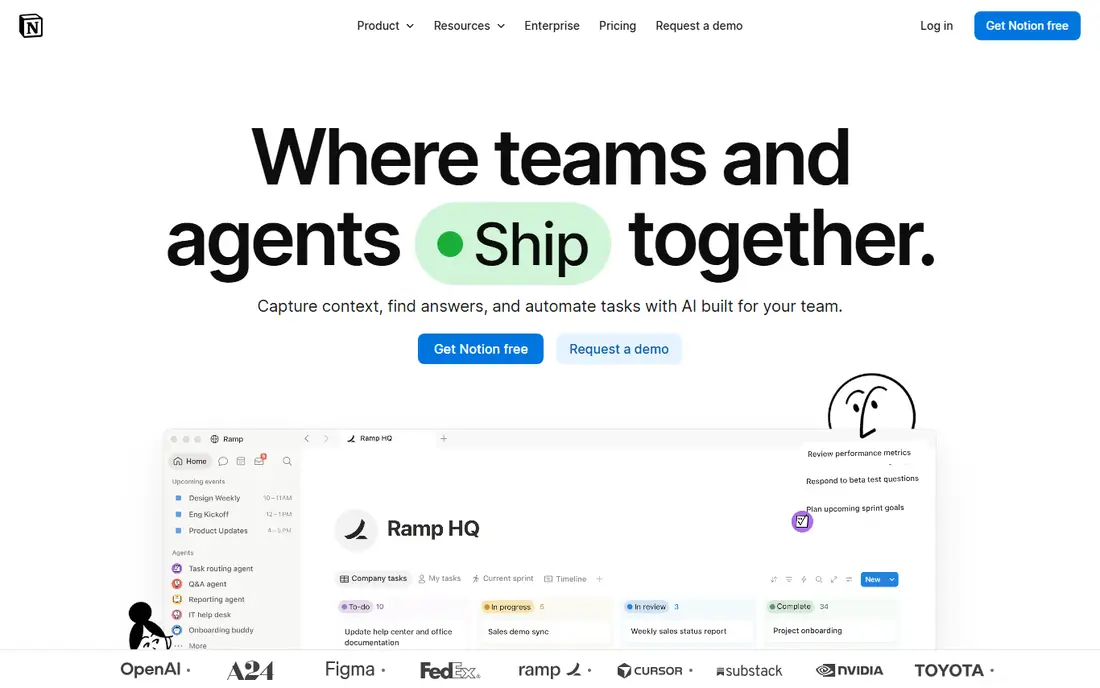
Notion is a workspace where pages, databases and tasks live side by side, so a team can keep its wiki, meeting notes, product specs and project tracker in one place instead of four tools. The Plus plan at 10 dollars per user per month billed annually adds unlimited file uploads and a 30 day page history, while Business at 20 dollars adds full Notion AI, private teamspaces and SAML single sign on. The trade off is structure. Notion gives you building blocks rather than a ready made project system, so a team must design its own boards, timelines and status workflows, and reporting across projects takes more effort than in Asana or monday Work Management.
What we like- Flexible pages and databases, strong wiki and docs, full AI on Business, unlimited guests on paid plans
Watch out for- No native time tracking, reporting is weaker than Asana, and project views need manual setup
#2Asana
Best for: Teams that need structured projects, timelines, portfolios and workload views4.4/5 on
G2 (13,930 reviews, checked Oct 2026)
Visit asana.com
Starting priceFrom $10.99 per user per month, billed annually (Starter plan)
Free planYes, Personal plan free for up to 2 users

Asana is the most structured tool in this guide, and that is why it is the top pick for teams that manage many projects at once. Starter at 10.99 dollars per user per month billed annually includes Timeline and Gantt views, dashboards, forms, custom fields and unlimited automations. Advanced at 24.99 dollars adds portfolios, goals, workload management, approvals and native time tracking, plus AI Studio credits. The free Personal plan covers only two users, so a real team pays from the third seat onward. Asana suits marketing, operations and product teams that need clear ownership, deadlines and cross project visibility without building their own system first.
What we like- Timeline and Gantt views, portfolios and goals, unlimited automations, strong reporting dashboards
Watch out for- Seats are added in set increments above five users, and the price jumps to $24.99 on Advanced for portfolios
#3
monday Work Management
Best for: Visual teams that want colourful boards, dashboards and automations
Visit monday.com
Starting priceFrom $9 per seat per month, billed annually (Basic plan)
Free planYes, free plan for up to 2 seats

monday Work Management turns projects into visual boards with status columns, timelines and dashboards that are easy to read at a glance. Basic costs 9 dollars per seat per month billed annually, Standard costs 12 dollars and adds Timeline, Gantt, automations and integrations, and Pro costs 19 dollars and adds time tracking, private boards and 25,000 automation actions a month. The free plan covers two seats, and every paid plan starts at three seats, so a solo buyer pays for three. Note that these are Work Management prices. monday CRM is a separate product with higher prices, starting at 12 dollars per seat per month billed annually, so check which product you are pricing before you buy.
What we like- Visual boards and dashboards, strong automations from Standard, AI credits included on paid plans
Watch out for- Paid plans have a 3 seat minimum, Basic has no automations, and seats are sold in fixed buckets
#4ClickUp
Best for: Teams that want one tool for docs, tasks, chat, goals and time tracking4.6/5 on
G2 (14,878 reviews, checked Oct 2026)
Visit clickup.com
Starting priceFrom $9 per user per month, billed annually (Core plan)
Free planYes, Free Forever plan
ClickUp packs docs, whiteboards, chat, goals, time tracking and dashboards into a single workspace, which makes it the broadest tool in this guide. Core costs 9 dollars per user per month billed annually and adds custom fields, unlimited storage and Gantt charts, while Business costs 17 dollars and adds advanced dashboards, workload views, timesheets and webhooks. A top tier Max plan costs 100 dollars per user per month billed annually and centres on ClickUp AI. Buyers should note that ClickUp replaced its old Unlimited plan at 7 dollars with Core, and some existing workspaces still sit on the old line, so confirm which price applies to a new workspace before budgeting.
What we like- Generous free plan, huge feature set, AI credits included on paid plans, unlimited storage on Core
Watch out for- The interface can feel crowded and slow to learn, and ClickUp has run two price lists side by side during 2026
#5Trello
Best for: Small teams that want the simplest possible Kanban board4.4/5 on
G2 (14,064 reviews, checked Oct 2026)
Visit trello.com
Starting priceFrom $5 per user per month, billed annually (Standard plan)
Free planYes, free plan for up to 10 collaborators per Workspace
Trello is the simplest tool here, and for many small teams that is the point. Boards, lists and cards are easy to explain to a new hire in minutes, and the Standard plan at 5 dollars per user per month billed annually adds unlimited boards, custom fields, advanced checklists and 1,000 automation runs a month. Premium at 10 dollars adds Calendar, Timeline, Table, Dashboard and Map views plus unlimited automation, and Enterprise costs 17.50 dollars per user per month billed annually with a 50 seat minimum. The free plan caps a Workspace at 10 collaborators and 10 open boards, so a growing team hits the paid tier quickly. Trello suits simple workflows and struggles with complex, multi project reporting.
What we like- Cheapest paid plan in this guide, very easy to learn, Butler automation on every plan
Watch out for- Reporting and portfolio views are thin, and Premium is needed for Calendar, Timeline and Dashboard views
#6Jira
Best for: Agile software teams running sprints, backlogs and releases4.3/5 on
G2 (7,984 reviews, checked Oct 2026)
Visit atlassian.com
Starting priceFrom $9.70 per user per month, monthly billing for 1 to 100 users (Standard plan)
Free planYes, free for up to 10 users
Jira is the standard choice for software teams because it is built around agile work from the ground up, with backlogs, sprints, story points, roadmaps and release tracking. Standard costs 9.70 dollars per user per month for the first 100 users on monthly billing, and Premium costs 19.60 dollars and adds cross team planning, unlimited storage and 24/7 support for critical issues. Atlassian raised these list prices on 13 October 2026, up from 9.05 and 18.30 dollars, and per user rates fall as headcount rises above 100. The free plan covers up to 10 users, which suits a small dev team. Non technical teams often find Jira too complex, since its power comes with a long setup and a learning curve.
What we like- Deep agile features, scrum and Kanban boards, strong automation, part of the Atlassian suite
Watch out for- Atlassian raised prices on 13 October 2026, and the setup is heavy for non technical teams
#7Wrike
Best for: Mid size and enterprise teams that need approvals, proofing and resource planning4.2/5 on
G2 (4,540 reviews, checked Oct 2026)
Visit wrike.com
Starting priceFrom $10 per user per month, billed annually (Team plan)
Free planYes, free plan available
Wrike is built for planned, controlled work, with Gantt charts, request forms, approvals, proofing and resource management that suit agencies, marketing departments and professional services teams. Team costs 10 dollars per user per month billed annually for 2 to 15 users and adds Gantt charts and shareable dashboards, while Business costs 25 dollars for 5 to 200 users and adds time tracking, request forms, approvals and resource management. Pinnacle and Apex are quote only. Wrike publishes no monthly billing price, and seats are sold in bundles, so a team of 12 may pay for 15 seats. It is more tool than a small team needs, and it earns its price on larger, process heavy work.
What we like- Gantt charts with dependencies, proofing and approvals, resource management, strong security controls
Watch out for- Business and above are annual billing only with no monthly price, and Team has no time tracking
#8Smartsheet
Best for: Teams that think in spreadsheets and need grid, Gantt and card views of the same work4.4/5 on
G2 (22,767 reviews, checked Oct 2026)
Visit smartsheet.com
Starting priceFrom $9 per Member per month, billed annually (Pro plan)
Free planNo free plan for new signups since 28 August 2024, 30 day free trial instead
Smartsheet looks like a spreadsheet and works like a project platform, which makes it easy for teams that already plan in grids. Pro costs 9 dollars per Member per month billed annually and is capped at 10 members with 250 automation runs a month, while Business costs 19 dollars and removes the member cap with unlimited automations, 1 TB of storage and unlimited free guests. Enterprise and Advanced Work Management are quote only. There is no free plan for new signups since 28 August 2024, only a 30 day trial, and premium add ons such as Resource Management, Dynamic View and Control Center are priced separately, so the headline price is a floor rather than the full cost.
What we like- Familiar spreadsheet interface, unlimited sheets on Pro, unlimited automations on Business, free Contributor seats for viewers
Watch out for- Pro is capped at 10 members, Business has a 3 member minimum, and add ons such as Resource Management cost extra
Frequently asked questions
Is Notion or Asana better for project management?
Asana is better for project management when a team needs structure, deadlines and cross project reporting without building its own system. It offers Timeline, Gantt, portfolios, workload and goals. Notion is better when the priority is docs, wikis and flexible databases, with project tracking as one use among many. A team that manages client deadlines and launches should pick Asana, while a team that writes and plans in documents should pick Notion.
Can I use Notion and Asana together?
Yes, many teams use both, with Notion as the wiki and knowledge base and Asana as the project tracker. Meeting notes, specs and decisions live in Notion, while tasks, deadlines and owners live in Asana, and links connect the two. This setup costs two subscriptions and needs discipline, since work can drift between the tools. A small team should usually pick one tool first and add the second only when a clear gap appears.
Which is the cheapest project management tool in this guide?
Trello is the cheapest plan in this guide, with Standard at 5 dollars per user per month billed annually. Its free plan covers 10 collaborators, which suits a small team at no cost. The next cheapest entries are monday Work Management, ClickUp and Smartsheet at 9 dollars per user per month billed annually. Seat minimums and missing features can push a team to a higher tier, so the cheapest headline price is not always the cheapest cost.
Do these tools offer a free plan?
Seven of the eight tools offer a free plan, with Smartsheet excepted. Notion Free suits a member, Asana Personal covers two users, monday Free covers two seats, ClickUp Free Forever is the most generous, Trello Free covers 10 collaborators, Jira Free covers 10 users, and Wrike has a free plan. Smartsheet closed its free plan to signups on 28 August 2024 and offers a 30 day trial instead. Free plans suit trials and small teams, but most teams outgrow them.
Which tool is best for software development teams?
Jira is the best fit for development teams because it is built for agile work, with backlogs, sprints, story points, roadmaps and release tracking. It integrates with Bitbucket and the wider Atlassian suite, which many dev teams already use. Asana and ClickUp are workable alternatives for a dev team that also manages marketing or operations work in the same tool. Notion suits product specs and documentation but is weaker as a sprint tracker, so dev teams pair it with Jira.
Sources we checked (8)
- https://www.notion.com/pricing
- https://asana.com/pricing
- https://monday.com/pricing
- https://clickup.com/pricing
- https://trello.com/pricing
- https://www.atlassian.com/software/jira/pricing
- https://www.wrike.com/pricing/
- https://www.smartsheet.com/pricing
Is your product missing or out of date?
We review this list regularly. Vendors can request a listing, send updated pricing or ask about featured placement.

Shihab Mia · Founder, Rankite
Shihab has 5+ years in B2B and SaaS SEO. He writes Rankite's software buying guides from pricing pages, documentation and public user reviews. More about Shihab.