How we make this list: we compare pricing pages, product documentation and public user reviews. Ratings come from G2, Capterra or Trustpilot, with the date we checked them.
What is the best trial presentation software
Trial presentation software puts exhibits, video clips and deposition transcripts on the courtroom screen, under the presenting lawyer's control, without fumbling through paper binders. The best pick for most trial lawyers is TrialPad, because the whole LIT SUITE costs $600 a year per user, runs on an iPad the lawyer already owns, and covers exhibits, transcripts, timelines and document review in one subscription. Teams running multi-week complex trials with a litigation support department should look at TrialDirector instead, and Windows-only shops should compare OnCue and Sanction before deciding.
Key takeaways
- TrialPad is the value pick at $600 a year for the full LIT SUITE, but it only runs on iPad and Mac.
- TrialDirector is the standard for large, complex trials, and it is quote-only since Reveal acquired iPro in 2023.
- OnCue costs $900 a year for the Pro plan, and it is Windows only.
- ExhibitView Trial Presenter and iLitigate are the low-cost options, at $498 one-time and $19.99 a month.
- Platform is the first filter: half the tools here run on one operating system only, so check the courtroom hardware before shortlisting.
We started with the searches trial lawyers run: trial presentation software, courtroom presentation software and exhibit presentation software. For each candidate we confirmed the product is still sold and current on the vendor's site, checked the pricing page or a dated third-party pricing read, and weighed practitioner discussion. Only products sold to litigators today made the list. Prices were checked 22 Nov 2026.
What trial presentation software has to do in court
The job sounds simple, and that is why it goes wrong. The software must open a document, call out a paragraph, play a video clip synced to the transcript, and blank the screen on command, all without a visible delay. The jury notices a five-second hunt for a file. The judge notices it more. So the real buying criteria are speed of retrieval, reliability under pressure, and how the tool handles the exhibits the case actually has, which are usually PDFs, scanned images, video depositions and spreadsheets.
Platform matters before features. TrialPad runs on iPad and Mac. TrialDirector, OnCue and Sanction run on Windows. ExhibitView covers Windows and iPad. AgileLaw and LiveLitigation are cloud tools that run in a browser. A firm that presents from a Windows laptop cannot buy TrialPad, and a firm that presents from an iPad cannot buy TrialDirector. Check the courtroom setup first, then compare features.
How much does trial presentation software cost
Published prices run from $19.99 a month for iLitigate to $900 a year for OnCue Pro, with TrialPad at $600 a year for the whole LIT SUITE. TrialDirector and Sanction publish no price and quote by engagement. ExhibitView Trial Presenter is sold as a $498 one-time payment. The license is rarely the whole cost: budget for the display hardware, the adapter the courtroom accepts, and the time to load and tag exhibits before trial. A cheap tool with a week of exhibit prep costs more than an expensive tool with same-day import.
Quick comparison
| Tool | Best for | Starting price | Free plan |
|---|
 TrialPad | Solo litigators and small firms presenting from an iPad | $600 per year (LIT SUITE, $50 per month billed annually) | No free plan; 7-day free trial |
 TrialDirector | Large firms and litigation support teams running complex, multi-week trials | Quote only | No free plan; 14-day free trial |
 OnCue | Litigation teams that want fast, searchable exhibit retrieval on Windows | $900 per year (Pro plan) | No free plan; free trial available |
 Sanction | Firms already inside the LexisNexis ecosystem that need exhibit, video and transcript presentation | Quote only | No free plan; demo available |
 ExhibitView Trial Presenter | Firms that want a one-time purchase instead of a subscription | $498 one-time payment | No free plan; 14-day free trial |
 AgileLaw | Litigation teams that manage exhibits across depositions, briefing and trial in the cloud | From $195 per month | Free plan available; 14-day free trial |
 iLitigate | Solo attorneys who want the cheapest credible iPad presentation tool | $19.99 per month | No free plan; trial available |
 LiveLitigation | Court reporting companies and firms running remote proceedings with live transcripts | From $399 per year | No free plan; demo available |
Is your product missing or out of date?
We review this list regularly. Vendors can request a listing, send updated pricing or ask about featured placement.
The best trial presentation software
Starting price$600 per year (LIT SUITE, $50 per month billed annually)
Free planNo free plan; 7-day free trial
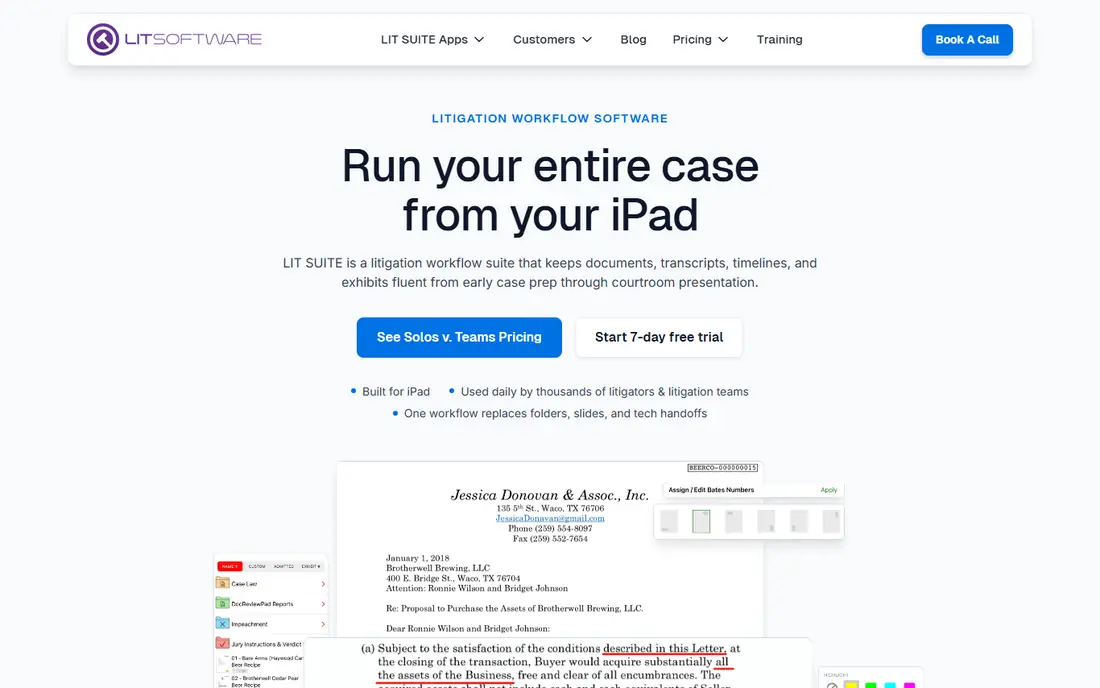
TrialPad is the flagship app of the LIT SUITE from LIT Software, and it is the most widely used trial presentation tool among solo and small-firm litigators. The presenting lawyer organizes exhibits into folders, annotates with callouts and highlights, and drives the display from the iPad while the jury watches the courtroom screen. Video deposition clips play with transcript sync, and the same subscription includes TranscriptPad for designations, DocReviewPad for annotation and Bates stamping, TimelinePad for chronologies, and ExhibitsPad for electronic exhibit binders. The price is transparent: $600 a year per user through the App Store, or as low as $500 a year through the Enterprise Program for teams of ten or more. The limitation is the platform. There is no Windows version, so a Windows firm must buy iPads and adapters, and the 7-day trial is short for a tool that needs a real case to evaluate.
What we like- Purpose-built for live courtroom presentation
- Callouts, highlights and side-by-side exhibit comparison
- The subscription includes all five LIT SUITE apps
Watch out for- IPad and Mac only, with no Windows or web version
- The App Store subscription sits on the lawyer's Apple account, so a departing associate takes the license unless the firm uses the team package
#2
TrialDirector
Best for: Large firms and litigation support teams running complex, multi-week trials
Visit trialdirector.com
Starting priceQuote only
Free planNo free plan; 14-day free trial
TrialDirector has been the default trial presentation suite for large firms for two decades, and it is still the tool litigation support departments reach for on document-heavy cases. It manages exhibits, video, transcripts and demonstratives in one Windows workspace, with multi-monitor output so the presenting lawyer, the witness and the jury each see the right screen. Video depositions sync to the transcript, and annotations go on live. The trade-off is weight. TrialDirector is a professional tool that rewards trained operators, and smaller firms often find it more than they need. Pricing is quote-only since Reveal acquired iPro in August 2023, and the legacy iPro discovery products have posted end-of-life dates as Reveal migrates customers to its own platform.
What we like- The long-standing standard for complex trials
- Multi-monitor control, video sync and live annotation
- Handles very large exhibit sets
Watch out for- Windows only, with no native Mac version
- No published pricing since Reveal acquired iPro in 2023
- Needs trained staff and implementation time
#3
OnCue
Best for: Litigation teams that want fast, searchable exhibit retrieval on Windows
Visit oncue.com
Starting price$900 per year (Pro plan)
Free planNo free plan; free trial available

OnCue, from Opus 2, is built around one idea: the presenting lawyer should find any exhibit in seconds, not minutes. The case database is searchable, layouts switch instantly between single exhibit, side-by-side and video views, and the display controls are designed for a second operator or the lawyer alone. The vendor's own comparison with TrialPad puts OnCue Pro at $900 a year, with a Flex plan at $100 a month. Older listings cite $80 a month to $780 a year for two activations, so confirm the current figure on a quote. OnCue is Windows only, and the ProSync collaboration feature is an add-on rather than part of the base price. For a Windows litigation team that values retrieval speed over iPad portability, it is the strongest alternative to TrialDirector.
What we like- Searchable case databases with instant layout switching
- ProSync keeps the team on the same exhibit set
- Well regarded by trial consultants
Watch out for- Windows only
- ProSync syncing costs extra
- The Flex plan at $100 a month costs more per year than the annual Pro plan
#4
Sanction
Best for: Firms already inside the LexisNexis ecosystem that need exhibit, video and transcript presentation
Visit lexisnexis.com
Starting priceQuote only
Free planNo free plan; demo available
Sanction is LexisNexis's trial presentation software, and it covers the courtroom basics well: exhibits, video playback, transcript display and annotation. Its strength is the ecosystem. Firms that already buy LexisNexis research and litigation products get one vendor, one support contract and training that fits the rest of their stack. The weakness is that Sanction publishes no price, so budgeting means a sales conversation, and the Windows-only desktop interface feels dated next to TrialPad or OnCue. It is a solid pick for a LexisNexis shop that wants a supported, familiar tool, and a weak pick for a firm that wants transparent pricing or iPad presentation. Ask for a demo on your own exhibit set before committing, because the interface is the deciding factor.
What we like- Strong video playback with transcript support
- Exhibit annotation and callouts
- Backed by LexisNexis support and training
Watch out for- Windows only
- Quote-only pricing with no published figures
- The interface is older than the newer iPad tools
#5
ExhibitView Trial Presenter
Best for: Firms that want a one-time purchase instead of a subscription
Visit exhibitview.net
Starting price$498 one-time payment
Free planNo free plan; 14-day free trial
ExhibitView Trial Presenter is the budget-conscious pick for firms that dislike subscriptions. The software organizes exhibits into witness folders and an exhibit library, then presents PDFs and media with highlight, draw and zoom tools during trial. The iPad companion app, iTrial, costs $99.99 and integrates with ExhibitView through Dropbox, so a firm can prepare on Windows and present from an iPad. The price is reported as a $498 one-time payment in current directory listings, while a 2022 American Bar Association article cited $549 for two installations, so confirm the current price with the vendor before budgeting. The trade-off for the low price is depth: there is no transcript sync as strong as TrialDirector, and support comes from a small company. For a firm that tries one or two cases a year, that trade is usually worth it.
What we like- One-time payment with no annual renewal
- Runs on Windows and iPad through the iTrial app
- Simple exhibit library and witness folders
Watch out for- Smaller vendor with limited support hours
- The price has been reported as $549 for two installations in older sources, so confirm the current figure
- Fewer advanced features than TrialDirector
#6
AgileLaw
Best for: Litigation teams that manage exhibits across depositions, briefing and trial in the cloud
Visit agilelaw.com
Starting priceFrom $195 per month
Free planFree plan available; 14-day free trial
AgileLaw manages litigation exhibits across witness preparation, depositions, briefing, trial and arbitration, which makes it broader than a pure presentation tool. Exhibits are findable and shareable in real time, citations and indexes can be generated in Word, and remote depositions work through the web and mobile apps. The vendor lists a free plan and a 14-day trial. Pricing is reported from $195 a month in recent comparison reads, while SourceForge lists $250 a month, so the current figure needs a direct check. At either figure, the monthly cost is the highest among the cloud tools here, and it makes sense only for teams that use the exhibit management workflow every week. A firm that only needs courtroom display should buy a cheaper presentation-only tool.
What we like- Cloud-based exhibit management across web, iPad, Android and desktop
- Real-time exhibit sharing and citations
- Deposition and remote proceeding support
Watch out for- Monthly pricing adds up fast for small firms
- Directory listings disagree, with SourceForge citing $250 a month, so confirm the current rate
- More of an exhibit management platform than a pure presentation tool
#7
iLitigate
Best for: Solo attorneys who want the cheapest credible iPad presentation tool
Visit ilitigate.com
Starting price$19.99 per month
Free planNo free plan; trial available
iLitigate is trial presentation and litigation management software built by trial lawyers for iPad, and its pitch is simplicity at a low price. The presenting lawyer highlights, redacts, calls out and annotates case documents, shares them through Dropbox, and drives the courtroom display from the iPad. At $19.99 a month it is the cheapest published price in this guide by a wide margin. The catch is scope: it is an iPad-only tool with a narrower feature set than TrialPad, no transcript sync as deep as the enterprise tools, and a small vendor behind it. For a solo attorney who tries a few cases a year and already owns an iPad, it is a reasonable first tool. For a firm that needs team workflows or Windows support, look elsewhere.
What we like- The lowest published price here
- IPad-native with highlights, redactions, callouts and notes
- Dropbox sharing for collaboration
Watch out for- IPad only, with no Windows or Mac version
- A smaller feature set than TrialPad
- Limited vendor support and documentation
#8
LiveLitigation
Best for: Court reporting companies and firms running remote proceedings with live transcripts
Visit livelitigation.com
Starting priceFrom $399 per year
Free planNo free plan; demo available
LiveLitigation brings transcript, video and exhibit tools together for remote legal proceedings, with local offline transcript delivery for court reporting companies. Realtime reporters get a platform built around their workflow, and attorneys get searchable live transcripts, annotations and exhibit display in the same session. Pricing is reported from $399 a year, while some listings cite $33.25 a month, which works out to the same annual figure, so the two reports are consistent. The platform runs on Windows, Mac, web, iPhone and iPad, which is broader platform support than most tools here. The limitation is focus: it is a court reporting platform that attorneys use, not an attorney presentation platform, so a firm that only needs courtroom display will find tools built for that job first.
What we like- Transcript, video and exhibit tools in one platform
- Live realtime transcripts with offline delivery
- Works across Windows, Mac, web and mobile
Watch out for- Built for court reporters first, so the attorney workflow is secondary
- Pricing reports vary, with some listings citing $33.25 a month
- Smaller market presence than the major tools
Comparison table
| Tool |
Best for |
Starting price |
Free plan |
| TrialPad |
Solo litigators presenting from iPad |
$600 per year (LIT SUITE) |
7-day free trial |
| TrialDirector |
Large firms running complex trials |
Quote only |
14-day free trial |
| OnCue |
Windows teams wanting fast exhibit retrieval |
$900 per year (Pro) |
Free trial |
| Sanction |
LexisNexis shops needing exhibit and video |
Quote only |
Demo available |
| ExhibitView Trial Presenter |
Firms wanting a one-time purchase |
$498 one-time |
14-day free trial |
| AgileLaw |
Cloud exhibit management across depositions and trial |
From $195 per month |
Free plan; 14-day trial |
| iLitigate |
Solo attorneys wanting the cheapest iPad tool |
$19.99 per month |
Trial available |
| LiveLitigation |
Remote proceedings with live transcripts |
From $399 per year |
Demo available |
How to choose trial presentation software
Start with the courtroom, not the feature list. Confirm what hardware the court allows, whether the display is HDMI or wireless, and whether the venue has reliable Wi-Fi, because a cloud tool fails without it. Then match the platform: iPad firms shortlist TrialPad and iLitigate, Windows firms shortlist TrialDirector, OnCue and Sanction, and cloud-first teams shortlist AgileLaw and LiveLitigation. Load a real exhibit set and run a rehearsal, because retrieval speed and annotation comfort only show up under pressure. Finally, count the total cost, including the display, the adapter and the hours spent tagging exhibits, before comparing license prices.
Frequently asked questions
What is the best trial presentation software for a solo litigator
TrialPad is the best pick for most solo litigators, because the LIT SUITE costs $600 a year per user, runs on an iPad, and covers exhibits, transcripts, timelines and document review in one subscription. iLitigate at $19.99 a month is cheaper, but it has a narrower feature set and no Mac version. The deciding factor is how often the lawyer presents: weekly presenters should pay for TrialPad, and occasional presenters can start with iLitigate.
Is TrialDirector still available after the Reveal acquisition
Yes. TrialDirector is still sold, and it remains the standard for complex trials, but pricing is quote-only since Reveal acquired iPro in August 2023. The legacy iPro discovery products have posted end-of-life dates as Reveal migrates customers to its own platform. TrialDirector itself continues as a courtroom presentation product, so buyers should confirm the roadmap and the support terms on a demo rather than assuming the old iPro terms still apply.
How much does TrialPad cost in 2026
TrialPad costs $600 a year per user, shown as $50 a month billed annually through the App Store, and that subscription includes the full LIT SUITE of five apps: TrialPad, TranscriptPad, DocReviewPad, TimelinePad and ExhibitsPad. The apps are not sold separately. Litigation teams of ten or more users can use the Enterprise Program, which the vendor prices as low as $500 a year per user, with central license management. A 7-day free trial runs through the App Store.
Can I present a trial from an iPad
Yes, and TrialPad is the most established iPad presentation tool, with iLitigate and ExhibitView's iTrial app as alternatives. The iPad approach works well for exhibit display, callouts and video clips, and it avoids carrying a laptop and cables into court. The limits are real: there is no Windows version of TrialPad, the subscription sits on the lawyer's Apple account for solo purchases, and some courts restrict wireless display, so bring the right adapter and test it in the actual courtroom before trial day.
What is the cheapest trial presentation software
iLitigate is the cheapest published price here at $19.99 a month, and ExhibitView Trial Presenter at $498 one-time is the cheapest over three years for a firm that tries cases regularly. TrialPad at $600 a year is the cheapest full workflow, because it includes transcript review, document review and timelines. The honest comparison is total cost: a cheap license plus a week of exhibit prep can cost more than an expensive license with same-day import, so count the prep hours before choosing on price alone.
Sources we checked (11)
- https://caseagent.com/blog/trialpad-pricing
- https://www.litsoftware.com/blog/trialpad-v-oncue
- https://www.americanbar.org/groups/journal/articles/2022/exhibit-a-top-trial-presentation-tools/
- https://litsoftware.com
- https://trialdirector.com
- https://oncue.com
- https://www.lexisnexis.com
- https://exhibitview.net
- https://agilelaw.com
- https://ilitigate.com
- https://livelitigation.com
Is your product missing or out of date?
We review this list regularly. Vendors can request a listing, send updated pricing or ask about featured placement.

Shihab Mia · Founder, Rankite
Shihab has 5+ years in B2B and SaaS SEO. He writes Rankite's software buying guides from pricing pages, documentation and public user reviews. More about Shihab.