How we make this list: we compare pricing pages, product documentation and public user reviews. Rankite is independent; if a vendor ever pays for a featured spot, that listing is clearly labeled Partner.

Key takeaways
- AutoCAD Electrical, now included with an AutoCAD subscription at $2,095 per year, remains the most widely adopted choice for teams already in the Autodesk ecosystem.
- EPLAN Electric P8 and Zuken E3.series lead on database-driven engineering, where a single change propagates through every schematic, report and panel layout automatically.
- Capital X Panel Designer (formerly Electra, now part of Siemens) brings electrical CAD into the browser, removing installation and IT overhead for distributed teams.
- KiCad and EasyEDA are genuinely free and capable, though they target electronic circuit and PCB design rather than industrial control-panel wiring.
- For small shops, the real cost is not the license but the library: tools with large manufacturer parts databases save weeks of symbol-building.
Quick comparison
| Tool | Best for | Starting price | Free plan |
|---|
 AutoCAD Electrical AutoCAD Electrical | Teams already standardized on AutoCAD | $2,095 per year (AutoCAD subscription, includes Electrical toolset) | Free trial |
 EPLAN Electric P8 EPLAN Electric P8 | Panel builders and plant engineers who want database-driven design | See website | No |
 SOLIDWORKS Electrical Schematic SOLIDWORKS Electrical Schematic | Companies that design electrical and mechanical together | See website | No |
 Capital X Panel Designer Capital X Panel Designer | Teams that want electrical CAD without installing anything | See website | No |
 SEE Electrical SEE Electrical | Growing firms that want an easy on-ramp to electrical CAD | See website | No |
 E3.series E3.series | Wiring, harness and control cabinet engineering | See website | No |
 KiCad KiCad | Free open-source schematic and PCB design | Free | Yes |
 EasyEDA EasyEDA | Free browser-based circuit design with manufacturing built in | Free | Yes |
Is your product missing or out of date?
We review this list regularly. Vendors can request a listing, send updated pricing or ask about featured placement.
The best electrical CAD software
A commercial HVAC contractor in Ohio kept designing control panels in plain AutoCAD, redrawing symbols for every job and renumbering wires by hand. After a panel shipped with two duplicated wire numbers, they moved to dedicated electrical CAD. The new workflow caught numbering errors automatically, and the bill of materials generated itself from the schematic. That shift, from drawing lines to engineering a database of connected components, is what separates electrical CAD from general CAD, and it is what this guide compares.
Starting price$2,095 per year (AutoCAD subscription, includes Electrical toolset)
Free planFree trial
AutoCAD Electrical is no longer a standalone product. It now ships as one of seven specialized toolsets inside an AutoCAD subscription, which costs $2,095 per year for a single user according to Autodesk's own subscription FAQ. That bundling is either a bargain or a tax depending on your shop: if you already pay for AutoCAD, the electrical toolset arrives at no extra cost.
What the toolset adds is purpose-built electrical intelligence on top of familiar AutoCAD drafting. The symbol library covers AS, GB, IEC, JIC, JIS, NFPA and IEEE standards. Wire numbering and component tags update automatically, and reports such as bills of materials, wire lists and terminal plans generate from the schematic rather than being drafted separately. PLC I/O drawings can be generated from a spreadsheet, which alone saves hours on automation projects.
The limitations are familiar ones. The Electrical toolset runs on Windows only, even though base AutoCAD supports Mac. And if your team does nothing but electrical schematics, you are paying for architecture, mechanical and mapping toolsets you will never open. For firms that already live in DWG files, though, nothing else fits as naturally.
What we like- Included with AutoCAD rather than sold separately
- 65,000+ intelligent electrical symbols
- Automated wire numbering, component tagging and report generation
Watch out for- Windows-only for the Electrical toolset
- Annual price is high if you only need the electrical features
#2
EPLAN Electric P8
Best for: Panel builders and plant engineers who want database-driven design
Visit eplan.com
Starting priceSee website
Free planNo

EPLAN Electric P8 is the reference product for database-driven electrical engineering. Instead of drawings that happen to contain symbols, you engineer a project database of devices, connections and functions, and the schematics, terminal diagrams, cable plans and reports are all views of that one data source. Change a part number and every document updates. For machine and panel builders producing variants of similar equipment, that consistency is worth more than any drafting feature.
The ecosystem is a major draw: the Eplan Data Portal offers millions of ready-to-use device data sets from manufacturers, and the platform integrates with ERP, PDM and PLM systems. Eplan Pro Panel extends the same data into 3D cabinet layout and automated manufacturing.
The honest catch is cost and complexity. Pricing is handled through quotes and sits at the enterprise end of the market, and teams should budget real time for training and template setup before the productivity gains arrive. But for serious control-panel and plant work, EPLAN is the tool other tools are measured against.
What we like- Single-platform data model where one change updates every document
- Millions of manufacturer device data sets in the Eplan Data Portal
- Deep automation for panel production
Watch out for- Pricing is quote-based and enterprise-level
- Significant training investment for new teams
#3
SOLIDWORKS Electrical Schematic
Best for: Companies that design electrical and mechanical together
Visit solidworks.com
Starting priceSee website
Free planNo
SOLIDWORKS Electrical Schematic earns its place through one capability: the live connection between electrical schematics and 3D mechanical design. Route wires and cables in the actual 3D assembly, get automatic wire lengths, and check that the cabinet layout physically fits before anything is built. For equipment manufacturers where the electrical panel lives inside a machine, that integration catches fit and routing problems that schematic-only tools cannot see.
The schematic side is fully parametric. Copy a circuit and every label, wire number and report updates automatically. The multi-user SQL database lets several engineers work on the same project concurrently, with shared libraries keeping documentation consistent.
Pricing runs through Dassault resellers as a quote, and the full value lands for companies already on SOLIDWORKS. A pure electrical contractor with no mechanical design will pay for integration it does not need. But for mechatronic products, the electrical-mechanical link is genuinely difficult to replicate.
What we like- Real-time two-way link between 2D schematics and 3D mechanical models
- Parametric automation of wire numbering and documentation
- Multi-user SQL database for concurrent work
Watch out for- Quote-based pricing through resellers
- Strongest value only for existing SOLIDWORKS shops
#4
Capital X Panel Designer
Best for: Teams that want electrical CAD without installing anything
Visit radicasoftware.com
Starting priceSee website
Free planNo
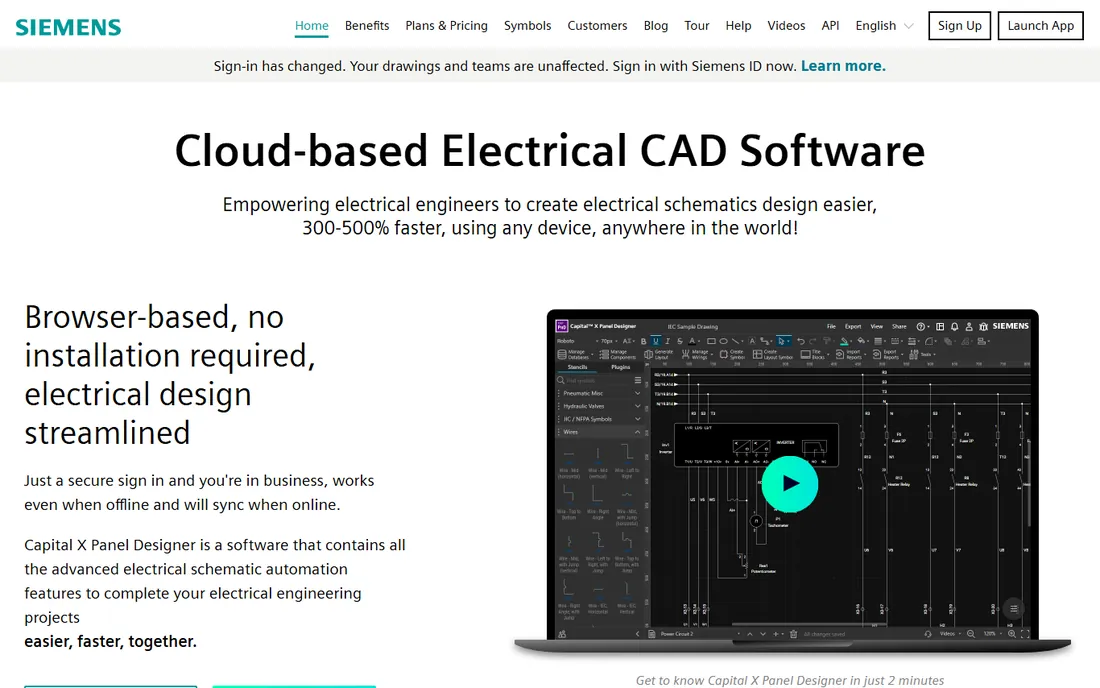
Capital X Panel Designer is the product formerly known as Electra, now part of Siemens after the acquisition of Radica Software. The rebrand matters because it signals where the product is going: deeper integration with the Siemens Xcelerator ecosystem, including Designcenter Solid Edge and Teamcenter, while keeping the cloud-native approach that made Electra distinctive.
The pitch is simplicity. It runs in a browser with no installation, works offline and syncs when reconnected, and automates the tedious parts of schematic work: intelligent numbering of symbols and wires, one-click reports for BOMs, terminal listings and panel layouts, and reusable circuit stencils the whole team can share. The vendor claims circuits can be created several times faster than manual drafting.
For small and mid-size firms, the appeal is low friction: no license servers, no IT tickets for updates, drawings accessible from any device. The trade-off is dependence on a cloud workflow and a product line still settling into its new corporate home. Worth a demo for any team frustrated by desktop CAD overhead.
What we like- Fully browser-based with offline capability and automatic sync
- Automatic symbol and wire tagging with real-time cross-referencing
- No IT overhead for installation or updates
Watch out for- Newer brand identity after the Siemens acquisition
- Cloud workflow is a shift for shops used to desktop tools
#5
SEE Electrical
Best for: Growing firms that want an easy on-ramp to electrical CAD
Visit ige-xao.com
Starting priceSee website
Free planNo
SEE Electrical, from IGE+XAO, positions itself as the electrical CAD you can actually start using this week. The interface is deliberately simple, and the three-tier lineup (Basic, Standard, Advanced) lets a small contractor buy only what it needs and upgrade without losing project data. For shops moving up from general-purpose CAD, that gentle ramp matters more than any advanced feature.
The tool covers the essentials well: schematic design, wiring diagrams, terminal and cable management, and automated documentation. The integrated environment lets you work across multiple projects and combine documents from other Windows applications through its ActiveX interface.
The catch is scale of ecosystem. SEE Electrical has fewer third-party tutorials, forum answers and integration partners than AutoCAD Electrical or EPLAN, and pricing goes through quotes rather than a public page. For a small firm that values ease of use over ecosystem depth, it is a pragmatic pick.
What we like- Designed for fast productivity with minimal training
- Three editions (Basic, Standard, Advanced) that scale with needs
- Strong on wiring diagrams and project documentation
Watch out for- Pricing handled through quotes and resellers
- Smaller community and fewer tutorials than the market leaders
#6
E3.series
Best for: Wiring, harness and control cabinet engineering
Visit zuken.com
Starting priceSee website
Free planNo

E3.series is Zuken's single-platform answer to electrical and fluid system design, and its object-oriented architecture is the selling point. Every wire, device and connection is an object in a central database, so a change in the schematic instantly reflects in the wiring diagram, the cabinet layout, the harness formboard and every report. Nothing is redrawn, nothing drifts out of sync.
The modular lineup covers the full flow: E3.schematic for circuit design, E3.cable for harnesses, E3.panel for 2D and 3D cabinet layout with automatic wire routing, and E3.fluid for hydraulic and pneumatic systems. The 2027 release added browser-based project access for production and field teams, which is a practical touch for shops where the people building panels are not the people who designed them.
Pricing is enterprise and quote-based, and the product shines brightest in automotive, aerospace and industrial equipment, where harness complexity justifies the investment. For building-services electrical work, the toolset is heavier than needed. For manufacturers of complex electrical systems, it is a top-tier choice.
What we like- Object-oriented database keeps every view consistent automatically
- Strong wire harness and panel modules with 2D and 3D
- Modular lineup scales from schematics to manufacturing
Watch out for- Enterprise pricing via quote
- Most powerful in automotive and machinery niches rather than building services
#7
KiCad
Best for: Free open-source schematic and PCB design
Visit kicad.org
Starting priceFree
Free planYes
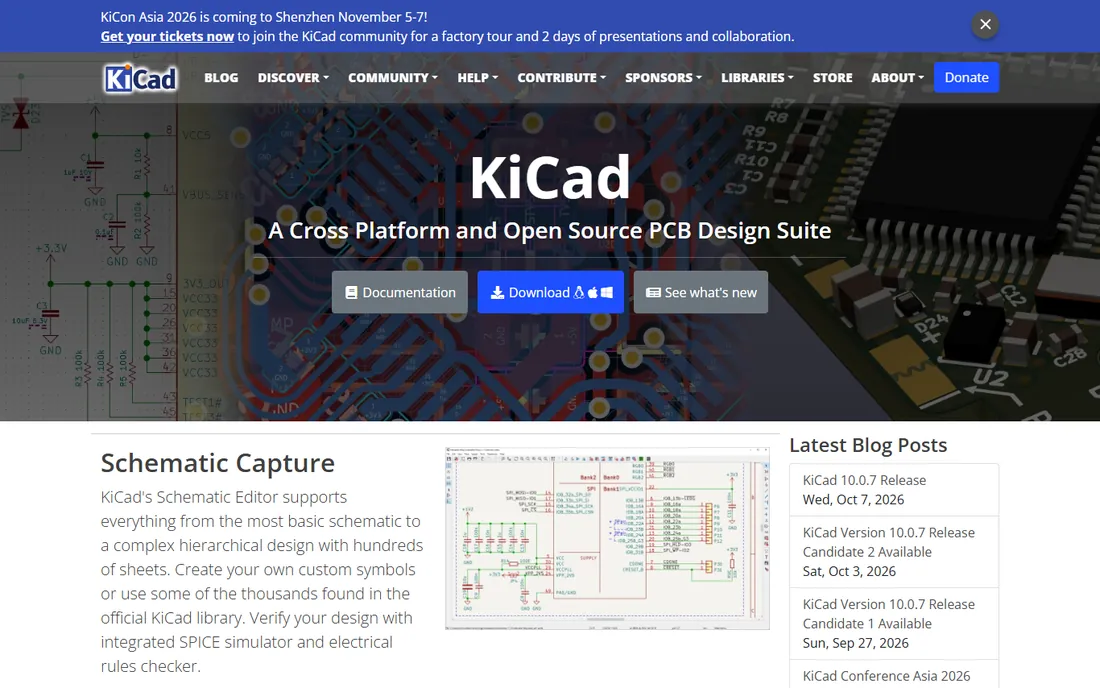
KiCad is the free tool that professionals genuinely use. It is open source, has no paid tier to upsell you to, and its schematic editor handles hierarchical designs with hundreds of sheets, backed by an integrated SPICE simulator and electrical rules checker. The 3D viewer and interactive router make it a complete electronic design package.
The scope caveat matters for this guide: KiCad is electronic design automation, built for circuit boards, not for the industrial control panels, PLC wiring and terminal plans that define electrical CAD. If your work is electronics, sensors or embedded systems, KiCad belongs on your shortlist. If you are wiring motor control centers, you need one of the tools above.
For startups, makers and electronics teams, though, the value is unmatched: professional capability at zero cost, with a community that produces tutorials for nearly everything.
What we like- Completely free and open source with no feature limits
- Professional-grade schematic editor with SPICE simulation
- Large community and extensive libraries
Watch out for- Focused on electronic circuits and PCBs, not industrial control-panel wiring
- Steeper learning curve than commercial electrical CAD
#8
EasyEDA
Best for: Free browser-based circuit design with manufacturing built in
Visit easyeda.com
Starting priceFree
Free planYes

EasyEDA takes the free electronic design concept into the browser. The schematic editor supports large designs, the library includes millions of symbols, footprints and 3D models with real-time pricing and inventory, and the standout feature is the direct path to manufacturing: order your PCBs with one click through the same platform.
Like KiCad, EasyEDA is EDA rather than industrial electrical CAD. It will not generate your control-panel terminal plans. But for electronics prototyping, IoT devices and small production runs, the combination of free design tools and integrated manufacturing is compelling.
The business model is the supply chain, not the software, which is why the design tools stay free. For a small electronics team that wants to go from schematic to physical boards without leaving the browser, EasyEDA is the fastest free path.
What we like- Free cloud-based schematic and PCB design with millions of library parts
- One-click ordering of manufactured boards
- Desktop client available for offline work
Watch out for- Electronic circuit focus rather than industrial electrical design
- Advanced team features target paying users
How we chose
We started with each vendor's own product pages, confirming the tool is live under its current name (which mattered: Electra is now Capital X Panel Designer under Siemens). We checked pricing pages and documentation for current licensing models, and where vendors do not publish prices, we say so rather than repeating third-party guesses. We compared capabilities against public reviews on G2, Capterra and engineering forums, plus community discussion among working electrical engineers, looking for evidence of real-world use in panel building, wiring and harness work. We made sure the list spans different needs: database-driven enterprise tools, accessible mid-market options, and genuinely free tools, with honest notes on where the free ones differ in scope.
What to check before you buy electrical CAD software
Electrical CAD purchases go wrong in predictable ways. A few checks up front save expensive regret.
Match the tool to your drawings, not the other way around
Industrial control-panel wiring, building-services power distribution and electronic circuit boards are different jobs. The enterprise tools here target the first, KiCad and EasyEDA the last. Buying a PCB tool for panel work (or vice versa) is the most common mismatch.
Count the library, not just the license
A tool with a deep manufacturer parts database can save weeks of building symbols and footprints. Ask vendors what ships in the box for your industry's components before comparing sticker prices.
Test multi-user workflows early
If two or more engineers will touch the same project, verify concurrent access, version control and library sharing during the trial. Database-driven tools handle this natively; file-based tools need discipline.
Budget for training and templates
The productivity gains of EPLAN or E3.series arrive after setup, not before. Plan for training time and for building your company's symbol libraries, title blocks and report templates. The free tools invert this: no cost, but you build everything yourself.
The hidden cost is always the library
Vendors compete on features, but experienced electrical engineers will tell you the real differentiator is the parts database. A tool that ships with manufacturer-specific symbols, footprints and catalog data for the components you actually buy can cut weeks off a project. A tool without them means someone on your team becomes a full-time librarian. When demoing, bring a real bill of materials from a recent job and ask the vendor to show you how many of those exact parts exist in their library. The answer tells you more than any feature checklist.
Frequently asked questions
What is the difference between electrical CAD and regular CAD?
Regular CAD draws geometry: lines, shapes and dimensions. Electrical CAD works with intelligent components that know what they are: a relay knows its coil and contacts, wires know their numbers, and the software tracks connections across pages. That intelligence enables automatic wire numbering, cross-referencing and report generation that plain CAD cannot do.
Do I need electrical CAD if I already have AutoCAD?
If you draw electrical schematics more than occasionally, yes. The Electrical toolset automates wire numbering, component tagging and report generation that takes hours to do manually in base AutoCAD. Since it is now included with an AutoCAD subscription, many firms already have it without realizing.
Is EPLAN better than AutoCAD Electrical?
They serve different priorities. EPLAN's database-driven approach gives stronger consistency and automation for panel builders and plant engineers producing complex or variant-rich projects. AutoCAD Electrical fits better for teams already standardized on Autodesk file formats and workflows. Neither is universally better; the right choice depends on your project types.
Are there free electrical CAD tools?
KiCad and EasyEDA are free and genuinely capable, but they target electronic circuit and PCB design rather than industrial control-panel wiring. For industrial electrical schematics, free options are limited, which is why this guide focuses on commercial tools with free trials where available.
How much does electrical CAD software cost?
It ranges widely. AutoCAD Electrical comes with an AutoCAD subscription at $2,095 per year. EPLAN, E3.series, SOLIDWORKS Electrical and SEE Electrical use quote-based pricing that typically lands in the thousands per seat annually. Capital X Panel Designer publishes its pricing on its site. Free tools exist but serve different design domains.
Can electrical CAD software generate bills of materials automatically?
Yes, this is one of its core advantages. Because every component in the schematic is a database object with manufacturer data, tools like AutoCAD Electrical, EPLAN and E3.series generate BOMs, wire lists, terminal plans and other reports directly from the design, updating them automatically when the design changes.
Sources we checked (10)
- https://www.autodesk.com/products/autocad/included-toolsets/autocad-electrical
- https://www.autodesk.com/solutions/autocad-subscription-faq
- https://eplan.com/
- https://www.solidworks.com/product/electrical-schematic-designer
- https://radicasoftware.com/
- https://www.ige-xao.com/en/
- https://www.zuken.com/en/product/e3series/
- https://kicad.org/
- https://easyeda.com
- https://slashdot.org/software/p/SolidWorks-Electrical-Schematics/
Is your product missing or out of date?
We review this list regularly. Vendors can request a listing, send updated pricing or ask about featured placement.

Shihab Mia · Founder, Rankite
Shihab has spent more than a decade helping SaaS and e-commerce brands grow through search. He writes Rankite's software buying guides from pricing pages, documentation and public user reviews. More about Shihab.