How we make this list: we compare pricing pages, product documentation and public user reviews. Ratings come from G2, Capterra or Trustpilot, with the date we checked them.
Key takeaways
- Adobe Photoshop is the most capable AI photo editor, with Generative Fill, Remove, and Expand, at 22.99 dollars a month on an annual plan.
- Topaz Photo is the quality king for fixing flawed shots, but its pricing changed: the standalone app now costs 39 dollars a month.
- Google Photos is the best free option, with Magic Editor, Magic Eraser, and Photo Unblur included at no cost.
- Remini is the fastest fix for old or blurry portraits, with a free tier supported by ads.
- Luminar Neo suits photographers who want one-click AI edits without a subscription, with one-time licenses available.
Quick comparison
| Tool | Best for | Starting price | Free plan |
|---|
 Adobe Photoshop Adobe Photoshop | Full creative control | $22.99 per month | Free trial |
 Adobe Lightroom Adobe Lightroom | Photo libraries and RAW | $9.99 per month | Free trial |
 Luminar Neo Luminar Neo | One-click AI edits | See website | Free trial |
 Topaz Photo Topaz Photo | Fixing flawed photos | $39 per month | No |
 Remini Remini | Old and blurry portraits | See website | Yes |
 Google Photos Google Photos | Free everyday fixes | $0 | Yes |
 Canva Canva | Social posts and fast edits | See website | Yes |
 Picsart Picsart | Mobile creative edits | $10.50 per month | Yes |
Is your product missing or out of date?
We review this list regularly. Vendors can request a listing, send updated pricing or ask about featured placement.
The best AI apps for photos
#1Adobe Photoshop
Best for: Full creative control4.6/5 on
G2 (13,426 reviews, checked Oct 2026)
Visit adobe.com
Starting price$22.99 per month
Free planFree trial
Photoshop remains the standard that every other AI photo editor is measured against. Generative Fill lets you select an area and describe what should appear there, Remove erases distractions with content-aware fill, and Expand extends a canvas beyond its original borders. The newer Harmonize feature blends a pasted subject into a scene's lighting and color.
The AI sits inside a full professional editor, so you keep layers, masks, selections, and precise color control that one-click apps cannot offer. Firefly models are built in, and Photoshop now works across desktop, web, and mobile, so edits started on a phone can finish on a computer.
The cost is 22.99 dollars a month on an annual plan, with a 7-day trial, and the learning curve is real. If you only need quick fixes, a simpler app below will save time and money. If you need precision, compositing, or print work, Photoshop is still the tool to beat.
What we like- Generative Fill, Remove, and Expand
- Layers and masks
- Firefly models built in
Watch out for- Steepest learning curve here
- Subscription-only
- Generative tools need internet
#2Adobe Lightroom
Best for: Photo libraries and RAW4.6/5 on
G2 (3,299 reviews, checked Oct 2026)
Visit adobe.com
Starting price$9.99 per month
Free planFree trial
Lightroom is the photographer's workflow app: import, organize, edit, and export thousands of photos with consistent looks. Its AI tools cover the daily grind: Denoise cleans high-ISO shots, AI masking selects skies, subjects, and backgrounds with one click, Generative Remove erases objects, and adaptive presets apply your style across a whole shoot.
The Photography plan at 9.99 dollars a month on an annual plan includes Lightroom, Lightroom Classic, Photoshop, and 20GB of cloud storage, which makes it the best value in Adobe's lineup for photographers. Lightroom Classic works offline for most editing, though generative tools need an internet connection.
The weakness is compositing. Lightroom cannot layer and blend images the way Photoshop can, and its AI culling is assisted rather than automatic. For photographers managing large libraries with consistent edits, Lightroom is the right home base.
What we like- AI masking and Denoise
- Catalogs thousands of photos
- Included in the Photography plan
Watch out for- Generative tools need internet
- Weaker compositing than Photoshop
#3Luminar Neo
Best for: One-click AI edits4.4/5 on
G2 (115 reviews, checked Oct 2026)
Visit skylum.com
Starting priceSee website
Free planFree trial
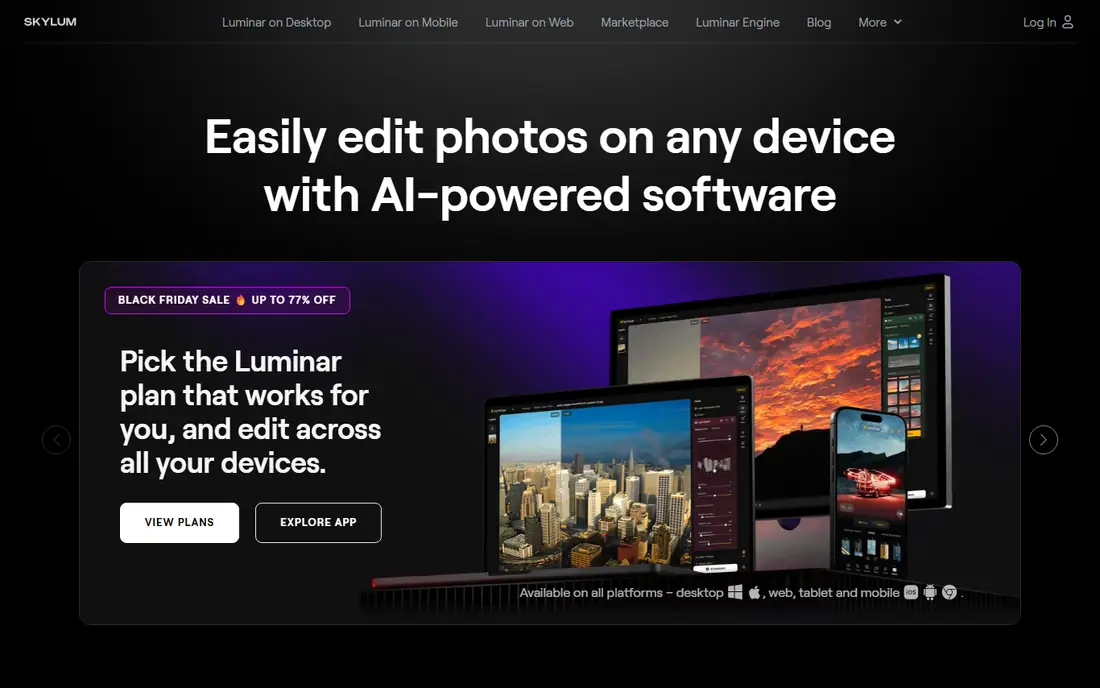
Luminar Neo from Skylum packs the widest set of one-click AI edits in a desktop app. Sky AI replaces skies with automatic lighting adjustment, GenErase removes unwanted elements and fills the gaps, GenSwap replaces objects from a text prompt, GenExpand extends borders, and Portrait AI retouches faces and skin with natural-looking results.
The appeal for many photographers is the license model. Unlike Adobe's subscription-only approach, Luminar Neo offers one-time perpetual licenses alongside subscriptions, and a 7-day full trial lets you test everything. Note that Skylum now brands the product family simply as Luminar, with Luminar on Desktop, Mobile, and Web, so check which version a license covers before buying.
Pricing is the caveat: 2026 sources list desktop licenses from 99 to 129 dollars one-time, so confirm the current price on Skylum's site. Luminar Neo cannot match Photoshop for layered compositing, but for fast, creative edits without a monthly bill, it is the strongest alternative.
What we like- Sky AI, GenErase, GenSwap, GenExpand
- One-time licenses available
- Works offline except generative tools
Watch out for- Pricing varies across sources
- No full layer compositing
- Mobile version is separate
#4Topaz Photo
Best for: Fixing flawed photos4.3/5 on
G2 (2 reviews, checked Oct 2026)
Visit topazlabs.com
Starting price$39 per month
Free planNo
Topaz Photo is the tool photographers reach for when a photo is technically flawed: noise at high ISO, motion blur, soft focus, or too-small resolution. Its models cover denoise, sharpen, upscale, face recovery, dust and scratch removal, Super Focus, and lighting and color adjustment, and it works standalone or as a Lightroom plugin.
Buyers should note a major pricing change. Topaz Photo AI used to sell as a 199 dollar one-time license, but the current homepage lists Topaz Photo at 39 dollars a month, with a Topaz Studio bundle at 399 dollars a year covering all apps, and a web version from 12 dollars a month. The old one-time price no longer applies, so budget the subscription.
Two honest caveats from 2026 reviews: processing is slow on older machines, and default settings can give skin a plastic look on portraits, so dial sliders back. A preview-only trial lets you test models before buying, but exports need a paid plan. If you regularly rescue flawed shots, Topaz is still the quality leader.
What we like- Best denoise, sharpen, and upscale models
- Face recovery
- Works standalone or as a plugin
Watch out for- New subscription pricing is much higher than the old one-time license
- Slow on older machines
#5Remini
Best for: Old and blurry portraits4.6/5 on
G2 (13 reviews, checked Oct 2026)
Visit remini.ai
Starting priceSee website
Free planYes
Remini is the simplest app on this list: upload a photo, tap one button, and get a sharper, cleaner version. Its Unblur and Sharpener removes motion blur and focus issues, Old Photos Restorer repairs faded and damaged prints, Denoiser cleans grain, Face Enhancer adds facial detail, and Image Enlarger upscales up to 2x. A video enhancer applies the same treatment to clips.
The scale is remarkable: the homepage cites 100 million monthly active users and 5 billion enhanced photos and videos. That popularity comes from the free tier, which offers limited daily enhancements in return for viewing ads, while paid plans remove caps and ads. Paid pricing varies by user, plan, and platform, with 2026 sources listing Pro from around 5 dollars a month, so confirm the price in your app store.
The tradeoff is control. Remini gives you one-tap results, not sliders, and heavy enhancement can over-smooth skin. For restoring family photos or rescuing a blurry phone shot in seconds, nothing here is faster.
What we like- One-tap enhancement
- Excellent old photo restoration
- Video enhancement too
- Huge user base
Watch out for- Paid pricing varies by platform
- Free tier has daily caps and ads
- Results can look over-smoothed
Starting price$0
Free planYes
Google Photos is the best free AI photo app, because most readers already have it. Magic Editor lets you reposition subjects, resize them, and change skies with a few taps. Magic Eraser removes distractions, Photo Unblur sharpens blurry shots, and a newer ask-to-edit feature applies changes from a typed description. AI organization groups faces, pets, places, and documents automatically, and search understands plain language like "best photo from each national park."
Every Google Account includes 15GB of storage shared across Photos, Gmail, and Drive, and the editing tools themselves are free. The catch is storage: saving unlimited photos at original quality needs a paid Google One plan, and some AI features are limited by device, region, or account language settings.
Google Photos will not replace Photoshop for serious editing, but for everyday phone photos it is the fastest, cheapest path to good results, and it is already installed on most Android phones and free on iPhone.
What we like- Magic Editor, Magic Eraser, Photo Unblur free
- 15GB storage included
- Best search and organization
Watch out for- Unlimited original-quality saves need a paid Google One plan
- AI features vary by device and region
#7Canva
Best for: Social posts and fast edits4.7/5 on
G2 (7,678 reviews, checked Oct 2026)
Visit canva.com
Starting priceSee website
Free planYes
Canva is the design app most non-designers already know, and its AI photo tools are built for speed. Magic Edit changes a selected area from a typed prompt, Magic Eraser removes objects, background remover cuts out subjects in one click, and Magic Expand extends images for different social formats. Thousands of templates mean a finished post takes minutes, not hours.
The free plan covers core AI tools with limits, and Pro adds full access, with 2026 sources listing it around 13 to 15 dollars a month. Canva's homepage currently shows an unsupported-browser notice to some browsers, a known quirk also seen in earlier checks, but the service itself is fully available in current Chrome, Firefox, Safari, and Edge and on mobile apps.
The limit is quality depth. Canva cannot produce the full-resolution, color-critical output a print photographer needs, and its edits are optimized for screens. For social posts, thumbnails, and marketing graphics, it is the fastest AI photo workflow here.
What we like- Magic Edit and Magic Eraser
- Huge template library
- Easiest social sizing
Watch out for- Homepage shows an unsupported-browser notice to some browsers
- Not for full-resolution professional work
#8Picsart
Best for: Mobile creative edits4.5/5 on
G2 (797 reviews, checked Oct 2026)
Visit picsart.com
Starting price$10.50 per month
Free planYes
Picsart has grown from a mobile photo editor into a full AI creative platform, and its homepage now leads with image, video, and audio generation across 180 plus AI models. For photo editing specifically, it still offers a one-tap image enhancer, advanced background and object removal, retouching tools, and bulk editing of up to 50 images at once on Pro.
The homepage lists Pro at 10.50 dollars a month billed yearly, down from 15 dollars, with a free tier that includes core editing tools. Pro adds all photo and video editing features, 100GB of cloud storage, millions of stock photos and video clips, and support for multiple brand kits, which suits small businesses making consistent social content.
The tradeoff is focus. Picsart's current platform pushes video generation, AI agents, and team workflows, which can feel like overkill if you only want photo edits. But for mobile creators who want effects, stickers, templates, and AI generation in one app, Picsart is the most complete free-to-start option.
What we like- 180 plus AI models
- One-tap enhancer
- Bulk editing up to 50 images
- Free tier included
Watch out for- New platform focus may overwhelm pure photo editors
- Best features need Pro
How we chose
We compared AI photo apps with real photo editing features, published or comparison-confirmed pricing, and homepages we opened on 27 October 2026 to confirm they load and belong to the vendor. Lensa was excluded because its homepage could not be verified in this session and was replaced by Picsart, whose homepage and pricing were confirmed. Canva was kept on its unsupported-browser notice, a known display quirk, since the service is available in current browsers. Prices change often, so confirm them on each vendor page before buying. We did not claim hands-on testing.
What to check before you pick
Start from the job, not the app. Fixing blurry or noisy photos points to Topaz or Remini. Managing thousands of RAW files points to Lightroom. Making social posts points to Canva or Picsart. Buying the most powerful editor for a one-click job wastes money and time.
Next, test two or three apps on the same photo before committing. Compare skin texture, edges, and text, since AI enhancement can over-smooth faces or invent detail that was never there. A free tier or trial is enough for this test on every app here except Topaz, whose trial is preview-only.
Finally, check the license model. Subscriptions like Photoshop and Topaz cost more over years than one-time licenses like Luminar Neo, but subscriptions include updates and cloud features. If you edit rarely, a free tier plus an occasional one-time purchase beats any monthly bill.
Frequently asked questions
What is the best free AI photo app?
Google Photos, for most people. Magic Editor, Magic Eraser, and Photo Unblur are free, and the app is already installed on most phones. Remini is the best free option for restoring old portraits, and Canva and Picsart offer strong free tiers for social edits.
Is Topaz Photo still a one-time purchase?
No. Topaz switched from a 199 dollar one-time license to subscription pricing in late 2025. The current homepage lists Topaz Photo at 39 dollars a month, with a Studio bundle at 399 dollars a year and a web version from 12 dollars a month.
Can AI photo apps really fix a blurry photo?
Sometimes. AI sharpening and face recovery can rescue mild blur and noise convincingly, and Topaz and Remini lead here. Severe blur, where detail never existed, cannot be truly recovered: the AI invents plausible detail, which can look wrong on close inspection.
Do I need Photoshop if I use Luminar Neo or Lightroom?
Not for most photo work. Luminar Neo covers creative one-click edits, and Lightroom covers library management and RAW editing. Photoshop is needed for layered compositing, precise retouching, and print work that the others cannot do.
Are AI-edited photos allowed on social media and stock sites?
Generally yes for personal and social use, but stock agencies and contests often require disclosure of AI edits or generative content, and some ban fully AI-generated images. Check the platform's rules before submitting AI-edited work commercially.
Which app is best for old family photos?
Remini, for speed and simplicity: one tap restores faded, blurry prints. Topaz Photo gives more control and higher-quality output for prints, especially at large sizes, but costs more and takes longer per photo.
Sources we checked (7)
- https://adobe.com
- https://skylum.com
- https://topazlabs.com
- https://remini.ai
- https://photos.google.com
- https://canva.com
- https://picsart.com
Is your product missing or out of date?
We review this list regularly. Vendors can request a listing, send updated pricing or ask about featured placement.

Shihab Mia · Founder, Rankite
Shihab has 5+ years in B2B and SaaS SEO. He writes Rankite's software buying guides from pricing pages, documentation and public user reviews. More about Shihab.