How we make this list: we compare pricing pages, product documentation and public user reviews. Ratings come from G2, Capterra or Trustpilot, with the date we checked them.
Key takeaways
- npm suits teams that want the default, most compatible option, since it ships with Node.js and works everywhere without extra setup.
- Yarn suits teams that want mature workspace and caching features, while Bun suits teams that want maximum install and run speed.
- Deno suits teams that want a secure, TypeScript-first runtime with built-in tooling, though its package ecosystem differs from npm.
- Rush, Lerna, Nx, and Turborepo suit monorepos, with Rush and Lerna managing versions and publishing, and Nx and Turborepo speeding up task runs.
Quick comparison
| Tool | Best for | Starting price | Free plan |
|---|
 npm npm | Default Node.js choice | Free | Yes |
 Yarn Yarn | Mature workspaces | Free | Yes |
 Bun Bun | Fastest installs | Free | Yes |
 Deno Deno | Secure TypeScript runtime | Free | Yes |
 Rush Rush | Large monorepos | Free | Yes |
 Lerna Lerna | Versioning and publishing | Free | Yes |
 Nx Nx | Smart monorepo tasks | Free | Yes |
 Turborepo Turborepo | Fast cached task runs | Free | Yes |
Is your product missing or out of date?
We review this list regularly. Vendors can request a listing, send updated pricing or ask about featured placement.
The best alternatives to pnpm
Starting priceFree
Free planYes

npm is the default answer for teams leaving pnpm, since it needs no extra install and every tutorial, CI template, and hosting platform supports it. Its registry is the largest JavaScript package collection available, and workspaces now cover basic monorepo needs without extra tools. For teams that value compatibility over speed, npm removes a whole class of setup problems.
Speed and disk use are the gaps versus pnpm. npm installs take longer on large projects, and its node_modules layout duplicates packages across projects, using more disk. Lockfile churn and occasional install quirks also frustrate teams used to pnpm strictness. For standard projects where compatibility matters most, npm remains the safe choice.
What we like- Ships with Node.js
- Largest registry
- Works everywhere
Watch out for- Slower installs
- Uses more disk than pnpm
Starting priceFree
Free planYes

Yarn suits teams that want mature workspace tooling with a long track record. Workspaces, selective dependency resolutions, and offline caching are well proven, and Yarn Berry adds Plug-n-Play mode, which skips node_modules entirely for faster, stricter installs. Many large companies run Yarn in production, so its rough edges are well documented.
Version confusion is the main drawback. Yarn Classic and Yarn Berry differ enough that tutorials, flags, and configs do not always transfer, and Plug-n-Play breaks tools that expect a node_modules folder. Teams should pick one Yarn line and standardize on it. For workspace-heavy projects that want a proven tool, Yarn is a strong pnpm alternative.
What we like- Stable workspaces
- Plug-n-Play option
- Strong caching
Watch out for- Two major versions confuse
- Plug-n-Play breaks some tools
Starting priceFree
Free planYes
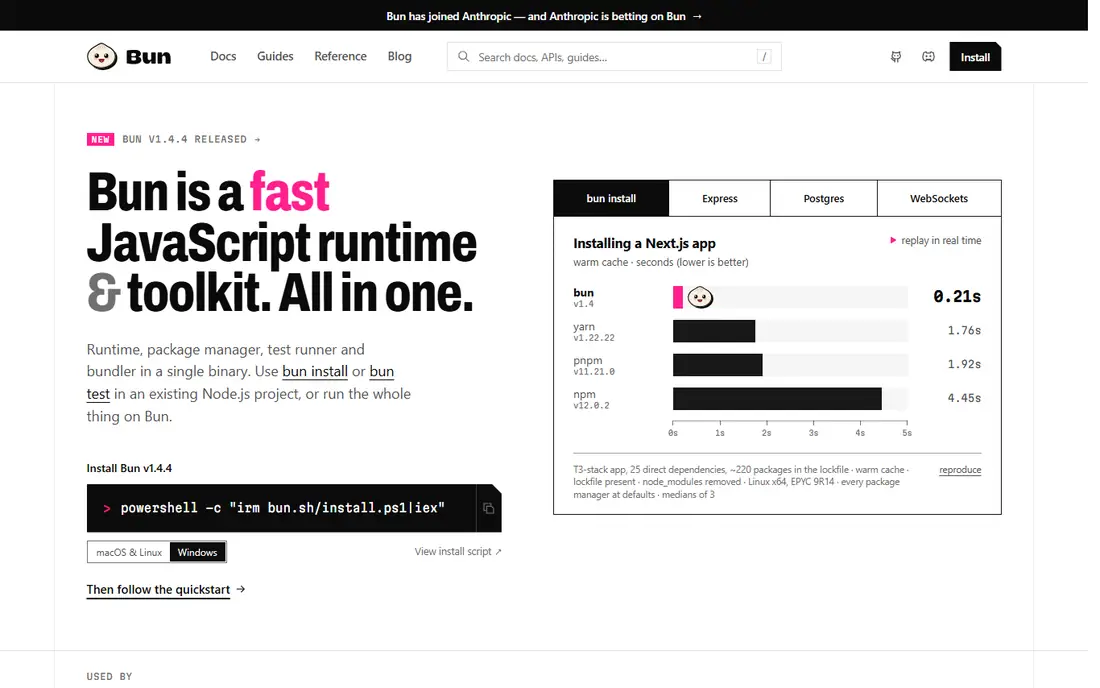
Bun is the speed pick, and its install times embarrass every rival on this list. As a fast JavaScript runtime with a package manager built in, Bun installs dependencies quickly, runs code quickly, and bundles a bundler, test runner, and transpiler in one binary. Its npm compatibility covers most packages, so many projects switch with little change.
Youth is the caveat. Bun edge cases still differ from Node.js in places, and some native or unusual packages need workarounds. Production teams should test their full suite before committing, especially for server workloads with exotic dependencies. For speed-focused teams that accept some early-adopter risk, Bun is exciting.
What we like- Very fast installs and runs
- Built-in bundler and tests
- Npm compatible
Watch out for- Younger ecosystem
- Some Node.js edge cases differ
Starting priceFree
Free planYes
Deno suits teams that want security and TypeScript built in rather than bolted on. It runs TypeScript directly, requires explicit permissions for file, network, and environment access, and bundles formatting, linting, and testing without extra installs. Its standard library covers common needs, and npm compatibility has improved enough that many npm packages now work.
Ecosystem difference is the limit. Deno package habits differ from npm, some packages need compatibility shims, and hiring Deno developers is harder than hiring Node.js developers. Teams building new TypeScript services from scratch benefit most, while teams with large npm codebases face migration work. For secure, modern TypeScript services, Deno is a principled choice.
What we like- TypeScript by default
- Secure permissions
- Built-in tools
Watch out for- Ecosystem differs from npm
- Some npm packages need shims
Starting priceFree
Free planYes
Rush, from Microsoft, suits very large monorepos where many packages and teams share one repository. It enforces version policies, installs with pnpm or npm under the hood, and runs phased builds that respect dependency order across hundreds of packages. Large enterprises use Rush to keep sprawling JavaScript codebases consistent and releasable.
Setup complexity rules it out for small repos. Rush configuration takes real effort, and its conventions suit organizations with dedicated platform teams. Small and mid-size monorepos will find Nx or Turborepo simpler. For huge monorepos, Rush governance is worth its learning curve.
What we like- Handles huge monorepos
- Strict version policies
- Phased builds
Watch out for- Complex setup
- Overkill for small repos
Starting priceFree
Free planYes
Lerna suits teams whose main monorepo pain is versioning and publishing many packages together. It versions packages independently or together, publishes them in dependency order, and runs scripts across packages with filtering. Modern Lerna uses Nx for task running, which improves speed over older versions.
Activity has cooled compared with Nx and Turborepo, and Lerna overlaps heavily with Nx, so new teams often pick Nx directly. Lerna still fits teams that already know it or that need its publishing workflow specifically. For versioning-led monorepos, Lerna remains a practical, familiar tool.
What we like- Manages versions across packages
- Simplifies publishing
- Nx-powered tasks
Watch out for- Less active than before
- Overlaps with Nx
Starting priceFree
Free planYes
Nx suits monorepos that need smart task running, not just package installation. It runs only tasks affected by a change, caches results locally and remotely, and provides generators for consistent new packages and apps. That affected-only logic saves large teams hours of CI time daily, which is why Nx pairs well with npm, Yarn, or pnpm as the underlying installer.
Learning curve and conventions are the costs. Nx adds its own project structure and mental model, and small repos gain little from it. Teams should adopt Nx when CI time and consistency matter more than simplicity. For growing monorepos, Nx is often the highest-value addition after the package manager itself.
What we like- Affected-only task runs
- Caching
- Code generators
Watch out for- Learning curve
- Adds its own conventions
Starting priceFree
Free planYes
Turborepo suits teams that want faster monorepo builds with minimal setup. It caches task outputs locally and remotely, runs tasks in dependency order, and works with npm, Yarn, or pnpm underneath, so switching to Turborepo does not mean switching installers. Configuration is a single JSON file for most repos, which keeps adoption light.
It is a task runner, not a package manager, so it does not replace pnpm installation, disk efficiency, or strictness on its own. Remote caching extras also lean toward Vercel, though self-hosting is possible. For teams that keep their installer and just want faster builds, Turborepo is the simplest upgrade.
What we like- Simple setup
- Remote caching
- Works with npm, Yarn, and pnpm
Watch out for- Task runner only, not a package manager
- Vercel-centric extras
How we chose
We compared JavaScript package managers and monorepo tools on install speed, disk use, workspace support, and ecosystem fit, using vendor documentation and public benchmarks. pnpm users were the reference buyer, so each pick was judged on how it replaces pnpm strengths: speed, strictness, and workspace handling. Task runners were included only where their role was stated plainly, so readers do not mistake them for installers. Price played no role here, since every tool on this list is free and open source, so the real costs are learning time, CI time, and migration effort.
How to pick the right replacement
Start from your repo shape
Single repos should weigh npm, Yarn, or Bun, while monorepos should add Nx or Turborepo on top of an installer. Rush suits only the largest monorepos with governance needs. That shape-first choice prevents buying monorepo tooling for a repo that will never need it.
Test install and CI time on your real repo
Measure clean install time, disk use, and CI task time with your actual dependencies. Benchmarks on sample repos hide the slow packages and scripts that dominate real projects. Run the test on CI hardware, not just a fast laptop, since CI machines often run slower and colder.
Check strictness needs before switching
pnpm strictness prevents phantom dependencies, and looser installers can reintroduce them. If your team values strictness, keep it through lint rules or a stricter tool, rather than losing it silently. Audit imports after switching, since phantom imports often surface only when a package version changes.
Frequently asked questions
Is npm slower than pnpm?
Yes, npm installs are generally slower and use more disk than pnpm, since pnpm shares packages through a content-addressable store. npm wins on compatibility and zero setup, which matters more for many teams. For large monorepos, the disk and time differences grow large enough to reconsider, so measure on your own repo. Small projects rarely notice the difference at all, so default to npm there. Cache configuration can narrow the gap on repeated installs. Disk cleanup scripts help too, since old caches grow over time. Schedule cleanups monthly to avoid slow disks. Monitor disk use after each major dependency update. Alert the team when cache size passes a threshold. Review cache policy yearly as projects grow. Document cleanup steps for new developers. Automate cleanups where safe. Test automation on a staging machine first.
Can Bun replace pnpm completely?
Bun can replace pnpm as installer and runtime for many projects, thanks to npm compatibility. Test native packages and edge cases first, since Bun behavior still differs from Node.js in places. Pay special attention to native modules and long-running server processes, where differences surface most often. Run your full test suite under Bun before any production switch. Monitor error rates closely during the first weeks after switching. Keep a rollback plan ready in case edge cases appear. Document every difference you find during testing. Share those findings with the whole team.
What is the difference between Nx and Turborepo?
Both speed up monorepo tasks with caching, but Nx adds generators, affected analysis, and a broader plugin system, while Turborepo focuses on simple, fast task running. Nx suits larger, more structured monorepos. Turborepo suits teams that want caching with minimal new conventions, so pick based on how much structure your repo needs. Both work with npm, Yarn, or pnpm underneath, so the installer choice stays separate. Remote caching setup differs, so compare that cost too. Trial both on your largest package before committing.
Does Deno use npm packages?
Deno supports many npm packages through compatibility layers, and it can import npm specifiers directly. Some packages still need shims or alternatives, so test your dependency list before migrating.
Should small projects use Rush or Lerna?
No, small projects gain little from Rush or Lerna and pay setup costs instead. npm workspaces or Yarn workspaces cover small monorepos well, with Nx or Turborepo added only when task time grows.
Sources we checked (8)
- https://www.npmjs.com
- https://yarnpkg.com
- https://bun.sh
- https://deno.com
- https://rushjs.io
- https://lerna.js.org
- https://nx.dev
- https://turborepo.dev
Is your product missing or out of date?
We review this list regularly. Vendors can request a listing, send updated pricing or ask about featured placement.

Shihab Mia · Founder, Rankite
Shihab has 5+ years in B2B and SaaS SEO. He writes Rankite's software buying guides from pricing pages, documentation and public user reviews. More about Shihab.