How we make this list: we compare pricing pages, product documentation and public user reviews. Ratings come from G2, Capterra or Trustpilot, with the date we checked them.
Key takeaways
- Bitdefender Total Security is the best overall pick, with top lab scores, a light client and a $59.99 first year price for 5 devices.
- Norton 360 Deluxe suits families that want every extra, including VPN, cloud backup and parental controls, from $49.99 for the first year.
- Avast One Free is the strongest free option, with the same core engine as the paid version at no cost.
- McAfee+ is the pick for households with many devices, since its top plans cover unlimited devices.
- No antivirus product guarantees complete protection, so keep backups and system updates current alongside any tool here.
Quick comparison
Is your product missing or out of date?
We review this list regularly. Vendors can request a listing, send updated pricing or ask about featured placement.
The best antivirus software
Starting price$59.99 first year (5 devices)
Free planYes
Bitdefender is the reference point everything else gets measured against. In AV-Comparatives February to May 2026 real world testing it blocked 99.5% of attacks, and AV-TEST gave it perfect 6/6/6 marks for protection, performance and usability. Independent reviewers consistently find it the lightest client of the big names, which matters if your home computer is a few years old and already feels slow.
The catch is the upsell structure. The bundled VPN caps at 200 MB a day per device, and the $59.99 first year price rises at renewal. There is a limited free edition if you want the engine without the suite. For most home users who want to pay once and stop thinking about security, this is the safest recommendation in the list.
What we like- Top lab scores with 99.5% blocked in AV-Comparatives testing
- Famously light on system resources
- Five devices covered on every plan
Watch out for- Bundled VPN limited to 200 MB per day unless you upgrade
- Renewal price jumps after year one

#2Norton 360 Deluxe
Best for: Families wanting every extra4.4/5 on
Capterra (4,462 reviews, checked Oct 2026)
Visit norton.com
Starting price$49.99 first year (5 devices, then $124.99)
Free planFree trial
Norton 360 Deluxe bundles the most extras of any suite here. Beyond antivirus, you get an unlimited VPN, 50 GB of cloud backup, a full password manager, advanced parental controls and dark web monitoring, plus a virus protection promise that offers a refund if a Norton technician cannot remove an infection. For a family with five devices and children online, that bundle replaces several separate subscriptions.
The price math needs attention. Deluxe costs $49.99 for the first year and renews at $124.99, a jump that surprises buyers who do not set a renewal reminder. The client is also busier than Bitdefender or ESET, with more prompts and features to manage. If you will actually use the VPN, backup and parental controls, Deluxe is good value. If you only need malware protection, a lighter tool will serve you better.
What we like- Unlimited VPN with no data caps
- 50 GB secure cloud backup included
- Dark web monitoring and parental controls
Watch out for- Renewal price more than doubles after year one
- Suite can feel heavy with upsell prompts
Starting price$39.99 first year
Free planFree trial
McAfee+ solves a specific household problem: too many devices to count. While most suites cap coverage at five or ten devices, McAfee top plans cover unlimited devices, so phones, tablets, laptops and a smart TV can all sit under one subscription. Its mobile apps are among the best in this list, with scam detection, secure VPN and identity monitoring that feel designed for phones first.
Lab scores are strong but not class leading, trailing Bitdefender and Norton by a small margin in recent AV-Comparatives testing. That gap is unlikely to matter for a careful user, but a buyer choosing purely on detection should pick Bitdefender. For a large household that has lost count of its devices, McAfee unlimited coverage is the deciding feature.
What we like- Unlimited device coverage on top plans
- Strong mobile apps
- Identity monitoring and scam detection included
Watch out for- Malware detection scores trail Bitdefender and Norton slightly
- Renewal pricing is higher than the first year
Starting priceFree (paid plans from $49.99 first year)
Free planYes
Avast One Free is the best free antivirus available, and the reason is simple: it uses the same real time engine as the paid version, with top AV-TEST marks and a 99.3% block rate in AV-Comparatives testing. The modular app lets you switch on antivirus, ransomware protection, breach alerts and cleanup separately, so you are not forced into features you do not want. For a single PC user on a tight budget, it is hard to justify paying before trying this first.
Paid plans from $49.99 for the first year add a full VPN, premium cleanup and anti tracking, and the free app will remind you of those gaps. Some users find those prompts annoying, though they can be dismissed. If you want free protection without a trial clock, start with Avast One and upgrade only if you need the VPN or cleanup tools.
What we like- Strongest free tier with the same real time engine as paid
- Modular app where you switch on only the extras you want
- Excellent lab scores
Watch out for- Paid plans add VPN, cleanup and anti tracking that free users may miss
- Upsell prompts for paid features appear in the free app

#5
ESET Home Security Premium
Best for: Lightweight protection for gamers
Visit eset.com
Starting price$29.99 per year
Free planFree trial
ESET has long been the choice of users who notice every frame rate drop and every background process. Its client is famously light, with minimal impact on gaming and older hardware, while still earning strong lab scores and very few false positives. The interface is clean and technical without being intimidating, and settings are easy to find for users who like control.
The trade off is extras. ESET Home Security Premium covers antivirus, firewall, safe banking and device protection well, but it does not bundle the same VPN, backup and identity suite as Norton at a similar price, and identity protection requires the Ultimate tier. For a gamer or a technical user who values speed and quiet operation over bundles, ESET is the right call.
What we like- Very small system footprint, ideal for gaming
- Strong detection with few false positives
- Clean interface without clutter
Watch out for- Fewer bundled extras than Norton or Bitdefender
- Identity features sit on higher tiers
Starting priceSee website
Free planYes
Malwarebytes built its name as the cleanup tool people run after an infection, and Premium turns that engine into always on protection. It is particularly good at adware, potentially unwanted programs and browser based threats that traditional antivirus sometimes lets through. The interface is deliberately simple, with few settings to get wrong, which suits users who want protection without a dashboard full of features.
The free version is an on demand scanner only, so real time protection, web blocking and ransomware layers require Premium. Published comparisons put Premium around $59.99 per year for one device, with family and bundle pricing varying, so check the vendor pricing page for your device count. As a second opinion scanner alongside another antivirus, the free version remains useful even if you buy a different suite.
What we like- Excellent at removing infections other tools miss
- Simple interface with little to configure
- Free version works as a second opinion scanner
Watch out for- Full real time protection requires the paid version
- Fewer suite extras than larger rivals
Starting price$29.95 per year
Free planFree trial
Trend Micro Maximum Security is the easiest suite in this list for a beginner to live with. Installation takes minutes, the interface uses plain language, and features like Pay Guard (a secured browser for banking) and social media privacy checks address the scams beginners actually encounter. It covers Windows, Mac, Android and iOS, with parental controls on family plans.
Performance is the compromise. Trend Micro slows full system scans and some everyday tasks more than ESET or Bitdefender in lab performance testing, though most users will not notice on a modern PC. Technical users may also miss the granular controls ESET offers. For a parent buying protection for a family PC, or a first time buyer who wants simplicity over tuning, Trend Micro is a safe and affordable pick.
What we like- Very easy setup and interface for beginners
- Good web and social media protection
- Pay Guard for safer online banking
Watch out for- System impact is higher than ESET or Bitdefender
- Fewer advanced controls for technical users
Starting price$19 first year (4 devices)
Free planYes
TotalAV wins on first year price alone: $19 for four devices undercuts every other paid suite here, and the bundle includes real time protection, a VPN, ad blocking, password vault and device tune up tools. For a budget buyer covering a small household, that entry price is genuinely hard to ignore, and the free version offers a basic scan to test the interface.
The cautions are renewal pricing and reputation. Renewal rates are much higher than the first year figure, so the long term cost is closer to rivals, and independent lab coverage is thinner than for Bitdefender or Norton. Support reviews are mixed. TotalAV suits a price sensitive buyer who will set a renewal reminder and shop around in year two, rather than someone who wants a set and forget suite.
What we like- Cheapest first year price in this list
- Covers four devices on the entry plan
- Includes VPN, ad blocking and system tune up tools
Watch out for- Renewal price rises sharply after year one
- Lab scores and support draw mixed reviews
Starting price$34.99 first year (1 device)
Free planNo
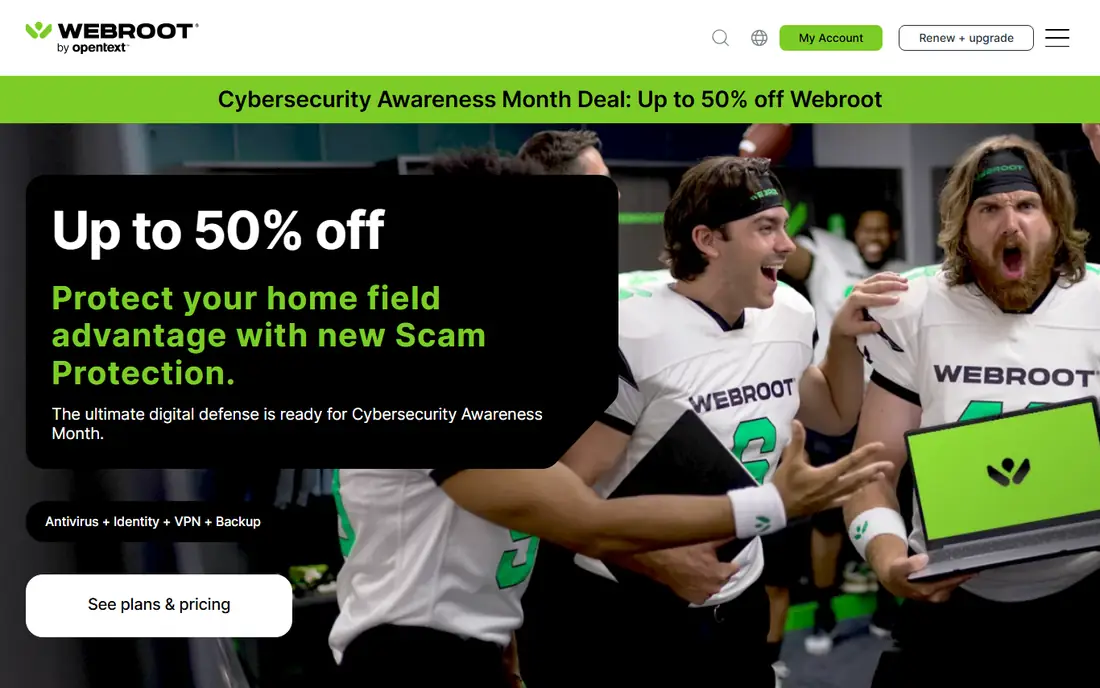
Webroot takes a cloud first approach that makes it the smallest antivirus here. Most threat intelligence lives in the cloud, so the local client is tiny, installs in seconds and runs scans far faster than traditional suites. That design is a real benefit for old PCs, Chromebooks and low spec laptops where a heavy suite would drag performance down. Its homepage pricing starts at $34.99 for the first year for one device.
The trade off is breadth. Webroot covers antivirus, firewall, web threat blocking and identity features on higher tiers, but it does not bundle the same VPN, backup and parental suite as Norton, and there is no free plan to try first. For an old PC that needs protection without slowing down, Webroot is the best fit. For a modern multi device household, a fuller suite offers more for a similar price.
What we like- Tiny client that installs in seconds and scans very fast
- Cloud based intelligence keeps the local footprint small
- Good for old or low spec PCs
Watch out for- No free plan
- Fewer features than full suites at a similar price
How we chose
We compared vendor pricing pages, independent lab results from AV-TEST and AV-Comparatives, product documentation and public reviews, and we opened each homepage to confirm the product exists and matches its name. We favored tools with recent lab scores over marketing claims, and we mixed free, budget and full suite options so different households are covered. Prices reflect published pages and comparison sources checked in October 2026, and first year prices are labeled as such because renewal prices are usually higher.
How to pick the right antivirus
Start with your device count and your computer age. A single modern PC with a careful user may be fine with free Avast One or built in Windows Defender, while a five device family benefits from Bitdefender or Norton. An old or low spec PC should steer toward Webroot or ESET, where the client footprint matters more than bundled extras. A household with more than ten devices should look at McAfee unlimited coverage before buying multiple five device licenses.
Mind the renewal price, not just the first year
Almost every paid suite discounts year one heavily and renews at two to three times that price. Norton Deluxe jumps from $49.99 to $124.99, Bitdefender rises after $59.99, and TotalAV renewal is far above its $19 entry price. Set a calendar reminder a month before renewal, check whether a new customer deal beats the renewal rate, and cancel auto renewal if you plan to switch. The cheapest first year deal is rarely the cheapest two year deal.
What actually protects you beyond antivirus
Antivirus is one layer, not a complete shield. Keep your operating system and browser updated, use a password manager with unique passwords, turn on two factor authentication for email and banking, and keep an offline or cloud backup of photos and documents. Phishing and scam messages now cause more losses than classic viruses, so a tool with scam detection (Norton, McAfee, Webroot) adds value beyond malware blocking. No product in this list can guarantee protection against every new threat, and any vendor claiming otherwise should be treated with skepticism.
Frequently asked questions
Do I still need antivirus if I have Windows Defender?
Windows Defender is a capable free baseline, scoring 99.0% blocked in AV-Comparatives February to May 2026 testing, and it may be enough for a careful user on one PC. Paid tools add extras Defender lacks, such as VPN, password management, parental controls, identity monitoring and cross device coverage. If you bank, shop and share devices across a family, a paid suite closes gaps Defender leaves open.
What is the best free antivirus software?
Avast One Free is the strongest free option, with the same core engine as its paid version and top lab scores. Microsoft Defender, built into Windows, is the other credible free choice and requires no install. Free tools cover malware well but usually lack a full VPN, backup and identity monitoring, so upgrade if those features matter to you.
How many devices does one antivirus license cover?
Coverage varies widely. Bitdefender and Norton Deluxe cover five devices, ESET and Trend Micro vary by plan, TotalAV entry covers four, and McAfee top plans cover unlimited devices. Count every PC, Mac, phone and tablet you want protected, including family members, before choosing a plan, since buying a second license often costs more than stepping up one tier.
Why does the renewal price jump so much?
Antivirus vendors discount the first year to win new customers, then renew at the standard rate. The jump is normal across the industry, but it catches buyers who assume the first year price continues. Check the renewal price on the pricing page before buying, set a reminder before renewal, and compare a fresh deal against renewing.
Does antivirus slow down my computer?
Modern antivirus has a small impact on a current PC, but the effect varies by vendor and by task. Bitdefender and ESET are consistently the lightest in lab performance testing, while heavier suites can slow full scans and older machines more noticeably. If your PC is old, choose Webroot or ESET, schedule full scans overnight, and avoid running two real time antivirus products at once.
Can antivirus protect against phishing and scams?
Yes, up to a point. Modern suites block known phishing sites, scan links and messages, and warn about scam calls and texts, with Norton, McAfee and Webroot offering dedicated scam features. No tool catches every new scam, especially AI written messages that look personal. Treat unexpected payment requests, urgent account warnings and too good offers with skepticism, and verify through a separate channel before acting.
Sources we checked (9)
- https://www.bitdefender.com/pricing
- https://www.norton.com/pricing
- https://www.mcafee.com/pricing
- https://www.avast.com/pricing
- https://www.eset.com/pricing
- https://www.malwarebytes.com/pricing
- https://www.trendmicro.com/pricing
- https://www.totalav.com/pricing
- https://www.webroot.com/pricing
Is your product missing or out of date?
We review this list regularly. Vendors can request a listing, send updated pricing or ask about featured placement.

Shihab Mia · Founder, Rankite
Shihab has 5+ years in B2B and SaaS SEO. He writes Rankite's software buying guides from pricing pages, documentation and public user reviews. More about Shihab.
 Bitdefender Total Security
 McAfee+
 Avast One
 Malwarebytes Premium
 Trend Micro Maximum Security
 TotalAV
 Webroot