How we make this list: we compare pricing pages, product documentation and public user reviews. Ratings come from G2, Capterra or Trustpilot, with the date we checked them.
Key takeaways
- Opencode is an open source terminal based AI coding agent, so alternatives split between terminal agents and editor based assistants.
- Claude Code and OpenAI Codex lead on terminal agents, while Cursor and Windsurf lead on editor based AI coding.
- Aider and Continue suit developers who want open, model flexible tools, while Cline suits VS Code users who want an agent in the editor.
- Model choice matters, since the same agent performs differently with different models, and API costs follow model pricing.
- Test agents on your own codebase, since benchmark scores rarely predict how an agent handles your repo, tests, and conventions.
Quick comparison
| Tool | Best for | Starting price | Free plan |
|---|
 Claude Code Claude Code | Terminal AI coding agent | See website | Free trial |
 Cursor Cursor | Editor based AI coding | See website | Free trial |
 Windsurf Windsurf | Editor based AI coding | See website | Free |
 Aider Aider | Terminal pair programming | Free | Free |
 Continue Continue | Open editor AI assistant | Free | Free |
 Cline Cline | VS Code AI agent | Free | Free |
 OpenAI Codex OpenAI Codex | Terminal and cloud agent | See website | Free trial |
 Zed AI Zed AI | Fast editor AI features | See website | Free trial |
Is your product missing or out of date?
We review this list regularly. Vendors can request a listing, send updated pricing or ask about featured placement.
The best opencode alternatives
#1Claude Code
Best for: Terminal AI coding agent4.7/5 on
G2 (125 reviews, checked Oct 2026)
Visit anthropic.com
Starting priceSee website
Free planFree trial

Claude Code is a terminal based AI coding agent from Anthropic, built around Claude models, with plan mode, file editing, test running, and Git workflows from the command line. The agent reads a codebase, plans changes, and executes them with user approval, which suits developers who live in the terminal. Plan mode lets users review a plan before the agent writes code.
Usage costs follow Claude API or subscription pricing, and the model focus is Claude, so teams wanting other models need different tools. For a terminal agent with strong reasoning, Claude Code offers the closest Opencode style experience with a major model behind it.
What we like- Strong agent reasoning
- Terminal workflow
- Plan mode
Watch out for- Usage costs
- Claude model focus
#2Cursor
Best for: Editor based AI coding4.6/5 on
G2 (326 reviews, checked Oct 2026)
Visit cursor.com
Starting priceSee website
Free planFree trial
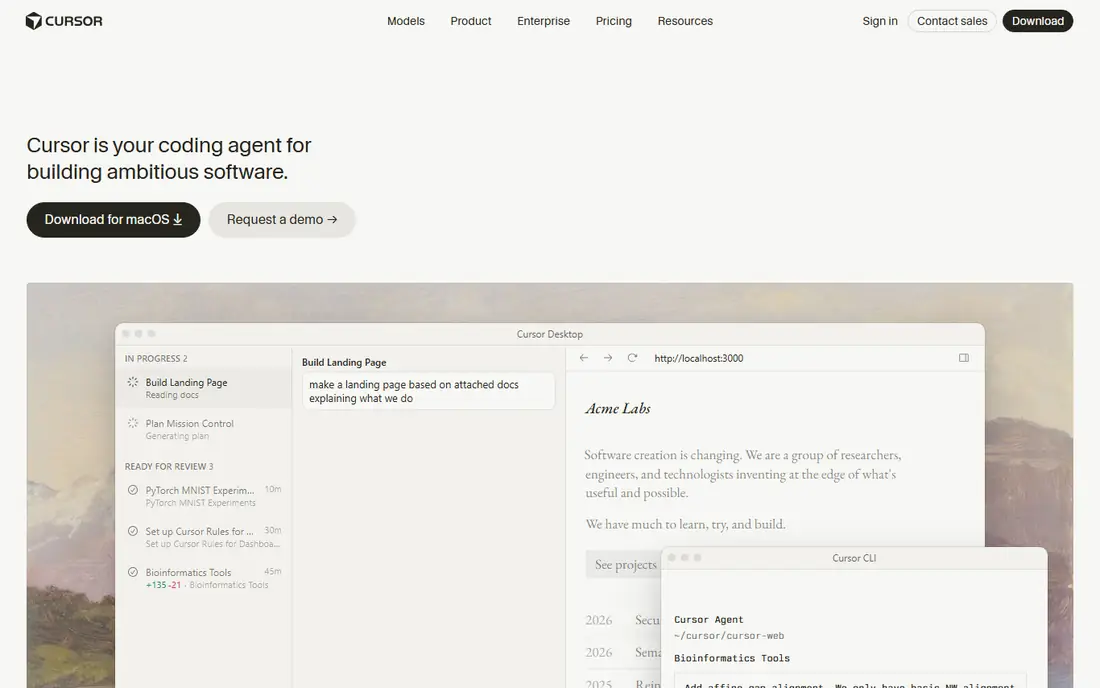
Cursor is an AI first code editor with agent mode, codebase chat, and multi model support, letting developers describe a task and watch the agent edit files, run tests, and fix errors. The editor builds on VS Code familiarity, with chat, autocomplete, and agent workflows in one place. Multi model support lets teams pick models by task and cost.
Subscription cost adds up for teams, and the editor learning curve, though small for VS Code users, still exists. For an editor based AI coding experience with agent power, Cursor leads the field.
What we like- Editor agent mode
- Codebase chat
- Multi model
Watch out for- Subscription cost
- Editor learning curve
#3Windsurf
Best for: Editor based AI coding4.2/5 on
G2 (56 reviews, checked Oct 2026)
Visit windsurf.com
Starting priceSee website
Free planFree
Windsurf, from Codeium, is an AI editor with Cascade agent flows that understand a codebase, plan multi file changes, and execute them with context. A free tier lets developers test agent features, while paid plans raise limits and add team features. The editor suits developers who want agent coding inside a polished editor without a terminal workflow.
The ecosystem is smaller than Cursor, and team pricing scales with seats. For an editor agent with a generous free tier, Windsurf offers a strong alternative.
What we like- Editor agent flows
- Free tier
- Cascade agent
Watch out for- Smaller ecosystem
- Pricing for teams
Starting priceFree
Free planFree
Aider is an open source terminal pair programming tool that edits code with AI, supports many models through API keys, and integrates with Git for commits and diffs. Developers chat with Aider in the terminal, it edits files, runs tests, and suggests commits, which suits terminal users who want model freedom. The open source model keeps costs to API usage alone.
Terminal only limits editor users, and setup needs API keys and model choice, which takes care. For an open, model flexible terminal agent, Aider offers the closest open source match to Opencode.
What we like- Open source
- Model flexible
- Git integration
Watch out for- Terminal only
- Setup needs API keys
Starting priceFree
Free planFree
Continue is an open source AI assistant for VS Code and JetBrains, with chat, autocomplete, and agent style edits, plus model choice across providers. The extension keeps code in the editor developers already use, with context from open files and codebase indexing. Custom rules and docs integration help the assistant follow team conventions.
Agent features are lighter than Cursor or Claude Code, and setup takes care for models and context. For an open, editor based assistant with model freedom, Continue offers a flexible, free starting point.
What we like- Open source
- VS Code and JetBrains
- Model choice
Watch out for- Agent features are lighter
- Setup takes care
Starting priceFree
Free planFree
Cline, formerly Claude Dev, is a VS Code extension that acts as an AI coding agent, with plan and act modes, file editing, terminal commands, and browser use. Model choice spans providers through API keys, and plan mode lets users approve a plan before the agent acts. The agent suits VS Code users who want terminal style agency inside the editor.
Token costs follow model usage and can grow on large tasks, and plan mode needs review to avoid unwanted changes. For a VS Code agent with model choice, Cline offers a powerful, community driven option.
What we like- VS Code agent
- Plan and act modes
- Model choice
Watch out for- Token costs
- Plan mode needs review
#7OpenAI Codex
Best for: Terminal and cloud agent4.7/5 on
G2 (19 reviews, checked Oct 2026)
Visit openai.com
Starting priceSee website
Free planFree trial
OpenAI Codex provides terminal and cloud based AI coding agents powered by OpenAI models, with GitHub integration, task delegation, and code review features. The terminal agent suits developers who work in the shell, while cloud agents handle longer tasks in parallel. The tool fits teams already using OpenAI models and GitHub workflows.
Pricing follows usage, and agent workflows are newer than Claude Code, so some features keep evolving. For an OpenAI powered terminal agent with cloud options, Codex offers a strong alternative.
What we like- Terminal and cloud agents
- OpenAI models
- GitHub links
Watch out for- Pricing by usage
- Newer agent workflows
Starting priceSee website
Free planFree trial
Zed is a very fast, Rust based code editor with AI chat, inline edits, and collaboration features, plus model support for coding assistance. The editor opens instantly, handles large files well, and suits developers who value speed above all. AI features cover chat, edits, and agent style tasks, though lighter than Cursor agent mode.
AI depth is lighter than dedicated agents, and the ecosystem is smaller, with fewer extensions than VS Code. For a developer who wants a fast editor with solid AI help, Zed offers speed that other editors cannot match.
What we like- Very fast editor
- AI chat and edits
- Collaboration
Watch out for- AI features are lighter
- Smaller ecosystem
How we chose
We compared agent capability, terminal versus editor workflow, model choice, codebase understanding, Git integration, pricing, and public developer feedback. We favored tools that handle multi file changes, run tests, and respect user approval, rather than tools that only autocomplete single lines. No hands on testing is claimed, and prices are shown as Free where open source or a free tier exists, or See website where pricing varies.
Picking an agent for your workflow
Match the tool to where you code, since terminal developers suit Claude Code, Codex, or Aider, while editor developers suit Cursor, Windsurf, Cline, or Continue. Test on a real task from your repo, such as adding a feature with tests, since that reveals planning, editing, and test handling better than a toy example. Check model costs on that task, since a powerful model that costs ten times more may not beat a cheaper model enough to justify the price.
Safety, review, and cost control
Review every agent change before merging, since agents write plausible code with subtle bugs, security flaws, and convention breaks. Use plan mode where available, require tests for agent changes, and keep agent commits small and reviewable. Set spending limits on API keys, track token use per task, and prefer cheaper models for routine edits. An agent that saves an hour but introduces a security flaw costs far more than it saves.
Team adoption and conventions
Share agent rules, such as project conventions, test requirements, and file scopes, so every team member agent behaves consistently. Keep a shared prompt library for common tasks, and review agent output in merge requests with the same rigor as human code. Train the team on agent limits, since over trust causes bugs and under trust wastes the tool value. A team that reviews agent code well ships faster without sacrificing quality.
Before you decide
Start each agent task with a short written spec, naming files, behavior, and tests, since a vague prompt produces vague code that needs heavy rework. Run the project test suite after every agent change before you review the code, because failing tests catch broken edits faster than reading diffs alone. Keep agent edits to one feature per pull request, so reviewers can follow the change and revert it cleanly if something goes wrong. Set a daily token budget per developer and review usage weekly, since agent costs creep up silently when everyone runs large tasks all day. Share agent prompts that worked well in a team doc, so good prompts spread and teammates stop reinventing the same instructions. Review agent generated tests as carefully as agent code, since a test that asserts wrong behavior locks in a bug instead of catching it.
Frequently asked questions
What is Opencode?
Opencode is an open source, terminal based AI coding agent that helps developers build software from the command line, with support for several models and a focus on agent workflows. It suits terminal users who want an open agent they can run and extend. Alternatives in this guide cover both terminal and editor based agents.
Is Claude Code better than Cursor?
They suit different workflows, since Claude Code leads for terminal agents with strong reasoning, while Cursor leads for editor based agent coding with multi model support. Terminal users usually prefer Claude Code, while editor users usually prefer Cursor. Test both on your own tasks before you commit to one.
Can I use AI coding agents for free?
Yes, with open tools such as Aider, Continue, and Cline, where you pay only model API costs, plus free tiers from Windsurf and trials from Cursor and Claude Code. Free tiers limit usage, so heavy use needs a paid plan or API budget. Open tools give the most control over cost.
Do AI agents replace developers?
No, since agents write code fast but still need human review, planning, testing, and judgment for architecture, security, and product decisions. Developers who review agent output well ship faster, while developers who merge blindly introduce bugs. Agents amplify developers, they do not replace them.
Which agent is best for a large codebase?
Agents with strong codebase indexing, such as Cursor, Windsurf, and Claude Code, handle large repos better, since they retrieve relevant files before editing. Test on your repo specifically, since indexing quality varies by language and structure. Keep changes small and scoped, since large agent edits across many files risk subtle breaks.
Sources we checked (8)
- https://www.anthropic.com/claude-code
- https://www.cursor.com
- https://windsurf.com
- https://aider.chat
- https://www.continue.dev
- https://cline.bot
- https://openai.com/codex/
- https://zed.dev
Is your product missing or out of date?
We review this list regularly. Vendors can request a listing, send updated pricing or ask about featured placement.

Shihab Mia · Founder, Rankite
Shihab has 5+ years in B2B and SaaS SEO. He writes Rankite's software buying guides from pricing pages, documentation and public user reviews. More about Shihab.