How we make this list: we compare pricing pages, product documentation and public user reviews. Ratings come from G2, Capterra or Trustpilot, with the date we checked them.
Key takeaways
- Every service here is licensed, so you trade a few ad breaks for movies and shows without piracy or malware risk.
- Tubi has the largest free on-demand catalog, while The Roku Channel and Sling Freestream add hundreds of live channels.
- Kanopy and Hoopla are ad-free, but they need a public library card and carry monthly borrow limits.
- Almost none of these services let you download films to keep, so plan on streaming rather than building a collection.
- Unlicensed download sites often bundle malware and fake play buttons, which is the main reason to stay with licensed services.
Quick comparison
| Tool | Best for | Starting price | Free plan |
|---|
 Tubi Tubi | Largest free movie catalog | Free | Yes |
 The Roku Channel The Roku Channel | Free films plus live channels | Free | Yes |
 Plex Plex | Free streaming plus personal media | Free | Yes |
 Kanopy Kanopy | Arthouse and educational films | Free with library card | Yes |
 Hoopla Hoopla | Library films and audiobooks | Free with library card | Yes |
 Sling Freestream Sling Freestream | Live channel surfing | Free | Yes |
 Samsung TV Plus Samsung TV Plus | Built-in free TV on Samsung devices | Free | Yes |
 Internet Archive Internet Archive | Public domain classics | Free | Yes |
Is your product missing or out of date?
We review this list regularly. Vendors can request a listing, send updated pricing or ask about featured placement.
The best Levidia alternatives
Starting priceFree
Free planYes
Tubi is the natural first stop for anyone leaving an unlicensed streaming site. Owned by Fox, it carries a deep catalog of studio films, cult titles, horror, and a growing set of originals. Basic playback needs no account, though signing in adds watchlists and resume features. The app comes preloaded on most smart TVs and runs on phones, consoles, and browsers.
The catalog is the draw. Recent reports put Tubi's library in the tens of thousands of movies and episodes, ahead of every other free service. New studio titles arrive on a rolling basis, which keeps the home screen fresh. The trade is advertising, with breaks running roughly three to five minutes per hour, lighter than broadcast television but noticeable during a long film.
Titles also rotate. A movie spotted this week may leave next month, so watchlists need occasional pruning. For a viewer who wants the closest legal match to a free movie site, with the biggest choice and no sign-up wall, Tubi is the strongest single answer.
What we like- Tens of thousands of titles
- No account needed for basic playback
- Wide device support
Watch out for- Ad breaks run several minutes per hour
- Titles rotate out without warning
Starting priceFree
Free planYes
The Roku Channel mixes on-demand films with hundreds of live channels, which makes it feel closer to cable than a plain movie app. It carries licensed films, a slate of Roku Originals, and live blocks for news, sports, and entertainment. Playback works in a browser and on mobile apps, so you do not need a Roku device to use it.
Its strength is convenience. The service blends free and paid options on one home screen, and core playback needs no account. Optional sign-in adds personalization, watchlists, and resume across devices. For a household that already owns a Roku TV or stick, the channel is preinstalled and one remote press away.
The weak spot is the mix of free and paid. Some titles shown on the home screen require a subscription or a rental, so check the label before pressing play. Used as a free service, though, the combination of films, originals, and live channels gives it a wider daily role than a movies-only app.
What we like- Tens of thousands of titles plus live channels
- Works without Roku hardware
- Roku Originals included
Watch out for- Some premium content sits behind paywalls
- Recommendations favor Roku's own shows
#3
Plex
Best for: Free streaming plus personal media
Visit plex.tv
Starting priceFree
Free planYes
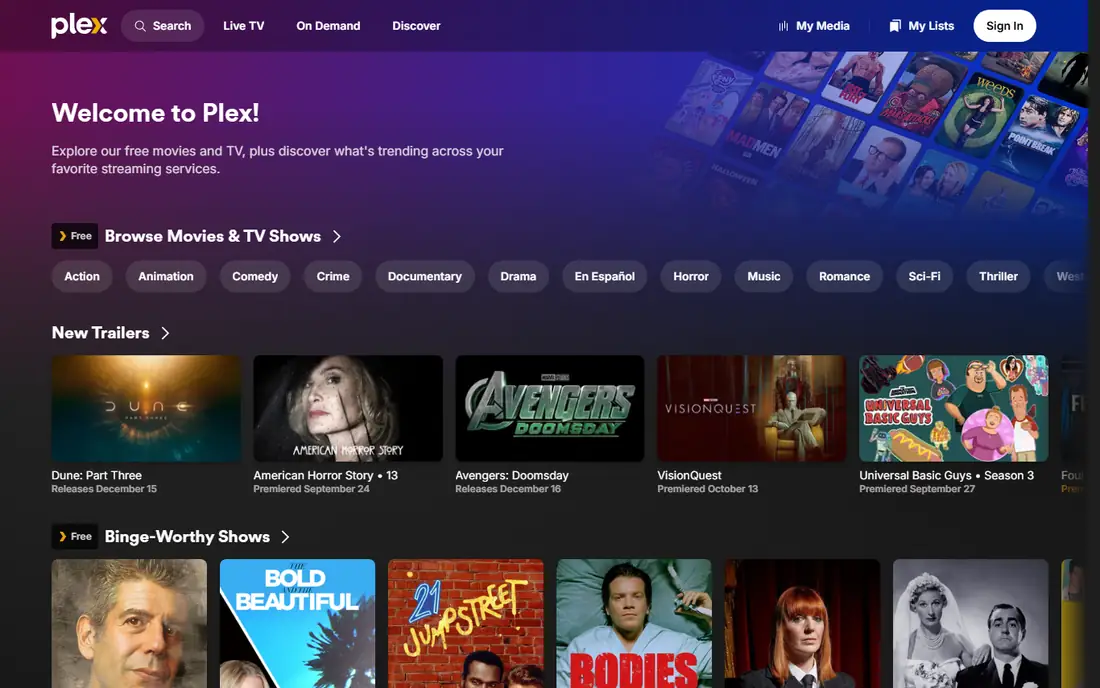
Plex wears two hats, and both are useful. On one side it is a free ad-supported streaming service with thousands of films and hundreds of live channels. On the other it is a media server that organizes your own video, music, and photo files and streams them to any device. Few rivals cover both jobs.
The free streaming side needs no account for basic playback, and the catalog leans toward studio films, documentaries, and older television. The personal media side is where Plex stands apart: point it at a folder of home videos or a ripped DVD collection, and it fetches artwork and episode details automatically.
The catch is that the free catalog is smaller than Tubi's, and the most loved features, such as downloads for offline viewing and advanced DVR, sit behind the paid Plex Pass. For a viewer with a personal media library who also wants free licensed films, Plex earns its place. For movies alone, Tubi still leads.
What we like- Thousands of free titles plus live channels
- Plays your own media files
- No account needed for basic streaming
Watch out for- Free catalog is smaller than Tubi
- Best features sit in the paid Plex Pass
Starting priceFree with library card
Free planYes
Kanopy is the quiet prestige option in free streaming. It is funded by public libraries rather than ads, so films play without commercial breaks. The catalog leans toward arthouse cinema, documentaries, and educational titles, including Criterion Collection releases that rarely appear on ad-supported services.
Access depends on your library. You sign in with a card from a participating public library or university, and most libraries set a monthly borrow limit, often around ten titles. That limit forces a slower, more deliberate viewing habit, which suits the catalog: these are films to choose, not to scroll past.
Kanopy will not replace Tubi for volume, and it has little mainstream blockbuster fare. Pair it with an ad-supported service and you get the best of both worlds: big free catalogs for casual nights, and Kanopy for the films that reward full attention.
What we like- Ad-free viewing
- Criterion Collection and indie films
- Strong documentary selection
Watch out for- Needs a participating library card
- Monthly borrow limits apply
Starting priceFree with library card
Free planYes
Hoopla shares Kanopy's library-funded model but covers a wider media shelf. Alongside films, it lends audiobooks, ebooks, comics, and music, all through one app. Borrowing is instant, with no wait lists: if your library offers a title, you can play it right away.
The film catalog mixes mainstream movies with documentaries and family titles, broader than Kanopy's arthouse focus but thinner than Tubi's volume. Like Kanopy, Hoopla sets monthly borrow limits, and the exact number depends on your library's budget. Heavy viewers can burn through a month's borrows in a week.
For a household that already uses a library card, Hoopla is a strong second app. It fills the gap between a free ad-supported catalog and a paid subscription, and the audiobook shelf alone makes it worth installing for commuters and readers.
What we like- Ad-free
- Movies plus audiobooks, ebooks, and comics
- Simple borrowing
Watch out for- Needs a participating library card
- Monthly borrow limits apply
Starting priceFree
Free planYes
Sling Freestream is built for viewers who miss flipping channels. It aggregates hundreds of live channels covering news, sports, entertainment, and lifestyle, all free and without an account for basic access. The guide-style layout recreates the cable habit of landing on something good without choosing first.
The on-demand side exists but is thinner than a dedicated movie app, so Freestream works best as a companion rather than a sole service. Pair it with Tubi for films and you cover both modes of viewing: pick a movie when you know what you want, surf channels when you do not.
The interface does push Sling's paid plans, and some rows in the guide lead to subscription content. The free channels themselves are clearly marked, so a careful viewer can stay free. For cord-cutters who want live television without a bill, Freestream is the most channel-rich free option.
What we like- Hundreds of live channels
- No account needed for basic access
- News and sports blocks
Watch out for- On-demand catalog is thinner than Tubi
- Interface pushes paid Sling plans
Starting priceFree
Free planYes
Samsung TV Plus comes built into Samsung televisions and Galaxy phones, which gives it an advantage no rival can copy: it is already there. The service offers a large lineup of free live channels plus a rotating set of on-demand films and shows, all without an account.
The channel lineup covers news, movies, sports, and themed blocks, and the service has grown to tens of millions of monthly users. On a Samsung TV, it sits alongside the antenna and app inputs, so it feels like part of the television rather than another app to manage.
Outside Samsung hardware, access is thinner. The service runs on the web and some other devices, but the experience is best on Samsung screens. For a Samsung household, it is a zero-effort free TV layer. For everyone else, Tubi or Sling Freestream will be easier to reach.
What we like- Preinstalled on Samsung TVs and phones
- Large channel lineup
- No account needed
Watch out for- Best on Samsung hardware
- On-demand films are limited
Starting priceFree
Free planYes
The Internet Archive is the only service here that lets you download films to keep, because its movie collection is built from public domain titles whose copyright has expired. That means silent classics, early horror, film noir, and educational reels, all free and ad-free.
The trade is age. You will not find current releases here, and the interface feels like a library catalog rather than a streaming app. Search takes some patience, and video quality varies by the source print. For film history, though, there is nothing else like it: thousands of titles that no commercial service bothers to carry.
The Archive also hosts books, audio, and software, which makes it a broader cultural resource than a movie app. Use it for classics and curiosities, and lean on Tubi or Kanopy for newer fare. Together they cover nearly a century of film without a subscription.
What we like- Huge public domain film collection
- No ads
- Downloads allowed for public domain titles
Watch out for- Old films only
- Interface is a library, not a polished streaming app
How we chose
We limited this list to licensed services available in the United States, using each vendor's own pages and recent October 2026 catalog reporting. We favored services that cost nothing, need no account for basic playback where possible, and cover different viewing styles: big on-demand catalogs, live channels, library-backed prestige films, and public domain classics. Unlicensed streaming and download sites were deliberately left out, since they carry malware and legal risk that no catalog advantage offsets. Where a service's catalog size or channel count is reported differently across sources, we used the lower, more cautious figure.
Staying safe when a free site looks too good
Unlicensed sites promise what licensed ones cannot: every new release, free, with a download button. That promise is the warning sign. Legal free viewing is paid for by advertising, library budgets, or expired copyright, and each model has visible limits. A site with no ads, no library partner, and no rights holder behind it is almost certainly hosting content it does not own.
The risks are practical, not just legal. Piracy sites rank among the worst sources of malware, fake play buttons, and phishing pages that mimic real services. A single bad download can cost more than a year of subscriptions. Licensed services also protect your payment details, since they never ask for a card for a free tier.
If a title is not on any free service, check your library first, then a one-month rental. Kanopy and Hoopla often carry films that never reach ad-supported platforms, and a library card costs nothing. Staying inside licensed services keeps the viewing free and the device safe, which is the whole point of cutting the cord.
Frequently asked questions
Is Levidia legal to use?
Levidia-style sites that stream or offer downloads of current films without a license operate outside copyright law, and they often expose visitors to malware and phishing pages. The licensed services in this article carry studio and distributor agreements, so they are the safe replacement.
Which free service has the most movies?
Tubi has the largest free on-demand catalog among licensed services, with tens of thousands of movies and episodes. The Roku Channel and Plex follow, while Kanopy and Hoopla trade volume for ad-free, library-backed quality.
Do I need an account to watch free movies?
Tubi, The Roku Channel, Plex, Sling Freestream, and Samsung TV Plus all allow basic playback without an account, though sign-in adds watchlists and resume features. Kanopy and Hoopla require a participating public library card.
Can I download movies from these services to keep?
Almost none of them allow downloads to keep, since their licenses cover streaming only. The Internet Archive is the exception, and only for public domain titles whose copyright has expired.
Why do free services have ads?
Advertising pays the studios and distributors for the license, which is what keeps the service free for viewers. Library-backed services such as Kanopy and Hoopla replace ads with public funding, and that is why they need a library card and set monthly borrow limits.
What is the best combination for a cord-cutter?
Pair Tubi for on-demand films with Sling Freestream or The Roku Channel for live channels, and add Kanopy or Hoopla if you have a library card. That combination covers new films, live television, and prestige titles without any subscription.
Sources we checked (6)
- https://filmdaily.co/news/movie-stream-free-sites-that-actually-work-in-2026/
- https://www.thecityceleb.com/editorial/top-15-best-free-movie-download-sites-for-safe-and-legal-streaming/
- https://tms-outsource.com/blog/posts/apps-like-tubi/
- https://tubi.tv
- https://therokuchannel.roku.com
- https://plex.tv
Is your product missing or out of date?
We review this list regularly. Vendors can request a listing, send updated pricing or ask about featured placement.

Shihab Mia · Founder, Rankite
Shihab has 5+ years in B2B and SaaS SEO. He writes Rankite's software buying guides from pricing pages, documentation and public user reviews. More about Shihab.