How we make this list: we compare pricing pages, product documentation and public user reviews. Ratings come from G2, Capterra or Trustpilot, with the date we checked them.
Key takeaways
- No tool recovers detail that was never captured. The best results come from mild to moderate blur, not from a photo that was badly out of focus.
- Topaz Photo AI is the quality king for photographers, with local control over denoise, sharpen, and upscale.
- LetsEnhance is the strongest web choice for general deblurring, with different models for different photo types.
- Remini rebuilds faces best on mobile, but it can also invent facial features, so check eyes, teeth, and hands before publishing.
- Adobe Photoshop and Lightroom suit photographers who already manage photos in Adobe apps.
- Always keep the original file, compare at full size, and prefer local processing for sensitive personal photos.
Quick comparison
Is your product missing or out of date?
We review this list regularly. Vendors can request a listing, send updated pricing or ask about featured placement.

#1Topaz Photo AI
Best for: Desktop quality repair4.3/5 on
G2 (2 reviews, checked Oct 2026)
Visit topazlabs.com
Starting priceSee website
Free planNo
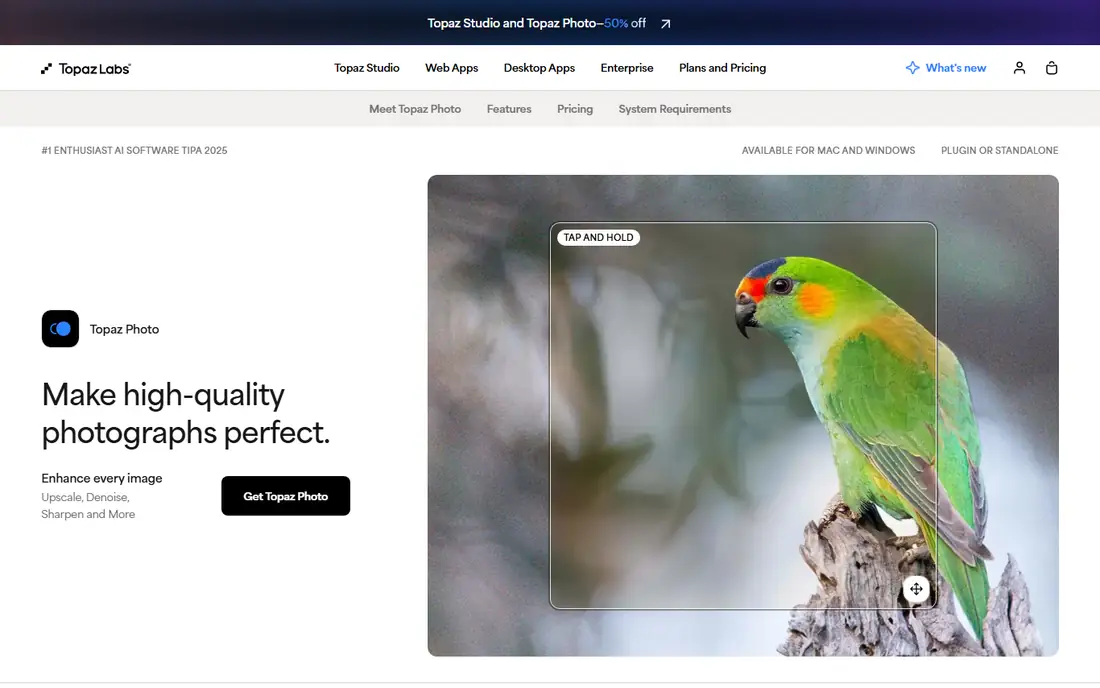
Topaz Photo AI is the tool photographers reach for when a photo is technically flawed: noise at high ISO, motion blur, soft focus, or too-small resolution. Its sharpen, denoise, and upscale models consistently rank best in the category, and it works standalone or as a Lightroom plugin, with an Autopilot mode that scans each photo and picks settings for you.
Pricing needs care: older guides cite 199 dollars one-time, but Topaz ended perpetual licenses in 2025 and renamed the product to Topaz Photo, now subscription-only near 39 dollars a month in some guides, while the old Photo AI 4.0.4 release is frozen at its old feature set. Processing is slow on older machines, and default settings can give skin a plastic look on portraits, so dial the sliders back. For a photographer who wants the best desktop quality and local processing, Topaz remains the quality king.
What we like- Best denoise, sharpen, and upscale quality
- Local processing
- Standalone or Lightroom plugin
- Autopilot picks settings
Watch out for- Pricing changed: older guides cite 199 dollars one-time, current product is subscription near 39 dollars a month
- Slow on older machines
- Default settings can over-smooth skin

#2Adobe Photoshop
Best for: Full creative control4.6/5 on
G2 (13,426 reviews, checked Oct 2026)
Visit adobe.com
Starting price$22.99/month
Free planNo
Adobe Photoshop is the most capable AI photo editor, with Generative Fill, Remove, and Expand alongside manual repair tools for large damage that no one-click tool handles reliably. A photo torn in half or missing a large area needs manual reconstruction in Photoshop, where you control the repair, rather than an AI guess. The plan costs 22.99 dollars a month on an annual plan, with a free trial.
The learning curve is steep, and Photoshop is overkill for a single blurry snapshot, where a one-click tool finishes in seconds. For a photographer or editor who already uses Adobe apps and needs full creative control, Photoshop is the best unblur tool in a complete editing workflow.
What we like- Most capable AI photo editor
- Generative Fill, Remove, and Expand
- Manual repair for large damage
- 22.99 dollars a month annual
Watch out for- Subscription only
- Steep learning curve
- Overkill for a single blurry photo
- Web tools faster for one-click fixes

#3Adobe Lightroom
Best for: Photo libraries and RAW4.6/5 on
G2 (3,299 reviews, checked Oct 2026)
Visit adobe.com
Starting price$9.99/month
Free planNo
Adobe Lightroom suits photographers who already manage photos in Lightroom, with denoise and sharpen built into the library and RAW workflow. The plan starts at 9.99 dollars a month, with a free trial, and Lightroom hosts Topaz as a plugin, so a photographer can sharpen in Topaz without leaving the catalog.
Lightroom alone is weaker than Topaz for severe blur, and the catalog workflow suits photographers rather than casual users with one photo to fix. For a photographer whose library already lives in Lightroom, the built-in tools plus the Topaz plugin cover most unblur jobs without a separate app.
What we like- Photo libraries and RAW workflow
- Denoise and sharpen built in
- 9.99 dollars a month
- Plugin host for Topaz
Watch out for- Weaker than Topaz for severe blur
- Subscription only
- Catalog workflow suits photographers, not casual users

#4Luminar Neo
Best for: One-click AI edits4.4/5 on
G2 (115 reviews, checked Oct 2026)
Visit skylum.com
Starting priceSee website
Free planNo
Luminar Neo suits photographers who want one-click AI edits without a subscription, with one-time licenses available alongside a subscription near 59 dollars a year in some guides. The AI tools sharpen, denoise, and enhance with a single click, and the interface is beginner friendly compared with Photoshop.
Pricing varies by guide, with some citing 119 dollars perpetual, so confirm the current offer before buying. Luminar is weaker than Topaz for severe blur, and catalog features are thinner than Lightroom. For a photographer who wants fast AI edits in one app without a monthly bill, Luminar Neo is the best pick.
What we like- One-click AI edits without a subscription option
- One-time licenses available
- Beginner friendly
- Subscription near 59 dollars a year
Watch out for- Pricing varies: some guides cite 119 dollars perpetual
- Weaker than Topaz for severe blur
- Catalog features thinner than Lightroom

#5Remini
Best for: Mobile face restoration4.6/5 on
G2 (13 reviews, checked Oct 2026)
Visit remini.ai
Starting price$6.99/month
Free planYes
Remini built its reputation on taking a blurry face and rebuilding it in seconds, with face enhancement that still surprises reviewers. Upload a faded portrait, tap enhance, and the AI sharpens eyes, skin texture, and hair with a quality that general sharpeners cannot match. The free tier works with ads and daily limits, and paid plans start near 6.99 dollars a month in some guides, though third-party reviews list weekly plans near 6.99 dollars a week.
The business model adds up fast for hundreds of photos, and photos upload to Remini servers for processing, so skip anything highly sensitive. Most important, Remini can invent facial features, so check eyes, teeth, hands, and text at full size before publishing an enhanced portrait. For a single damaged family photo to share at a reunion, Remini is the fastest fix.
What we like- Fastest fix for old or blurry portraits
- Free tier with ads
- Mobile first
- Excellent face enhancement
Watch out for- Weekly subscriptions add up fast
- Free tier has daily limits and possible watermarks
- Photos upload to servers
- Can invent facial features
Starting price$9/month
Free planYes
VanceAI suits casual users who want many photo tools in one web account, with restoration that handles fading, scratches, and blur in bulk. The Starter plan costs 9 dollars a month on annual billing in some guides, while other guides cite 15 dollars a month for the Restorer, so confirm the current plan before buying. A free tier with a few credits lets you test before paying.
Web processing means photos upload to servers, so prefer local tools for sensitive images, and credit limits push regular users to a paid plan quickly. For a family archive project with many photos to restore in a browser, VanceAI is the best web pick.
What we like- Many photo tools in one web account
- Restoration handles fading, scratches, and blur in bulk
- Starter 9 dollars a month annual
- Free tier
Watch out for- Some guides cite 15 dollars a month for Restorer
- Web processing means uploads leave your device
- Credit limits push regular users to paid plans
Starting priceSee website
Free planYes
HitPaw FotorPea, formerly HitPaw Photo Enhancer, offers one-click desktop enhancement with batch support, so a photographer can sharpen many photos at once without uploading them. The free tier covers testing, and local processing keeps photos on your computer, which suits sensitive personal images better than web tools.
Pricing is not published in the guides checked, so confirm it on the vendor site before buying, and quality sits below Topaz for severe blur. For a desktop user who wants one-click batch enhancement with local processing, HitPaw is a solid pick.
What we like- One-click desktop enhancement
- Batch support
- Free tier
- Local processing keeps photos on your computer
Watch out for- Pricing not published in guides, check vendor site
- Quality below Topaz for severe blur
- Desktop app needs a capable machine
Starting price$9/month
Free planYes
LetsEnhance is the strongest web choice for general deblurring, with different models for different photo types, so a portrait, a scenery shot, and a product photo each get a suitable model. The plan starts at 9 dollars a month, with a free tier for testing, and the browser workflow needs no GPU or desktop app.
Web processing means uploads leave your device, and free plans carry credit limits and resolution caps that push regular users to a paid plan quickly. For a web user who wants strong deblurring without installing software, LetsEnhance is the best pick.
What we like- Strongest web choice for general deblurring
- Different models for different photo types
- 9 dollars a month
- Free tier
Watch out for- Web processing means uploads leave your device
- Credit limits and resolution caps on free tier
- No desktop app
How we chose
We ranked unblur tools on the job that matters: mild to moderate blur, since no tool recovers detail that was never captured, and a badly out-of-focus photo stays soft no matter the tool. We separated desktop tools from web tools, since local processing matters for privacy, and we flagged where pricing changed, since Topaz moved from one-time to subscription in 2025. We also weighted face handling separately, since faces need a specialist and a specialist can invent features.
What to check before you buy
Always keep the original file, compare at full size, and check eyes, teeth, hands, and text before publishing an enhanced image, since AI sharpening guesses at detail and those guesses are often wrong on faces and text. Read the privacy policy before uploading personal photos to a web tool, and prefer local processing for anything you would not post publicly, since web tools process photos on their servers. For a family archive, use free tiers and a single month of a paid tool, since most archives can be restored for under 50 dollars total that way. Finally, set expectations honestly: a mildly blurry photo can look much better, but a badly blurred photo will not become sharp, and a tool that promises otherwise is guessing.
Frequently asked questions
Can AI really unblur a photo?
Only partly. AI sharpening guesses at detail that blur removed, and the guess is often good for mild blur but wrong for severe blur. No tool recovers detail that was never captured.
Is it safe to upload family photos to unblur websites?
Web tools process photos on their servers, which is how the AI works. Desktop tools such as Photoshop, Topaz, and HitPaw keep everything on your computer. Read the privacy policy for sensitive photos, and prefer local processing for anything private.
Which tool is best for old family portraits?
Remini is fastest for mobile face restoration, while VanceAI handles fading, scratches, and blur in bulk in a browser. For the highest quality on badly damaged originals, Topaz Photo AI reconstructs detail other tools cannot.
Can I unblur photos for free?
Yes, within limits. Google Photos includes Photo Unblur free, VanceAI and LetsEnhance have free tiers, and Upscayl is free and open source. Credit limits, watermarks, and resolution caps push regular users to a paid plan.
Why do enhanced faces sometimes look wrong?
Face tools rebuild facial detail by guessing, and the guess can invent eyes, teeth, or skin texture that was never there. Always check faces at full size before publishing, and dial back the strength for portraits.
Sources we checked (0)
Is your product missing or out of date?
We review this list regularly. Vendors can request a listing, send updated pricing or ask about featured placement.

Shihab Mia · Founder, Rankite
Shihab has 5+ years in B2B and SaaS SEO. He writes Rankite's software buying guides from pricing pages, documentation and public user reviews. More about Shihab.
 VanceAI
 HitPaw FotorPea
 LetsEnhance