How we make this list: we compare pricing pages, product documentation and public user reviews. Ratings come from G2, Capterra or Trustpilot, with the date we checked them.
Key takeaways
- Gusto is the best all-round payroll pick for independent restaurants, with simple setup, benefits and contractor payments.
- Square Payroll suits restaurants already running Square point of sale, since hours flow straight into payroll.
- Toast Payroll fits Toast POS restaurants that want scheduling, tips and payroll in one system.
- ADP and Paychex suit multi-location restaurant groups that need compliance support and dedicated service.
- Tip handling, overtime rules and multi-state tax filing matter more for restaurants than for most other small businesses.
Restaurant payroll is harder than office payroll. Staff mix hourly and salaried roles, tips flow through several channels, schedules change weekly, and turnover means constant onboarding. A payroll tool built for restaurants should handle tip reporting, overtime rules, multiple locations and the tax filings that come with hourly staff. The eight tools below are judged on exactly those points, not just on generic payroll features.
Most restaurant payroll tools charge a monthly base fee plus a per-employee fee, and several bundle scheduling or time tracking. Prices below are marked "See website" where plans and per-person fees change often, so confirm the current figure on the vendor's pricing page before budgeting. Free trials are common, and a trial run with a real pay period is the best test of any tool here.
Quick comparison
| Tool | Best for | Starting price | Free plan |
|---|
 Gusto Gusto | Independent restaurants | See website | Free trial |
 Square Payroll Square Payroll | Square POS restaurants | See website | Free trial |
 Toast Payroll Toast Payroll | Toast POS restaurants | See website | No |
 ADP RUN ADP RUN | Multi-location groups | See website | Free trial |
 Paychex Flex Paychex Flex | Compliance support | See website | Free trial |
 Rippling Rippling | Growing restaurant groups | See website | Free trial |
 Homebase Homebase | Scheduling plus payroll | See website | Yes |
 OnPay OnPay | Simple low-cost payroll | See website | Free trial |
Is your product missing or out of date?
We review this list regularly. Vendors can request a listing, send updated pricing or ask about featured placement.
The best payroll software for restaurants
#1Gusto
Best for: Independent restaurants4.6/5 on
G2 (13,355 reviews, checked Oct 2026)
Visit gusto.com
Starting priceSee website
Free planFree trial
Gusto is the most popular payroll choice for small restaurants, and the reason is simplicity. Owners can run payroll in a few steps, new hires onboard from their phones, and the system files federal, state and local payroll taxes automatically. Benefits such as health insurance can be managed in the same place, and contractors can be paid alongside employees without a separate tool.
The gap is scheduling. Gusto tracks time through integrations and its own time tools, but restaurants that need full shift scheduling usually pair it with a scheduling app. Tip data from a non-integrated POS also needs checking before each run. For a single restaurant or a small group that wants payroll done without a learning curve, Gusto is the easiest start.
What we like- Easy onboarding for hourly staff
- Benefits administration included
- Contractor payments and tax filings handled
Watch out for- Tip reporting needs care with third-party POS data
- Advanced scheduling is not built in
#2Square Payroll
Best for: Square POS restaurants4.2/5 on
G2 (31 reviews, checked Oct 2026)
Visit squareup.com
Starting priceSee website
Free planFree trial

Square Payroll is the natural pick for restaurants already ringing sales through Square. Hours worked, overtime and tip data flow from Square point of sale and timecards into payroll without re-entry, which removes the most error-prone step in restaurant payroll. Employees can access pay stubs and tax forms in the Square app, and same-day pay options help with retention in a tight labour market.
Outside Square, the appeal drops. The tool works standalone, but its advantage is the integration, and benefits administration is lighter than Gusto's. For a Square restaurant, though, the time saved on each pay run is real, and the per-location setup suits small groups.
What we like- Hours and tips flow from Square POS automatically
- Same-day pay options
- Simple per-location setup
Watch out for- Best value only inside the Square ecosystem
- Benefits options are thinner than Gusto
Starting priceSee website
Free planNo
Toast Payroll is part of the Toast restaurant platform, and that integration is its whole argument. Schedules, time clocks, tip pools and payroll live in one system, so a manager changes a shift and payroll reflects it. Tip pooling and sharing rules, which many generic payroll tools handle awkwardly, are built for restaurant practice. Reporting covers labour cost against sales, which owners watch closely.
The catch is lock-in. Toast Payroll only makes sense for restaurants running Toast point of sale, and pricing comes through a quote rather than a public page. For a Toast restaurant, the combined system removes duplicate data entry and several integrations. For anyone else, it is not an option.
What we like- Scheduling, time tracking, tips and payroll in one Toast system
- Tip pooling and tip sharing support
- Restaurant-specific reporting
Watch out for- Requires Toast POS, so it is not a standalone choice
- Pricing is quote-based
#4ADP RUN
Best for: Multi-location groups4.7/5 on
G2 (6,546 reviews, checked Oct 2026)
Visit adp.com
Starting priceSee website
Free planFree trial
ADP RUN is the enterprise-grade option scaled for smaller employers, and restaurant groups with several locations are its natural users. Multi-state tax filing, new-hire reporting and labour law compliance are handled with a depth that small tools cannot match. Dedicated support teams help when a group opens in a new state or faces an audit question.
The trade-offs are cost and setup time. Quotes vary, and the platform takes longer to configure than Gusto or Square. Small single restaurants may find it more than they need. For a growing group that needs compliance handled properly across states, ADP RUN is the safe, scalable pick.
What we like- Deep compliance support across states
- Dedicated service teams
- Scales from one site to many
Watch out for- Pricing is quote-based and can be high
- Setup takes longer than simpler tools
#5Paychex Flex
Best for: Compliance support4.1/5 on
G2 (1,748 reviews, checked Oct 2026)
Visit paychex.com
Starting priceSee website
Free planFree trial
Paychex Flex pairs payroll with HR tools that restaurant groups actually use: onboarding, employee handbooks, time tracking and benefits. The employee app lets staff check pay, request time off and update details without calling the office. Retirement plans and health benefits can be administered in the same system, which suits groups that want one HR vendor.
The interface is less modern than Gusto or Rippling, and pricing comes by quote. For a restaurant group that wants payroll plus a solid HR backbone and a support team to call, Paychex Flex is a dependable choice.
What we like- Strong HR and compliance tools alongside payroll
- Employee self-service app
- Retirement and benefits options
Watch out for- Interface can feel dated
- Pricing is quote-based
#6Rippling
Best for: Growing restaurant groups4.8/5 on
G2 (13,464 reviews, checked Oct 2026)
Visit rippling.com
Starting priceSee website
Free planFree trial
Rippling unifies payroll, HR, benefits, scheduling and even device management in one system, with automation that handles onboarding, offboarding and pay changes across tools. Its integration library connects to common restaurant point of sale and accounting systems. The interface is modern and the workflow builder lets managers automate repetitive tasks.
Modular pricing means the total can climb as you add features, and a single small restaurant may not need the breadth. For a restaurant group that is growing, adding locations and wants one system to scale with it, Rippling is the most forward-looking option here.
What we like- Payroll, HR, scheduling and IT in one platform
- Strong automation and integrations
- Modern interface
Watch out for- Pricing is modular and can add up
- Overkill for a single small restaurant
Starting priceSee website
Free planYes
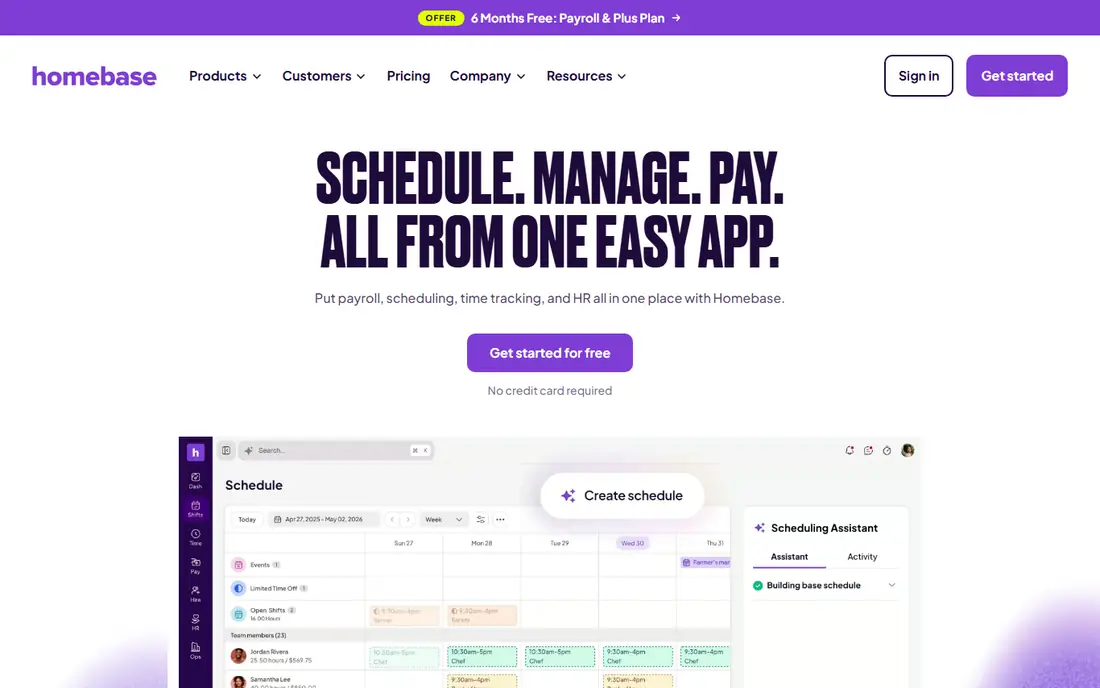
Homebase starts from scheduling, which is where many restaurant managers live day to day. The free tier covers scheduling, time clocks and team messaging, and the payroll add-on turns tracked hours into pay runs without exporting data. Hiring tools and onboarding are built in, which helps with the constant churn of restaurant staffing.
Payroll itself is less deep than a dedicated payroll tool. Complex multi-state situations and rich benefits administration are better served by Gusto or ADP. For a small restaurant that wants scheduling free and payroll attached, Homebase is the most budget-friendly route.
What we like- Free scheduling and time tracking tier
- Payroll add-on keeps hours in one place
- Team messaging included
Watch out for- Payroll is an add-on, not the core product
- Advanced payroll features are thinner than Gusto
#8OnPay
Best for: Simple low-cost payroll4.8/5 on
G2 (407 reviews, checked Oct 2026)
Visit onpay.com
Starting priceSee website
Free planFree trial
OnPay is a payroll-first tool with a reputation for simplicity and fair pricing. It handles hourly pay, tips, garnishments, multi-state filings and contractor payments without layers of menus. Setup is quick, support is well rated, and the price structure is easy to understand, which appeals to owners who want payroll done without a project.
The integration list is shorter than Rippling or Gusto, and there is no scheduling module. Restaurants that need scheduling will pair it with another app. For an owner who wants payroll handled cleanly at a modest cost, OnPay is a strong value pick.
What we like- Straightforward pricing and setup
- Handles tips, garnishments and multi-state taxes
- Good support ratings
Watch out for- Fewer integrations than larger platforms
- No built-in scheduling
How we chose
We compared tools on their published payroll features, restaurant-specific handling of tips and scheduling, tax filing coverage and public reviews from restaurant owners. We favoured tools with tip reporting, overtime handling, multi-location support and integrations with common point of sale systems. Prices were marked "See website" because base and per-employee fees change often and vary by state and feature bundle. We did not claim hands-on testing.
What restaurant owners should check first
Tip handling is the first test. Confirm how tips from your point of sale reach payroll, whether tip pooling and sharing rules are supported, and how reported tips appear on pay stubs. A tool that forces manual tip entry every period will cost hours and invite errors. Next, check overtime and break rules for your state, since restaurant schedules routinely cross daily and weekly thresholds.
Also confirm tax filing coverage for every state where you operate, including local taxes in cities that levy them. Finally, run a parallel pay period before switching: run the new tool alongside your old process for one cycle and compare every line. That single test catches more problems than any demo.
Frequently asked questions
What is the best payroll software for a small restaurant?
Gusto is the best starting point for most small restaurants, with simple setup, automatic tax filings and contractor payments. Square Payroll is better if you already use Square point of sale, since hours and tips flow in automatically. Try both free trials with a real pay period before deciding.
How does restaurant payroll handle tips?
Good restaurant payroll tools import tip data from the point of sale or time clock, apply tip pooling or sharing rules, and report tips on pay stubs and tax forms. Confirm your tool supports your tip policy before buying, since manual tip entry is slow and error-prone. Some tools also support tip payouts on paycards or same-day pay.
Do I need scheduling software with payroll?
Not always, but the combination saves time. Tools like Toast Payroll and Homebase combine scheduling with payroll, so hours flow directly into pay runs. If your payroll tool lacks scheduling, pair it with a scheduling app that integrates cleanly, and check that hours sync without manual export.
Can payroll software file taxes for multiple states?
Yes, the tools in this guide file federal and state payroll taxes, and most handle multi-state filing for groups with locations in several states. Confirm local tax coverage for cities with their own payroll taxes, and check whether new-hire reporting is included for each state where you hire.
What does restaurant payroll software cost?
Most tools charge a monthly base fee plus a per-employee fee, and the total depends on headcount, locations and features. Expect the base fee to cover the account and tax filings, with per-person fees on top. Prices change often, so confirm the current figure on the vendor's pricing page and ask about implementation fees.
Is Toast Payroll only for Toast POS users?
Yes, Toast Payroll is part of the Toast platform and works best for restaurants running Toast point of sale. Restaurants on other systems should look at Gusto, Square Payroll or Rippling, which integrate with a wider range of point of sale tools.
Sources we checked (8)
- https://gusto.com
- https://squareup.com
- https://pos.toasttab.com
- https://www.adp.com
- https://www.paychex.com
- https://www.rippling.com
- https://www.joinhomebase.com
- https://onpay.com
Is your product missing or out of date?
We review this list regularly. Vendors can request a listing, send updated pricing or ask about featured placement.

Shihab Mia · Founder, Rankite
Shihab has 5+ years in B2B and SaaS SEO. He writes Rankite's software buying guides from pricing pages, documentation and public user reviews. More about Shihab.