How we make this list: we compare pricing pages, product documentation and public user reviews. Ratings come from G2, Capterra or Trustpilot, with the date we checked them.
Key takeaways
- Microsoft OneNote is the best free all-rounder, with freeform notebooks on any device and no subscription needed.
- Apple Notes is the best free app for Apple users, built in with 5 GB of iCloud storage.
- Google Keep is the best app for quick capture, with fast notes and lists inside a Google account.
- Notion suits structured team workspaces, with pages and databases in one free personal workspace.
- Obsidian suits private linked notes in plain Markdown files you own, free for personal use.
- Joplin suits open source notes with encryption and your own sync, while Bear and Standard Notes suit Apple writing and encrypted notes.
Quick comparison
Is your product missing or out of date?
We review this list regularly. Vendors can request a listing, send updated pricing or ask about featured placement.
The best free note taking apps
#1Microsoft OneNote
Best for: Free all-rounder4.5/5 on
G2 (1,872 reviews, checked Oct 2026)
Visit onenote.com
Starting priceFree
Free planYes
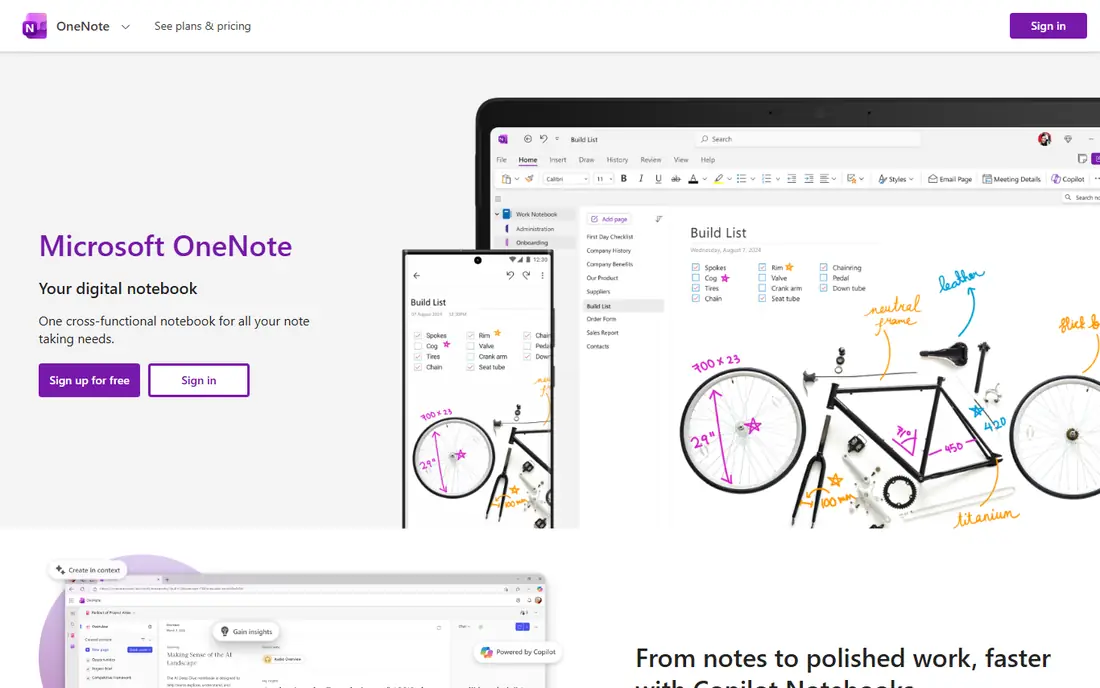
Microsoft OneNote is the best free all-rounder, with freeform notebooks on any device and no subscription needed. All supported versions are free to download and use, notes sync through OneDrive with 5 GB free storage, and the app supports handwriting and images placed anywhere on a page, which text-first apps cannot match. The web and mobile apps cover every platform, and the free OneNote on Windows app replaces the retired Windows 10 version.
Copilot in OneNote needs Microsoft 365 Personal at 99.99 dollars a year or higher, and Basic has no AI features, so AI is a paid extra rather than a free feature. OneDrive storage beyond 5 GB needs Microsoft 365 Basic at 19.99 dollars a year. For a user who wants a free notebook that works everywhere, OneNote is the best pick.
What we like- Best free all-rounder
- Freeform pages with handwriting and images anywhere
- Web and mobile apps
- Sync through OneDrive
Watch out for- OneDrive free storage 5 GB
- Copilot needs Microsoft 365 Personal at 99.99 dollars a year
- Windows 10 app ended support in October 2025
Starting priceFree
Free planYes
Apple Notes is the best free app for Apple users, built in on iPhone, iPad, and Mac with an Apple ID, no separate download or subscription. Notes sync through iCloud with 5 GB free storage, offline access works everywhere, and iCloud plus 50 GB costs 0.99 dollars a month for users who need more space. The app covers quick notes, lists, sketches, and scanned documents in one place.
Apple only plus web is the limit: there is no Android app, and collaboration is thinner than Notion. For an Apple user who wants a built-in app that costs nothing extra, Apple Notes is hard to beat for quick capture and everyday notes.
What we like- Built in on Apple devices
- Free with an Apple ID
- 5 GB iCloud storage
- Offline access
- ICloud plus 50 GB at 0.99 dollars a month
Watch out for- Apple only plus web
- No Android app
- Storage shared across iCloud
- Collaboration thinner than Notion
Starting priceFree
Free planYes
Google Keep is the best app for quick capture, with fast notes and lists inside a Google account at no extra cost. The app opens fast, captures a thought in seconds, and syncs across web and mobile with 15 GB of shared Google storage. For shopping lists, reminders, and fleeting ideas, Keep is faster than any full notebook app.
Keep is too simple for long notes, databases, or linked knowledge, and offline access is limited. For a user who wants the fastest capture tool and already lives in Google, Keep is the best pick, paired with a deeper tool for long-form notes.
What we like- Best for quick capture
- Free with a Google account
- 15 GB shared Google storage
- Fast notes and lists
- Web and mobile
Watch out for- Too simple for long notes or databases
- Offline access limited
- No linked notes or graph
- Storage shared across Google services
#4Notion
Best for: Structured team workspaces4.6/5 on
G2 (13,834 reviews, checked Oct 2026)
Visit notion.so
Starting priceFree
Free planYes
Notion suits structured work that mixes notes, tasks, and databases, with pages and databases in one workspace that teams can share. The free plan covers 1 person with unlimited blocks and 10 guests, across all platforms plus web, which makes Notion the best free starting point for a team workspace. Templates for projects, wikis, and docs speed setup.
Plus costs 10 dollars a member a month on annual billing, offline access is limited, and large databases can lag. There are no local files, so a user who wants to own plain files should pick Obsidian or Joplin instead. For a team or a structured personal workspace, Notion is the best free pick.
What we like- Best for structured team workspaces
- Pages and databases in one workspace
- Free for 1 person with unlimited blocks and 10 guests
- All platforms plus web
Watch out for- Plus 10 dollars a member a month annual
- Offline access limited
- Lags on large databases
- No local files

#5Obsidian
Best for: Private linked notes4.5/5 on
G2 (13 reviews, checked Oct 2026)
Visit obsidian.md
Starting priceFree
Free planYes
Obsidian is the best local-first knowledge base, free for personal use with no limits, storing everything as plain Markdown files in a folder on your computer. If Obsidian disappeared tomorrow, every note would still be readable in any text editor, which is the strongest ownership story in this list. Backlinks and graph views link notes into a knowledge web, performance is excellent on 5,000-note vaults, and over 1,800 community plugins fill feature gaps from daily journals to flashcards.
Sync costs 4 dollars a user a month on annual billing, though free sync via Dropbox, OneDrive, iCloud, or Git works, and there is no team collaboration or web app. For a user who wants private linked notes in plain files, Obsidian is the best free pick.
What we like- Free for personal use with no limits
- Local Markdown files you own
- Backlinks and graph
- Fast on 5,000-note vaults
- 1,800-plus community plugins
Watch out for- Sync 4 dollars a user a month annual
- No team collaboration
- No web app
- Learning curve for plugins

#6Joplin
Best for: Open source and encryption4.8/5 on
G2 (5 reviews, checked Oct 2026)
Visit joplinapp.org
Starting priceFree
Free planYes
Joplin is the best open source Evernote replacement, free and open source with end-to-end encryption and your own sync across every OS. The app supports Markdown, web clipping, and a OneNote importer, and Joplin Cloud Basic costs 2.40 euros a month on annual billing for users who want managed sync. Privacy advocates and Linux users get a full-featured notebook without a subscription or a proprietary database.
The interface is less polished than Notion or Bear, sync needs setup for self-hosting, and the plugin ecosystem is smaller than Obsidian. For a user who wants free, open, encrypted notes with full control, Joplin is the best pick.
What we like- Free and open source
- End-to-end encryption
- Your own sync
- Every OS
- OneNote importer
- Joplin Cloud Basic 2.40 euros a month annual
Watch out for- Interface less polished than Notion or Bear
- Sync needs setup
- Mobile apps less mature than rivals
- Plugin ecosystem smaller than Obsidian

#7Bear
Best for: Clean Apple writing4.5/5 on
G2 (45 reviews, checked Oct 2026)
Visit bear.app
Starting priceFree
Free planYes
Bear is the best polished Markdown app for Apple users, with a clean writing interface, offline access, and a free tier for local notes. The app suits writers who want beautiful Markdown notes on iPhone, iPad, and Mac, with tags and search that stay fast even in a large library. Pro costs 29.99 dollars a year or 2.99 dollars a month, adding sync across devices.
Apple only is the limit, and the free tier covers local notes only, so sync needs Pro. There are no Windows or Android apps and no databases. For an Apple writer who wants clean Markdown notes, Bear is the best free starting point.
What we like- Clean Markdown writing on Apple devices
- Free tier for local notes
- Polished interface
- Offline access
- Pro 29.99 dollars a year
Watch out for- Apple only
- Free tier local notes only, sync needs Pro at 2.99 dollars a month
- No Windows or Android
- No databases
Starting priceFree
Free planYes
Standard Notes is the best privacy-first free sync option, with end-to-end encrypted notes and a free tier covering plain text with encrypted sync across platforms. The privacy story is the strongest here alongside Joplin, and the cross-platform apps cover every device without a subscription for basic notes.
The free tier is plain text only, and rich features such as Markdown, themes, and advanced editors need the Productivity plan at 90 dollars a year. The interface is plainer than Bear or Notion. For a user who wants encrypted notes with free sync and does not need rich formatting, Standard Notes is the best pick.
What we like- End-to-end encrypted notes
- Free tier with plain text and encrypted sync
- Privacy-first
- Cross-platform
- Productivity plan 90 dollars a year for extras
Watch out for- Free tier plain text only
- Rich features need the 90 dollar a year Productivity plan
- Interface plainer than Bear or Notion
How we chose
We ranked free note apps on the free tier that actually matters, not the trial: genuinely free tiers, not time-limited trials, with the limits named, such as Evernote 50 notes and 1 device, Bear local notes only, and Standard Notes plain text only. We separated quick capture from deep knowledge work, since a capture app on the phone plus a deeper tool on the desktop gives the best of both worlds without overcomplicating things. We also weighted ownership and privacy, since local Markdown files and encryption decide the pick for many users more than feature counts do.
What to check before you buy
Try two or three apps for a week and see what sticks, since the best app is the one you actually use. Start with OneNote or Apple Notes or Google Keep for a week, move to Notion only when you need databases or team structure, and move to Obsidian, Joplin, or Standard Notes when ownership, Markdown, offline access, or encryption becomes the deciding factor. Check the free tier limits before committing, especially note counts, device counts, and sync, and confirm export formats, since a note app that cannot export your notes traps your knowledge. Finally, back up notes outside the app, since no note tool replaces an independent backup.
Frequently asked questions
What is the best free note taking app in 2026?
There is no single winner. For Apple users, Apple Notes is the best free all-rounder. For a linked Markdown knowledge base, Obsidian is free for personal use. For quick capture, Google Keep is fastest.
Are these apps actually free or just free trials?
Every app here has a genuinely free tier, not a time-limited trial. Apple Notes, Google Keep, and OneNote are completely free, while Obsidian and Notion are free for personal use and Joplin and Standard Notes are free with open or encrypted options.
Which free note app is best for privacy?
Standard Notes with end-to-end encryption and Joplin with open source and optional encryption are the most privacy-focused free options. Obsidian also stores notes as local files you fully own.
Can I import notes from another app?
Obsidian, Joplin, and Zoho Notebook document OneNote imports. Notion, Evernote, Apple Notes, and Bear have no OneNote importer of their own, so check import tools before switching.
Do I need to pay for sync?
Not always. OneNote, Apple Notes, and Google Keep sync free within their ecosystems. Obsidian Sync costs 4 dollars a month, but free sync via Dropbox, OneDrive, iCloud, or Git works, and Joplin offers free self-hosted sync.
Sources we checked (0)
Is your product missing or out of date?
We review this list regularly. Vendors can request a listing, send updated pricing or ask about featured placement.

Shihab Mia · Founder, Rankite
Shihab has 5+ years in B2B and SaaS SEO. He writes Rankite's software buying guides from pricing pages, documentation and public user reviews. More about Shihab.
 Apple Notes
 Google Keep
 Standard Notes