How we make this list: we compare pricing pages, product documentation and public user reviews. Ratings come from G2, Capterra or Trustpilot, with the date we checked them.
Key takeaways
- Raindrop.io is the best all-round free bookmark manager, with unlimited bookmarks, collections, and cross-platform apps on its free tier.
- Instapaper is the strongest free pick for pure article reading, with a clean reading view and offline access.
- Toby suits tab hoarders, turning open tabs into saved collections for free.
- Start.me suits a visual start page, with bookmarks as a dashboard.
- Wallabag, Karakeep, and Linkwarden are free if you self-host, so no company can shut them down on you.
- Diigo suits researchers with annotation features on a free tier.
- Pocket shut down on July 8, 2025, and is not listed here, so export your library before committing to any new service.
- Judge bookmark apps on export before features, since two well-known apps shut down in about two years.
Quick comparison
Is your product missing or out of date?
We review this list regularly. Vendors can request a listing, send updated pricing or ask about featured placement.
The best free bookmarks apps
Starting priceFree
Free planYes
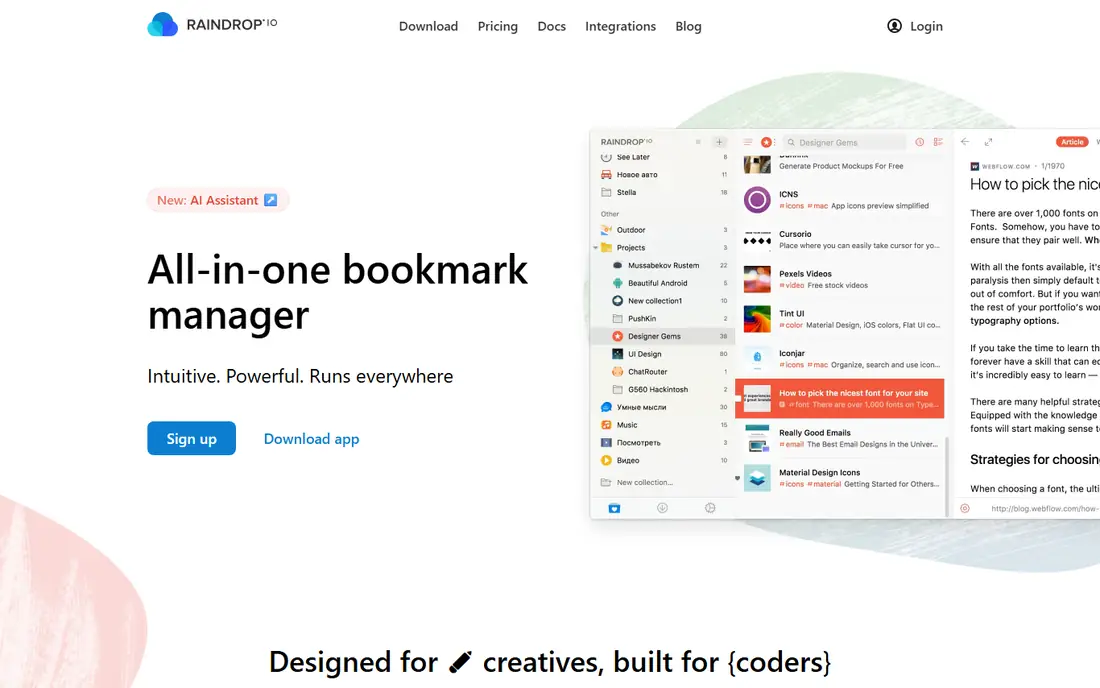
Raindrop.io is the best all-round replacement for Pocket, with a genuinely usable free tier and the strongest organisation. The free tier covers unlimited bookmarks, collections, and cross-platform apps, with visual layouts including thumbnail grids, lists, and masonry, switchable per collection. Pro, at about $3 per month billed yearly or $28 per year, adds full-text search, permanent copies, an AI assistant, and deeper nested collections.
Full-text search sits behind Pro, which limits retrieval from large libraries. For all-round free bookmarking, Raindrop.io is clearly the best pick, since its free tier covers unlimited bookmarks and collections.
What we like- Unlimited bookmarks and collections
- Cross-platform apps
- Visual layouts with thumbnails
Watch out for- Full-text search needs Pro at $3 per month
- Deeper nested collections need Pro
- Permanent copies need Pro
Starting priceFree
Free planYes
Instapaper remains the nicest place to read, with a clean reading view, offline access, and a free account that is strongest for pure article reading. Free tier includes five notes and ten summaries monthly on supported platforms, with Premium at $5.99 per month or $59.99 per year adding unlimited notes, full-text search, and more. The app suits readers who save articles and read them later without clutter.
Premium costs $5.99 per month, and summaries are not yet on Android. For pure article reading, Instapaper is clearly the best pick, since its reading view is the cleanest in this list.
What we like- Cleanest reading view
- Free account strong for reading
- Offline access
- Notes on free tier
Watch out for- Premium costs $5.99 per month
- Free notes capped at five monthly
- Summaries not yet on Android
Starting priceFree
Free planYes
Toby turns open tabs into saved collections, which suits tab hoarders who keep dozens of tabs open across projects. The browser extension saves a whole window as a collection in one click, with drag-and-drop organisation. Personal use is free, with paid team plans for shared workspaces.
Toby is browser-only, with no full mobile app, and sessions need manual saving. For tab collections, Toby is clearly the best pick, since no other app handles tab session management as well.
What we like- Turns open tabs into saved collections
- Free for personal use
- Browser extension
Watch out for- Paid team plans for sharing
- Browser-only, no full mobile app
- Sessions need manual saving
Starting priceFree
Free planYes
Start.me presents bookmarks as a visual start page, with widgets for news, feeds, and notes alongside bookmark groups. The free tier covers the dashboard and bookmark groups, which suits users who want their browser home page to double as a bookmark manager. Paid Pro adds more widgets and backup options.
The dashboard focus means Start.me is not a read-it-later app, and the design feels dated. For a visual start page, Start.me is clearly the best pick, since its dashboard doubles as a browser home page.
What we like- Bookmarks as a visual dashboard
- Free tier useful
- Widgets for news and feeds
Watch out for- Paid Pro tier for advanced features
- Dashboard focus, not reading
- Design dated
Starting priceFree
Free planYes
Wallabag is the only option nobody can shut down, because you host it yourself, with open source code and import-friendly support for Pocket HTML exports, Instapaper CSV, and Omnivore archives. Managed hosting starts from 11 euros per year for users who do not want to self-host. The app suits readers who want full data ownership, with articles living on their own server.
Self-hosting needs basic Linux comfort, and the UI is functional, not beautiful. For self-hosted reading, Wallabag is clearly the best pick, since it is the only option nobody can shut down on you.
What we like- Open source
- Free if you self-host
- Managed plans from 11 euros per year
- Import-friendly
Watch out for- Self-hosting needs basic Linux comfort
- UI functional, not beautiful
- You handle updates and backups
Starting priceFree
Free planYes
Karakeep is an open source bookmark manager and read-later app that is free if you self-host, with no cloud service dependency. The app suits users who want bookmarking plus reading in one self-hosted tool, after Pocket shutdown made cloud dependency a real risk. Community support and documentation cover common setups.
Self-hosting effort is real, and Karakeep is newer, with fewer guides than Wallabag. For self-hosted bookmarks, Karakeep is clearly the best pick, since it combines bookmarking and reading in one self-hosted tool.
What we like- Open source
- Free if you self-host
- Bookmark manager plus read-later
- No cloud dependency
Watch out for- Self-hosting effort
- Newer project with fewer guides
- Community support only
Starting priceFree
Free planYes
Linkwarden is an open source, self-hosted bookmark manager for privacy-focused users, with collections, tags, and minimal data collection. The app suits users who want their bookmark library under their own control, with no vendor tracking. Self-hosting keeps data on your own server, with export options for migration.
Self-hosting effort is real, and the community is smaller than Raindrop or Wallabag. For self-hosted privacy, Linkwarden is clearly the best pick, since its minimal data collection suits privacy-focused users.
What we like- Open source
- Free if self-hosted
- Minimal data collection
- Collections and tags
Watch out for- Self-hosting effort
- Smaller community
- Managed hosting costs extra
Starting priceFree
Free planYes
Diigo suits researchers with annotation features that are genuinely useful for academic or deep research work, including highlighting, sticky notes, and tagging across saved pages. The free tier covers basic annotation and bookmarking, with premium plans for larger libraries and groups. The app suits students and researchers who annotate sources.
The free tier limits library size, and the interface feels dated. For research annotation, Diigo is clearly the best pick, since its highlighting and sticky notes suit academic work.
What we like- Annotation features for research
- Highlighting and sticky notes
- Free tier useful
Watch out for- Free tier limits library size
- Interface dated
- Premium needed for larger libraries
How we chose
We compared free tier usefulness, export options, offline access, reading experience, and survival risk. We also weighed import quality, since a bookmark app that mangles your Pocket or browser export on day one wastes the library you are trying to protect. We favored apps with readable exports, since proprietary dumps strand libraries when services shut down. We noted self-hosting effort honestly, since free self-hosted apps cost time and server upkeep. We did not test any app hands-on, and prices come from vendor and comparison sources checked in August 2026.
Buying guide: what to check before you pick
Start with export: before committing several thousand saved articles to any service, export once and look at what you get, and prefer apps that hand back readable files rather than a proprietary dump. Test the export with a small batch first, since a broken export discovered after migration costs hours of manual repair. Next, decide between bookmark manager and read-it-later: a bookmark manager optimizes for retrieval with collections, tags, and search, while a read-it-later app optimizes for consuming content with a clean view and offline access. Most users need one primary job, not both, so pick the app that serves your main habit and accept its weaker side. Check self-hosting comfort if you pick Wallabag, Karakeep, or Linkwarden, since you handle updates and backups. Budget a few hours for setup and a small monthly server cost, or choose managed Wallabag hosting from 11 euros per year instead. Check the free tier limits, since Diigo caps library size and Raindrop holds full-text search behind Pro. Test your largest collection against the free tier before importing thousands of links, since a cap discovered mid-migration is painful. Finally, keep a local backup of your library, since even popular services shut down. Schedule a monthly export to a local folder, so a surprise shutdown notice never means losing years of saved research and reading. Treat your bookmark library like any other important data: if it exists in only one cloud account, it is not backed up at all, period, and a single shutdown can erase it completely without warning or recovery options at all.
Frequently asked questions
Is Pocket still available?
No, Mozilla shut Pocket down on July 8, 2025, and export-only access ended on November 12, 2025, when data deletion began. Raindrop.io absorbed users who wanted organized bookmarks, while Instapaper took the reading-first crowd.
What is the best free bookmark manager?
Raindrop.io is the best all-round free bookmark manager, with unlimited bookmarks, collections, and cross-platform apps on its free tier. Instapaper is the best free pick for pure article reading.
Should I self-host my bookmarks?
Self-hosting with Wallabag, Karakeep, or Linkwarden means no company can shut your library down, but you handle updates, backups, and server costs. Managed Wallabag plans start from 11 euros per year if you want ownership without server work.
What is the difference between a bookmark manager and a read-it-later app?
A bookmark manager optimizes for retrieval with collections, tags, and search over a large permanent library, while a read-it-later app optimizes for consuming content with a clean view and offline access. Raindrop blurs the line with reading features.
How do I export my bookmarks before switching?
Most apps offer HTML or CSV export in settings. Export once, check that the file contains readable links and titles, and store a local copy before importing into the new app. Verify that tags and collections survive the export, since some formats drop organisation and leave a flat link list behind. Keep that local copy even after a successful import, as a safety net for future moves between apps and services over time ahead always today too often.
Sources we checked (0)
Is your product missing or out of date?
We review this list regularly. Vendors can request a listing, send updated pricing or ask about featured placement.

Shihab Mia · Founder, Rankite
Shihab has 5+ years in B2B and SaaS SEO. He writes Rankite's software buying guides from pricing pages, documentation and public user reviews. More about Shihab.
 Raindrop.io
 Instapaper
 Toby
Toby Start.me
 Wallabag
 Karakeep
 Linkwarden
 Diigo
Diigo