How we make this list: we compare pricing pages, product documentation and public user reviews. Ratings come from G2, Capterra or Trustpilot, with the date we checked them.
Key takeaways
- There are two kinds of disposable email: burners that vanish in minutes, for a one time code or download, and alias services that forward to your real inbox until you switch them off.
- SimpleLogin and addy.io are the alias standards: free tiers with real forwarding, paid plans from $1 to $4 a month for unlimited aliases and your own domain.
- DuckDuckGo Email Protection is completely free with unlimited addresses and tracker removal; Firefox Relay and Apple Hide My Email serve their own browser and device users from $0.99 a month.
- Guerrilla Mail and Temp Mail are the classic burners: free, instant, and gone within the hour or the session.
- Use these for privacy and testing, not deception. Creating accounts to evade bans, commit fraud, or break a service's terms is misuse, many services block disposable domains anyway, and nothing here is for that.
Quick comparison
Is your product missing or out of date?
We review this list regularly. Vendors can request a listing, send updated pricing or ask about featured placement.
The best disposable email services
Starting priceFree
Free planYes
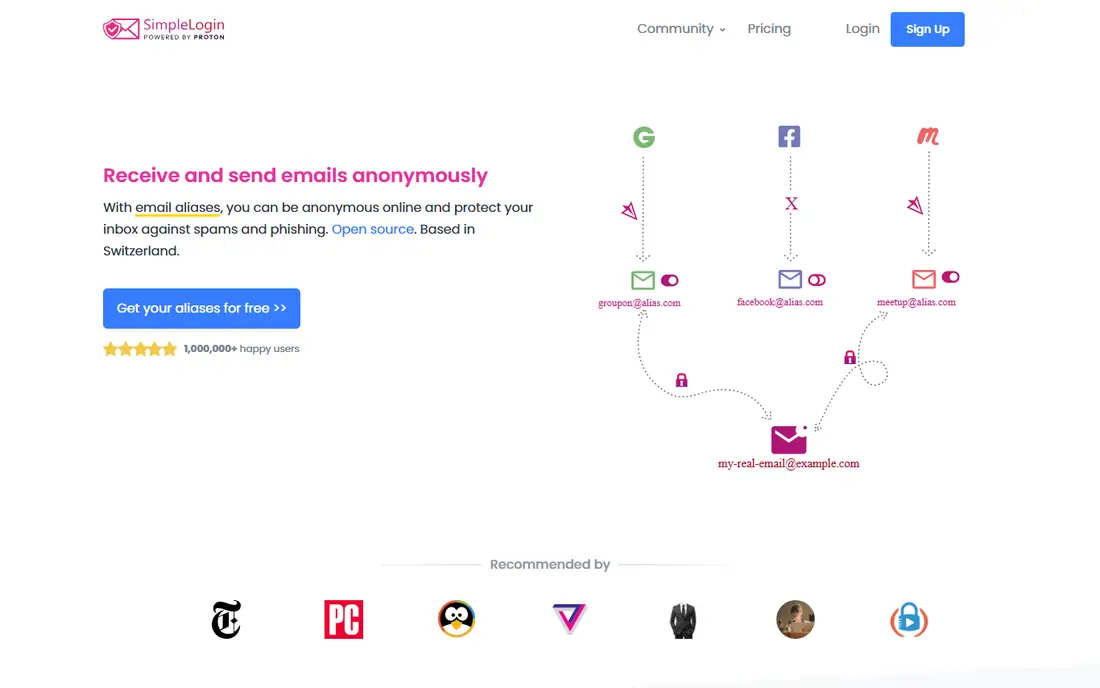
SimpleLogin is the reference alias service. Create an alias for each site, give the alias out instead of your address, and mail forwards to your inbox, with replies routed back through the alias so your real address never appears. If a site sells its list or gets breached, the junk arrives at one alias, you disable it, and the leak tells you exactly which site leaked. The free plan is genuinely usable, and Premium at $36 a year is the standard upgrade.
SimpleLogin is open source, can be self hosted, and is owned by Proton, which puts it under Swiss jurisdiction and a privacy first operator. Its limits are the honest kind: own domain aliases and initiating mail from an alias sit on Premium. For the common job, protecting a real inbox from a hundred signups, SimpleLogin is where most people should start.
What we like- Free plan includes 10 aliases, one mailbox, and replies through the alias
- Premium at $4 per month or $36 per year adds unlimited aliases and custom domains
- Open source and self hostable, owned by Proton
- Browser extensions and mobile apps generate aliases at the signup form
Watch out for- Custom domains and sending new mail from an alias need Premium
- The free 10 alias cap goes quickly for heavy users
- Forwarding means SimpleLogin's servers handle your mail metadata
- Shared domains can be blocked by strict signup forms occasionally

#2
addy.io
Best for: Unlimited aliases on a free plan
Visit addy.io
Starting priceFree
Free planYes
addy.io, formerly AnonAddy, is the power user's alias service. Its free plan's unlimited standard aliases remove the counting problem SimpleLogin's free tier creates, in exchange for a 10 MB monthly bandwidth cap that light email easily fits. Paid tiers are the cheapest here: Lite at $1 per month billed yearly adds replies and a custom domain.
The trade offs are polish and plumbing. addy.io's controls, rules, and statistics are excellent, and its dashboard less hand holding than the consumer tools below. It is open source and self hostable for people who want the forwarding under their own control entirely. If your instinct is to configure rather than to click, addy.io is your service.
What we like- Free plan allows unlimited standard aliases, unusual generosity
- Lite at $1 per month billed yearly is the cheapest paid upgrade here
- Open source, self hostable, based in the Netherlands
- Fine grained rules, per alias controls, and usage stats
Watch out for- Free plan caps bandwidth at 10 MB a month and one recipient
- Replying through aliases is a paid feature
- Shared domain aliases are limited to 10 on free
- The interface rewards technical users more than casual ones
Starting priceFree
Free planYes
DuckDuckGo Email Protection is the simplest offer in this category: a free service that gives you a personal @duck.com address plus unlimited randomly generated private addresses, forwards everything to your real inbox, and strips the tracking pixels senders hide in mail, telling you how many it removed. There is no paid tier to upsell you; free is the product.
Its limits match its simplicity. There is no custom domain, and keeping track of which random address belongs to which service is on you, since the management view is minimal compared with the alias specialists. For a set and forget layer of protection on signups and newsletters, though, unlimited and free is hard to argue with, and the tracker report alone teaches most people something about their inbox.
What we like- Completely free, with unlimited private Duck Addresses
- Strips email trackers and reports how many it removed
- Works through DuckDuckGo browsers and extensions for the major browsers
- Replies possible from your Duck address with some limitations
Watch out for- No custom domain support
- Alias management and overview are weaker than SimpleLogin or addy.io
- Addresses are random word combinations, fine for signups, odd for humans
- Tied to the DuckDuckGo app and extension ecosystem
Starting priceFree
Free planYes
Firefox Relay puts the alias at the exact moment of need. When a form in Firefox asks for an email, Relay offers a mask, a generated address that forwards to you, and the dashboard tracks every mask, what it received, and lets you block or delete it. Premium, from $0.99 per month, lifts the mask limit, adds replies within a window after receiving mail, and provides a subdomain for addresses you invent on the fly.
Sources differ on the current free mask count, so check Mozilla's page; the structure, small free allowance, cheap premium, is consistent. Relay's centre of gravity is the Firefox browser, which makes it the natural pick for Firefox households and a secondary one for everyone else. It is also one of only two entries here run by a nonprofit.
What we like- Free masks generated from inside Firefox at the signup field
- Premium from $0.99 per month adds unlimited masks, replies, and a Relay subdomain
- Tracker and promotion filtering on incoming mail
- Run by Mozilla, a nonprofit with a privacy record
Watch out for- Free mask allowance is small on Mozilla's standard offer
- Replies are a Premium feature and time limited
- No custom domain, Premium's subdomain is the closest equivalent
- Most useful inside Firefox, though a dashboard works elsewhere
Starting price$0.99 per month
Free planNo
If you own Apple devices and pay for iCloud+, you already own this service. Hide My Email generates a unique random address for each signup, offered right on the form in Safari and in apps through Sign in with Apple, forwards to your inbox, and can be deactivated per service in settings. The addresses Apple generates look unremarkable, which makes them the least likely on this list to be refused by a signup form.
The price is the iCloud+ subscription itself, from $0.99 a month for the smallest storage tier, and every tier includes the feature. The lock in is the consideration: your addresses live inside Apple's system, and a household that later leaves the ecosystem leaves them behind. For an Apple household that is a tomorrow problem; today, this is the zero effort option.
What we like- Built into iPhone, iPad, Mac, and Safari, offered automatically on signup forms
- Addresses look like normal private relays and are rarely blocked
- Reply and send from the address inside Apple Mail
- Included with iCloud+ storage you may already pay for, from $0.99 a month
Watch out for- Requires an iCloud+ subscription, there is no free version
- Locked to the Apple ecosystem, leaving Apple strands the addresses
- No custom domain through Hide My Email itself
- Management lives in iCloud settings, not a dedicated dashboard

#6Proton Pass
Best for: Aliases bundled with a password manager4.6/5 on
G2 (6 reviews, checked Oct 2026)
Visit proton.me
Starting priceFree
Free planYes
Proton Pass answers a workflow insight: the moment you need an alias is the moment you are creating a password, so it puts both in one tool. Sign up somewhere and Pass offers a generated password and a hide my email alias together, saved as one login. Its free plan includes 10 aliases, and paid Pass plans, from around $1.99 per month on annual billing in current comparisons, make them unlimited.
Proton owns SimpleLogin, and the services connect, so choosing between them is about shape: SimpleLogin for a dedicated alias manager, Pass for aliases inside your password vault. For someone starting a privacy setup from zero, Pass is the efficient single purchase.
What we like- Aliases built into a full password manager, generated at the signup form beside the password
- Free plan includes 10 aliases
- Paid plans from about $1.99 per month billed yearly add unlimited aliases
- Same Swiss, open source ecosystem as SimpleLogin, and the two integrate
Watch out for- Full value needs the Proton ecosystem
- Sending from an alias needs Proton Mail on a paid plan
- The password manager, not the aliasing, is the product's centre
- Free alias count matches SimpleLogin's cap
Starting priceFree
Free planYes
Guerrilla Mail is the original burner: open the page and you have an address and an inbox, valid for roughly sixty minutes, no account and no questions. It is the right tool for a narrow job, receiving a confirmation or a download link from a site you will never visit again, or testing your own signup flow end to end without touching a real mailbox.
Respect its limits and it serves that job well. Anything that arrives there is visible to anyone who enters the same address, so never let a password reset or a receipt with personal details land in it. And for accounts you intend to keep, a burner is the wrong tool entirely: the day you need the reset link, the inbox is a year gone. Use an alias instead.
What we like- No signup, an inbox exists the moment you open the page
- Addresses last about an hour, long enough for a verification email
- Can send mail as well as receive, unusual among burners
- Has run for years and is widely recognised as the category's default
Watch out for- The inbox is public to anyone who guesses the address, never use it for anything sensitive
- An hour is too short for accounts you keep, password resets will fail later
- Many sites block its domains for account creation
- No forwarding, no persistence, no support
Starting priceFree
Free planYes
Temp Mail is the other long running burner, distinguished mainly by shape: a generated address tied to your session, with mobile apps, and a premium tier that adds your own domain and removes ads. It does the same one job as Guerrilla Mail, catching a disposable message, with a slightly softer edge for people who prefer an app.
The cautions are identical, because the model is identical. The inbox is not private in any meaningful sense, the domains are on every blocklist a strict signup form consults, and the address will not exist when a future you needs it. Between a burner and an alias, pick by whether the account matters. If it matters at all, it is an alias.
What we like- Instant address on arrival, with apps for iOS and Android
- Inbox persists for the session rather than a fixed short timer
- Premium tier offers custom domains and an ad free experience
- Simple enough for anyone to use once and forget
Watch out for- Also a public style inbox, unsuitable for sensitive mail
- Domains are famous and frequently blocked at signup
- Free tier is ad supported
- Session based persistence still means the address is gone when you are
How we chose
We split the category by model, persistent aliases versus expiring burners, because choosing the wrong model is the common failure, and used October 2026 comparisons from Emcognito, EmailAlias.io, Cloaked's disposable email roundup, Tmailor, and Help Net Security's SimpleLogin showcase, with vendor pages for prices. Where sources disagreed, the free mask count on Firefox Relay, we said so rather than printing a figure. We excluded plus addressing tricks, which are not disposable, VPN bundled relays with no standalone service, and the many copycat burner sites with no track record.
What to look for in a disposable email service
Choose the model first. If the account has a password you will want back, a receipt you might need, or a subscription attached, you need a persistent alias that forwards to you and can be disabled individually. Burners are for messages, not accounts: one code, one download, one test. Mixing the two up is how people lock themselves out of services they paid for.
For aliases, the features that matter are replies through the alias, so conversations never expose your address; a custom domain on paid plans, which makes addresses unblockable and portable between providers; and a dashboard that labels each alias with the service it belongs to, because an unlabelled alias list is a mystery within a year. Then hold the ethical line yourself: one alias per service for privacy is standard practice and widely accepted, while throwaway accounts for ban evasion, spam, or fraud are misuse, and the services here will close accounts used that way.
Frequently asked questions
Is using a disposable email address legal?
Yes, for the ordinary uses in this guide: protecting your inbox from spam and breaches, receiving a one time download or code, and testing your own product's email flows. What is not permitted is the purpose behind it: using throwaway addresses to commit fraud, evade an account ban, or open accounts in breach of a service's terms can breach contracts and, for fraud, the law. Several services also prohibit disposable domains at signup, which is a policy block, not a crime, but it means burner addresses often simply will not work for accounts.
What is the difference between a burner and an alias?
A burner is a temporary public inbox. It exists for minutes or a session, anyone who knows the address can read it, and then it is gone: Guerrilla Mail and Temp Mail are burners. An alias is a private forwarding address tied to your real inbox. It lasts until you disable it, only you receive its mail, and you can reply through it: SimpleLogin, addy.io, DuckDuckGo, Relay, Apple, and Proton Pass are alias services. Use burners for single messages and aliases for accounts.
Will websites accept a disposable address?
It depends on the service's blocklist. Burner domains are famous and are refused by many banks, social networks, and subscription services at signup. Alias addresses fare better: shared domain aliases are occasionally blocked, while aliases on your own custom domain, a paid feature at SimpleLogin and addy.io, look like ordinary email and are accepted almost everywhere. Apple's relay addresses are also rarely blocked, since they are built into iPhone signups.
Which of these services is free?
DuckDuckGo Email Protection is fully free with unlimited addresses. SimpleLogin, addy.io, Firefox Relay, and Proton Pass all have free tiers with real forwarding, capped by alias count, bandwidth, or mask count, and the burners are free with ads. The paid upgrades are small: addy.io Lite is $1 a month billed yearly, Relay Premium starts at $0.99, SimpleLogin Premium is $36 a year, and Hide My Email rides on iCloud+ from $0.99 a month.
Sources we checked (0)
Is your product missing or out of date?
We review this list regularly. Vendors can request a listing, send updated pricing or ask about featured placement.

Shihab Mia · Founder, Rankite
Shihab has 5+ years in B2B and SaaS SEO. He writes Rankite's software buying guides from pricing pages, documentation and public user reviews. More about Shihab.
 SimpleLogin
 DuckDuckGo Email Protection
 Firefox Relay
 Apple Hide My Email
 Guerrilla Mail
 Temp Mail