How we make this list: we compare pricing pages, product documentation and public user reviews. Ratings come from G2, Capterra or Trustpilot, with the date we checked them.
TickTick vs Todoist: which one should your team pick
TickTick and Todoist are the two best known task apps for people who want more than a basic checklist. Both capture tasks fast, sync across devices and handle recurring work, but they take different paths once you look closer. TickTick packs a calendar, a habit tracker and a Pomodoro timer into the same app, while Todoist stays focused on a clean, fast task list with strong natural language input and a long track record.
The price gap matters too. TickTick Premium costs 49.99 dollars per year on the web, while Todoist Pro costs 60 dollars per year when billed annually.
Direct answer: TickTick is the top pick for most solo buyers, because Premium costs less per year and includes a full calendar, a habit tracker and a focus timer that Todoist either charges extra for or does not offer. Todoist suits buyers who value the fastest task capture, a mature integration set and a proven team plan. Microsoft To Do is the best free alternative for anyone already inside the Microsoft 365 world.
Key takeaways
- TickTick Premium costs 49.99 dollars per year, about 10 dollars less than Todoist Pro at 60 dollars per year on annual billing.
- TickTick bundles a calendar, habit tracker and Pomodoro timer in one app, while Todoist keeps the focus on task capture and list management.
- Todoist Pro raised its price in December 2025, from 48 dollars a year to 60 dollars a year, so older comparison pages still show the stale figure.
- Microsoft To Do and Google Tasks are free and cover basic task lists well, but neither offers the power features of the paid apps.
- Asana and Trello suit teams that need shared projects and boards, while Things 3 suits Apple only users who prefer a one time purchase.
TickTick is better for daily task tracking if you plan your whole day in one place. Its calendar views show tasks beside appointments, the Pomodoro timer keeps focus sessions inside the same app, and the habit tracker records the small routines that sit next to your task list.
Todoist is better if your day runs on fast capture and triage. Its natural language input turns a typed sentence into a dated, labelled task in seconds, and its filters let you build custom views for contexts like calls, errands or deep work.
How much do TickTick and Todoist cost
TickTick Premium is listed at 49.99 dollars per year on TickTick's own web upgrade page, with no separate monthly price shown there. The App Store lists Premium at 4.99 dollars a month or 49.99 dollars a year. Some older pages still show 35.99 dollars a year, but that was the old price and it no longer applies, so ignore any comparison that still quotes it.
Todoist Pro costs 5 dollars per user per month when billed annually, which totals 60 dollars per year, or 7 dollars per month when billed monthly. Todoist raised Pro in December 2025 from 48 dollars a year to 60 dollars a year. The Business plan costs 8 dollars per user per month billed annually, or 10 dollars per user per month billed monthly, and adds a shared team workspace.
What feature differences matter most between TickTick and Todoist
The calendar is the biggest difference. TickTick includes day, week, month and agenda calendar views in the same app, with two way calendar sync on Premium, so tasks and events share one timeline. Todoist offers a calendar layout on Pro, but it is a view of your tasks rather than a full calendar replacement, and many buyers still pair Todoist with a separate calendar app.
Habits and focus tools are the second difference. TickTick includes a habit tracker with statistics and a Pomodoro timer with no extra charge, which suits buyers who want routines and timed work sessions tracked alongside tasks. Todoist has no built in habit tracker and no focus timer, so buyers who want those features need a second app.
How hard is it to switch from Todoist to TickTick or back
Switching between TickTick and Todoist is straightforward for most buyers, because both apps import tasks from common formats and both support CSV export. TickTick offers an import tool that pulls tasks, lists and due dates from Todoist, and Todoist supports importing from a CSV file, so a personal task list usually moves in under an hour.
The work that takes longer is rebuilding your system, not moving the tasks. Filters, labels, custom views and recurring task rules do not map one to one, so expect to spend an evening recreating your views and checking that recurring tasks landed with the right dates.
Quick comparison
| Tool | Best for | Starting price | Free plan |
|---|
 TickTick | Solo buyers who want tasks, a calendar, habits and a focus timer in one app | $49.99 per year for Premium | Yes, free plan with 9 lists, up to 99 tasks per list, 2 reminders per task and a basic calendar view |
 Todoist | Buyers who want the fastest task capture and a mature, reliable task list | $5 per user per month billed annually for Pro ($60 per year) | Yes, Beginner plan is free with 5 personal projects, 3 filter views and board layouts |
 Microsoft To Do | Microsoft 365 users who want a free task list that syncs with Outlook | Free | Yes, fully free with a Microsoft account |
 Any.do | Buyers who want a calm daily planner with a calendar and WhatsApp reminders | $4.99 per month billed annually for Premium ($59.88 per year) | Yes, free Personal plan with tasks, lists, reminders, calendar, daily planner and sync across devices |
 Google Tasks | Google Workspace users who want a free list inside Gmail and Calendar | Free | Yes, fully free with a Google account |
 Things 3 | Apple only users who want a polished personal task manager with a one time purchase | $9.99 one-time for iPhone; $49.99 one-time for Mac; $19.99 one-time for iPad | No free plan; 15-day trial for Mac |
 Asana | Teams that need shared projects, timelines and workload views beyond a personal task list | $10.99 per user per month billed annually for Starter ($13.49 billed monthly) | Yes, free Personal plan for up to 10 teammates |
 Trello | Small teams and solo buyers who think in boards and cards | $5 per user per month billed annually for Standard | Yes, free plan with unlimited cards and up to 10 boards per workspace |
Is your product missing or out of date?
We review this list regularly. Vendors can request a listing, send updated pricing or ask about featured placement.
The eight tools below cover the full range of this comparison, from free task lists to paid team platforms. TickTick and Todoist lead the list, and the other six cover buyers who want a free option, an Apple only app, or a team workspace. Prices below were checked against vendor pricing pages and current search results in November 2026.
#1TickTick
Best for: Solo buyers who want tasks, a calendar, habits and a focus timer in one app4.5/5 on
G2 (113 reviews, checked Oct 2026)
Visit ticktick.com
Starting price$49.99 per year for Premium
Free planYes, free plan with 9 lists, up to 99 tasks per list, 2 reminders per task and a basic calendar view
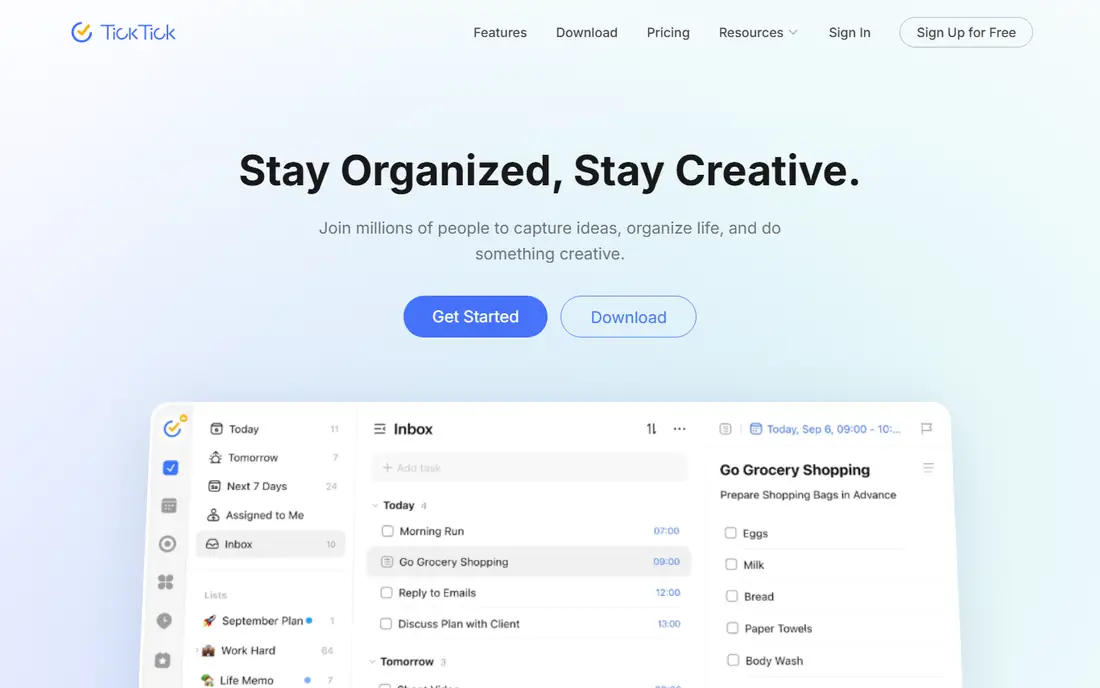
TickTick is a to do app that bundles more into the list than any rival at this price. Premium costs 49.99 dollars a year and adds 299 lists with up to 999 tasks each, a timeline view, custom smart lists, task durations, email reminders and two way calendar sync. The Pomodoro timer splits work into 25 minute sessions, the habit tracker records streaks, and the Eisenhower Matrix sorts tasks by urgency and importance.
What we like- Full calendar views, habit tracker and Pomodoro timer included
- Cheaper per year than Todoist Pro
- Works on iOS, Android, Windows, Mac, Linux and web
Watch out for- No team billing or shared workspace
- The interface can feel crowded because so many features share one screen
#2Todoist
Best for: Buyers who want the fastest task capture and a mature, reliable task list4.5/5 on
G2 (832 reviews, checked Oct 2026)
Visit todoist.com
Starting price$5 per user per month billed annually for Pro ($60 per year)
Free planYes, Beginner plan is free with 5 personal projects, 3 filter views and board layouts
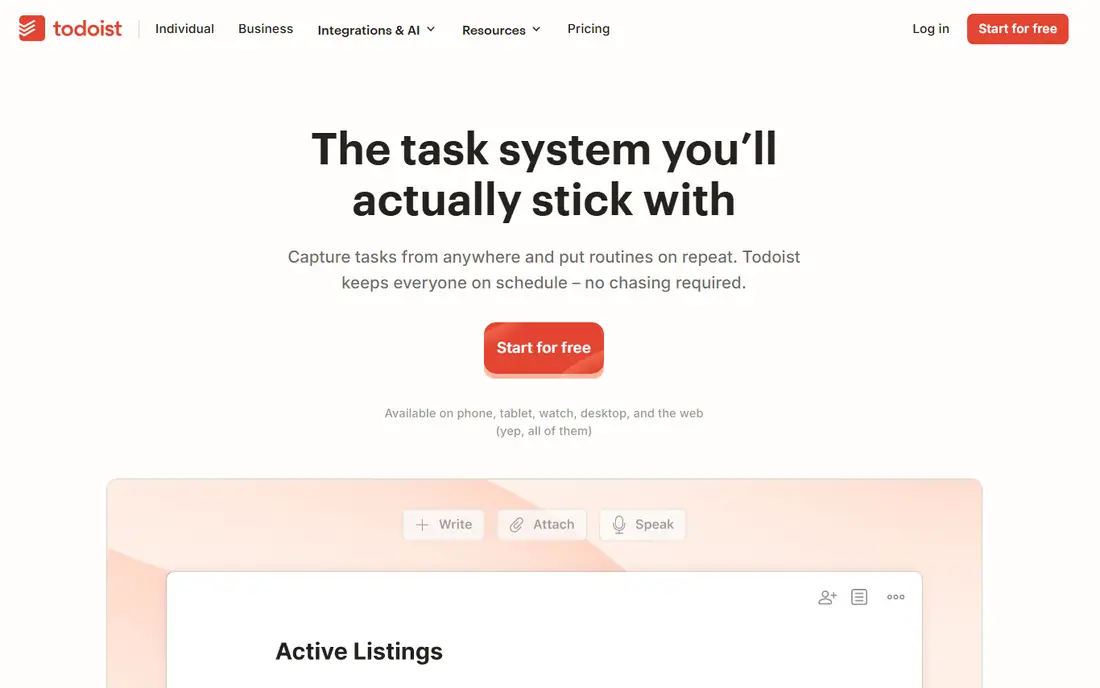
Todoist has been the reference task app for years, and its strength is still capture speed. Type a sentence like "call the accountant every Friday at 9am" and Todoist turns it into a dated, recurring task with the right label in seconds. Pro costs 5 dollars per user per month billed annually, or 60 dollars billed yearly, and 7 dollars per month on monthly billing. Pro raises the limit to 300 personal projects and 150 filter views, and adds the calendar layout, task durations, custom reminders, full activity history and Todoist Assist.
What we like- Excellent natural language input, strong filters and labels, large integration library, proven sync across every platform
Watch out for- Pro price rose in December 2025 from 48 dollars to 60 dollars a year
- No built in calendar, habit tracker or focus timer
#3Microsoft To Do
Best for: Microsoft 365 users who want a free task list that syncs with Outlook4.4/5 on
G2 (99 reviews, checked Oct 2026)
Visit to-do.microsoft.com
Starting priceFree
Free planYes, fully free with a Microsoft account
Microsoft To Do is the free task app that ships with a Microsoft account, and it is the simplest option in this list. It syncs with Outlook tasks and Microsoft 365, so a task flagged in Outlook appears in To Do without extra setup, and the My Day view lets you pick the tasks you plan to finish today. The trade off is depth. Microsoft To Do has no natural language input, no flexible recurring task rules, and no calendar, habit or timer features. For a buyer already paying for Microsoft 365, it costs nothing extra and handles daily lists well.
What we like- Free with no paid tier, syncs with Outlook tasks and Microsoft 365, simple My Day view, available on web, Windows, iOS and Android
Watch out for- No natural language input, no habit tracking or focus timer, and far fewer integrations than Todoist or TickTick
#4Any.do
Best for: Buyers who want a calm daily planner with a calendar and WhatsApp reminders4.2/5 on
G2 (197 reviews, checked Oct 2026)
Visit any.do
Starting price$4.99 per month billed annually for Premium ($59.88 per year)
Free planYes, free Personal plan with tasks, lists, reminders, calendar, daily planner and sync across devices
Any.do builds its app around the day rather than the list, with a daily planner and a calendar that sit beside your tasks. Premium costs 4.99 dollars a month billed annually, or 7.99 dollars a month billed monthly, and adds recurring tasks, WhatsApp reminders, AI powered features, color tags and location reminders. The free Personal plan covers tasks, lists, reminders, a calendar and a daily planner, but recurring tasks are Premium only, which is a real limit for anyone with weekly routines. Buyers should note a pricing conflict. Any.do's main pricing page shows Premium at 4.99 dollars a month billed annually,.
What we like- Daily planner view built around the day rather than the list, WhatsApp reminders, location reminders, clean mobile design
Watch out for- Recurring tasks, color tags and location reminders are locked behind Premium
- Any.do's own pages show conflicting Premium prices, so check the checkout total before paying
#5
Google Tasks
Best for: Google Workspace users who want a free list inside Gmail and Calendar
Visit tasks.google.com
Starting priceFree
Free planYes, fully free with a Google account
Google Tasks is the simplest tool in this list, and that is both its appeal and its limit. It lives inside Gmail and Google Calendar, so a task created from an email stays attached to that email, and tasks with due dates appear on the calendar without any integration work. The limits are clear. Google Tasks has no natural language input, no tags or filters, no recurring task rules beyond a basic repeat option, and no team sharing beyond a simple list. For a Google Workspace user who needs a light personal list beside email and calendar, it is free and good enough.
What we like- Free, built into Gmail and Google Calendar, very simple to learn, syncs across phone and web with no setup
Watch out for- No natural language input, no reminders beyond basic due dates, no tags, filters or team features, and no desktop app
#6
Things 3
Best for: Apple only users who want a polished personal task manager with a one time purchase
Visit culturedcode.com
Starting price$9.99 one-time for iPhone; $49.99 one-time for Mac; $19.99 one-time for iPad
Free planNo free plan; 15-day trial for Mac
Things 3 is the most polished task app on Apple devices, and it is the only tool here sold as a one time purchase instead of a subscription. The Mac app costs 49.99 dollars once, the iPhone app costs 9.99 dollars once and includes the Apple Watch app, and the iPad app costs 19.99 dollars once. Buying all three costs 79.97 dollars, with no bundle discount. Areas hold the parts of your life, Projects sit inside them with headings for phases, and every task can have a checklist, tags, notes, a start date and a separate deadline.
What we like- Beautiful native design, Areas and Projects structure with headings, separate start and deadline dates, free Things Cloud sync, no subscription
Watch out for- Apple only, with no web, Windows or Android version
- Each device is a separate purchase with no bundle, so all three cost 79.97 dollars
- No collaboration or team features
#7Asana
Best for: Teams that need shared projects, timelines and workload views beyond a personal task list4.4/5 on
G2 (13,930 reviews, checked Oct 2026)
Visit asana.com
Starting price$10.99 per user per month billed annually for Starter ($13.49 billed monthly)
Free planYes, free Personal plan for up to 10 teammates
Asana is a team work management platform, and it belongs in this list for buyers whose task list is really a team project. Starter costs 10.99 dollars per user per month billed annually, or 13.49 dollars billed monthly, and Advanced costs 24.99 dollars per user per month billed annually, or 30.49 dollars billed monthly. The free Personal plan covers up to 10 teammates with unlimited tasks, projects and messages. Asana's strength is structure. Tasks live inside projects with assignees, due dates, dependencies and comments, and managers can see workload across the team.
What we like- Strong project views including list, board, timeline and calendar
- Good team collaboration and workload management
- Large integration library
Watch out for- Starter price rose to 10.99 dollars a month on annual billing, and Advanced at 24.99 dollars is a steep jump
- Overkill for a solo buyer who only needs a task list
#8Trello
Best for: Small teams and solo buyers who think in boards and cards4.4/5 on
G2 (14,064 reviews, checked Oct 2026)
Visit trello.com
Starting price$5 per user per month billed annually for Standard
Free planYes, free plan with unlimited cards and up to 10 boards per workspace
Trello organises work as cards on boards, which suits buyers who think visually rather than in lists. Standard costs 5 dollars per user per month billed annually, Premium costs 10 dollars and Enterprise costs 17.50 dollars per user per month. Standard adds unlimited boards, advanced checklists, custom fields and more automation, while Premium adds timeline, calendar, dashboard and workspace views. The free plan covers unlimited cards and up to 10 boards per workspace. Trello has no built in habit tracker or focus timer, and tasks inside cards stay basic, with checklists rather than the subtask and filter depth of Todoist or TickTick.
What we like- Visual board layout is easy to learn, generous free plan, large Power-Up and integration library, simple automation with Butler
Watch out for- No built in calendar, habit or timer features
- Premium at 10 dollars and Enterprise at 17.50 dollars per user per month add up for larger teams
- Task lists inside cards stay basic
Comparison table
| Tool |
Starting price |
Free plan |
Best for |
| TickTick |
$49.99 per year |
Yes |
Tasks, calendar, habits and focus timer in one app |
| Todoist |
$5 per user per month billed annually |
Yes |
Fast task capture and mature list management |
| Microsoft To Do |
Free |
Yes, fully free |
Microsoft 365 users who want a simple free list |
| Any.do |
$4.99 per month billed annually |
Yes |
Calm daily planner with WhatsApp reminders |
| Google Tasks |
Free |
Yes, fully free |
Google Workspace users who want a list inside Gmail |
| Things 3 |
$9.99 one-time for iPhone |
No, 15-day Mac trial |
Apple only users who prefer a one time purchase |
| Asana |
$10.99 per user per month billed annually |
Yes, up to 10 teammates |
Teams that need shared projects and timelines |
| Trello |
$5 per user per month billed annually |
Yes |
Visual boards and cards for small teams |
Frequently asked questions
Is TickTick cheaper than Todoist?
Yes, on annual billing TickTick Premium costs 49.99 dollars per year while Todoist Pro costs 60 dollars per year, a saving of about 10 dollars a year. On monthly billing the gap is wider, since TickTick costs 4.99 dollars a month through the App Store against 7 dollars a month for Todoist Pro.
Does TickTick have a free plan?
Yes, TickTick has a free plan with 9 lists, up to 99 tasks per list, 2 reminders per task and a basic calendar view. The free plan is usable for a light personal list, but the full calendar views, task durations, custom smart lists and two way calendar sync need Premium.
Can I use Todoist for free?
Yes, Todoist has a free Beginner plan with 5 personal projects, 3 filter views, smart quick add, reminders and board layouts. The free plan suits a light personal list, but the calendar layout, task durations, custom reminders and full history need Pro.
Which is better for teams, TickTick or Todoist?
Todoist is better for teams, because its Business plan adds a shared team workspace with up to 500 team projects, roles and centralised billing for up to 1,000 members and guests. TickTick lets you share lists with up to 29 members, but it has no team billing or admin console.
Should I switch from Todoist to TickTick?
Switch if you want a built in calendar, habit tracker and Pomodoro timer in one app, and if the 10 dollar annual saving matters to you. Stay with Todoist if you rely on its natural language capture, filters and integrations, or if you share projects with a team.
Sources we checked (8)
- https://ticktick.com
- https://todoist.com/pricing
- https://to-do.microsoft.com
- https://www.any.do/pricing
- https://tasks.google.com
- https://culturedcode.com/things/
- https://asana.com/pricing
- https://trello.com/pricing
Is your product missing or out of date?
We review this list regularly. Vendors can request a listing, send updated pricing or ask about featured placement.

Shihab Mia · Founder, Rankite
Shihab has 5+ years in B2B and SaaS SEO. He writes Rankite's software buying guides from pricing pages, documentation and public user reviews. More about Shihab.