How we make this list: we compare pricing pages, product documentation and public user reviews. Ratings come from G2, Capterra or Trustpilot, with the date we checked them.
Key takeaways
- Gusto is the simplest switch for small teams that want published pricing and fast payroll setup.
- Rippling suits growing companies that want HR, payroll, and IT access managed from one employee record.
- BambooHR, Paylocity, ADP, and Paychex fit larger or more complex teams, but expect a sales quote rather than a public price.
- Deel is the clear pick when part of the team works outside the United States, while Justworks suits small US teams that want PEO benefits help.
- Always price the full bundle, including payroll, benefits administration, time tracking, and implementation, before comparing headline rates.
Quick comparison
| Tool | Best for | Starting price | Free plan |
|---|
 Gusto Gusto | Small teams wanting simple payroll | $49 per month plus $6 per person | No |
 Rippling Rippling | Growing teams wanting HR plus IT | $8 per user per month | No |
 BambooHR BambooHR | People-focused HR and onboarding | See website | No |
 Paylocity Paylocity | Midsize teams wanting one HR platform | See website | No |
 Deel Deel | Global hiring and contractor pay | $49 per contractor per month | No |
 Justworks Justworks | Small teams wanting PEO support | See website | No |
 ADP Workforce Now ADP Workforce Now | Large and regulated employers | See website | No |
 Paychex Flex Paychex Flex | Small to midsize payroll and HR | See website | No |
Is your product missing or out of date?
We review this list regularly. Vendors can request a listing, send updated pricing or ask about featured placement.
The best Paycor alternatives
#1Gusto
Best for: Small teams wanting simple payroll4.6/5 on
G2 (13,355 reviews, checked Oct 2026)
Visit gusto.com
Starting price$49 per month plus $6 per person
Free planNo
Gusto works best for a small business that wants payroll done without a long implementation project. The Simple plan covers full-service payroll, and the interface keeps the steps in plain order: add people, set pay, review, and run. For owners who also handle hiring and benefits, that simplicity matters more than an extra reporting module they may never open. Automatic tax filing removes one of the most stressful parts of payroll, and employee self-service lets staff check pay stubs and update details without emailing the owner every time.
The trade-off is scale. Gusto is built for small and midsize teams, so a company with complex multi-entity payroll, heavy shift scheduling, or deep enterprise reporting may outgrow it. Benefits administration is strong on higher plans, but the lowest plan is payroll-first, so buyers should check which plan includes the benefits help they need. Support is available, but dedicated service and certified HR help sit on the Premium plan. For a team under about 50 people with straightforward pay, Gusto is often the fastest and clearest alternative to Paycor.
What we like- Clear published pricing
- Fast payroll setup
- Automatic tax filing included
Watch out for- Limited depth for large enterprises
- Some features need higher plans
#2Rippling
Best for: Growing teams wanting HR plus IT4.8/5 on
G2 (13,464 reviews, checked Oct 2026)
Visit rippling.com
Starting price$8 per user per month
Free planNo
Rippling starts from a different idea than a payroll-only tool. One employee record drives payroll, benefits, device provisioning, and app access, so a new hire can be set up in several systems from a single workflow. When someone leaves, access can be removed at the same time, which reduces security gaps that come from forgotten accounts. For tech-forward companies and remote teams, that connection is the main reason to choose Rippling over a narrower payroll product.
The catch is pricing and scope. Rippling is modular, so the starting rate covers a base product and additional modules add cost. A buyer who only needs payroll may pay for breadth they do not use, while a buyer who uses HR, IT, and finance together gets more value from the same platform. Implementation also needs more thought, because workflows, permissions, and app provisioning must be mapped before launch. Teams that plan that work up front tend to get the most from Rippling, while teams that want a quick payroll swap may prefer a simpler tool first.
What we like- One record drives HR, payroll, and IT access
- Strong automation
- Global hiring options
Watch out for- Modular pricing can rise quickly
- Setup takes more planning than a payroll-only tool
#3BambooHR
Best for: People-focused HR and onboarding4.4/5 on
G2 (7,718 reviews, checked Oct 2026)
Visit bamboohr.com
Starting priceSee website
Free planNo
BambooHR is a strong fit for companies that think of HR first and payroll second. Employee records, time off, onboarding checklists, and performance notes live in one place, and managers can see reporting lines and team structure without digging through spreadsheets. Onboarding is a particular strength, with tasks, documents, and e-signatures that help a new hire feel organized from day one. For HR teams of one or two people, that clarity can save hours each week.
Payroll is available as an add-on, but it is not the product that made BambooHR known, so buyers who want payroll depth should test the payroll workflow carefully during a demo. Pricing is quote-based and varies with headcount and features, which makes direct comparison harder than with Gusto. Companies that already use a separate payroll provider can still use BambooHR for HR and keep payroll where it is, but that split adds a data connection to maintain. BambooHR fits best when the main problem is messy people data and inconsistent onboarding, not payroll alone.
What we like- Clear employee records and org charts
- Smooth onboarding
- Strong reporting
Watch out for- Pricing requires a quote
- Payroll is an add-on rather than the core
#4Paylocity
Best for: Midsize teams wanting one HR platform4.4/5 on
G2 (6,312 reviews, checked Oct 2026)
Visit paylocity.com
Starting priceSee website
Free planNo
Paylocity positions itself as a single platform for HR, finance, and IT-adjacent work, with payroll, time, benefits, talent, and reporting in one system. Its mobile app is a real draw for hourly and deskless workers who need to check schedules, request time off, and view pay from a phone. Engagement features such as recognition and surveys also help midsize companies that want more than basic payroll from the same vendor. For a company moving from Paycor, the breadth will feel familiar, with a different interface and workflow emphasis.
The main drawback is transparency. Paylocity does not publish a simple starting price, so buyers must go through a sales process to get a firm number, and the final cost depends on modules and headcount. Implementation for a midsize team also takes planning, especially around time tracking rules, benefits, and historical payroll data. Teams should ask for a written breakdown of module costs, implementation fees, and what support is included after launch. Paylocity is a good shortlist pick for companies with 100 or more employees that want one vendor for most HR work.
What we like- Broad HR, payroll, and finance coverage
- Strong mobile experience
- Engagement tools
Watch out for- Quote-only pricing
- Implementation can be involved for midsize teams
#5Deel
Best for: Global hiring and contractor pay4.7/5 on
G2 (6,959 reviews, checked Oct 2026)
Visit deel.com
Starting price$49 per contractor per month
Free planNo
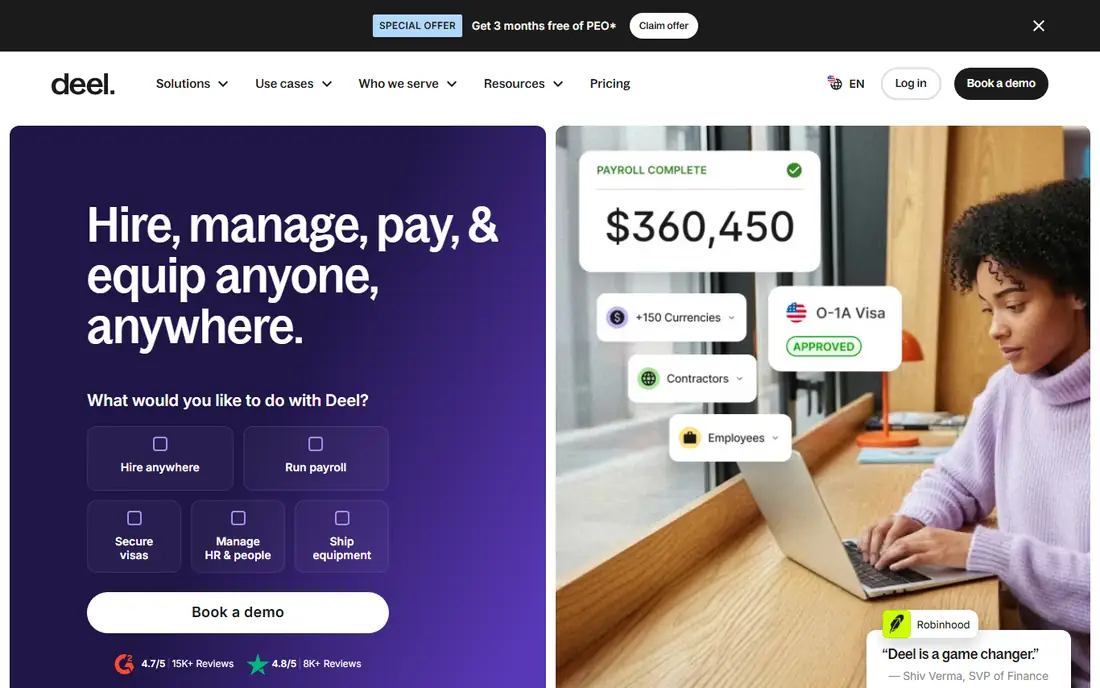
Deel is the alternative to consider first when the team is not all in one country. It handles employer-of-record services, contractor payments, and localized contracts, so a US company can hire abroad without setting up a foreign entity for each hire. Contractors can be paid in local currency with flexible withdrawal options, and compliance checks are built into the hiring flow. For a company that is adding its first international hires, that structure removes a large amount of legal and administrative work.
For a purely US team, Deel may be more than needed. Its contractor pricing is clear, but full employee pricing for employer-of-record services is substantially higher and varies by country, so US-only buyers should compare it with Gusto or Rippling before assuming it is cheaper. Deel also works best when the company accepts Deel as the system of record for global workers, which can mean running two systems if US payroll stays elsewhere. The fit is strongest for remote-first companies with a real mix of US and international workers.
What we like- Hiring in many countries without local entities
- Localized contracts
- Contractor payments
Watch out for- US-only teams may not need its global depth
- Employer-of-record pricing is higher
Starting priceSee website
Free planNo
Justworks suits a small business that wants help beyond software. As a professional employer organization, it can give small teams access to benefits plans and compliance support that are hard to arrange alone, while handling payroll, tax filing, and HR paperwork. The platform itself covers payroll, benefits, time off, and compliance tasks, and support is a consistent point of praise in public reviews. For a founder who does not want to become a part-time HR expert, that combination is appealing.
The PEO model is also the main thing to understand before signing. Co-employment means Justworks shares certain employer responsibilities, which changes how some HR decisions and filings work. That is normal for a PEO, but it is different from buying software alone, and some companies prefer to keep full employer control. Pricing is quote-based, so buyers should ask for the per-employee monthly cost, benefits costs, and any setup fees in writing. Justworks is a good fit for small US teams that value benefits access and human support over the lowest possible software price.
What we like- PEO benefits access for small teams
- Payroll and compliance in one place
- Helpful support
Watch out for- PEO model means co-employment
- Pricing requires a quote
#7ADP Workforce Now
Best for: Large and regulated employers4.2/5 on
G2 (4,475 reviews, checked Oct 2026)
Visit adp.com
Starting priceSee website
Free planNo
ADP Workforce Now is built for companies that need payroll and HR to work at scale, across states, and under strict compliance rules. It handles complex pay rules, tax filing, benefits, time, and talent in one platform, with a large integration ecosystem for accounting, benefits carriers, and other business systems. For regulated industries and companies with hundreds or thousands of employees, that depth and history matter, because payroll errors at that scale are costly and visible.
Small teams often find ADP heavier than needed. The sales process is consultative, pricing is quoted, and the platform has more configuration options than a 20-person company will use. That complexity can slow setup if the buyer does not have an HR lead to manage it. ADP is the right alternative when the Paycor problem is scale, compliance depth, or multi-state complexity, rather than simplicity or price transparency. Buyers should request a demo using their own pay scenarios, including overtime, multi-state tax, and benefits deductions, before deciding.
What we like- Deep compliance and payroll scale
- Broad integrations
- Long track record
Watch out for- Quote-only pricing
- Can feel complex for small teams
#8Paychex Flex
Best for: Small to midsize payroll and HR4.1/5 on
G2 (1,748 reviews, checked Oct 2026)
Visit paychex.com
Starting priceSee website
Free planNo
Paychex Flex covers payroll, HR, time, and benefits in a single cloud platform, with a PEO option for companies that want more hands-on support. Full-service tax administration is central to the offer, and employee self-service covers pay, time off, and benefits from desktop or mobile. For a small to midsize business that wants a traditional, full-service payroll provider with local support options, Paychex is a familiar and credible alternative to Paycor.
Pricing is the main friction. Paychex Flex pricing depends on employee count and the bundle chosen, and buyers must contact sales for a quote. That makes it harder to compare at a glance with Gusto, and the bundle structure means two buyers can pay quite different amounts for similar headcounts. Companies should ask which features are included in the base bundle, what time tracking and benefits administration cost, and whether implementation help is included. Paychex fits best when the priority is dependable full-service payroll with human support, rather than self-serve software alone.
What we like- Full-service payroll with tax administration
- HR and benefits in one platform
- PEO option
Watch out for- Quote-only pricing
- Feature depth varies by bundle
How we chose
We compared pricing pages, product documentation, and public reviews on sites such as G2 and Capterra, along with each vendor's stated features, integrations, and company-size fit. We favored tools that exist today, serve US employers, and cover payroll plus HR in a way that maps to what Paycor buyers actually replace. Where a vendor does not publish pricing, we wrote See website rather than repeating a third-party estimate as fact. That choice keeps the comparison honest, even though it makes quote-based tools harder to rank on price alone.
What to check before you switch
Start with payroll accuracy, not the feature list. Ask each vendor how it handles your pay types, pay schedules, overtime rules, and state taxes, and request a parallel payroll run if possible. A clean demo means little if the first live run misses a deduction or a state filing. Next, map the data move: employee records, pay history, time-off balances, and benefits elections all need a transfer plan, and year-to-date payroll data must balance before you cut over.
Then price the whole year, not the first month. Add the base fee, per-employee fees, benefits administration, time tracking, implementation, and any PEO fees, and ask what changes when headcount grows. Check contract length, renewal terms, and data export options, because switching payroll providers twice in two years is painful. Finally, test the employee experience. If staff cannot easily view pay, request time off, and update direct deposit from a phone, the back-office savings will be lost to support questions. A short pilot with one department often reveals more than a long sales presentation.
Frequently asked questions
Is Gusto cheaper than Paycor?
It depends on headcount and modules, because Gusto publishes a starting plan of $49 per month plus $6 per person, while Paycor pricing is typically quoted. For a small team with straightforward payroll, Gusto is often cheaper and easier to compare. Larger teams with more modules should request quotes from both vendors on the same headcount and feature list.
Which Paycor alternative is best for a small business?
Gusto and Justworks are the most common small-business picks, for different reasons. Gusto suits teams that want self-serve software with clear pricing, while Justworks suits teams that want PEO benefits access and more human support. A team under 25 people with simple payroll will usually start with Gusto, and a team that struggles to offer competitive benefits may prefer Justworks.
Does Rippling replace both HR and IT tools?
Rippling can replace several HR and IT workflows, because one employee record can drive payroll, benefits, device provisioning, and app access. It does not replace every IT tool, such as a full help-desk system or security monitoring platform. Teams should list the IT tasks they want automated and confirm each one in a demo before assuming Rippling covers it.
Can I keep my current benefits broker when switching?
In many cases yes, but it depends on the vendor and plan type. Software-only platforms often work with an existing broker, while PEO arrangements usually require using the PEO's benefits plans. Ask the vendor directly whether outside brokers are supported, and get the answer in writing before signing.
How long does switching payroll providers take?
A simple switch can take two to four weeks, while a midsize switch with benefits, time tracking, and historical data can take six to twelve weeks. The timeline depends on data quality, benefits enrollment dates, and whether a parallel payroll run is needed. Start the move well before a quarter-end or open enrollment if possible.
Sources we checked (8)
- https://www.gusto.com
- https://www.rippling.com
- https://www.bamboohr.com
- https://www.paylocity.com
- https://www.deel.com
- https://www.justworks.com
- https://www.adp.com
- https://www.paychex.com
Is your product missing or out of date?
We review this list regularly. Vendors can request a listing, send updated pricing or ask about featured placement.

Shihab Mia · Founder, Rankite
Shihab has 5+ years in B2B and SaaS SEO. He writes Rankite's software buying guides from pricing pages, documentation and public user reviews. More about Shihab.