How we make this list: we compare pricing pages, product documentation and public user reviews. Ratings come from G2, Capterra or Trustpilot, with the date we checked them.
Key takeaways
- MadCap Flare is a desktop help authoring tool for single-source publishing, with a 4.4 out of 5 G2 rating and a desktop license cited at 3,150 dollars per author per year in comparison sources.
- Adobe RoboHelp is the best direct replacement, with HTML5 authoring, microcontent, and publishing to Responsive HTML5, PDF, and Adobe Experience Manager.
- ClickHelp is the best cloud pick, with AI-ready publishing, AnswerGenius answers, and imports from MadCap Flare itself.
- Document360 is the best knowledge base pick, with AI writing agent Eddy, 100 plus features, and a 4.7 out of 5 G2 rating.
- Paligo is the best structured content pick, with component-based CCMS authoring, versioning, and translation at scale.
- HelpNDoc is the best budget desktop pick, with a free Personal edition and exports to HTML5, PDF, CHM, Word, ePub, and Qt Help.
- Help+Manual is the best word-processor-simple pick, with WYSIWYG XML editing, conditional tags, and DeepL translation.
- GitBook is the best developer pick, with Git sync, branch and merge workflows, and AI drift detection.
- Confluence is the best collaboration pick, with AI workspaces, templates, and deep Atlassian integration.
Quick comparison
Is your product missing or out of date?
We review this list regularly. Vendors can request a listing, send updated pricing or ask about featured placement.
The best MadCap Flare alternatives
Starting priceSee website
Free planFree trial
Adobe RoboHelp is the best direct replacement. Its homepage describes a help authoring tool to author technical content, improving authoring productivity and compliance for online help, policy and procedure, knowledge base, and self-service content. Features include HTML5 and CSS3 authoring through a minimal yet powerful interface, rules and references for creating content once and reusing it efficiently across channels and formats, web-based review collaboration, and connections to Git and SharePoint Online for version control. Publishing covers Responsive HTML5, PDF, Adobe Experience Manager, and Microsoft Help, with microcontent authoring to fuel AI-powered chatbots, search engine snippets, and voice response systems. Adobe reports 800,000 plus users across 40,000 plus companies trusting its technical communication tools.
The trade-off is ecosystem. RoboHelp fits best inside Adobe workflows, and pricing is by quote rather than published. For teams that want the closest Flare-like desktop authoring with modern publishing, RoboHelp is the best pick.
What we like- HTML5 and CSS3 authoring for beginners and experts
- Microcontent for chatbots and search snippets
- Publishing to Responsive HTML5, PDF, and Adobe Experience Manager
Watch out for- Adobe ecosystem pricing by quote
- Enterprise focus may overwhelm small teams
Starting priceSee website
Free planFree trial
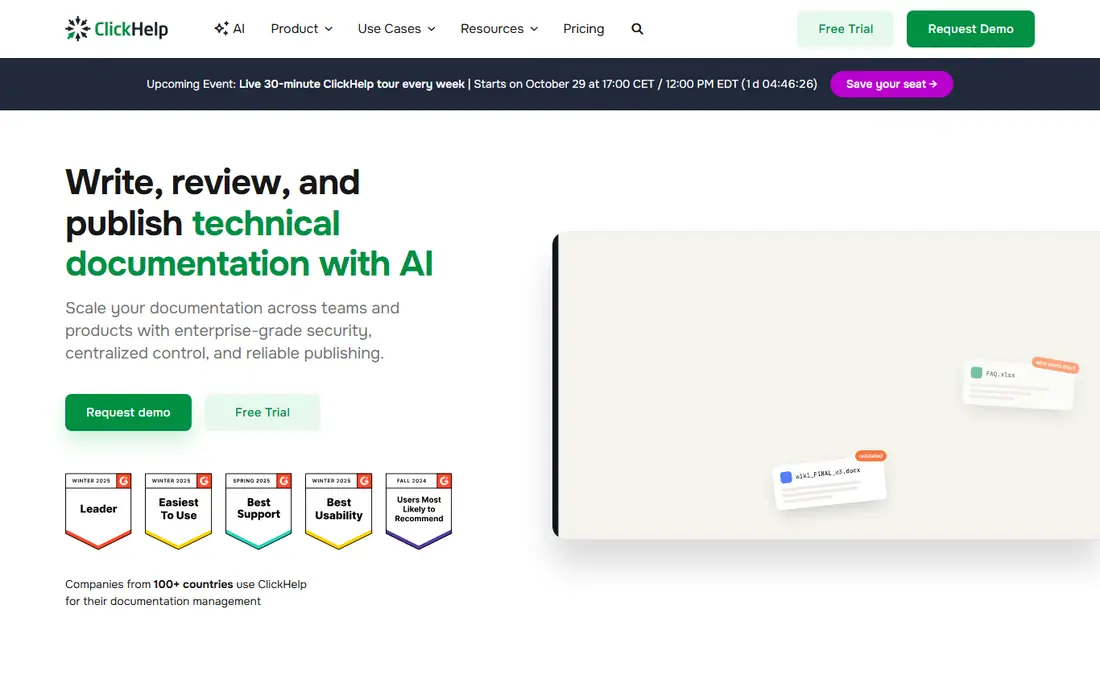
ClickHelp is the best cloud pick. Its homepage describes an AI documentation tool for technical writers and documentation teams, centralizing product knowledge and delivering AI-powered help anywhere. Features include AI-ready publishing the moment you publish, with clean HTML for AI tools, Markdown at any page URL, a controllable llms.txt file, and a published docs MCP server, plus AnswerGenius AI answers that cite sources and respect access, WriteAssist that understands topic and table of contents context, and Ask Your Docs for finding knowledge gaps. The same text serves several manuals, product versions, and languages through snippets, variables, and conditional content, and imports come from Word, MadCap Flare, Confluence, HTML, Markdown, or CHM. ClickHelp reports SOC 2 Type II certification, WCAG 2.2 AA reader accessibility, GDPR and CCPA compliance, and a 14-day free trial with no credit card required.
The catch is price and model. ClickHelp is cloud-only, so teams that want a desktop app should look at RoboHelp or HelpNDoc instead. For teams that want modern cloud authoring with AI answers built in, ClickHelp is the best pick.
What we like- AI-ready publishing with clean HTML, Markdown, and llms.txt
- AnswerGenius source-linked answers
- Imports from MadCap Flare, Word, Confluence, HTML, and CHM
Watch out for- Starter plan cited at 185 dollars per month in comparison sources
- Cloud-only, no desktop app
Starting priceSee website
Free planNo
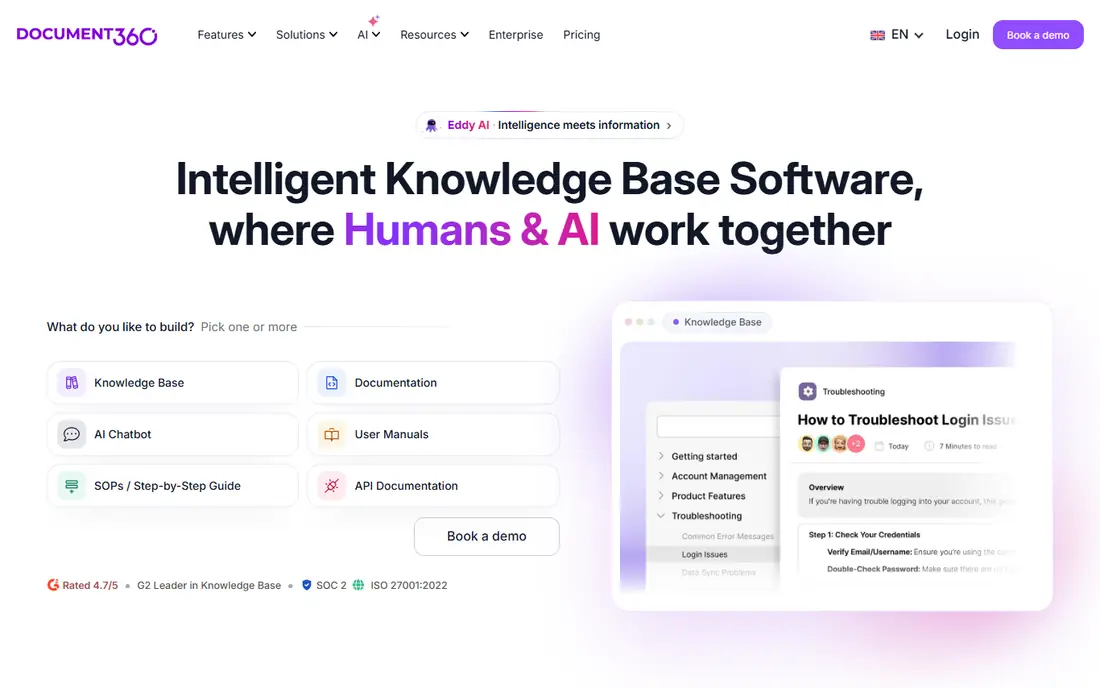
Document360 is the best knowledge base pick. Its homepage describes AI knowledge base software for documentation, rated 4.7 out of 5 on G2 as a Leader in Knowledge Base, with SOC 2 and ISO 27001:2022 certifications. Features include 100 plus features for authoring, search, security, and self-service, AI at the core with writing agent Eddy, templates, imports, analytics, version comparison and rollback, and collaboration, plus integrations with Slack, Intercom, Zendesk, Salesforce, GitHub, and 60 plus other tools. Document360 reports customers including Panaya with 4,000 customers using documentation monthly, SafeBreach with a 30 percent increase in documentation traffic, and Fastmag with a 15 percent reduction in support tickets.
The trade-off is depth. Document360 is a knowledge base platform, not a full single-source desktop authoring tool, so complex conditional publishing needs may fit Flare or Paligo better. For teams that want an AI-ready hosted knowledge base fast, Document360 is the best pick.
What we like- AI writing agent Eddy
- WYSIWYG and Markdown authoring
- Version comparison and rollback
- 60 plus integrations including Slack, Teams, Zendesk, and Salesforce
Watch out for- Custom pricing on request
- Knowledge base focus, less single-source depth than Flare

#4Paligo
Best for: Structured content4.6/5 on
G2 (57 reviews, checked Oct 2026)
Visit paligo.net
Starting priceSee website
Free planNo
Paligo is the best structured content pick. Its homepage describes giving enterprise AI a source it can trust, with three products on one platform: Paligo CCMS for building structured content, Nexus Portal for delivering it, and Nexus Answers for grounding AI answers in it. In Paligo CCMS, knowledge is written once and structured as components, versioned, translated, reviewed, and tagged by product, version, and audience, so correcting a procedure at the source updates every experience using it. Nexus Portal publishes that content as a branded, searchable site in one click with hosting, enterprise search, and analytics included, while Nexus Answers answers questions directly from published content with citations linking each response to its source. Paligo is ISO 27001:2022 certified, never uses content to train models, and requires human approval before content reaches an answer.
The catch is price and learning curve. Paligo is an enterprise CCMS with enterprise pricing, and structured authoring takes training. For teams with large, multilingual, multi-version documentation, Paligo is the best pick.
What we like- Component-based CCMS with versioning, translation, and review
- Nexus Portal for branded publishing
- Nexus Answers for cited AI answers
Watch out for- Professional tier cited around 4,800 dollars per seat per year in comparison sources
- Structured authoring learning curve
Starting priceSee website
Free planFree edition
HelpNDoc is the best budget desktop pick. Its homepage describes a help authoring tool for creating help files, user manuals, and eBooks, with projects exported to help files, websites, documents, and eBooks, supporting batch export, conditional generation, and advanced customization. Outputs include responsive HTML5 websites adapting to any device and screen size, printer-ready PDF documents with compression, encryption, and font embedding, ePub and Kindle eBooks, Microsoft Word DocX and RTF documents, standard Windows CHM help files without the outdated HTML Help Workshop bugs, and Qt Help files for cross-platform applications. Comparison sources cite a Standard license from 99 euros one-time, with a free Personal edition for non-commercial use.
The trade-off is platform. HelpNDoc is a Windows-only desktop app, so distributed teams and browser-based review need another tool. For small teams and solo writers on Windows who want affordable desktop authoring, HelpNDoc is the best pick.
What we like- Free Personal edition for non-commercial use
- Exports to HTML5, PDF, ePub, Kindle, Word, CHM, and Qt Help
- Batch export and conditional generation
Watch out for- Windows-only desktop app
- Interface feels dated next to cloud competitors
Starting priceSee website
Free planNo
Help+Manual is the best word-processor-simple pick. Its homepage describes the most popular help authoring and documentation tool, as easy to use as a word processor yet much more powerful, with a true WYSIWYG XML editor and all needed tools at hand. Features include single-source multi-channel output for desktop, mobile, iOS, Android, Windows help, and PDF manuals, conditional tags for different outputs per channel with no post-processing required, teamwork and multi-user editing, integrated version control, translation management, and image tools. Imports cover Word, HTML, Winhelp, RoboHelp, and Author-It projects, plus Visual Studio source documentation, and plugins add DeepL machine translation and PDF peer review. A bundled screen capture and screencasting tool creates step-by-step instructions and interactive tutorials.
The catch is collaboration. Help+Manual is desktop-first, so cloud review workflows are less native than ClickHelp or Document360. For writers who want word-processor simplicity with real single-source power, Help+Manual is the best pick.
What we like- Word-processor-simple WYSIWYG XML editing
- Single-source multi-channel output with conditional tags
- DeepL translation plugin
- Screen capture and screencasting
Watch out for- Desktop focus, less cloud collaboration
- Pricing by quote on the homepage

#7GitBook
Best for: Developer docs4.7/5 on
G2 (207 reviews, checked Oct 2026)
Visit gitbook.com
Starting priceSee website
Free planFree plan
GitBook is the best developer pick. Its homepage describes the knowledge layer for AI, where agents turn small docs errors into big problems and GitBook spots what has drifted and queues it for review before the wrong answer appears everywhere. Features include Git sync to branch, review, and merge documentation like a pull request, a GitBook Agent scanning docs for content that no longer matches the product, an AI Assistant letting users ask docs directly for personalized support, and analytics tracking where users and agents get stuck. GitBook reports SOC 2, ISO 27001, and GDPR compliance with SAML-based single sign-on, tiered roles and permissions, authenticated content, and white-glove migration.
The trade-off is audience. GitBook fits developer teams that already live in Git, while non-technical writers may prefer ClickHelp or Document360. For docs-as-code teams that want accuracy at scale, GitBook is the best pick.
What we like- Git sync with branch, review, and merge workflows
- AI drift detection flagging outdated content
- AI Assistant for user questions
- SOC 2, ISO 27001, and GDPR compliance
Watch out for- Developer workflow focus, less suited to non-technical writers
- Pricing by quote for larger sites
Starting priceSee website
Free planFree tier
Confluence is the best collaboration pick. Its homepage describes an AI workspace for knowledge and collaboration, the one place for ideas, docs, knowledge, and human plus AI teammates. Features include AI creation with ready-to-use templates for PRDs, social briefs, and annual plans, Rovo AI for transforming ideas into action, AI search across team workspaces, AI page and comment summaries with audio briefings, live docs, whiteboards, databases, pages, videos, and slides, and integrations with tools teams already use. Confluence reports customers including Reddit using it as a single source of truth, Dropbox praising its collaboration, and Royal Caribbean saving over 800 hours and 500,000 dollars per year with Jira and Confluence automated reporting.
The catch is publishing depth. Confluence is a collaboration wiki, not a single-source help authoring tool, so multi-format publishing and conditional content are weaker than Flare or RoboHelp. For teams inside the Atlassian ecosystem that want collaborative documentation, Confluence is the best pick.
What we like- AI workspace with Rovo AI for creation, search, and summaries
- Templates for PRDs, plans, and briefs
- Deep Jira and Atlassian integration
Watch out for- Collaboration wiki, not a single-source publishing tool
- PDF and multi-format output less deep than Flare
How we chose
We compared tools that replace MadCap Flare across its core jobs: topic-based authoring, single-source publishing, conditional content, multi-format output, and team collaboration. Each vendor homepage was opened to confirm the product exists today and matches its category, and we kept a mix of desktop authoring tools, cloud platforms, structured CCMS, developer docs, and collaboration wikis, since Flare users range from solo writers to enterprise documentation teams. We flagged model differences where they matter: desktop tools like RoboHelp, HelpNDoc, and Help+Manual offer deep single-source control, while cloud tools like ClickHelp and Document360 offer faster setup and AI features, and Paligo offers structured reuse at enterprise scale. Pricing is taken from vendor homepages where published, and written as See website where vendors price by quote.
Migrating from Flare without losing content
Migration is where Flare replacements succeed or fail. Export a representative sample first, including conditional content, variables, snippets, and master pages, and test how each candidate handles them before committing. ClickHelp imports directly from MadCap Flare, and Help+Manual imports RoboHelp and Author-It projects, but conditional logic and stylesheets rarely transfer perfectly, so budget time for cleanup.
Run the old and new systems in parallel for one release cycle. Publish the same content from both, compare outputs side by side, and fix gaps before retiring Flare. Finally, train writers on the new model: structured authoring in Paligo and docs-as-code in GitBook require different habits than Flare topics, and a short training investment prevents months of workaround content.
Frequently asked questions
What is the closest alternative to MadCap Flare?
Adobe RoboHelp is the closest direct replacement, with desktop authoring, single-source reuse, and multi-format publishing. For a cloud alternative, ClickHelp imports Flare projects directly.
Which MadCap Flare alternative is cheapest?
HelpNDoc is the cheapest desktop option, with a free Personal edition and a Standard license cited at 99 euros one-time in comparison sources. Confluence and GitBook also offer free tiers for small teams.
Can I import MadCap Flare projects into another tool?
Yes, ClickHelp imports from MadCap Flare directly, and Help+Manual imports RoboHelp and Author-It projects. Conditional content and stylesheets may need cleanup after import, so test with a sample project first.
Which alternative is best for structured content?
Paligo is the best structured content pick, with component-based CCMS authoring, versioning, translation, and reuse at scale. It is priced for enterprise teams, so smaller teams may prefer ClickHelp or Document360.
Which alternative is best for developer documentation?
GitBook is the best developer pick, with Git sync, branch and merge workflows, and AI drift detection. Document360 is also strong for API documentation alongside guides.
Which alternative works best with Atlassian tools?
Confluence is the best pick inside the Atlassian ecosystem, with Jira integration, Rovo AI, and shared team workspaces. It is a collaboration wiki rather than a single-source publishing tool.
Sources we checked (8)
- https://www.adobe.com/products/robohelp.html
- https://clickhelp.com
- https://document360.com
- https://paligo.net
- https://www.helpndoc.com
- https://www.helpandmanual.com
- https://www.gitbook.com
- https://www.atlassian.com/software/confluence
Is your product missing or out of date?
We review this list regularly. Vendors can request a listing, send updated pricing or ask about featured placement.

Shihab Mia · Founder, Rankite
Shihab has 5+ years in B2B and SaaS SEO. He writes Rankite's software buying guides from pricing pages, documentation and public user reviews. More about Shihab.
 Adobe RoboHelp
 ClickHelp
 Document360
 HelpNDoc
 Help+Manual
 Confluence