How we make this list: we compare pricing pages, product documentation and public user reviews. Ratings come from G2, Capterra or Trustpilot, with the date we checked them.
What Is the Best Corona Renderer Alternative for Archviz?
V-Ray is the best overall Corona Renderer alternative for most archviz studios. It comes from the same company, Chaos, and it covers the same hosts, 3ds Max, SketchUp, Rhino, Revit, Maya, Cinema 4D and more. It renders on CPU, GPU or both, so you can keep your current hardware. The Solo plan costs 540 dollars per year, which is 126 dollars more than Corona Solo, and it adds a larger asset library plus real-time rendering through Chaos Vantage on higher tiers.
If your budget is zero, Blender with Cycles is the best free alternative. If you need live client walkthroughs instead of final stills, Enscape or Lumion will serve you better than any offline renderer. The right pick depends on your host application, your hardware and whether you sell stills, animations or live presentations.
Prices in this guide were checked on 16 November 2026 against vendor pricing pages. Prices exclude tax and can change, so confirm the current figure on the vendor page before you buy.
How Much Does Corona Renderer Cost in 2026?
Corona Solo costs 414 dollars per year for one named licence, billed annually. Corona Premium costs 562.80 dollars per year and adds a floating licence, a larger asset library, more Chaos AI credits and companion products such as Phoenix. Corona Collection costs 994.80 dollars per year and bundles the full Chaos toolset. All three plans include a 30-day free trial, and prices exclude tax.
That puts Corona among the cheaper production renderers in this guide. Only Blender costs less, because it is free, and only Redshift undercuts it among paid options at 289 dollars per year. V-Ray Solo costs 540 dollars per year and Arnold costs 430 dollars per year. The gap between Corona and V-Ray is small enough that the choice should rest on workflow and control, not on price alone.
Should You Switch from Corona to a GPU Renderer?
A GPU renderer can cut render times sharply, but only if your scenes fit in graphics memory. Corona renders on the CPU, so it handles very large scenes with heavy geometry and high-resolution textures without running out of memory. GPU renderers such as OctaneRender and Redshift are faster on scenes that fit in VRAM, yet a scene that exceeds VRAM can slow down or fail. Test one of your heaviest real projects during the trial period rather than a small demo scene.
There are other reasons to switch besides speed. You may need real-time walkthroughs, which Corona does not offer, or a renderer that also covers product shots, animation or visual effects. If you only need clean, photoreal interior stills and your CPU workflow already works, switching may add learning time without a clear gain. Keep your Corona licence until the replacement has passed a real project test.
Which Corona Alternative Is Best for Your Workflow?
Match your host application and your output type first, then check price and hardware needs.
| Tool | Best for | Starting price | Needs a GPU |
| V-Ray | Photoreal archviz stills and animation | 540 dollars per year | No, CPU or GPU |
| OctaneRender | Fast GPU stills and animation | 19.99 euros per month, billed yearly | Yes, Nvidia |
| Arnold | Film-quality stills, Maya and 3ds Max users | 430 dollars per year | No, CPU or GPU |
| Redshift | Fast GPU rendering, Cinema 4D users | 289 dollars per year | Yes |
| Blender Cycles | Free full 3D pipeline | Free | No, CPU or GPU |
| Lumion | Real-time scenes, animation and walkthroughs | 1,149 dollars per year | Yes, Windows only |
| Enscape | Live design reviews inside CAD and BIM | 574.80 dollars per year | Yes |
| KeyShot | Product shots and CAD visualisation | 1,299 dollars per year | No, CPU or GPU |
Studios that live in 3ds Max should shortlist V-Ray and Arnold first, since both integrate deeply with that host. Cinema 4D users should look at Redshift, which is included with Cinema 4D, and at OctaneRender, which has a mature Cinema 4D plugin. SketchUp and Revit users who present to clients should test Enscape and Lumion first, because live feedback changes how design meetings run. Freelancers on a tight budget should start with Blender Cycles.
Quick comparison
| Tool | Best for | Starting price | Free plan |
|---|
 V-Ray | Photoreal archviz stills and animation in 3ds Max, SketchUp, Rhino and Revit | 540 dollars per year for V-Ray Solo, billed annually | No free plan; 30-day free trial |
 OctaneRender | Fast, interactive GPU rendering for archviz, animation and product shots | 19.99 euros per month for Studio+, billed yearly (239.88 euros per year) | OctaneRender Prime free tier, limited to one GPU and a smaller set of plugins |
 Arnold | Film-quality stills and animation for Maya and 3ds Max users | 430 dollars per year for a single-user annual subscription | No free plan; free one-year educational access for eligible students and educators |
 Redshift | Fast GPU rendering for Cinema 4D users and small studios | 289 dollars per year, billed annually (24.08 dollars per month) | No free plan; 14-day free trial of Maxon One, which includes Redshift |
 Blender (Cycles) | Freelancers and small studios that want a free, full 3D pipeline | Free, open source under the GNU GPL | Free forever; the full application costs nothing, with no seat limits |
 Lumion | Real-time architectural scenes, animation and client walkthroughs | 1,149 dollars per year for Lumion Pro, named user, billed annually | No free plan; 14-day free trial of Lumion Pro, no credit card required |
 Enscape | Live design reviews and walkthroughs inside SketchUp, Revit, Rhino and Archicad | 574.80 dollars per year for Enscape Solo, billed annually | No free plan; 14-day free trial on Premium and Collection plans |
 KeyShot | Product visualisation and CAD-based stills for designers and engineers | 1,299 dollars per year for KeyShot Studio Professional, billed annually | No free plan; 14-day free trial with full features, no credit card required |
Is your product missing or out of date?
We review this list regularly. Vendors can request a listing, send updated pricing or ask about featured placement.
8 Best Corona Renderer Alternatives
The eight tools below cover CPU rendering, GPU rendering, and free options.
#1V-Ray
Best for: Photoreal archviz stills and animation in 3ds Max, SketchUp, Rhino and Revit4.5/5 on
G2 (241 reviews, checked Oct 2026)
Visit chaos.com
Starting price540 dollars per year for V-Ray Solo, billed annually
Free planNo free plan; 30-day free trial

V-Ray is the production renderer most Corona users already know by reputation, and it is the closest like-for-like replacement. Both tools come from Chaos, so the material logic, the lighting approach and the asset library feel familiar. V-Ray Solo includes up to 15,000 Chaos Cosmos assets and 100 Chaos AI credits per month, which covers most archviz work. Higher tiers add Chaos Vantage for real-time previews, more assets and the full Chaos toolset. The renderer works in CPU, GPU or hybrid mode, so you can start on your current machine and add a graphics card later. Host support is broad, with plugins for 3ds Max, SketchUp, Rhino, Revit, Maya, Cinema 4D, Houdini and Unreal.
What we like- Same vendor as Corona, so support and licensing stay in one place
- CPU, GPU and hybrid rendering
- Large Chaos Cosmos asset library
- Strong material and lighting control
Watch out for- The learning curve is steep, and simple interior scenes take far longer to set up than they do in Corona, because V-Ray exposes many more settings that a beginner must work through
#2OctaneRender
Best for: Fast, interactive GPU rendering for archviz, animation and product shots4.1/5 on
G2 (11 reviews, checked Oct 2026)
Visit home.otoy.com
Starting price19.99 euros per month for Studio+, billed yearly (239.88 euros per year)
Free planOctaneRender Prime free tier, limited to one GPU and a smaller set of plugins
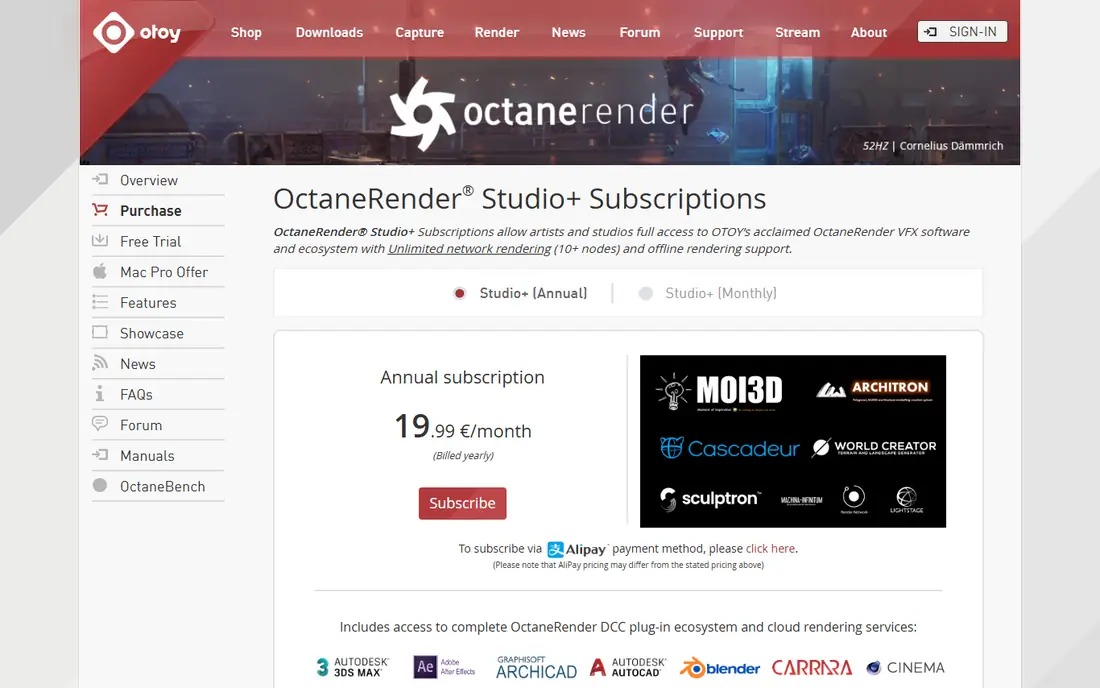
OctaneRender is a GPU path tracer from OTOY that trades Corona's CPU simplicity for raw interactive speed. Move a light or change a material and the preview updates almost at once, which makes look development far quicker than waiting on CPU buckets. Studio+ includes the standalone renderer and plugins for 21 host applications, plus network rendering across up to 10 nodes and bundled tools such as MoI 3D and Cascadeur. The free Prime tier is a real way to learn the tool, since it covers Blender, Unreal Engine and DAZ Studio on a single GPU. OctaneRender is a strong pick for artists who already own a capable Nvidia card and who render animations, where per-frame speed matters most.
What we like- Very fast interactive previews
- Unbiased spectral rendering
- Plugins for 21 host applications
- Network rendering included in Studio+
Watch out for- It needs a compatible Nvidia GPU with enough VRAM, and large archviz scenes can exceed graphics memory and fail to render, which forces you to simplify the scene or buy a card with more memory
#3Arnold
Best for: Film-quality stills and animation for Maya and 3ds Max users4.6/5 on
G2 (22 reviews, checked Oct 2026)
Visit autodesk.com
Starting price430 dollars per year for a single-user annual subscription
Free planNo free plan; free one-year educational access for eligible students and educators
Arnold is Autodesk's production renderer, and it is the default choice for artists who already work in Maya or 3ds Max. In fact, Arnold ships with both applications, so check whether your existing Autodesk subscription already includes it before you buy a standalone seat. The renderer is a Monte Carlo path tracer with a reputation for stable, physically plausible light, which suits interior scenes with complex bounce light. Arnold runs on CPU or GPU, so you can start on your current hardware. The main drawback for archviz is the smaller ecosystem of ready-made materials and furniture compared with Chaos Cosmos. You will spend more time building materials, and you will find fewer archviz-specific tutorials.
What we like- Physically based Monte Carlo path tracer with a strong record in film and visual effects
- Ships with Maya and 3ds Max
- Predictable, clean results on complex lighting
Watch out for- Arnold is slower than GPU renderers on large scenes, and its archviz material and asset library is thinner than the Chaos Cosmos library, so you will build more materials from scratch
#4Redshift
Best for: Fast GPU rendering for Cinema 4D users and small studios4.1/5 on
G2 (18 reviews, checked Oct 2026)
Visit maxon.net
Starting price289 dollars per year, billed annually (24.08 dollars per month)
Free planNo free plan; 14-day free trial of Maxon One, which includes Redshift
Redshift is Maxon's GPU renderer, and it is the cheapest paid option in this guide at 289 dollars per year. It is included with every Cinema 4D subscription, so Cinema 4D users may already have it without realising. A standalone Redshift subscription covers all integration plugins, including Maya, 3ds Max, Houdini, Katana and Cinema 4D, and it supports multiple GPUs in one machine. Redshift is a biased renderer, which means it takes shortcuts that speed up renders, and it gives you fine control over where to spend quality. Its out-of-core architecture can use system memory when a scene exceeds VRAM, which softens the main weakness of GPU rendering.
What we like- Very fast biased GPU rendering
- Out-of-core memory handling helps large scenes
- Included with every Cinema 4D subscription
- One subscription covers all integration plugins
Watch out for- As a biased renderer it needs manual tuning for some effects, and its archviz content library is thinner than Chaos Cosmos, so you will source more furniture and materials yourself
#5Blender (Cycles)
Best for: Freelancers and small studios that want a free, full 3D pipeline4.6/5 on
G2 (319 reviews, checked Oct 2026)
Visit blender.org
Starting priceFree, open source under the GNU GPL
Free planFree forever; the full application costs nothing, with no seat limits
Blender is the only option in this guide that costs nothing, and that changes the maths for freelancers and small studios. The download includes the full 3D pipeline, with modelling, sculpting, animation, simulation and compositing, plus two render engines. Cycles is a physically based path tracer with GPU acceleration through OptiX, HIP and Metal, and it produces clean, photoreal interior stills. Eevee is a real-time engine for fast previews and stylised work. Blender runs on Windows, macOS and Linux, and it places no limit on seats or render nodes. The trade-offs are real: there is no vendor support line, and a studio built around 3ds Max will face conversion work.
What we like- No licence cost at all
- Cycles is a capable path tracer with GPU acceleration
- Eevee gives fast real-time previews
- Huge community and a large add-on ecosystem
Watch out for- There is no official support desk, so you rely on community help when something breaks, and moving a 3ds Max scene into Blender takes conversion work that can break materials and scale
#6Lumion
Best for: Real-time architectural scenes, animation and client walkthroughs4.5/5 on
G2 (110 reviews, checked Oct 2026)
Visit lumion.com
Starting price1,149 dollars per year for Lumion Pro, named user, billed annually
Free planNo free plan; 14-day free trial of Lumion Pro, no credit card required
Lumion is a real-time renderer built for architects rather than for rendering specialists. You model in SketchUp, Revit, Archicad or Rhino, and LiveSync keeps the Lumion scene updated as you work, so design changes show up at once. The Pro plan includes more than 10,000 assets, full physically based materials, animation tools, 360-degree panoramas and AI upscaling, plus Lumion Cloud for sharing work with clients. A 3-year term costs 2,758 dollars upfront, which saves about 20 percent against three single years, and a floating seat costs 1,499 dollars per year. Lumion suits architects who present work live and need finished-looking images fast. It is less suited to artists who sell high-end hero stills, where a path tracer still holds an edge.
What we like- Very fast real-time output
- LiveSync plugins for SketchUp, Revit, Archicad and Rhino
- Library of more than 10,000 assets
- Built-in animation, 360 panoramas and AI upscaling
Watch out for- Lumion runs on Windows only, so Mac-based studios cannot use it, and its photorealism ceiling is lower than a path tracer for close-up stills, where materials can look flat
#7Enscape
Best for: Live design reviews and walkthroughs inside SketchUp, Revit, Rhino and Archicad4.6/5 on
G2 (416 reviews, checked Oct 2026)
Visit chaos.com
Starting price574.80 dollars per year for Enscape Solo, billed annually
Free planNo free plan; 14-day free trial on Premium and Collection plans
Enscape is a real-time plugin from Chaos that turns your modelling software into a live visualisation tool. It installs into SketchUp, Revit, Rhino, Archicad and Vectorworks, and it renders the scene in a second window as you work. Move a wall or change the sun angle and the image updates at once, which makes client meetings far more productive. Enscape Solo costs 574.80 dollars per year for one named licence and includes Chaos Cloud sharing, 6,700 Chaos Cosmos assets, Veras AI image generation and 100 Chaos AI credits per month. Enscape runs on Windows and on Apple Silicon Macs for SketchUp, Rhino, Archicad and Vectorworks, though Revit itself has no Mac release.
What we like- Renders live inside your modelling software with no export step
- Easy walkthroughs and virtual reality
- Chaos Cloud sharing
- Veras AI image tools bundled on every paid tier
Watch out for- It offers less fine control over materials and lighting than V-Ray or Corona, so final stills can look flatter, and it depends on the host CAD or BIM application for modelling
#8KeyShot
Best for: Product visualisation and CAD-based stills for designers and engineers4.5/5 on
G2 (182 reviews, checked Oct 2026)
Visit keyshot.com
Starting price1,299 dollars per year for KeyShot Studio Professional, billed annually
Free planNo free plan; 14-day free trial with full features, no credit card required
KeyShot Studio is a real-time ray tracer from Luxion that is best known in product design, and it earns its place here for architects who also visualise products, furniture or fixtures. Import a CAD file, drop a material onto a part and the image updates at once. Professional costs 1,299 dollars per year for one named seat, Business costs 1,599 dollars per year and adds team seat management and network rendering, and Enterprise is custom quoted. KeyShot supports more than 34 CAD formats, includes animation tools, and adds Studio AI features for image variations and denoising. The limits for archviz are clear: there is no native live link for 3ds Max or Revit, and scene management for whole buildings is limited.
What we like- Real-time ray tracing with drag-and-drop materials
- Supports more than 34 CAD formats
- Strong animation tools
- Studio AI features for variations and denoising
Watch out for- KeyShot is built for product design rather than buildings, so it lacks archviz tools such as sun studies and large scene management, and the price is high if you only render architecture
Frequently asked questions
Is V-Ray better than Corona for archviz?
V-Ray gives you more control over materials, lighting and render settings, and it renders on CPU, GPU or both, which makes it the stronger pick for studios that need flexibility. Corona is simpler to learn and often faster to set up for interior stills. If your team already knows Corona and your stills sell well, V-Ray adds control rather than a clear quality jump, so test it on a real project first.
Can I convert my Corona scenes to V-Ray?
Yes, in most cases. 3ds Max includes a scene converter that maps many Corona materials and lights to V-Ray equivalents, and Chaos documents the workflow. Simple scenes convert cleanly, while complex scenes with custom Corona materials, scatter objects or proprietary shaders need manual fixes. Budget time to check every material after conversion, and render test frames before you commit to a deadline.
What is the cheapest Corona alternative?
Blender with Cycles is free and is the cheapest option by a wide margin, since it costs nothing for any number of seats. Among paid renderers, Redshift is the cheapest at 289 dollars per year, followed by Arnold at 430 dollars per year and Corona itself at 414 dollars per year for Solo. Licence cost is only part of the total, since hardware, training time and render farm fees all add to the bill.
Does Corona work on Mac?
Corona for Cinema 4D runs natively on Apple Silicon Macs, so Cinema 4D users on a Mac can use it. Corona for 3ds Max is Windows only, because 3ds Max itself does not run on macOS. If your studio is Mac based and you use Cinema 4D, Corona is a workable choice. If you use SketchUp or Rhino on a Mac, Enscape and Blender are stronger alternatives.
Do I need a GPU to replace Corona?
No, not always. V-Ray, Arnold, Blender Cycles and KeyShot all render on the CPU, so you can replace Corona without buying new hardware. A GPU helps a lot with OctaneRender, Redshift, Lumion and Enscape, which need a capable graphics card. Check the VRAM on your card and the system requirements of your chosen tool before you buy, and test a heavy scene during the trial.
Sources we checked (9)
- https://www.chaos.com/corona/buy-online?srsltid=AfmBOoqyhC_P7NT-OPCUjx4poP0tNxBA19nnYdKpQIrrAYm_ea8S-DQN
- https://www.chaos.com/vray
- https://home.otoy.com/render/octane-render/purchase/?ref=blog.paperspace.com
- https://www.autodesk.com/products/arnold/buy
- https://www.maxon.net/en/product-detail/redshift
- https://www.blender.org/download/
- https://lumion.com/
- https://www.chaos.com/explore-enscape-plans
- https://www.keyshot.com/pricing/
Is your product missing or out of date?
We review this list regularly. Vendors can request a listing, send updated pricing or ask about featured placement.

Shihab Mia · Founder, Rankite
Shihab has 5+ years in B2B and SaaS SEO. He writes Rankite's software buying guides from pricing pages, documentation and public user reviews. More about Shihab.