How we make this list: we compare pricing pages, product documentation and public user reviews. Ratings come from G2, Capterra or Trustpilot, with the date we checked them.
Key takeaways
- Todoist is the cheapest serious pick for fast personal and shared task lists, with natural language entry and a useful free plan.
- TickTick gives the most features without paying, bundling tasks, calendar, habits, and a Pomodoro timer in one app.
- Asana and ClickUp suit small teams that need shared projects, timelines, and rules, with free plans for getting started.
- Trello remains the easiest board to adopt, while Monday.com suits teams that want to build their own boards.
- Microsoft To Do is free inside Microsoft accounts, and Notion suits teams that want docs, wikis, and tasks in one workspace.
- A to do app only works when entering a task takes less time than remembering it, so test capture speed during a real work week before committing.
Quick comparison
| Tool | Best for | Starting price | Free plan |
|---|
 Todoist Todoist | Fast task capture | $5 per month | Yes |
 TickTick TickTick | Tasks, calendar, and habits | $49.99 per year | Yes |
 Asana Asana | Team projects with timelines | $10.99 per user per month | Yes |
 ClickUp ClickUp | One workspace for many kinds of work | $7 per user per month | Yes |
 Trello Trello | Simple visual boards | $5 per user per month | Yes |
 Microsoft To Do Microsoft To Do | Free lists inside Microsoft accounts | Free | Yes |
 Monday.com Monday.com | Visual team planning | $9 per seat per month | Yes |
 Notion Notion | Docs, wikis, and tasks in one place | $10 per user per month | Yes |
Is your product missing or out of date?
We review this list regularly. Vendors can request a listing, send updated pricing or ask about featured placement.
The best to do list apps for small business
#1Todoist
Best for: Fast task capture4.5/5 on
G2 (832 reviews, checked Oct 2026)
Visit todoist.com
Starting price$5 per month
Free planYes
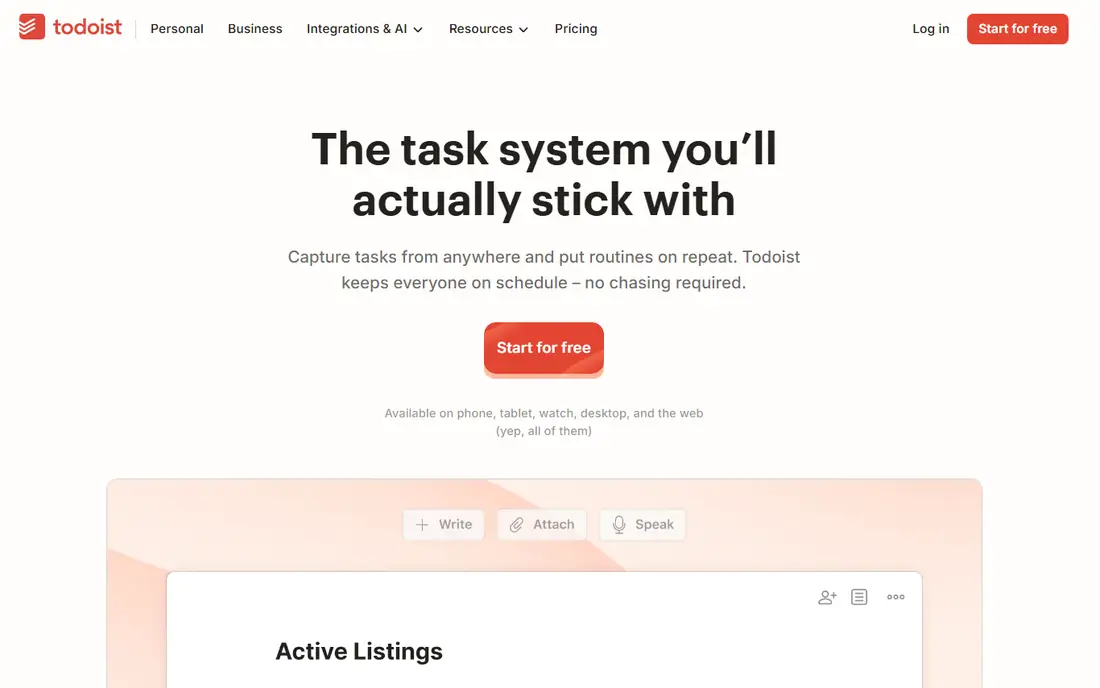
Todoist earns its place first because it removes friction at the exact moment a task appears. Type a sentence with a date and a repeat, and the app parses the date, the repeat, and the wording without extra taps. That speed matters for small business work, since a system only works when entering a task takes less time than remembering it. The free plan covers basic lists with five projects, while Pro at $5 per month billed annually raises the project limit to 300 and adds reminders, a calendar layout, and full activity history. Business adds team workspaces and central billing.
The trade off is scope against speed. Todoist is a list tool, not a notes app or a project dashboard, so teams that want documents, time tracking, or habit streaks inside the same app will need a second tool or a broader workspace. Todoist fits small businesses that want the fastest capture and clean shared lists.
What we like- Natural language task entry
- Clean lists on every platform
- Useful free plan
- Fast capture
- Wide integration set
Watch out for- Free plan caps projects at five
- No built in calendar or habit depth
- Team workspace needs the Business plan
- AI features need Pro
#2TickTick
Best for: Tasks, calendar, and habits4.5/5 on
G2 (113 reviews, checked Oct 2026)
Visit ticktick.com
Starting price$49.99 per year
Free planYes
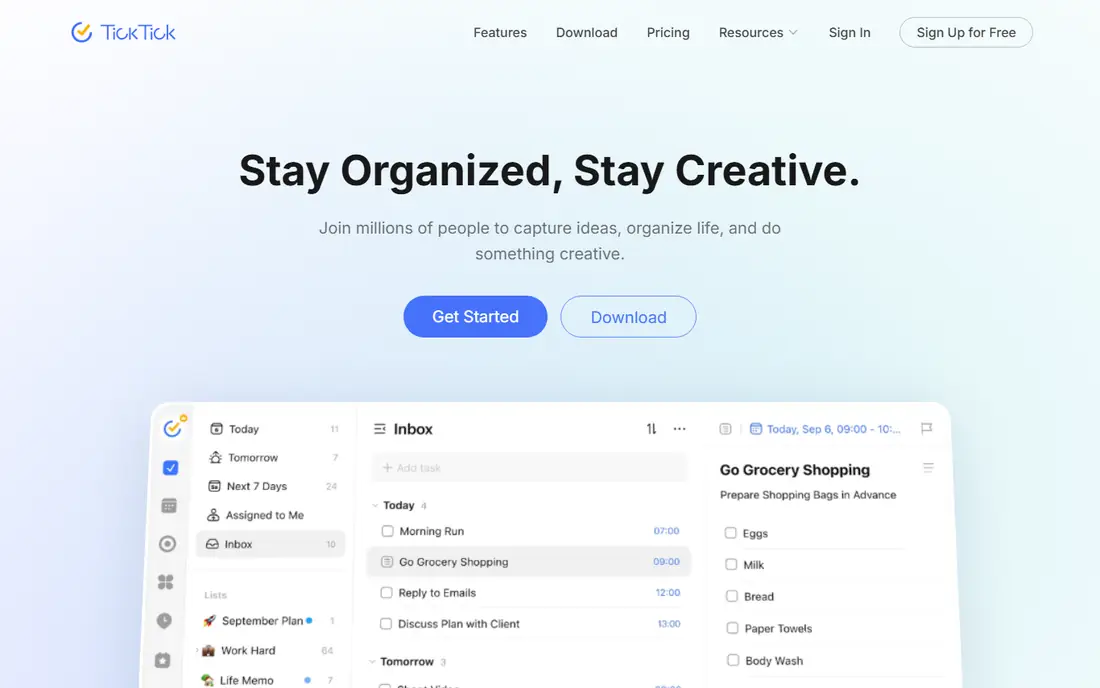
TickTick bundles a task manager, habit tracker, Pomodoro timer, and calendar into one app, which makes it the most features for no money in this guide. The free plan covers nine lists with 99 tasks per list and five habits, while Premium at $49.99 per year adds more lists, tasks, and calendar features. Note that some sources report $35.99 per year, so check the current price before buying, since pricing reports conflict.
The trade off is breadth against caps. TickTick covers more daily planning in one app than any rival here, but free plan caps on lists, tasks, and checklist items will push heavy users to Premium. TickTick fits small business owners who want tasks, habits, and focus timing in one app at a low annual price.
What we like- Tasks, calendar, habits, and Pomodoro timer in one app
- Generous free plan
- Eisenhower matrix
- Fast capture
- Good value premium
Watch out for- Free plan caps lists at nine and tasks per list at 99
- Checklist items cap at 19 per task
- Shared lists cap at 29 members
- Pricing reports conflict across sources
#3Asana
Best for: Team projects with timelines4.4/5 on
G2 (13,930 reviews, checked Oct 2026)
Visit asana.com
Starting price$10.99 per user per month
Free planYes
Asana is the team project tool for small businesses that have outgrown personal lists, with timelines, rules, templates, and cross functional project views. The free plan covers unlimited tasks and projects for small teams, while Starter is reported at $10.99 per user per month billed annually, with some sources reporting $13.49, so confirm the current price. Rules and automation help small teams run repeatable workflows, such as client onboarding or weekly reporting, without manual chasing.
The trade off is power against simplicity. Asana handles team projects well, but it is heavier than Todoist or TickTick for solo capture, and free plan user limits vary by source. Asana fits small teams that run shared projects with deadlines, owners, and timelines.
What we like- Team projects with timelines and rules
- Unlimited tasks and projects on free plan
- Strong templates
- Good for cross functional teams
Watch out for- Free plan stops at two users in some reports
- Starter pricing reports vary
- AI requests are limited on lower tiers
- Heavier than a simple list
#4ClickUp
Best for: One workspace for many kinds of work4.6/5 on
G2 (14,878 reviews, checked Oct 2026)
Visit clickup.com
Starting price$7 per user per month
Free planYes
ClickUp packs more features per dollar than Asana or Monday.com for small teams, with lists, boards, docs, goals, and dashboards in one workspace. The free plan covers unlimited tasks and members with 60 MB of storage and five Spaces, while paid plans start at $7 per user per month billed annually. Personal lists sit next to team views, so one person can manage private work and shared projects in the same app.
The trade off is breadth against setup time. ClickUp covers more kinds of work than any rival here, but setup takes longer and the interface can feel busy. ClickUp fits small businesses that want one workspace for tasks, docs, and goals instead of several separate apps.
What we like- Unlimited tasks and members on free plan
- Lists, boards, docs, and goals in one workspace
- Personal lists plus team views
- Good value per dollar
Watch out for- More setup than a solo list needs
- Free plan storage caps at 60 MB
- AI Brain is a $9 per user per month add on
- Interface can feel busy
#5Trello
Best for: Simple visual boards4.4/5 on
G2 (14,064 reviews, checked Oct 2026)
Visit trello.com
Starting price$5 per user per month
Free planYes
Trello remains the easiest board to adopt for small teams, with visual Kanban cards that anyone can understand in minutes. Its inbox captures tasks from email, Slack, and Teams, so work lands on the board without manual entry, and sharing a board with a client or contractor takes seconds. Pricing is reported at $5 per user per month billed annually for Standard, with a free plan for basic boards.
The trade off is ease against depth. Trello is the fastest team board to start, but reporting and dependencies are thin even on paid plans, so complex projects with many dependencies will outgrow it. Trello fits small teams that want a visual board running today with almost no training.
What we like- Easiest board to adopt
- Visual Kanban workflow
- Inbox captures from email, Slack, and Teams
- Simple sharing
- Low learning curve
Watch out for- Reporting and dependencies are thin even on paid plans
- No native task dependencies
- Power ups cost extra on some plans
- Limited for complex projects
Starting priceFree
Free planYes
Microsoft To Do is the free list app inside Microsoft accounts, with a My Day planning view, lists, reminders, and integration with Outlook tasks and Teams. It costs nothing, it is already on the device for Microsoft users, and it covers daily planning well for solo owners and tiny teams. There is no paid tier to weigh, which makes the decision simple.
The trade off is price against depth. Microsoft To Do is free and simple, but it lacks the team project features, habits, and focus tools of rivals. Microsoft To Do fits small businesses already on Microsoft 365 that want a free daily list without another subscription.
What we like- Fully free
- Inside Microsoft accounts
- My Day planning view
- Lists and reminders
- Integrates with Outlook and Teams
Watch out for- No team project depth
- Fewer power features than Todoist
- Best value only inside Microsoft 365
- No habit or Pomodoro tools
#7Monday.com
Best for: Visual team planning4.7/5 on
G2 (17,182 reviews, checked Oct 2026)
Visit monday.com
Starting price$9 per seat per month
Free planYes
Monday.com is the visual team planning tool for small businesses that want to build their own boards, with custom columns, templates, and automations for client work, sales pipelines, and operations. Pricing is reported at $9 per seat per month billed annually for Basic, with a three seat minimum on paid plans, so a solo owner pays for three seats. The free plan covers small use in some reports, with up to two users.
The trade off is visual flexibility against minimum cost. Monday.com boards are more customizable than Trello, but the three seat minimum makes it pricier for very small teams. Monday.com fits small teams of three or more that want visual planning with custom workflows.
What we like- Custom columns on every board
- Visual team planning
- Templates for many workflows
- Automations
- Good for client facing work
Watch out for- Three seat minimum on paid plans
- Automation actions are capped by plan
- Free plan covers up to two users in some reports
- Costs add up for larger teams
#8Notion
Best for: Docs, wikis, and tasks in one place4.6/5 on
G2 (13,834 reviews, checked Oct 2026)
Visit notion.so
Starting price$10 per user per month
Free planYes
Notion is the pick when a small team needs docs, wikis, and tasks in one workspace instead of separate apps. It covers pages, databases, and projects in one surface, with templates for SOPs, client docs, and meeting notes alongside task lists. Pricing is reported at $10 per user per month billed annually for Plus, with a free plan for individuals, while AI features vary by plan and source, so confirm the current rule before budgeting.
The trade off is workspace breadth against task depth. Notion replaces a docs tool and a list tool at once, but its task features are lighter than Asana or ClickUp for deadline driven team work. Notion fits small businesses that want one home for docs and tasks and are willing to spend setup time to shape it.
What we like- Docs, wikis, and tasks in one workspace
- Flexible databases
- Strong templates
- Free plan for individuals
- Good for SOPs and client docs
Watch out for- Task features are lighter than Asana
- Setup takes time
- AI pricing varies by plan
- Offline use is limited
How we chose
We compared published pricing and feature lists from 2026, favoring tools with distinct strengths: the fastest capture, the most free features, the best team timelines, the best value workspace, the easiest board, the best free Microsoft option, the most visual planning, and the best docs plus tasks workspace. We recorded prices as reported and flagged conflicts for TickTick and Asana, where sources differ. We favored tools with a current release and an active user base, and we weighed free plan limits carefully, since small businesses often start free and pay later.
How to choose a to do list app for small business
Start with how you capture work: if speed matters most, shortlist Todoist and TickTick, since a system only works when entering a task takes less time than remembering it. Next, count your team: solo owners and pairs can live on free plans, while teams of three or more should shortlist Asana, ClickUp, and Monday.com for shared projects. Then check the free plan caps that bite first, such as Todoist five projects, TickTick nine lists, and ClickUp 60 MB storage, since those caps decide when you pay. Finally, spend a full week using your shortlist for real daily work, since most tools feel great on day one and show real limits around day five when recurring tasks, notifications, and collaboration pile up.
Frequently asked questions
What is the best to do list app for a small business?
Todoist is the best pick for fast capture and shared lists, TickTick is the best pick for features without paying, and Asana or ClickUp are the best picks for teams that need shared projects and timelines.
Is there a free to do list app for small business?
Yes. Todoist, TickTick, Asana, ClickUp, Trello, Microsoft To Do, and Notion all offer free plans, though each caps projects, users, or storage, so check the limits before relying on free.
What is the cheapest serious to do app?
Todoist Pro at $5 per month and TickTick Premium at $49.99 per year are the cheapest serious picks, while Microsoft To Do is free inside Microsoft accounts.
Should a small team use Trello or Asana?
Trello is easier to adopt and suits simple visual boards, while Asana suits teams that need timelines, rules, and dependencies for shared projects.
Does Notion work as a to do app?
Yes, for teams that also want docs and wikis in one workspace, though its task features are lighter than Asana or ClickUp for deadline driven team work.
How do I pick between Todoist and TickTick?
Pick Todoist for the fastest capture and cleanest lists, and TickTick for tasks plus calendar, habits, and a Pomodoro timer in one app at a low annual price.
Sources we checked (0)
Is your product missing or out of date?
We review this list regularly. Vendors can request a listing, send updated pricing or ask about featured placement.

Shihab Mia · Founder, Rankite
Shihab has 5+ years in B2B and SaaS SEO. He writes Rankite's software buying guides from pricing pages, documentation and public user reviews. More about Shihab.