How we make this list: we compare pricing pages, product documentation and public user reviews. Ratings come from G2, Capterra or Trustpilot, with the date we checked them.
Key takeaways
- Scoro, Kantata, Accelo, and BigTime are built around money first, with quotes, time, invoicing, and margin reports in the same system as tasks.
- Monday.com, Asana, Smartsheet, and Wrike handle budgets well, but the deeper billing and revenue work usually needs a higher tier or an accounting connection.
- ProjectManager.com sits in the middle, with strong cost tracking and timesheets at a lower starting price than most professional services platforms.
- Per-user pricing hides the real cost when finance features sit on upper tiers, so check which plan includes invoicing, rate cards, and profit reports before you sign.
Quick comparison
| Tool | Best for | Starting price | Free plan |
|---|
 Scoro Scoro | Agencies and consultancies that want quotes to cash in one place | See website | Free trial |
 Kantata Kantata | Mid-market and enterprise services firms | See website | No |
 Accelo Accelo | Client work, retainers, and automated billing | See website | No |
 BigTime BigTime | Firms that bill from QuickBooks | $20 per user/month | Free trial |
 Monday.com Monday.com | Visual project and budget tracking | $9 per user/month (billed annually) | Yes |
 Asana Asana | Cross-team projects with portfolio budgets | $10.99 per user/month (billed annually) | Yes |
 Smartsheet Smartsheet | Spreadsheet-style budgets and cost reports | $9 per user/month (billed annually) | Free trial |
 Wrike Wrike | Large teams that need portfolio cost control | $10 per user/month (billed annually) | Yes |
 ProjectManager.com ProjectManager.com | Cost, time, and resource tracking on one dashboard | See website | Free trial |
Is your product missing or out of date?
We review this list regularly. Vendors can request a listing, send updated pricing or ask about featured placement.
The best project management software with financials
#1Scoro
Best for: Agencies and consultancies that want quotes to cash in one place4.5/5 on
G2 (503 reviews, checked Oct 2026)
Visit scoro.com
Starting priceSee website
Free planFree trial
Scoro starts from the sale, not from the task list. A team can build a quote, turn it into a project, schedule the people who will deliver it, track time against it, and invoice from the same record. That chain matters because margin problems usually appear in the gaps between systems, when hours are logged in one place and invoices are raised in another. Scoro closes those gaps by keeping planned cost, actual cost, and billed value side by side.
The trade-off is commitment. Scoro is built for firms with a real delivery operation, and its lower plans do not include every report a finance lead will want. Before buying, map the three reports you check every month, such as project profitability, utilization, and work in progress, to the plan that includes them. If those reports sit on a higher tier, price that tier from the start, not the entry tier.
What we like- Quotes, projects, time, invoicing, and margin reports in one system
- Strong resource planning
- Accounting links to Xero, QuickBooks, and Sage Intacct
Watch out for- Minimum seat rules apply on some plans
- The price rises sharply for advanced reporting
#2Kantata
Best for: Mid-market and enterprise services firms4.2/5 on
G2 (1,574 reviews, checked Oct 2026)
Visit kantata.com
Starting priceSee website
Free planNo
Kantata, formerly Mavenlink, is a professional services automation platform rather than a general task tool. Its strength is prediction. Resource plans, project schedules, time, expenses, and billing feed into forecasts that show whether a portfolio will hit its revenue and margin targets. For a firm running dozens of engagements at once, that forward view is more useful than a simple budget versus actual table.
The cost of that depth is a longer buying and setup process. Pricing is negotiated, and the platform rewards firms that have clean rate cards, clear roles, and someone to own the configuration. Small teams that only need task tracking and a few invoices will find Kantata heavy. Larger services firms that live or die on utilization will get more from it than from a general project tool.
What we like- Deep resource forecasting
- Revenue and margin reporting at portfolio level
- Strong Salesforce connection
Watch out for- Pricing is quoted, not published
- Setup takes real admin time
#3Accelo
Best for: Client work, retainers, and automated billing4.3/5 on
G2 (685 reviews, checked Oct 2026)
Visit accelo.com
Starting priceSee website
Free planNo

Accelo ties client work to money in a direct way. Retainers, fixed fees, and hourly work can live in the same system, and time logged against a project flows into billing and profitability views without a manual export. That helps firms that juggle many small clients, where a few unbilled hours on each account add up to real lost revenue over a quarter.
The honest catch is that Accelo is a system to learn, not a board to open and use in an afternoon. Teams should plan for onboarding and for cleaning up client, rate, and service data before go-live. If the firm is willing to do that work, the payoff is a single view of which clients pay for the effort they consume and which ones do not.
What we like- Retainer and recurring billing automation
- Client profitability views
- Time capture tied to projects
Watch out for- Pricing is not published
- The interface takes time to learn
Starting price$20 per user/month
Free planFree trial
BigTime comes from the time and billing side of professional services, and that shows in its priorities. Hours and expenses are captured against projects, approved, and pushed to QuickBooks for invoicing, with margin visible along the way. For accounting-led firms, that link is the main reason to choose it, because it removes the weekly reconciliation job that eats finance time.
Buyers should compare plans carefully rather than judging BigTime on its entry price. Essentials covers core time and billing, while budgeting, resource planning, and forecasting depth increase on Advanced and Premier. A firm that needs plan versus actual reporting should price Premier, not Essentials, and confirm the QuickBooks version it uses is supported before committing.
What we like- Native QuickBooks Online and Desktop links
- Time and expense billing
- Project budget and forecasting views
Watch out for- Advanced budgeting and resource features sit on higher plans
- Interface can feel dated in places
#5Monday.com
Best for: Visual project and budget tracking4.7/5 on
G2 (17,182 reviews, checked Oct 2026)
Visit monday.com
Starting price$9 per user/month (billed annually)
Free planYes
Monday.com works best for teams that want budgets visible next to the work, without adopting a full services platform. Budget columns, formulas, and dashboards can show planned spend, actual spend, and remaining budget on each project, and managers can filter that view by client, owner, or status. Adoption tends to be fast because the board layout is easy to read at a glance.
The limit appears when a team needs invoicing, revenue recognition, or detailed rate-card billing. Monday.com can connect to accounting tools and can be extended, but it is not a billing system on its own. It fits operations, marketing, and product teams that track project costs internally. Firms that bill clients by the hour will usually need a second tool or a higher-tier setup.
What we like- Clear boards, formulas, and budget columns
- Wide integration set
- Easy for non-technical teams to adopt
Watch out for- True financial depth needs higher tiers or add-ons
- Per-seat costs rise with larger teams
#6Asana
Best for: Cross-team projects with portfolio budgets4.4/5 on
G2 (13,930 reviews, checked Oct 2026)
Visit asana.com
Starting price$10.99 per user/month (billed annually)
Free planYes
Asana is the calm option for teams that run many projects across departments and want one portfolio view. Project budgets, workload, and status can be rolled up so a lead can see which projects are over budget before the month ends. The task, timeline, and calendar views are simple enough that new joiners can follow a project without training.
Finance teams should note what Asana does not do. It does not invoice clients, and it does not replace an accounting system. Its financial value is control and visibility: planned versus actual effort, portfolio spend tracking, and reporting that feeds a finance review. Teams that need that visibility, plus strong collaboration, will like it. Teams that need billing should pair it with an accounting or PSA tool.
What we like- Clean portfolios and goals
- Strong reporting on higher tiers
- Broad integrations
Watch out for- Budget and workload features need paid tiers
- No native invoicing
#7Smartsheet
Best for: Spreadsheet-style budgets and cost reports4.4/5 on
G2 (22,767 reviews, checked Oct 2026)
Visit smartsheet.com
Starting price$9 per user/month (billed annually)
Free planFree trial
Smartsheet suits teams that already think in spreadsheets. A project sheet can hold tasks, owners, dates, planned cost, actual cost, and variance in adjacent columns, and dashboards can pull those figures into a leadership view without a separate reporting tool. Resource views and baselines add control for operations teams that run repeatable, date-driven work.
The sheet model is also its limit. Finance features are tracking and reporting, not billing or revenue recognition. Teams that invoice from project data will export to accounting software or connect through an integration. For internal cost control, though, Smartsheet is hard to beat for speed, because finance staff can build and adjust a budget sheet without waiting for an admin.
What we like- Familiar grid layout
- Formulas, baselines, and dashboards
- Strong reporting for operations teams
Watch out for- No native invoicing
- Costs rise when collaborators need full licenses
#8Wrike
Best for: Large teams that need portfolio cost control4.2/5 on
G2 (4,540 reviews, checked Oct 2026)
Visit wrike.com
Starting price$10 per user/month (billed annually)
Free planYes
Wrike is built for scale. Large teams can run many projects under one portfolio, track time against tasks, set budgets, and report on spend, effort, and risk in one place. Custom workflows help when different departments follow different approval steps, and the analytics tools give managers a way to compare planned and actual performance across the whole portfolio.
Smaller teams may find Wrike more than they need, and the setup time reflects that scale. Budgeting is solid, but invoicing is not the focus, so services firms that bill clients will still need an accounting link. Wrike fits best when the main financial question is internal: are we spending the planned effort and money on the right projects, and where is the overrun coming from.
What we like- Portfolio budgets and time tracking
- Custom workflows
- Strong reporting and analytics
Watch out for- Setup can be complex
- Advanced financial reporting sits on higher tiers
#9ProjectManager.com
Best for: Cost, time, and resource tracking on one dashboard4.4/5 on
G2 (103 reviews, checked Oct 2026)
Visit projectmanager.com
Starting priceSee website
Free planFree trial
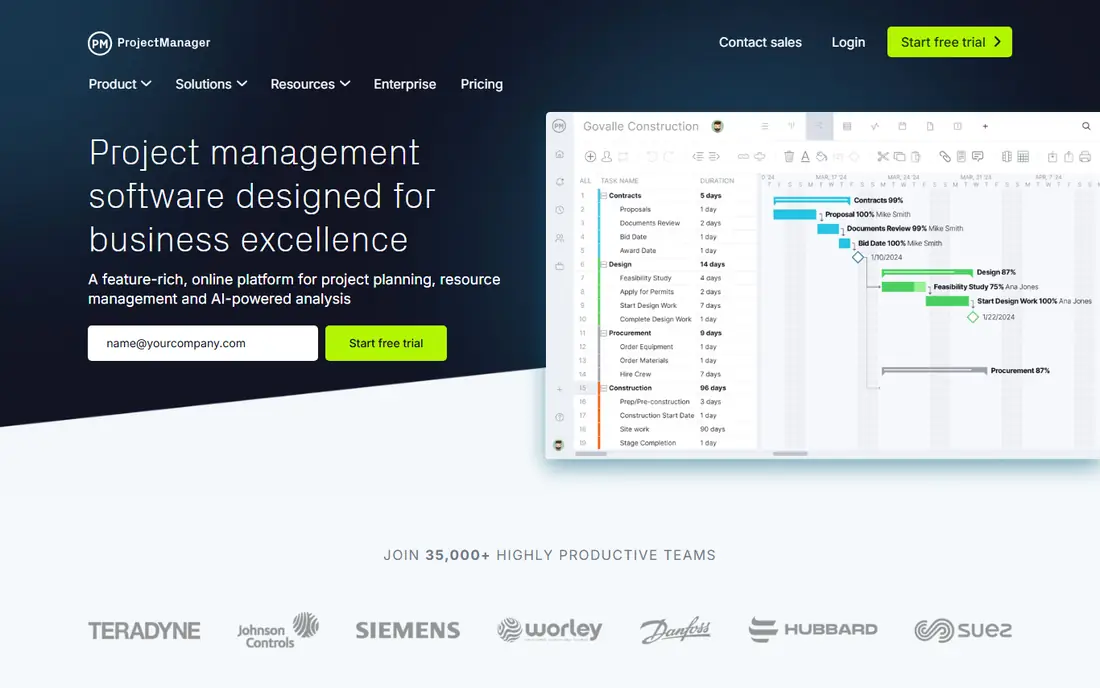
ProjectManager.com gives managers a classic project control view with money attached. Gantt charts show the schedule, timesheets show the effort, and dashboards show cost against budget, so a project lead can spot a cost problem in the same place as a schedule slip. Workload views help prevent the common cause of overruns, which is an overloaded team rather than a bad estimate.
It does not try to be a full billing platform, and buyers should judge it on that basis. For internal projects, construction, IT, and manufacturing work, its cost tracking is often enough. For client billing with rate cards, retainers, and revenue rules, a PSA tool such as Scoro or Kantata will fit better. ProjectManager.com is the practical middle choice when a team wants schedule, cost, and time in one paid tool.
What we like- Gantt, timesheets, and cost dashboards in one tool
- Workload views
- Guest access for clients
Watch out for- Billing features are limited compared with PSA tools
- Pricing details require a check on the vendor site
How we chose
We compared vendor pricing pages, product documentation, and public reviews on G2 and Capterra, with a focus on one question: does the tool connect project work to money, or does it only track tasks. Tools earned a place when they showed budgets, cost tracking, time capture, invoicing, or margin reporting as a core feature, not as a side note. We favored a mix of full professional services platforms and general project tools, so readers can see both the deep option and the lighter option. Prices shown are starting prices where the vendor publishes them, and See website means the vendor quotes or changes pricing by plan and region, so the pricing page is the final check.
What to check before you pay for financial features
Start with the money flow, not the task view. Write down how your firm earns money: fixed-fee projects, hourly billing, retainers, or internal budgets with no client invoice. That single answer narrows the list fast. Fixed-fee and hourly firms need time capture, rate cards, and invoicing. Retainer firms need recurring billing and utilization views. Internal teams need budget tracking and variance reports, and they can usually save money with a general tool.
Check which plan holds the finance features
Entry prices can mislead. Budget columns may sit on a basic plan while invoicing, margin reports, and revenue forecasting sit two tiers higher. Ask the vendor to confirm, in writing, which plan includes each feature you need: invoicing, expense capture, rate cards, multi-currency billing, and project profitability reports. Then price that plan for your full team, including finance and admin users who may need paid seats.
Test the accounting connection early
A project tool that cannot talk to your accounting system creates manual work every month. If you use QuickBooks, Xero, or Sage, run a trial sync with a real test project: log time, approve an expense, raise an invoice, and check that the figures match in both systems. Note whether the sync is one-way or two-way, and whether tax, discounts, and credit notes carry across. A weak sync will cost more in staff time than a higher subscription.
Agree on cost definitions before go-live
Budget overruns often come from different definitions, not bad data. Decide what counts as project cost: staff time at cost rate or bill rate, contractor fees, expenses, and overhead. Decide who can change a budget, who approves time, and when a project counts as over budget. Set those rules in the tool during setup, so reports mean the same thing to delivery leads and finance leads.
Frequently asked questions
What is the difference between project management software and professional services automation?
Project management software tracks tasks, schedules, and often budgets. Professional services automation adds the commercial side: quotes, resource planning, time and expense capture, invoicing, and margin reporting. A general tool suits internal projects. A PSA tool suits firms that sell time and need to know whether each engagement makes money.
Do I need invoicing inside my project tool?
It depends on how you bill. If invoices come from project time and expenses, invoicing inside the tool saves reconciliation work and reduces missed billings. If finance already invoices from accounting software, a clean sync between the two systems can work just as well, as long as time and cost data flow without manual re-entry.
Which tool is best for a small agency?
Scoro and BigTime are strong starting points for small agencies, for different reasons. Scoro covers the full quote to invoice chain in one place. BigTime is a better fit when the agency already runs on QuickBooks and wants billing to stay close to accounting. A general tool such as Monday.com can work for a very small team that only needs budget tracking.
Can these tools replace accounting software?
No. Even the strongest PSA tools in this list are not a full accounting system. They handle project finance, billing, and margin reporting, but payroll, tax filing, bank reconciliation, and statutory accounts still belong in accounting software. The goal is a clean link between the two, not a replacement.
How should I budget for a PSA tool?
Price the plan that includes the finance features you need, for every user who will log time or approve work. Add onboarding and data cleanup time, especially for rate cards and client records. Then compare that total with the cost of the separate tools it replaces, such as a task tool, a time tracker, and a billing spreadsheet, to see the true saving.
What is the biggest mistake when buying project software with financials?
Buying on the entry price, then finding that invoicing or margin reports need a higher tier. The fix is simple: list the finance features you need before a demo, confirm the plan for each one, and run a trial with a real project, real rates, and a real invoice before signing a contract.
Sources we checked (9)
- https://www.monday.com/pricing
- https://asana.com/pricing
- https://www.smartsheet.com/pricing
- https://www.wrike.com/pricing
- https://www.scoro.com/pricing
- https://www.kantata.com/pricing
- https://www.accelo.com/pricing
- https://www.bigtime.net/pricing
- https://www.projectmanager.com/pricing
Is your product missing or out of date?
We review this list regularly. Vendors can request a listing, send updated pricing or ask about featured placement.

Shihab Mia · Founder, Rankite
Shihab has 5+ years in B2B and SaaS SEO. He writes Rankite's software buying guides from pricing pages, documentation and public user reviews. More about Shihab.