How we make this list: we compare pricing pages, product documentation and public user reviews. Ratings come from G2, Capterra or Trustpilot, with the date we checked them.
Key takeaways
- Apple Wallet, Google Wallet, and Samsung Wallet are free, built into their phones, and cover tap to pay plus passes and tickets.
- Key Ring focuses on loyalty and gift cards, so it suits shoppers with a thick stack of store cards.
- CardPointers and MaxRewards manage rewards credit cards, tracking which card earns most in each spending category.
- Curve combines several payment cards behind one card, which suits people who carry many cards but want one in their pocket.
- No app here issues credit itself, so approval, interest, and fees still come from the card issuer, not the wallet app.
Quick comparison
Is your product missing or out of date?
We review this list regularly. Vendors can request a listing, send updated pricing or ask about featured placement.
The best card app
Starting priceFree
Free planYes
Apple Wallet sits at the center of payment on an iPhone. Payment cards added to the wallet work with Apple Pay in stores, in apps, and on the web, with each purchase confirmed by Face ID, Touch ID, or a passcode. The wallet also stores boarding passes, event tickets, loyalty cards, and digital keys, so a phone can replace several items from a pocket or bag.
The limit is the platform. Apple Wallet only runs on Apple devices, and whether a given card can be added depends on the issuing bank supporting Apple Pay. For iPhone owners, though, there is no reason to install a separate payment wallet, since the built in app already covers tap to pay and passes in one place.
What we like- Built into every iPhone
- Apple Pay with Face ID or Touch ID
- Stores passes, tickets, and keys
- Works with Apple Watch
Watch out for- IPhone and Apple Watch only
- Card support depends on the issuing bank
- No Android version
Starting priceFree
Free planYes
Google Wallet is the default payment wallet for most Android phones. Cards added to the wallet work for tap to pay in stores and for payment in apps and on the web, protected by the phone screen lock and by tokenization, which replaces the real card number with a device specific code for each purchase. Passes, tickets, transit cards, and loyalty cards sit alongside payment cards.
Support varies by bank and by country, and some phone makers add their own wallet features on top. For most Android owners, Google Wallet is the simplest choice, since it is already installed and covers payment plus passes without a separate download.
What we like- Built into most Android phones
- Tap to pay with a screen lock
- Stores passes, tickets, and loyalty cards
- Works with Wear OS watches
Watch out for- Card support varies by bank and country
- Features differ by phone maker
- No iPhone version beyond a limited app
Starting priceFree
Free planYes
Samsung Wallet combines Samsung Pay payment cards with passes, tickets, membership cards, and digital keys for cars and homes where supported. Tap to pay works at payment terminals, and the wallet also stores boarding passes and loyalty cards, so a Galaxy phone can carry most of a physical wallet.
The app only runs on Samsung Galaxy phones, which limits it to that audience. Digital ID and key features also depend on region and on partner support. For Galaxy owners, Samsung Wallet is the natural home for cards and passes, since it adds key storage that the other built in wallets match only in part.
What we like- Payment, passes, and digital keys in one app
- Samsung Pay tap to pay
- Works with Galaxy Watch
- Stores IDs and keys where supported
Watch out for- Samsung Galaxy phones only
- Some features vary by country
- Digital ID support is limited by region
Starting priceFree
Free planYes
Key Ring works simply: scan store loyalty cards once, then show them from the phone at checkout. The app also surfaces coupons and weekly ads from participating retailers, which helps shoppers who plan trips around deals. Setup takes minutes, since each card is added by scanning its barcode or entering its number.
Key Ring handles loyalty cards only, so it pairs with a payment wallet rather than replacing one. Retailer coverage varies, and smaller local stores may not appear. For shoppers who want a free, simple loyalty card holder without extra features, Key Ring remains a solid pick.
What we like- Free loyalty card storage
- Barcode display at checkout
- Coupons and weekly ads in the app
- Simple setup by scanning cards
Watch out for- Loyalty cards only, no payment cards
- Coverage depends on retailer participation
- App design is simpler than newer rivals
Starting priceSee website
Free planYes
CardPointers answers a common question for rewards card holders: which card should I use for this purchase. The app stores a user card list, shows the bonus category for each card, and highlights the best card for groceries, dining, travel, and other categories. A browser extension can auto activate Amex, Chase, and other card linked offers, and the app tracks statement credits with expiry reminders.
The core features work without a bank login, which suits users who prefer not to link accounts. The free tier covers basic tracking, while the paid plan adds full automation and unlimited tracking, with pricing shown on the vendor site. CardPointers fits people with three or more rewards cards who want to stop leaving bonus categories and credits unused.
What we like- Tracks bonus categories across many cards
- Auto activates card linked offers with a browser extension
- Tracks statement credits and deadlines
- No bank login needed for core features
Watch out for- Full value sits behind a paid plan
- Free tier limits cards per type
- Users must confirm used credits by hand
Starting priceSee website
Free planYes
MaxRewards tracks rewards, offers, and credits across linked card accounts, and it tells the user which card to use for each purchase type. The app monitors bonus categories, activates offers where supported, and flags credits before they expire. A free tier covers basic tracking, while the paid Gold plan adds deeper automation, with pricing shown on the vendor site.
The trade-off is account linking. Deeper automation needs access to card accounts, which some users prefer to avoid. MaxRewards fits rewards enthusiasts who accept linking in exchange for automatic tracking, and who hold enough cards that manual tracking has become a chore.
What we like- Automatic rewards tracking with linked accounts
- Offer activation and credit tracking
- Shows best card per purchase
- Covers many US issuers
Watch out for- Full automation requires linking accounts
- Paid plan needed for the best features
- US card focus limits use elsewhere
Starting priceFree
Free planYes
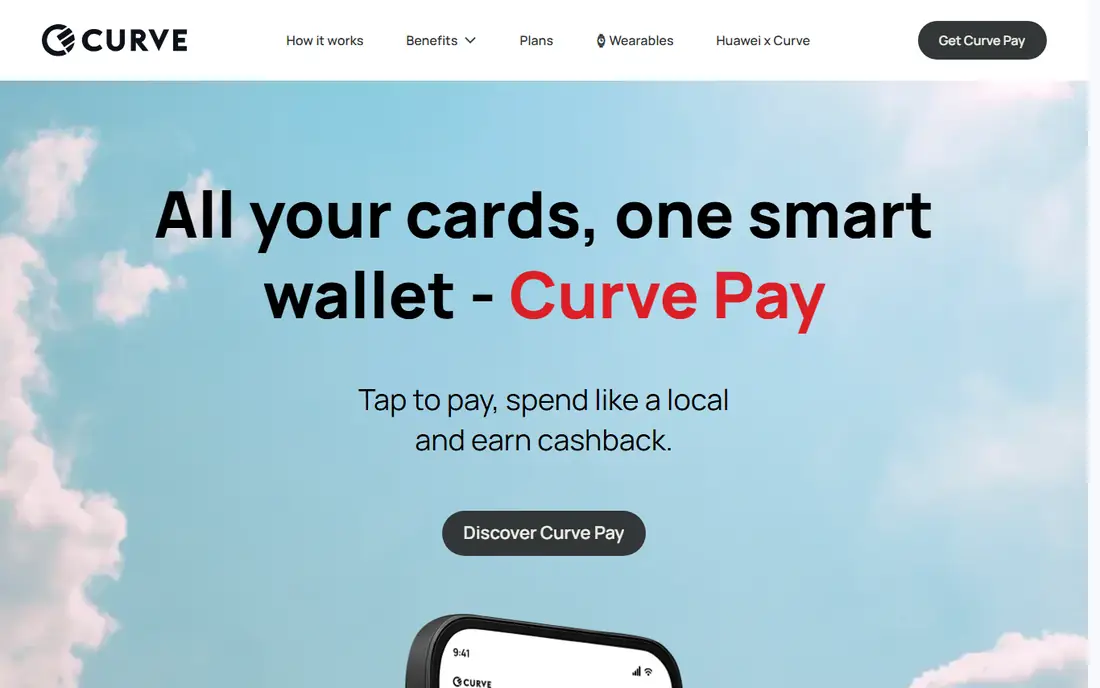
Curve issues a single card that links to a user existing payment cards. A purchase made with the Curve card charges the funding card chosen in the app, and the user can switch the funding card after a purchase within a set window. That setup lets someone carry one card while keeping several bank and rewards cards active behind it.
Curve is free on its basic plan, with paid plans adding higher limits and extra features. Availability varies by country, and support issues still go through the underlying issuer for the funding card. Curve fits people who carry many cards, travel light, or want to change which card pays after the fact.
What we like- One physical card linked to many payment cards
- Switch the funding card in the app after purchase
- Spending insights across cards
- Free basic plan
Watch out for- Availability varies by country
- Some features need a paid plan
- Adds a middleman between the user and the issuer
How we chose
We compared vendor sites, feature documentation, and public reviews on G2, Capterra, and Reddit, and we checked each app for a clear card management job: tap to pay, loyalty storage, rewards tracking, or combining cards. We favored apps that are free to start, widely available in the United States, and honest about their limits, such as platform exclusivity or a paid tier for full features. We excluded issuer marketing pages, since the task here is the wallet or management app itself, not a single credit card product.
How to set up a card wallet that works
A good card setup has three layers: one payment wallet, one loyalty holder, and, only if needed, one rewards tracker. More apps than that add work instead of saving it.
Start with the wallet on your phone
iPhone owners should start with Apple Wallet, Android owners with Google Wallet, and Galaxy owners with Samsung Wallet. Add your main debit and credit cards, confirm each card with the bank, and test tap to pay on a small purchase. Turn on a screen lock and, where offered, transaction alerts from the bank, so a lost phone does not mean silent spending.
Move loyalty cards out of your pocket
Scan every store loyalty card into Key Ring, then leave the plastic at home for a week and see which cards you actually use. Delete cards for stores you no longer visit, since a long list slows checkout. Keep gift cards in the same app, and check balances before shopping so an empty card does not hold up a queue.
Add a rewards tracker only with three or more cards
A rewards tracker pays off when several cards compete for the same purchase. With one or two cards, the best card is usually obvious, and a tracker adds little. With three or more, CardPointers suits users who avoid account linking, while MaxRewards suits users who want automatic tracking. Check the paid price against the credits and offers you actually used last year before subscribing.
Keep security simple
Never store full card numbers, PINs, or passwords in a notes app or a photo. Use the wallet tokenization that Apple, Google, and Samsung provide for payment, and use the bank app to freeze a card at once if a phone is lost. Review the card list in each app twice a year, and remove cards you no longer hold.
Frequently asked questions
What is the best card app for iPhone?
Apple Wallet is the best choice for most iPhone owners, since it is built in, free, and covers Apple Pay plus passes, tickets, and keys. Add Key Ring for loyalty cards, and CardPointers if you manage several rewards cards. There is no need for a separate payment wallet on an iPhone.
What is the best card app for Android?
Google Wallet is the best default for most Android phones, with tap to pay, passes, and loyalty cards in one free app. Samsung Galaxy owners can use Samsung Wallet instead, which adds digital key storage. Both pair well with a loyalty app such as Key Ring for store cards.
Can a card app replace my physical wallet completely?
For payment and loyalty cards, mostly yes, if your banks support your phone wallet and your regular stores accept tap to pay or barcode scans. A photo ID, and in some places a transit card, may still need a physical version. Keep one physical payment card as a backup for terminals that do not accept phones.
Is it safe to store cards in a phone wallet?
Phone wallets use tokenization, so a purchase uses a device specific code rather than the real card number, and purchases need a screen lock, fingerprint, or face check. That is generally safer than carrying plastic, which anyone can use if found. Still, set a strong screen lock, turn on bank alerts, and freeze a card at once if the phone is lost.
Do card wallet apps charge a fee?
Apple Wallet, Google Wallet, and Samsung Wallet are free, and Key Ring is free for loyalty storage. CardPointers and MaxRewards offer free tiers with paid plans for full automation, and Curve offers a free basic plan with paid tiers for higher limits. Card interest, annual fees, and late fees still come from the card issuer, not the wallet app.
What is the difference between a wallet app and a rewards tracker?
A wallet app stores cards and makes payments or shows loyalty barcodes, while a rewards tracker tells you which card to use and tracks offers and credits. Apple Wallet and Google Wallet are wallet apps, while CardPointers and MaxRewards are trackers. Many people use one of each, since the jobs are different.
Sources we checked (7)
- https://www.apple.com/wallet
- https://wallet.google.com
- https://www.samsung.com/us/apps/samsung-wallet
- https://www.keyringapp.com
- https://www.cardpointers.com
- https://www.maxrewards.com
- https://www.curve.com
Is your product missing or out of date?
We review this list regularly. Vendors can request a listing, send updated pricing or ask about featured placement.

Shihab Mia · Founder, Rankite
Shihab has 5+ years in B2B and SaaS SEO. He writes Rankite's software buying guides from pricing pages, documentation and public user reviews. More about Shihab.
 Apple Wallet
 Google Wallet
 Samsung Wallet
 Key Ring
 CardPointers
 MaxRewards
 Curve
Curve