How we make this list: we compare pricing pages, product documentation and public user reviews. Ratings come from G2, Capterra or Trustpilot, with the date we checked them.

What is AI architecture software and what can it do today?
AI architecture software uses machine learning to speed up early design work. It can propose massing options on a real site, generate apartment layouts from a boundary and a room list, test daylight and wind, and check a scheme against zoning rules. It does not replace the architect. It shortens the slow first pass, so a team can test more options each week.
The useful split is between tools that change geometry and tools that only change images. Generative design tools produce editable plans, unit counts and exports for Revit, Rhino or CAD. Rendering tools produce pictures from a model or a sketch. Only the first group can answer a feasibility question, so a buyer should ask: does this tool return a measurable plan, or does it return an image.
TestFit is the best tool in this guide for pure feasibility work. It starts with a parcel, applies zoning rules, places buildings and parking, and returns unit counts, yield and a live pro forma. A developer can test ten sites in a day and keep only the sites that clear the numbers. Autodesk Forma is the best tool when the site itself is complex, because it brings in real site context, sunlight, wind and noise. A scheme that looks good on a blank site can fail on a real street, and Forma catches that early. ArkDesign.ai sits between those two poles, with code-aware multifamily schematics for small developers.
How much does AI architecture software cost in 2026?
Prices in this guide range widely. PlanFinder Pro costs 16 euros per month when billed annually, and Maket Homeowner costs 20 dollars per month. At the middle, Hypar Professional costs 100 dollars per user per month, Spacio Pro costs about 79 euros per month, and Finch 3D Basic costs 79 euros per month. At the top, TestFit Site Solver starts at 15,000 dollars per year, and ArkDesign.ai Pro lists at 180 dollars per month as an introductory rate. The headline price is rarely the full cost. Credit limits matter on Maket and PlanFinder, seat limits matter on Hypar and Finch 3D, and add-ons matter on TestFit, where Site Intelligence, Pro Forma and the MCP Connection add 150, 170 and 100 dollars per month on Parking Solver.
Start with the deliverable the client or the planning officer must see. If it is a unit count, a parking count, a daylight result or a floor plan with dimensions, choose a generative design tool. If it is a mood image for a first pitch, a rendering tool may be enough, but it will not answer a planning question. Next, check the export path. A tool that cannot send its result to Revit, Rhino, CAD or IFC creates a dead end, because the team will redraw the scheme by hand. Check the export list before buying, and test it with one real scheme. Finally, check the rules the tool understands. ArkDesign.ai is explicit about United States multifamily work, and PlanFinder is explicit that its model was trained mostly on European apartment plans.
| Tool |
Best for |
Starting price |
Free plan |
Key strength |
| Autodesk Forma |
Site analysis and massing |
$85 per month |
30-day free trial, no permanent free plan |
Sunlight, wind, noise, Revit handoff |
| TestFit |
Feasibility and yield |
$75 per month |
No free plan listed |
Generative site plans, live pro forma |
| ArkDesign.ai |
Multifamily schematics |
$180 per month, introductory rate |
Free Lite plan, 3 projects |
Automated floor plans, PDF reports |
| Finch 3D |
Multifamily floor plans |
79 euros per month |
Free plan, editing only |
Unit mix, circulation, performance metrics |
| Hypar |
Space planning, test fits |
$100 per user per month |
Free Personal plan, 3 projects |
Program-driven layouts, Revit transfer |
| Spacio |
Residential massing |
21 euros per month, billed yearly |
Free plan, 3 projects |
Daylight, sun and code checks |
| Maket |
Residential floor plans |
$20 per month |
Free plan, 30 one-time credits |
Fast plan generation from text |
| PlanFinder |
Apartment layouts |
16 euros per month, billed yearly |
30-day free trial |
Fast apartment variants in Revit |
Quick comparison
| Tool | Best for | Starting price | Free plan |
|---|
 Autodesk Forma | Firms that need site context, massing and environmental analysis before BIM work | $85 per month, or $700 per year for Forma Site Design, checked 21 Nov 2026 | 30-day free trial; free for students and educators; no permanent free plan |
 TestFit | Developers and architects who need fast feasibility, unit mix, parking and yield | $75 per month per user for Urban Planner, checked 21 Nov 2026 on the vendor pricing page | No free plan listed on the vendor pricing page; paid plans start with Urban Planner |
 ArkDesign.ai | Architects and small developers doing United States multifamily schematics | $180 per month introductory rate, $399 list price, for Pro, checked 21 Nov 2026 | Free Lite plan with 3 projects, 3 PDF reports, knowledge centre access and free online courses |
 Finch 3D | Architects designing multifamily buildings who need optimised unit mix and circulation | 79 euros per month for Basic, billed monthly, checked 21 Nov 2026 | Free plan at 0 euros for one user, with editing tools and live metrics, but no AI generation |
 Hypar | Architects and engineers producing test fits and space plans | $100 per user per month for Professional, or $1,000 per user per year, checked 21 Nov 2026 | Free Personal plan, up to 3 projects, no card required, for evaluation only |
 Spacio | Architects and developers doing residential feasibility with massing, daylight and code checks | 21 euros per month for Starter, billed yearly at 250 euros, checked 21 Nov 2026 | Free plan, 3 projects, basic terrain; exports need a paid plan or a 30 euro day pass |
 Maket | Homeowners, builders and small firms that need fast residential floor plans and renders | $20 per month for Homeowner, with 300 credits, checked 21 Nov 2026 on the vendor pricing page | Free plan, 30 one-time credits, no card required, including single-floor generation and renders |
 PlanFinder | Architects who need fast apartment layout variants in Revit, Rhino or Archicad | 16 euros per month for Pro, billed annually at 192 euros per year, checked 21 Nov 2026 on the vendor pricing page | 30-day free trial with all features, up to 8 plans per run; no permanent free plan |
Is your product missing or out of date?
We review this list regularly. Vendors can request a listing, send updated pricing or ask about featured placement.
#1Autodesk Forma
Best for: Firms that need site context, massing and environmental analysis before BIM work4.4/5 on
G2 (5,667 reviews, checked Oct 2026)
Visit autodesk.com
Starting price$85 per month, or $700 per year for Forma Site Design, checked 21 Nov 2026
Free plan30-day free trial; free for students and educators; no permanent free plan
Autodesk Forma is the most complete early-stage tool in this guide. A team starts with a real site, tests massing options, and sees sunlight, wind and noise results without a separate analysis package. A scheme that fails on daylight is visible before the client falls in love with it. The Revit add-in carries a chosen scheme forward as a geolocated model.
What we like- Real site context
- Sunlight, wind and noise analysis
- Native Revit handoff
- Included with the AEC Collection
Watch out for- Standalone price is high for an early-phase only tool, and documents still need Revit
#2TestFit
Best for: Developers and architects who need fast feasibility, unit mix, parking and yield4.3/5 on
G2 (22 reviews, checked Oct 2026)
Visit testfit.io
Starting price$75 per month per user for Urban Planner, checked 21 Nov 2026 on the vendor pricing page
Free planNo free plan listed on the vendor pricing page; paid plans start with Urban Planner
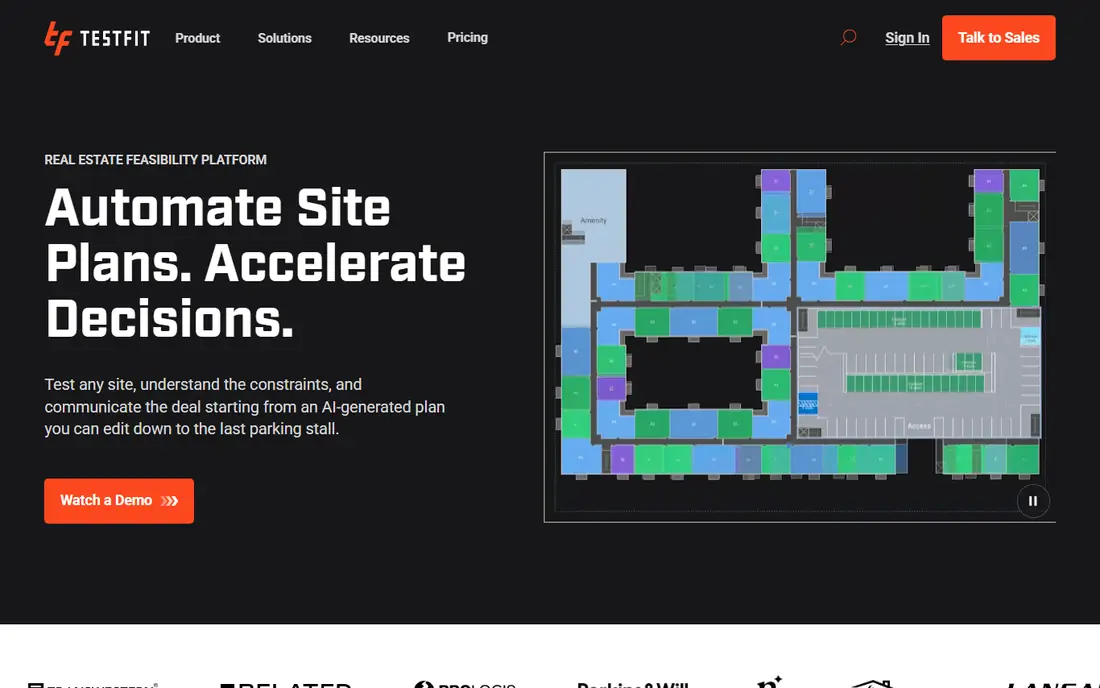
TestFit answers the question developers ask first, which is whether a site can make money. A user picks a parcel, sets zoning rules such as floor area ratio and parking ratio, and TestFit places buildings, roads and parking while it counts units and yield. Urban Planner at 75 dollars per month covers quick massing studies, and Parking Solver at 195 dollars per month adds parking automation. The full generative engine sits in Site Solver from 15,000 dollars per year.
What we like- Generative site design
- Live pro forma add-on
- Parking automation
- Exports to Revit, AutoCAD, SketchUp, Excel and PDF
Watch out for- Generative design sits only in Site Solver from 15,000 dollars per year, so the cheapest plan cannot do the core AI task
#3
ArkDesign.ai
Best for: Architects and small developers doing United States multifamily schematics
Visit arkdesign.ai
Starting price$180 per month introductory rate, $399 list price, for Pro, checked 21 Nov 2026
Free planFree Lite plan with 3 projects, 3 PDF reports, knowledge centre access and free online courses
ArkDesign.ai takes a lot and a brief and returns a schematic multifamily design with floor plans that respect code rules, rather than a pretty image that ignores them. That difference matters. Pro at 180 dollars per month as an introductory rate includes 12 projects, 60 PDF reports and 600 AI generations. Premium adds unlimited projects and consulting from licensed United States architects.
What we like- Automated, code-aware multifamily schematics
- PDF reports
- Revit export on Premium
- Consulting from licensed United States architects on Premium
Watch out for- Narrow focus, so it suits United States multifamily work far better than other building types
#4
Finch 3D
Best for: Architects designing multifamily buildings who need optimised unit mix and circulation
Visit finch3d.com
Starting price79 euros per month for Basic, billed monthly, checked 21 Nov 2026
Free planFree plan at 0 euros for one user, with editing tools and live metrics, but no AI generation
Finch 3D, now branded simply as Finch, is a strong tool for the middle of early design, where a residential scheme must balance unit mix, circulation and performance. Basic at 79 euros per month unlocks unit mix generation and circulation paths, work many architects do by hand for days. The free plan is useful for learning the interface, but it does not include generation. Enterprise holds the full system, from 14,500 euros per year.
What we like- Optimised unit mix and circulation
- Live performance metrics
- Grasshopper and Revit links
- 14-day free trial on Basic
Watch out for- Full generation and the AI agent sit only on Enterprise, from 14,500 euros per year for three seats
#5
Hypar
Best for: Architects and engineers producing test fits and space plans
Visit hypar.io
Starting price$100 per user per month for Professional, or $1,000 per user per year, checked 21 Nov 2026
Free planFree Personal plan, up to 3 projects, no card required, for evaluation only
Hypar turns a client program into an editable layout without redrawing every room by hand. A team imports the program from a spreadsheet, brings in the site as a drawing underlay, and places rooms while areas update live. Clearances and clashes are checked as the plan changes, which catches errors that often appear only at coordination stage. Professional at 100 dollars per user per month unlocks unlimited projects and DWG import. Documents still happen in Revit.
What we like- Imports a program from a spreadsheet
- Live area measurement and clash checks
- Revit add-in
- Exports to Rhino, PDF and Excel
Watch out for- Free plan is not licensed for client work, and curved spaces are not yet supported
#6
Spacio
Best for: Architects and developers doing residential feasibility with massing, daylight and code checks
Visit spacio.ai
Starting price21 euros per month for Starter, billed yearly at 250 euros, checked 21 Nov 2026
Free planFree plan, 3 projects, basic terrain; exports need a paid plan or a 30 euro day pass
Spacio is a browser-based early-phase platform for residential feasibility work. A team can set up a site, test massing options, run daylight and sun simulations, and check the scheme against code-oriented rules, all without opening a full authoring tool. Starter at 21 euros per month when billed yearly covers 10 projects with all simulations, while Pro at 79 euros per month adds unlimited projects and all exports. The free plan is enough to learn the tool, but a buyer should budget for Pro to export.
What we like- Parametric massing with live validation
- Daylight and sun simulations
- Exports to Revit, Archicad, Rhino and IFC
Watch out for- Exports are limited on free and Starter plans, and other building types get less support
#7
Maket
Best for: Homeowners, builders and small firms that need fast residential floor plans and renders
Visit maket.ai
Starting price$20 per month for Homeowner, with 300 credits, checked 21 Nov 2026 on the vendor pricing page
Free planFree plan, 30 one-time credits, no card required, including single-floor generation and renders
Maket is the fastest tool in this guide for a residential floor plan. A user answers a few questions about rooms, square footage and house shape, and Maket returns a complete layout in two to three minutes, with several variations to compare. The plan can be edited in plain language, furnished automatically, turned into 3D and rendered, all on one canvas. Homeowner at 20 dollars per month includes 300 credits, while Pro at 100 dollars per month includes 3,000 credits. Each floor costs 20 credits.
What we like- Full layout from rooms, size and shape
- Conversational editing
- One-click 3D and renders
- PDF and DXF export on paid plans
Watch out for- Credit limits cap monthly generation, and plans are design-stage only, not construction documents
#8
PlanFinder
Best for: Architects who need fast apartment layout variants in Revit, Rhino or Archicad
Visit planfinder.xyz
Starting price16 euros per month for Pro, billed annually at 192 euros per year, checked 21 Nov 2026 on the vendor pricing page
Free plan30-day free trial with all features, up to 8 plans per run; no permanent free plan
PlanFinder is a focused plugin that does one job fast. Give it an outer boundary and the rooms needed, and its model proposes several apartment layouts in a few seconds. Rooms, walls, doors and furniture can be edited in the palette, good rooms can be locked, and the rest can be generated again. The Fit command fits existing plans to a new input, and Furnish predicts room functions, doors and furniture in under a second. Pro costs 16 euros per month when billed annually.
What we like- Multiple apartment layouts in seconds
- Fit and Furnish reuse existing plans
- Plugin for Revit, Rhino and Archicad
Watch out for- Model trained mostly on European apartments, so United States layouts need more manual correction
Worked cost example and decision table
A three-person studio can compare two stacks. Stack A uses Spacio Pro at 79 euros per month, Maket Pro at 100 dollars per month, and PlanFinder Pro at 16 euros per month, about 195 per month before tax. Stack B uses TestFit Parking Solver at 195 dollars per month plus Pro Forma at 170 dollars per month, 365 per month, and still lacks generative design. Stack A gives massing, daylight checks, floor plans and renders, while Stack B gives stronger yield and parking numbers but needs Site Solver at 15,000 dollars per year.
| Your main question |
Pick first |
Add second |
| Will this site perform well on sun, wind and noise |
Autodesk Forma |
Spacio |
| Will this site make money, and how many units fit |
TestFit |
Autodesk Forma |
| Can I get a code-aware multifamily schematic fast |
ArkDesign.ai |
Finch 3D |
| Can I optimise unit mix and circulation |
Finch 3D |
Hypar |
| Does the client program fit the floor plate |
Hypar |
Spacio |
| Can I test residential massing and daylight quickly |
Spacio |
Maket |
| Can I generate house plans and renders for a client |
Maket |
PlanFinder |
| Can I generate many apartment variants in Revit |
PlanFinder |
TestFit |
We picked tools that return measurable design output, not only images, and that were live and purchasable on 21 Nov 2026. We checked each vendor pricing page or a reputable secondary source from October or November 2026. We excluded general CAD and BIM tools such as AutoCAD, Revit, SketchUp, ArchiCAD and Rhino, because those products are already covered on a live Rankite page. We also excluded generic image generators, because they cannot return a dimensioned plan. Prices change, so check the vendor page before buying. Last verified: 21 Nov 2026.
Frequently asked questions
What is the best AI architecture software for beginners?
The best starting point for a beginner is Maket, because the free plan needs no credit card and the workflow is simple: describe the home, generate a plan, edit it in plain language, and render it. PlanFinder is also easy to learn for apartment layouts. Start with one real past project, and only pay when it saves time.
Can AI architecture software replace an architect?
No, it cannot replace an architect. These tools speed up the first pass, test more options, and return counts and analysis that a human can check. They do not take legal responsibility for a design, and they can produce plans that look right but fail on structure, access or fire rules. A licensed architect must review every AI output before permits.
How accurate are AI-generated floor plans?
Accuracy varies by tool and by project type. Tools trained on the same building type and region as the project tend to produce usable first drafts, while tools used outside their training data need more correction. Treat every generated plan as a draft, and never send an AI plan as a final drawing.
Which AI architecture tool is best for multifamily housing?
ArkDesign.ai is the best pick for United States multifamily schematics because it is built around code-aware apartment design and returns PDF reports. Finch 3D is the best pick when unit mix and circulation need optimisation, and TestFit is the best pick when the developer needs yield, parking and a live pro forma first. Many teams use TestFit for feasibility and ArkDesign.ai for the plan.
Do I need Revit to use AI architecture software?
No, most tools in this guide work in the browser or as a plugin, and they do not need Revit to generate a plan. Autodesk Forma, TestFit, Spacio, Maket and ArkDesign.ai all work without Revit for the early stage. Revit becomes useful at detailed design, because several tools export to Revit.
Sources we checked (9)
- https://www.autodesk.com
- https://www.testfit.io/pricing
- https://www.arkdesign.ai
- https://www.finch3d.com
- https://www.hypar.io
- https://www.spacio.ai
- https://www.maket.ai/pricing
- https://www.planfinder.xyz
- https://rankite.com
Is your product missing or out of date?
We review this list regularly. Vendors can request a listing, send updated pricing or ask about featured placement.

Shihab Mia · Founder, Rankite
Shihab has 5+ years in B2B and SaaS SEO. He writes Rankite's software buying guides from pricing pages, documentation and public user reviews. More about Shihab.