How we make this list: we compare pricing pages, product documentation and public user reviews. Ratings come from G2, Capterra or Trustpilot, with the date we checked them.
Key takeaways
- Attendance-first tools such as OneTap and KidCheck are faster at the door than full program platforms, because check-in is their whole job.
- Full platforms such as EZChildTrack, Procare, and Brightwheel bundle attendance with billing, enrolment, and parent messaging, which suits larger programs.
- Grant-funded programs need date-range exports and per-child history, so check the reporting format before you buy, not after.
- A free plan only helps if it covers your real roster size, so count children and sites before comparing prices.
What should after school attendance software track?
After school attendance software should record who arrived, when they arrived, who picked them up, and when they left, with a timestamp that cannot be edited after the fact. For most programs that is the core record, and it is what parents, funders, and licensing bodies ask to see. Beyond that, useful tools link attendance to the enrolment roster, flag children who miss consecutive sessions, and export the record by child, date range, or site in Excel, CSV, or PDF. Programs that bill by attendance also need the check-in time to flow into invoicing without retyping. If a tool only stores a daily headcount with no per-child history, it will not survive an audit or a grant report.
How do QR code and kiosk check-in compare?
QR code check-in asks each child or parent to scan a code on arrival, usually from a phone, and it clears a line quickly because many people can scan at once. A kiosk puts a shared tablet at the door where staff or parents tap a name, which works well when children do not carry phones. The strongest setups combine both, with a QR code for the rush and a staff tablet for walk-ins and exceptions. Security matters here too: a QR code that refreshes every few seconds cannot be screenshotted and shared, and a signed checkout with a timestamp creates a defensible pickup record. Choose the method your least technical staff member can run on a wet Tuesday afternoon.
What does after school attendance software cost?
After school attendance software in this guide runs from free for small rosters to quote-only pricing for large multi-site platforms. OneTap starts free for up to 20 profiles, with paid plans from $49.99 a month billed yearly. KidCheck starts at $25 a month. Classcard starts at $99 a month. The full program platforms, EZChildTrack, AfterSchool HQ, Brightwheel, Procare, and Sawyer, do not publish a starting price and quote per program, so their cost depends on children, sites, and modules. When you compare, ask whether the price is per child, per site, or flat, and whether billing, messaging, and reporting are included or charged as add-ons.
A standalone attendance app is enough when your only problem is the paper register: who arrived, who left, and a clean export at the end of the month. A full program platform earns its cost when you also handle enrolment, online registration, parent payments, scheduling, and grant reporting, because keeping those in separate tools creates retyping and mismatched records. Small enrichment programs with one site and one weekly session usually do better with a focused app. School-based programs running several sites, billing families, and reporting to funders usually need the platform. If you are unsure, start with the attendance problem and add modules only when a second job is clearly suffering.
We compared tools on check-in speed, per-child records, export formats for grant and audit reporting, pickup security, and whether attendance is the core product or one module among many. We read each vendor homepage and used the published price where the vendor shows one, marking the rest as quote. We favoured tools built for after-school and out-of-school-time programs over generic childcare software where the choice existed. Last verified: 15 November 2026. Prices in this guide were checked on 15 November 2026, and quoted prices depend on roster size and sites, so confirm the figure for your program before buying.
| Tool | Best for | Starting price | Free plan |
| OneTap | Attendance-first programs moving off paper | $49.99 per month | Yes |
| EZChildTrack | Billing and attendance in one system | quote | No |
| AfterSchool HQ | Nonprofits managing multiple sites | quote | No |
| Brightwheel | All-in-one childcare with parent messaging | quote | No |
| Procare | Licensed centres at scale | quote | No |
| Sawyer | Session-based classes and enrichment | quote | No |
| KidCheck | Secure check-in and pickup control | $25 per month | No |
| Classcard | Activity-based academies and classes | $99 per month | No |
Quick comparison
| Tool | Best for | Starting price | Free plan |
|---|
 OneTap | After-school programs that want fast QR check-in with a defensible record | $49.99 per month, billed yearly | Yes, free forever for up to 20 profiles |
 EZChildTrack | Programs that need billing and attendance working together | quote | No |
 AfterSchool HQ | Nonprofits and community programs managing multiple sites | quote | No |
 Brightwheel | Childcare and after-school programs that want billing, messaging, and learning in one app | quote | No |
 Procare | Licensed childcare at scale and multi-site school districts | quote | No |
 Sawyer | Session-based after-school classes with attendance tied to the lesson plan | quote | No |
 KidCheck | Programs where pickup security and guardian authorisation matter most | $25 per month | No |
 Classcard | Activity-based after-school academies with scheduling, fees, and attendance in one place | $99 per month | No |
Is your product missing or out of date?
We review this list regularly. Vendors can request a listing, send updated pricing or ask about featured placement.
These eight tools cover the two ways programs buy attendance software: focused check-in apps that do one job well, and full platforms that fold attendance into enrolment, billing, and reporting. The right choice depends on program size, funding, and how much of the operation you want in one system.
#1
OneTap
Best for: After-school programs that want fast QR check-in with a defensible record
Visit onetapcheckin.com
Starting price$49.99 per month, billed yearly
Free planYes, free forever for up to 20 profiles
OneTap is an attendance app built for programs that check in the same people session after session, including after-school programs, youth programs, and camps. Each person scans a single QR code, the check-in lands on a shared register that staff see in real time, and every session keeps its own record with date, method, and who was there. The check-in QR refreshes every 20 seconds, so a screenshot passed to a friend expires before it can be used, and checkout can capture a signature with a timestamp. Paid plans start at $49.99 a month billed yearly for 250 profiles, and the free Individual plan covers 20 profiles forever. OneTap fits small and mid-size programs moving off paper registers.
What we like- One QR code per program with recurring sheets, proof of presence with location, time, photo, and signature, exports to Excel, CSV, or PDF by person or date range
Watch out for- It is attendance only, so programs that also need billing, enrolment, and parent payments must run a second tool alongside it
Starting pricequote
Free planNo
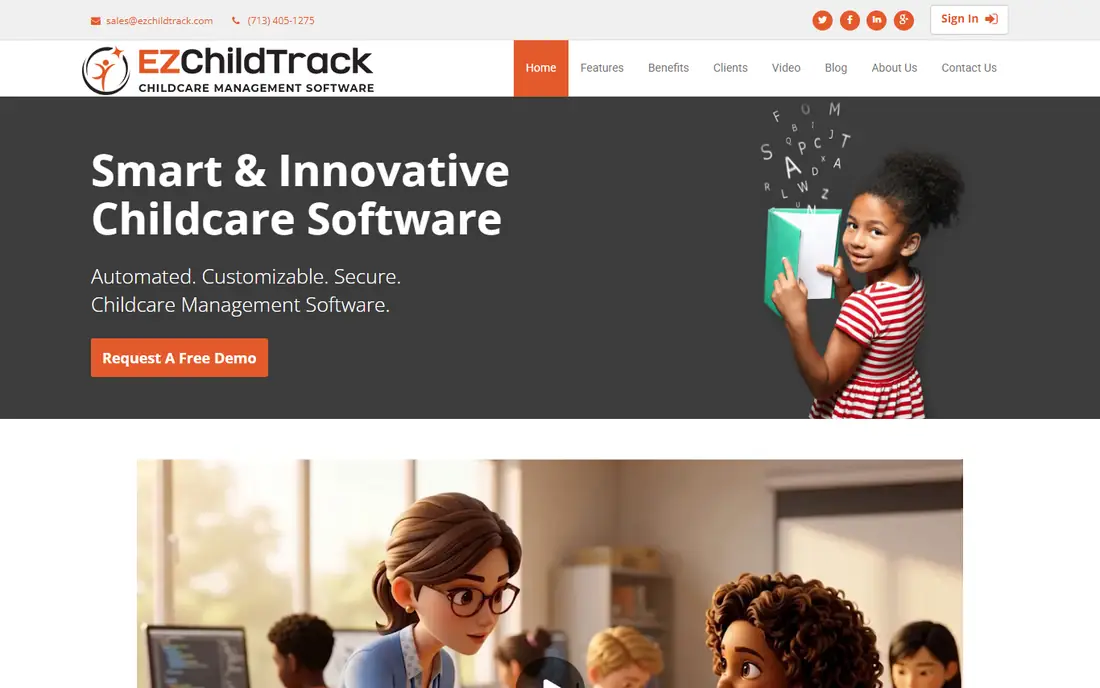
EZChildTrack is a web-based childcare and after-school management system that combines attendance with automated billing, parent portal, and site access in one place. Attendance options include touch-less check-in on iPad or phones, parent PIN, and student badges, with staff attendance tracked alongside children. The system posts tuition, late fees, and late checkout charges automatically and handles subsidy and payment plans, which removes the retyping that causes billing errors. For grant-funded programs, it works with EZReports to produce the reports funders require. EZChildTrack fits school-based after-school programs that bill families and report to funders.
What we like- Automated billing and parent portal in the same system, touch-less attendance with PIN and badges, grant reporting through EZReports for 21st CCLC programs
Watch out for- No published price, so budgeting needs a sales conversation, and the interface is older and less polished than newer cloud platforms
Starting pricequote
Free planNo
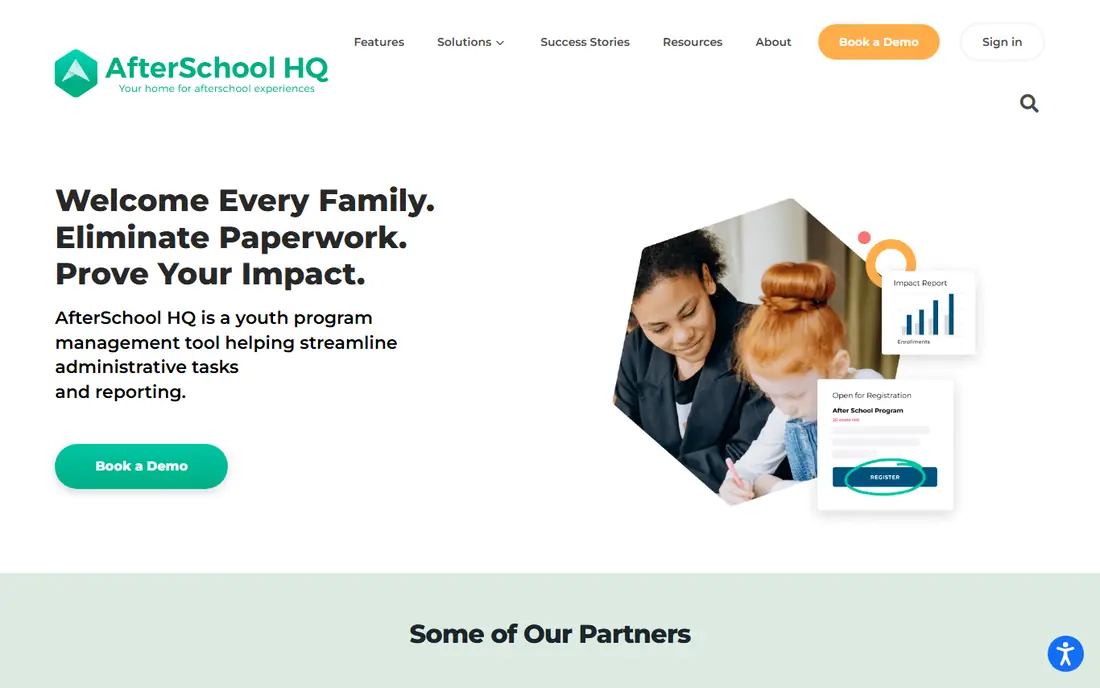
AfterSchool HQ was built from the ground up for after-school and out-of-school-time programs, rather than adapted from daycare software. It covers online registration, scheduling, QR or PIN check-in and check-out, attendance reporting, and payments, with impact reports that show funders what the program delivered. The Autopilot service handles the technical side of setup, from enrolment data migration to report configuration, which helps small nonprofit teams with no IT staff. AfterSchool HQ fits nonprofits and community programs running several sites that need registration, attendance, and funder reporting in one system.
What we like- Built specifically for out-of-school-time programs, QR or PIN check-in, impact reports for funders, Autopilot implementation service handles setup and migration
Watch out for- No published price, and the platform is aimed at larger organisations, so a single-site enrichment program may find it more than it needs
#4Brightwheel
Best for: Childcare and after-school programs that want billing, messaging, and learning in one app4.6/5 on
G2 (170 reviews, checked Oct 2026)
Visit mybrightwheel.com
Starting pricequote
Free planNo
Brightwheel is an all-in-one childcare management platform used by thousands of early childhood programs, and it covers the after-school day as part of the same system. It handles enrolment, automated billing, parent messaging, lesson planning, and digital check-in with health checks and room ratio tracking, plus staff scheduling and payroll. Parents get one app for messages, photos, milestones, and payments, which reduces the back-and-forth that eats staff time. Brightwheel fits licensed centres that run after-school care alongside preschool or daycare and want one system for the whole operation.
What we like- All-in-one platform with enrolment, billing, messaging, and learning, strong parent communication, digital check-in with health checks and ratio tracking
Watch out for- No published price, and the platform is built for licensed childcare centres first, so after-school-only programs pay for features they may never use
#5Procare
Best for: Licensed childcare at scale and multi-site school districts4.4/5 on
G2 (398 reviews, checked Oct 2026)
Visit procaresoftware.com
Starting pricequote
Free planNo
Procare is one of the most established names in childcare management software, trusted by over 40,000 programs for more than 30 years. It covers attendance, billing, compliance, staff management, and reporting together, with check-in and check-out linked to classroom ratios and family records. The platform suits licensed centres and school districts running after-school care at scale, where compliance records and audit trails matter as much as speed at the door. Procare fits organisations that need the most feature-complete system available and have the staff time to set it up properly.
What we like- Used by more than 40,000 programs over 30 years, full billing and compliance in one system, attendance tied to classroom ratios and staff scheduling
Watch out for- No published price, and the depth of the platform means setup and training take longer than a focused attendance app
#6Sawyer
Best for: Session-based after-school classes with attendance tied to the lesson plan4.5/5 on
G2 (74 reviews, checked Oct 2026)
Visit hisawyer.com
Starting pricequote
Free planNo
Sawyer is a platform for children activity providers, covering after-school classes, holiday camps, and enrichment programs, with attendance built into the session workflow. Each session log connects attendance and guardian communication to the specific activity plan for that day, which gives staff and parents a clear record of what happened and who was there. Registration, scheduling, payments, and messaging run in the same system, and attendance changes stay linked to the student record for audit-friendly exports. Sawyer fits activity-based after-school programs that run structured sessions and want attendance tied to the lesson, not a standalone register.
What we like- Session-level attendance linked to the day learning plan, guardian permissions and pickup records in the same flow, strong fit for enrichment and activity providers
Watch out for- No published price, and the platform is built around classes and camps, so drop-in programs without fixed sessions get less value from it
#7
KidCheck
Best for: Programs where pickup security and guardian authorisation matter most
Visit kidcheck.com
Starting price$25 per month
Free planNo
KidCheck is a secure children check-in system used by churches, schools, and after-school programs to make sure children only leave with an authorised guardian. It offers mobile express check-in, roster check-in, volunteer scheduling, and communication tools, with a 90-day money-back guarantee and live personal support six days a week, including Sunday mornings. Pricing starts at $25 a month, which makes it one of the cheapest paid options in this guide. KidCheck fits programs where the pickup record is the priority, especially community and faith-based programs that need guardian authorisation enforced at sign-out.
What we like- Secure children check-in with guardian records, mobile express check-in, volunteer scheduling, live support six days a week including Sunday mornings
Watch out for- The system was built for churches and ministries first, so after-school programs may need to adapt its language and workflows, and there is no free plan
#8
Classcard
Best for: Activity-based after-school academies with scheduling, fees, and attendance in one place
Visit classcardapp.com
Starting price$99 per month
Free planNo
Classcard is a class management platform for activity-based businesses and programs, including dance schools, martial arts academies, music schools, and after-school activity programs. Attendance is built into the core workflow rather than added as a feature: instructors mark registers digitally, coordinators see in real time who is in which activity, and memberships reconcile sessions attended against fees automatically. Pricing starts at $99 a month with unlimited staff and students on every plan, and a branded progressive web app is included at no extra cost. Classcard fits after-school academies running structured, multi-activity programs with enrolment and fees to manage.
What we like- Calendar and attendance in the core workflow, online booking and memberships, automated reminders that cut no-shows, branded student app included at no extra cost
Watch out for- The $99 starting price is higher than attendance-only apps, and the platform is built for class providers, so pure drop-in programs may not use its booking depth
Frequently asked questions
What is the best free after school attendance software?
OneTap is the strongest free option, with a free forever plan for up to 20 profiles, including QR check-in, recurring sheets, and exports. It fits a small enrichment program or a single class testing digital attendance before paying. Once the roster passes 20 children, the Basic plan starts at $49.99 a month billed yearly, so count your real roster before deciding whether free will last.
How do I prove attendance for a grant report?
Grant reports need per-child attendance history with dates, not a daily headcount. Export the record by child and date range in Excel, CSV, or PDF, and keep the check-in method and timestamp on each row. Tools such as OneTap and EZChildTrack are built for this, with EZChildTrack linking to EZReports for 21st CCLC programs. Confirm the export format matches what your funder accepts before you commit to a tool.
Can parents check children in and out themselves?
Yes, most tools in this guide support parent self check-in, either by scanning a QR code, tapping a name on a kiosk tablet, or using a PIN. OneTap and KidCheck both support parent-driven check-in with a timestamped record. The key control is pickup authorisation: the system should only release a child to a guardian listed on the record, and the checkout should capture who collected them and when.
What is the difference between attendance software and childcare management software?
Attendance software records who arrived and left, and exports that record. Childcare management software adds enrolment, billing, parent messaging, staff scheduling, and compliance on top of attendance. Programs that only need the register should buy the focused tool and save the money. Programs that bill families, manage enrolment, and report to funders usually save time with the full platform, because the data is entered once.
How long does it take to switch from paper registers?
A focused attendance app such as OneTap can be running in about five minutes: import the roster from a spreadsheet, print the QR code, and put it at the door. A full platform such as Procare or Brightwheel takes longer, usually one to two weeks including data migration, staff training, and parent onboarding. Whatever you choose, run the new system alongside paper for the first week so staff can fall back safely while they learn.
Sources we checked (10)
- https://www.onetapcheckin.com
- https://www.onetapcheckin.com/best-attendance-apps-for-after-school-programs
- https://ezchildtrack.com
- https://afterschoolhq.com
- https://mybrightwheel.com
- https://procaresoftware.com
- https://www.hisawyer.com
- https://www.kidcheck.com
- https://www.classcardapp.com
- https://www.classcardapp.com/blog/best-after-school-program-software-for-managing-activities
Is your product missing or out of date?
We review this list regularly. Vendors can request a listing, send updated pricing or ask about featured placement.

Shihab Mia · Founder, Rankite
Shihab has 5+ years in B2B and SaaS SEO. He writes Rankite's software buying guides from pricing pages, documentation and public user reviews. More about Shihab.