How we make this list: we compare pricing pages, product documentation and public user reviews. Ratings come from G2, Capterra or Trustpilot, with the date we checked them.
Why Do Teams Look for Teamwork Alternatives?
Asana is the best Teamwork alternative for most teams because it combines structured project views, portfolios and a free plan for up to two people, starting at $10.99 per user per month. Teams that want the lowest cost should look at Trello at $5 per user per month, while agencies that bill clients by the hour may prefer ClickUp.
Key takeaways:
- Teamwork is built for client work, so teams that manage mostly internal projects often pay for features they never use.
- Per-user pricing adds up fast. Teamwork Accelerate lists at $24.99 per user per month, while Trello Standard costs $5 and monday.com Basic costs $9.
- Time tracking, invoicing and advanced reporting sit on higher Teamwork tiers, which pushes some teams to look elsewhere.
- Simpler tools such as Basecamp and Trello suit small teams, while Asana, Wrike and Smartsheet suit larger teams that need portfolios and workload views.
Teamwork combines project management with time tracking, resource planning and invoicing. That focus is exactly why some teams leave it. If your work is mostly internal, if your clients never log in, or if your team is small, Teamwork can feel heavy and costly for what you actually use. Others leave because reporting needs a higher tier, or because the per-user bill grows every time a contractor joins a project.
How Much Does Teamwork Cost Compared With These Alternatives?
Teamwork charges per user, and its Accelerate plan lists at $24.99 per user per month, according to a comparison that read the vendor pricing pages in August 2026. Most alternatives start lower, and several charge less than half that amount. The table below uses annual billing.
| Tool |
Starting price, billed annually |
Free plan |
Best for |
| Asana |
$10.99 per user per month |
Personal, up to 2 users |
Cross-functional project teams |
| monday.com |
$9 per seat per month |
Free, up to 2 seats |
Visual boards and workflows |
| ClickUp |
$9 per user per month |
Free Forever, unlimited members |
All-in-one work hub on a budget |
| Wrike |
$10 per user per month |
Free plan |
Structured projects and proofing |
| Smartsheet |
$9 per member per month |
No free plan, 30-day trial |
Spreadsheet-style project tracking |
| Basecamp |
$29 per month per account |
Free, 1 project and 3 users |
Small teams that want flat pricing |
| Notion |
$10 per member per month |
Free plan for individuals |
Docs, wikis and project databases |
| Trello |
$5 per user per month |
Free, 10 boards and 10 collaborators |
Simple Kanban boards |
A lower starting price does not always mean a lower bill. monday.com sells seats in fixed buckets, so a seven-person team pays for ten seats, and Asana sells seats in bundles of five. Basecamp charges one flat price per account, which makes it cheaper than per-seat tools once a team passes about fifteen people. Confirm the current price on the vendor pricing page before you buy.
How Should You Choose the Right Teamwork Alternative?
Start with how your team actually works, not with a feature list. If clients log in to view progress, you need strong guest access and client-facing views, which Asana, monday.com and Basecamp all handle well. If you bill clients by the hour, native time tracking matters, and Wrike, ClickUp and monday.com include it on their mid tiers, while Trello and Notion do not include it at all. If your team lives in spreadsheets, Smartsheet will feel familiar on day one, while a team that wants the simplest possible tool will settle faster in Trello or Basecamp.
Next, count the people who need a paid seat, including contractors, and work out the monthly total on annual billing for your real headcount. Then check the limits that catch teams out: seat minimums, seat bundles, automation caps and storage caps. Finally, run a trial with one real project and test the import tool before you commit.
Quick comparison
| Tool | Best for | Starting price | Free plan |
|---|
 Asana | Cross-functional teams that need portfolios, goals and structured project views | $10.99 per user per month, Starter plan, billed annually ($13.49 billed monthly) | Personal plan, free for up to 2 users, with unlimited tasks and projects |
 monday.com | Teams that want colourful visual boards, simple automations and an easy learning curve | $9 per seat per month, Basic plan, billed annually ($12 billed monthly) | Free plan for up to 2 seats, with 3 boards and 3 docs |
 ClickUp | Teams that want one tool for tasks, docs, chat, goals and time tracking at a low seat price | $9 per user per month, Core plan, billed annually ($12 billed monthly) | Free Forever plan with unlimited members and guests, 100 MB storage |
 Wrike | Mid-size teams and departments that need approvals, proofing and resource management | $10 per user per month, Team plan, billed annually, for 2 to 15 users | Free plan with board and table views, task and project management |
 Smartsheet | Teams that manage projects in spreadsheet-style sheets and need reports and dashboards | $9 per member per month, Pro plan, billed annually ($12 billed monthly) | No free plan for new signups; 30-day free trial with no card required |
 Basecamp | Small teams and agencies that want one flat price and a calm, simple workspace | $29 per month per account, Freelancer plan, for up to 5 users | Free plan with 1 project, 1 GB storage and 3 users |
 Notion | Teams that want project tracking inside the same workspace as docs, wikis and meeting notes | $10 per member per month, Plus plan, billed annually ($12 billed monthly) | Free plan for individuals, with unlimited pages and blocks for one person |
 Trello | Small teams that want the simplest possible Kanban board at the lowest price | $5 per user per month, Standard plan, billed annually ($6 billed monthly) | Free plan with 10 boards and 10 collaborators per Workspace |
Is your product missing or out of date?
We review this list regularly. Vendors can request a listing, send updated pricing or ask about featured placement.
The 8 Best Teamwork Alternatives in 2026
These eight tools are the strongest replacements for Teamwork in 2026, ordered by how broadly they fit the teams that leave Teamwork. Prices below are the entry paid plan on annual billing, checked 15 November 2026.
#1Asana
Best for: Cross-functional teams that need portfolios, goals and structured project views4.4/5 on
G2 (13,930 reviews, checked Oct 2026)
Visit asana.com
Starting price$10.99 per user per month, Starter plan, billed annually ($13.49 billed monthly)
Free planPersonal plan, free for up to 2 users, with unlimited tasks and projects
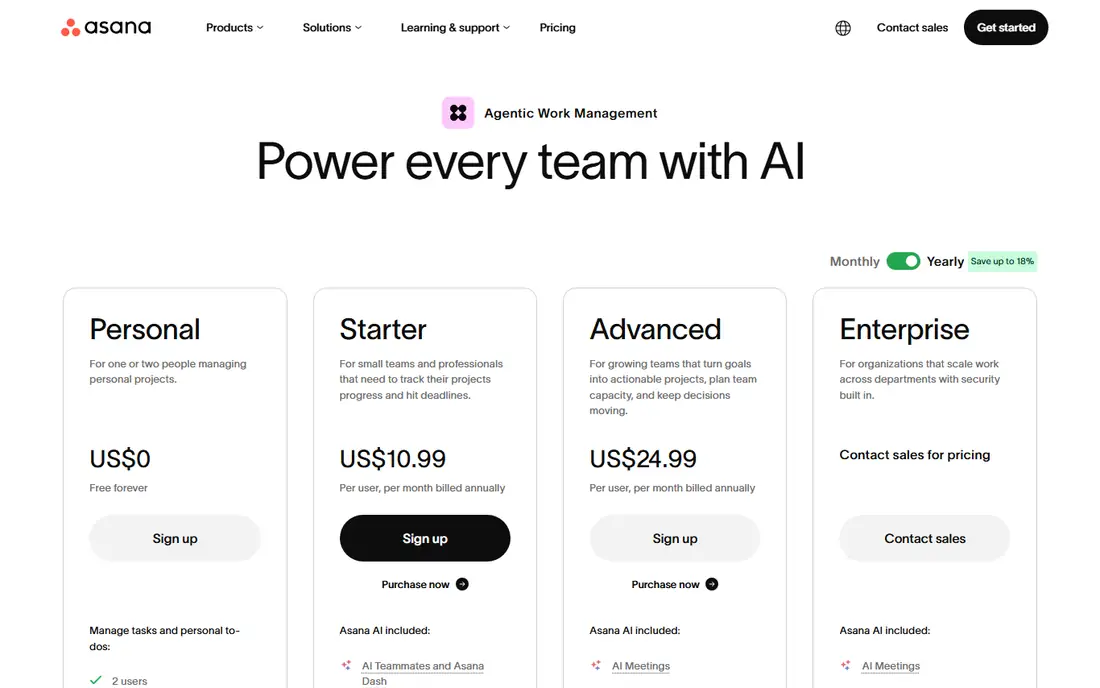
Asana is the closest like-for-like replacement for Teamwork for most teams. Where Teamwork is built around client projects and billable hours, Asana is built around cross-functional project work, with list, board, timeline and calendar views, plus portfolios that roll many projects into one view. That suits teams whose work is mostly internal. The trade-off is cost: the bundle rule means small teams can pay for empty seats, and time tracking needs the Advanced plan.
What we like- Polished interface, strong timeline and Gantt views, portfolios and goals on the Advanced plan, unlimited free guests on paid plans
Watch out for- Seats are sold in bundles of five once a team passes five users, so a six-person team pays for ten seats. Native time tracking only starts on Advanced at $24.99 per user per month.
#2monday.com
Best for: Teams that want colourful visual boards, simple automations and an easy learning curve4.7/5 on
G2 (17,182 reviews, checked Oct 2026)
Visit monday.com
Starting price$9 per seat per month, Basic plan, billed annually ($12 billed monthly)
Free planFree plan for up to 2 seats, with 3 boards and 3 docs
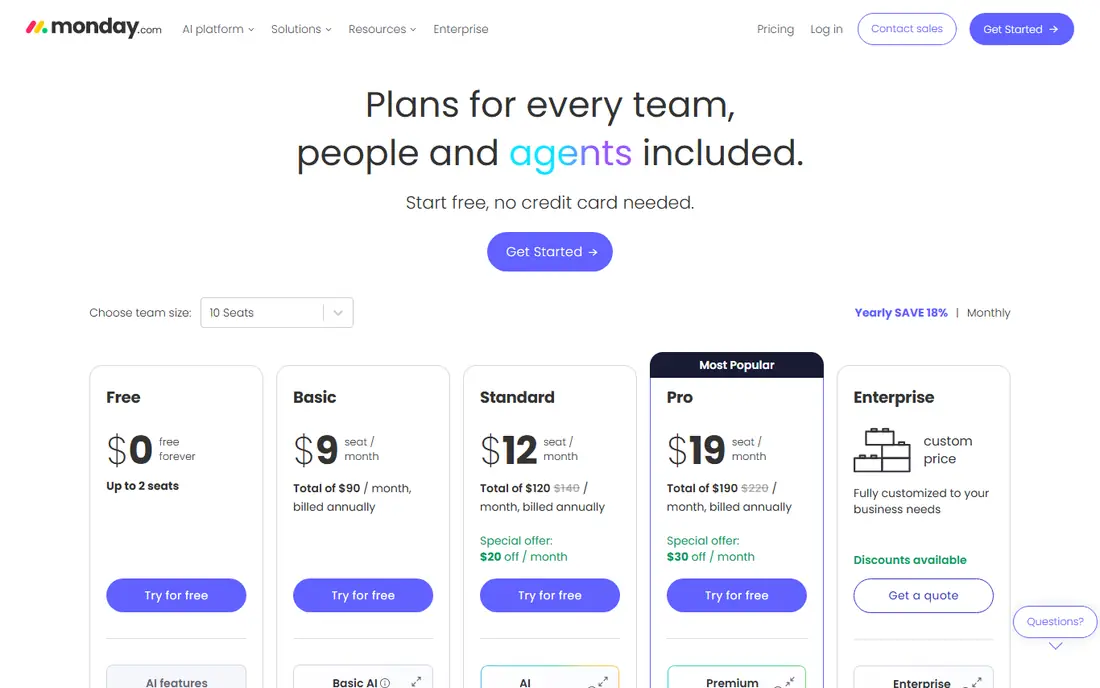
monday.com is the easiest of these tools to pick up, and that is its main advantage over Teamwork. Boards are visual, columns are flexible, and a new team member can understand a board without training, which is not always true of Teamwork. Compared with Teamwork, it is weaker on client billing and time tracking, which only appears on Pro, but stronger on visual workflow design and automations. The pricing catch is the seat bucket system and the three-seat minimum, and the Basic plan is too limited for most teams because it has no automations.
What we like- Very visual and easy to learn, strong board templates, timeline and Gantt views on Standard, free viewers on paid plans
Watch out for- Seats are sold in fixed buckets starting at three, so a seven-person team pays for ten seats. Automations are locked behind Standard at $12 per seat per month, and time tracking only starts on Pro at $19.
#3ClickUp
Best for: Teams that want one tool for tasks, docs, chat, goals and time tracking at a low seat price4.6/5 on
G2 (14,878 reviews, checked Oct 2026)
Visit clickup.com
Starting price$9 per user per month, Core plan, billed annually ($12 billed monthly)
Free planFree Forever plan with unlimited members and guests, 100 MB storage
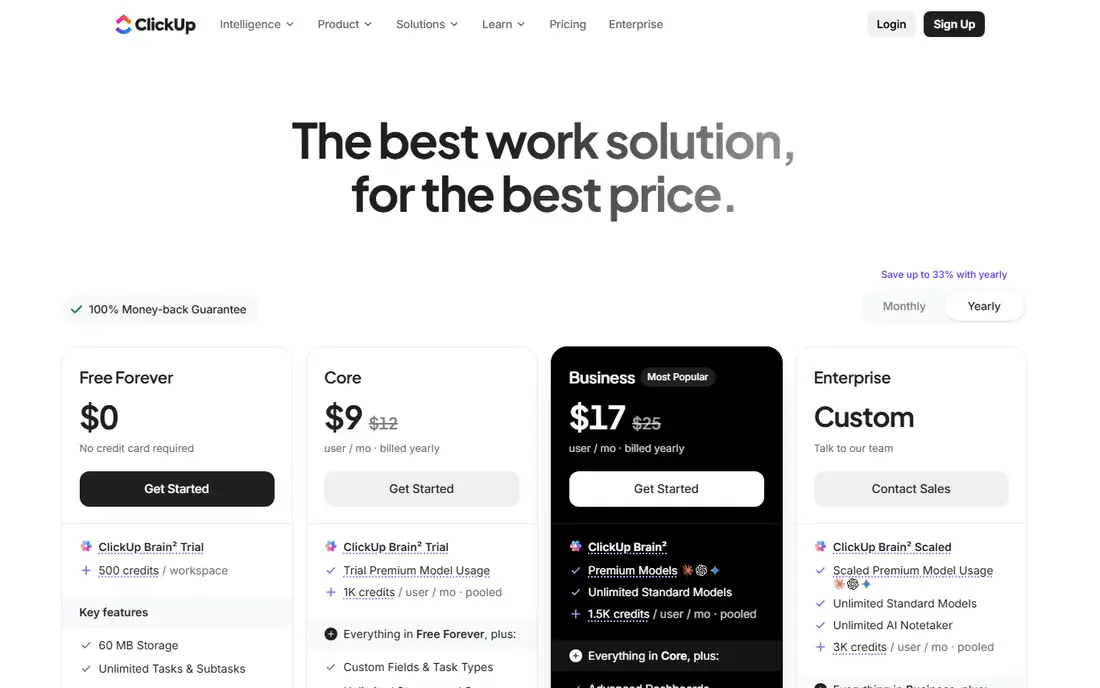
ClickUp is the value pick among Teamwork alternatives, and it is the only tool here that tries to replace several tools at once. Tasks, docs, whiteboards, chat, goals and time tracking all live in one workspace, where Teamwork needs add-ons for some of that. Core at $9 per user per month undercuts Teamwork by a wide margin, and Business at $17 adds the reporting and workload features agencies need. The trade-offs are real: the interface packs in so much that new users can feel lost, and AI costs extra.
What we like- Very low entry price, native time tracking and goals, docs and chat built in, generous free plan with no seat limit
Watch out for- ClickUp shows two overlapping price lines, a legacy Unlimited plan at $7 and a newer Core plan at $9, which makes the real price confusing. AI is a separate paid add-on at $9 per user per month, and the interface can feel crowded until you set it up.
#4Wrike
Best for: Mid-size teams and departments that need approvals, proofing and resource management4.2/5 on
G2 (4,540 reviews, checked Oct 2026)
Visit wrike.com
Starting price$10 per user per month, Team plan, billed annually, for 2 to 15 users
Free planFree plan with board and table views, task and project management
Wrike is the most structured alternative to Teamwork, and it suits teams that found Teamwork too loose. It adds request forms, so work arrives as a structured request, and approvals and proofing, so creative work can be reviewed inside the tool. Compared with Teamwork, Wrike is stronger on process control and resource management, and weaker on client billing, since it has no native invoicing. The Team plan at $10 per user per month is good value for a small department, but the 15-user cap is a hard limit, and the jump to Business at $25 is steep.
What we like- Strong Gantt charts and dashboards, request forms and approvals, proofing tools for creative review, resource management on Business
Watch out for- The Team plan stops at 15 users, which forces growing teams onto Business at $25 per user per month. Time tracking, request forms and proofing only start on Business, and Business is sold on annual billing only.
#5Smartsheet
Best for: Teams that manage projects in spreadsheet-style sheets and need reports and dashboards4.4/5 on
G2 (22,767 reviews, checked Oct 2026)
Visit smartsheet.com
Starting price$9 per member per month, Pro plan, billed annually ($12 billed monthly)
Free planNo free plan for new signups; 30-day free trial with no card required
Smartsheet is the best Teamwork alternative for teams that think in rows and columns. Projects live in sheets that look like spreadsheets, with Gantt, board and calendar views on top, and reports can pull rows from many sheets into one dashboard. Compared with Teamwork, it is stronger on reporting and repeatable processes, and weaker on task-level collaboration. The 10-member cap on Pro pushes a growing team to Business at $19.
What we like- Familiar spreadsheet grid, Gantt, card and calendar views, strong reports and dashboards, unlimited free contributors who can view and comment
Watch out for- There is no free plan for new signups, only a 30-day trial. Pro stops at 10 members and 250 automation runs a month, and premium add-ons such as Resource Management need a sales quote.
#6Basecamp
Best for: Small teams and agencies that want one flat price and a calm, simple workspace4.1/5 on
G2 (5,488 reviews, checked Oct 2026)
Visit basecamp.com
Starting price$29 per month per account, Freelancer plan, for up to 5 users
Free planFree plan with 1 project, 1 GB storage and 3 users
Basecamp is the opposite of Teamwork in philosophy, and that is why teams switch to it. Teamwork charges per user and piles on features; Basecamp charges one flat price per account and keeps the tool deliberately simple, with message boards, to-do lists, schedules, docs and group chat in one place. For a small agency, the flat price is the draw: Freelancer costs $29 a month for up to five users, Pro costs $79 for up to ten, and Pro Unlimited costs $199 a month billed annually for any number of users. Compared with Teamwork, it is weaker on planning depth, with no Gantt chart, no dependencies and no resource view, and it has no invoicing.
What we like- One flat price per account instead of per user, so clients and contractors cost nothing extra within the user cap
- Very simple interface with message boards, to-dos, docs and chat in one place
Watch out for- There is no Gantt chart and no native workload view, so planning a busy team is harder than in Teamwork. The user caps force a jump to Pro Unlimited at $199 a month billed annually past 15 users, and time tracking only starts on Pro Plus at $99 a month.
#7Notion
Best for: Teams that want project tracking inside the same workspace as docs, wikis and meeting notes4.6/5 on
G2 (13,834 reviews, checked Oct 2026)
Visit notion.com
Starting price$10 per member per month, Plus plan, billed annually ($12 billed monthly)
Free planFree plan for individuals, with unlimited pages and blocks for one person
Notion is a different kind of Teamwork alternative, because it replaces the docs and wiki side of Teamwork as well as the task lists. A team can keep its project database, meeting notes, client wiki and SOPs in one workspace, linked together. Compared with Teamwork, Notion is far more flexible: a database can be a task list, a content calendar, a CRM or a bug tracker, depending on how you set it up. That flexibility is also the cost, because a team has to build its own system, with no native time tracking or invoicing on any tier.
What we like- Flexible databases that can act as a project tracker, docs and wikis built in, unlimited guests on paid plans, strong templates for project hubs
Watch out for- There is no native time tracking or invoicing on any plan, so client billing needs another tool. Notion is not a purpose-built project manager, so Gantt views and dependencies need setup work, and full AI features only start on Business at $20 per member per month.
#8Trello
Best for: Small teams that want the simplest possible Kanban board at the lowest price4.4/5 on
G2 (14,064 reviews, checked Oct 2026)
Visit trello.com
Starting price$5 per user per month, Standard plan, billed annually ($6 billed monthly)
Free planFree plan with 10 boards and 10 collaborators per Workspace
Trello is the simplest and cheapest Teamwork alternative, and for some teams that is enough. Work lives on boards made of cards in lists, and anyone can understand it in minutes, where Teamwork needs onboarding. Compared with Teamwork, Trello drops almost everything an agency needs for client billing: there is no time tracking, no invoicing, no resource planning and no dependencies. What it keeps is the core of task tracking, plus automation on every plan, so cards can move themselves and set due dates. Standard at $5 per user per month adds unlimited boards, custom fields, card mirroring and 1,000 automation runs a month, which covers most small teams.
What we like- Cheapest paid plan on this list, very easy to learn, unlimited boards on Standard, built-in automation on every plan, card mirroring and custom fields on Standard
Watch out for- There is no native time tracking, no dependencies and no built-in reporting, so it cannot replace Teamwork for agencies that bill hours. Calendar, Timeline, Table, Dashboard and Map views only start on Premium at $10 per user per month.
Frequently asked questions
What is the best Teamwork alternative for agencies?
Asana is the best all-round choice for most agencies because it combines project views, portfolios and free guest access at $10.99 per user per month. ClickUp is the better pick when budget is the main concern, since Core costs $9 per user per month and includes native time tracking. Check that time tracking is included on the plan you would buy, because several tools lock it behind a higher tier.
Is there a free alternative to Teamwork?
Yes. ClickUp Free Forever is the most generous, with unlimited members and guests. Trello is free for up to 10 boards and 10 collaborators per Workspace, Asana Personal is free for up to two users, and monday.com is free for up to two seats. Basecamp has a free plan with one project and three users. Smartsheet offers a 30-day free trial instead of a free plan.
Which Teamwork alternative has the best time tracking?
ClickUp includes native time tracking on its paid plans from Core, and Wrike includes it on Business at $25 per user per month. monday.com adds time tracking on Pro at $19 per seat per month. Asana only adds native time tracking on Advanced at $24.99 per user per month. Trello, Notion and Basecamp have no native time tracking on entry plans, so teams that bill hours should avoid them unless they already use a separate time tool.
Can I migrate my projects from Teamwork to another tool?
Most tools on this list offer an importer or a migration service, and Teamwork lets you export project data. Asana, monday.com, ClickUp, Wrike and Smartsheet all have import tools for common formats, and several offer a guided migration for larger accounts. Test the import with one small project first, because comments, attachments and time logs do not always carry across cleanly.
Which Teamwork alternative is the cheapest?
Trello is the cheapest, at $5 per user per month on Standard with annual billing. Smartsheet Pro, monday.com Basic and ClickUp Core all cost $9. Basecamp can be cheaper for larger teams, because it charges a flat $199 a month for unlimited users on Pro Unlimited, so the per-person cost falls as the team grows. Compare the total monthly bill for your real headcount, not just the headline rate.
Sources we checked (8)
- https://asana.com/pricing
- https://monday.com/pricing
- https://clickup.com/pricing
- https://www.wrike.com/pricing
- https://www.smartsheet.com/pricing
- https://basecamp.com/pricing
- https://www.notion.com/pricing
- https://trello.com/pricing
Is your product missing or out of date?
We review this list regularly. Vendors can request a listing, send updated pricing or ask about featured placement.

Shihab Mia · Founder, Rankite
Shihab has 5+ years in B2B and SaaS SEO. He writes Rankite's software buying guides from pricing pages, documentation and public user reviews. More about Shihab.