How we make this list: we compare pricing pages, product documentation and public user reviews. Ratings come from G2, Capterra or Trustpilot, with the date we checked them.
Why teams look for a Drag alternative
Drag turns Gmail into a shared workspace. A team gets shared inboxes, Kanban boards, assignments and internal notes without leaving the Gmail interface. It is cheap and simple, which is why small Google Workspace teams adopt it. Teams look elsewhere for a few reasons. The first is channel coverage. Drag is Gmail only, so a team that also handles Outlook mail, chat or social messages hits a wall. The second is depth. Drag covers the core shared inbox job well, but it has no help centre, no serious reporting and limited automation on the Starter plan. The third is the AI add-on. The AI assistant is not included on Starter, so teams that want AI help pay extra or move up a tier.
How we picked these 8 alternatives
We picked tools that do the same job as Drag, which is letting a team share an inbox, assign conversations and work together on email. Every tool here has a published starting price checked on 15 Nov 2026 and a working vendor website. The list mixes Gmail-native tools with multi-channel helpdesks, so a team can compare a direct swap with a broader move. Prices below are per user per month on annual billing unless stated otherwise.
Drag alternatives at a glance
| Tool |
Best for |
Starting price |
Free plan |
| Hiver |
Gmail teams that want the original shared inbox |
$25 per user per month |
No, 7-day trial |
| Missive |
Small teams sharing email and chat |
$14 per user per month |
No, 30-day trial |
| Front |
Multi-channel team inboxes |
$25 per seat per month |
No, 14-day trial |
| Gmelius |
Gmail teams that want automation |
$19 per user per month |
No, 7-day trial |
| Help Scout |
Support teams that need a help centre |
$25 per user per month |
Yes, up to 5 users |
| Keeping |
Small Gmail support teams |
$14 per user per month |
No, 14-day trial |
| Spark |
Teams that want a better mail app with light sharing |
$8.25 per user per month |
Yes |
| Zoho TeamInbox |
Zoho users and tiny budgets |
$5 per user per month |
Limited mobile-only free plan |
Quick comparison
| Tool | Best for | Starting price | Free plan |
|---|
 Hiver | Gmail teams that want the most established shared inbox | $25 per user per month, billed annually (Growth) | No, 7-day Elite trial only. The free plan was delisted by September 2026. |
 Missive | Small teams that want shared email plus team chat | $14 per user per month, billed annually (Starter) | No, 30-day free trial of Productive only, no credit card required |
 Front | Teams that share email, chat and social messages in one inbox | $25 per seat per month, billed annually (Starter) | No, 14-day free trial only |
 Gmelius | Gmail teams that want shared inboxes plus automation | $19 per user per month, billed annually (Meli) | No, 7-day free trial only |
 Help Scout | Support teams that want a shared inbox plus a help centre | $25 per user per month, billed annually (Standard) | Yes, free for up to 5 users, 1 inbox, 1 Docs site, 100 contacts per month |
 Keeping | Small Gmail teams that need simple shared support | $14 per user per month, billed annually (Essentials) | No, 14-day free trial only, no credit card required |
 Spark | Teams that want a better mail app with light sharing | $8.25 per user per month, billed annually (Plus, $99 per year) | Yes, free plan at $0 with Smart Inbox, unlimited accounts, calendar, snooze and reminders |
 Zoho TeamInbox | Zoho users and teams on the tightest budget | $5 per user per month, billed annually (Starter) | Yes, limited. A mobile free plan covers up to 3 users and 30 conversations per month. Desktop plans have no free tier, only a 14-day trial. |
Is your product missing or out of date?
We review this list regularly. Vendors can request a listing, send updated pricing or ask about featured placement.
The 8 best Drag alternatives
#1Hiver
Best for: Gmail teams that want the most established shared inbox4.6/5 on
G2 (1,283 reviews, checked Oct 2026)
Visit hiverhq.com
Starting price$25 per user per month, billed annually (Growth)
Free planNo, 7-day Elite trial only. The free plan was delisted by September 2026.
Hiver is the tool Drag is most often compared with, because it does the same job inside Gmail with a longer track record. A team gets shared inboxes, assignments, internal notes, collision detection and analytics, all without leaving the Gmail interface. The price is the difference. Growth at $25 per user per month is double the Drag Starter price, and the seat model is the part to plan around. Buying seats in blocks of five and the ten-user cap on Growth means a growing team can face a sudden jump to Pro at $55. For a team that wants the most polished Gmail shared inbox and can live with the pricing shape, Hiver is the upgrade. For a team on a tight budget, Drag or Keeping costs less.
What we like- It is the most mature Gmail shared inbox, with assignment, notes, collision detection and shared templates, and the analytics show who is handling what.
Watch out for- Seats are sold in blocks of 5 above 5 users, and Growth caps at 10 users, so an 11th user forces the whole team onto the Pro tier at $55 per user per month.
#2Missive
Best for: Small teams that want shared email plus team chat4.7/5 on
G2 (861 reviews, checked Oct 2026)
Visit missiveapp.com
Starting price$14 per user per month, billed annually (Starter)
Free planNo, 30-day free trial of Productive only, no credit card required
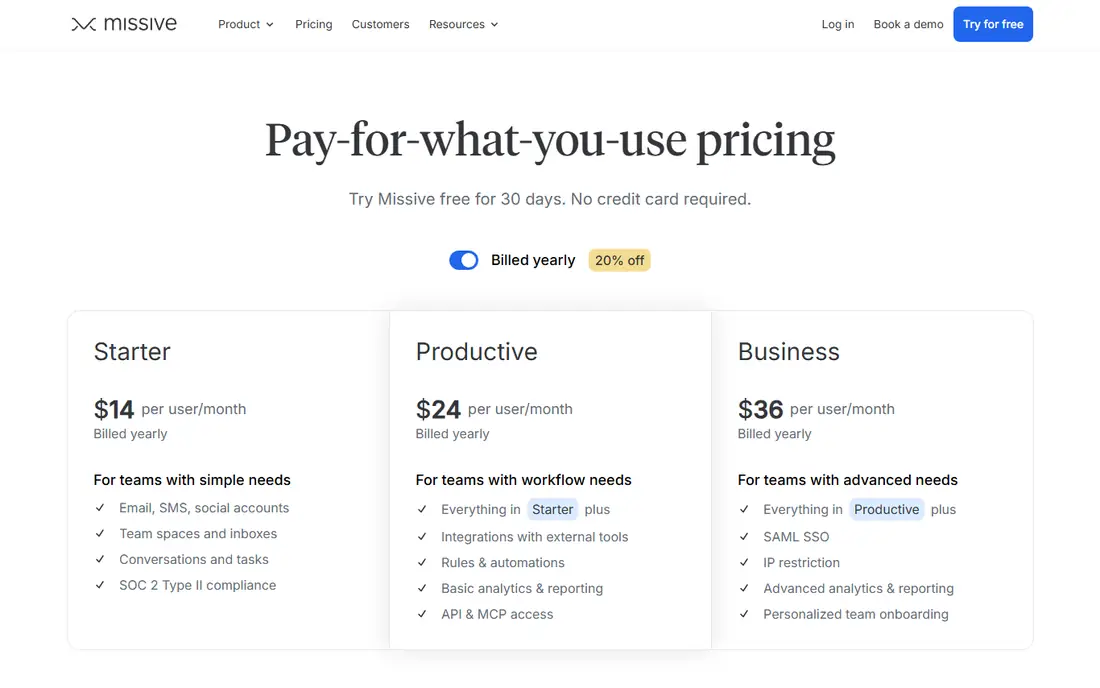
Missive is the best value swap for a small Drag team. It covers shared inboxes with assignment, internal comments and collision detection, and it adds team chat and tasks so a conversation can become a to-do without leaving the app. Unlike Drag, it is not Gmail only, so a team can bring Outlook and other accounts into the same shared inbox. The Starter price of $14 per user per month is close to Drag, but the user caps are the thing to plan around. A team of five pays $70 a month, and hiring a sixth person moves everyone to $24. For a team of five or fewer that wants sharing plus chat in one place, Missive is the strongest pick here.
What we like- Shared inboxes, team chat and tasks sit in one app, the interface is fast and calm, and the price undercuts Front and Help Scout for small teams.
Watch out for- Hard user caps force tier jumps. Starter stops at 5 users and Productive at 50, so the 6th user moves everyone from $14 to $24 per user per month.
#3Front
Best for: Teams that share email, chat and social messages in one inbox4.7/5 on
G2 (2,511 reviews, checked Oct 2026)
Visit front.com
Starting price$25 per seat per month, billed annually (Starter)
Free planNo, 14-day free trial only
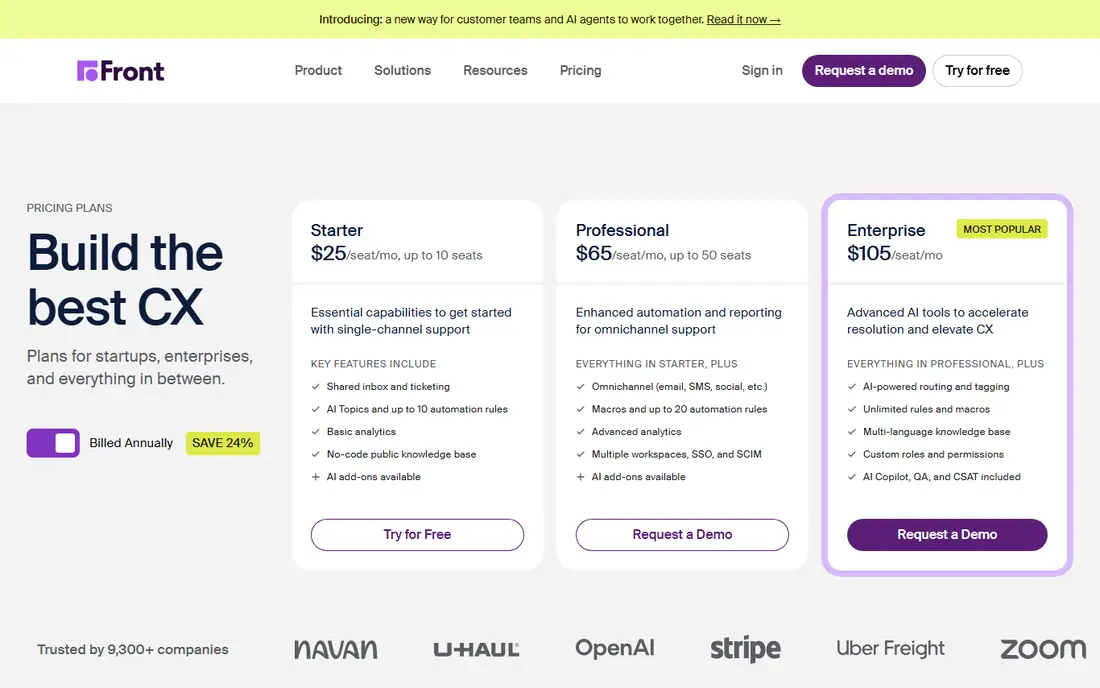
Front is the step up for a team whose inbox has grown beyond Gmail. Support@, sales@, chat and social DMs run from one queue, with assignment, internal comments and rules that route messages to the right person. It is the most complete shared inbox in this list, and it suits a team that is turning support into a real function. The cost is the catch. Starter at $25 per seat per month looks close to Hiver, but the caps are tight and Professional at $65 is a big jump. Front fits a team that has outgrown Gmail-only support and is ready to pay for a real helpdesk. A small Gmail-only team will find it more than it needs.
What we like- It handles email, SMS, chat and social messages in one place, collision detection stops two people replying to the same message, and the rules engine routes work without manual triage.
Watch out for- Starter is capped at 10 seats and a single channel type, so adding an 11th seat or a second channel forces a jump to $65 per seat per month on Professional, and AI Copilot costs $20 per seat extra below Enterprise.
#4Gmelius
Best for: Gmail teams that want shared inboxes plus automation4.4/5 on
G2 (776 reviews, checked Oct 2026)
Visit gmelius.com
Starting price$19 per user per month, billed annually (Meli)
Free planNo, 7-day free trial only
Gmelius is the Gmail-native alternative that adds automation to the shared inbox. It brings shared inboxes, shared labels, email sequences and Kanban boards into Gmail, so a team can manage a pipeline or a support queue without a separate app. The pricing needs a careful read. Meli at $19 per user per month sounds like the entry point, but it has no shared inbox, which is the feature most Drag buyers need. The real starting price for a shared inbox is Growth at $25. Conversation caps also apply below Enterprise, so a high-volume team should check its monthly volume against the limit. For a Gmail team that wants automation as well as sharing, Gmelius is a strong pick once the true tier is priced.
What we like- It works inside Gmail, so the team keeps the interface it knows, and the automation rules, sequences and templates are strong for sales and support follow-up.
Watch out for- Gmail only, and the $19 Meli tier has no shared inbox, so shared inboxes actually start at $25 per user per month on Growth, which also caps at 10,000 conversations a month.
#5Help Scout
Best for: Support teams that want a shared inbox plus a help centre4.4/5 on
G2 (431 reviews, checked Oct 2026)
Visit helpscout.com
Starting price$25 per user per month, billed annually (Standard)
Free planYes, free for up to 5 users, 1 inbox, 1 Docs site, 100 contacts per month
Help Scout is a proper helpdesk that still feels like email. Support@ becomes a shared inbox with assignment, collision detection and saved replies, and the Docs feature lets a team publish a help centre from the same system. The free plan for up to 5 users is the most generous in this list, and it is a genuine way to test the tool on real support volume. The Standard price of $25 per user per month matches Hiver Growth, but the feature set is wider. For a team that is turning support into a real function with a knowledge base, Help Scout is the right step up from Drag. For a team that only needs to share a Gmail inbox, it is more tool than necessary.
What we like- The free plan is a real starting point for a tiny team, the Docs knowledge base is included, and the reporting is better than any Gmail-native tool here.
Watch out for- The free plan stops replies after 100 contacts a month, and the AI agent costs an extra $0.75 per resolution on top of seat prices on every paid plan.
#6Keeping
Best for: Small Gmail teams that need simple shared support4.5/5 on
G2 (71 reviews, checked Oct 2026)
Visit keeping.com
Starting price$14 per user per month, billed annually (Essentials)
Free planNo, 14-day free trial only, no credit card required
Keeping is the simplest Drag replacement here. It turns Gmail labels into shared mailboxes, adds assignment, status tracking and collision detection, and stays out of the way. There is no new interface to learn, which is why small teams adopt it fast. The limits are clear. Essentials at $14 per user per month covers only 2 shared mailboxes and 10 agents, so a team with several inboxes moves to Advanced at $24. There is no Outlook support and no help centre. For a team of under ten people handling one or two shared Gmail inboxes, Keeping is the easiest swap. For anything bigger, Missive or Help Scout fits better.
What we like- It is the simplest tool in this list to set up, it works inside Gmail, and the price is low for what it covers.
Watch out for- Gmail only, through a Chrome or Safari extension that requires Gmail or Google Workspace, and Essentials is capped at 2 shared mailboxes and 10 agents.
Starting price$8.25 per user per month, billed annually (Plus, $99 per year)
Free planYes, free plan at $0 with Smart Inbox, unlimited accounts, calendar, snooze and reminders
Spark is a different kind of alternative. It is first a mail app, and second a sharing tool. Individuals get a smart inbox, snooze, send later and a calendar on the free plan, and teams can add shared inboxes on Pro. The catch is the price step. Plus at $8.25 per user per month is cheap, but shared inboxes need Pro at $16.58, so the sharing feature costs double the headline price. Spark suits a team where most people just need a better mail client and a few need a shared inbox. It does not suit a team that needs a full helpdesk with routing, reporting and a knowledge base. For that job, Help Scout or Front fits better.
What we like- The free plan is generous for individuals, the smart inbox and snooze features are polished, and it works across Gmail, Outlook, Yahoo and IMAP.
Watch out for- Shared inboxes are Pro-only, so a team that needs a shared sales@ or support@ inbox must pay $16.58 per user per month, and AI features are metered by a monthly quota.
#8
Zoho TeamInbox
Best for: Zoho users and teams on the tightest budget
Visit zoho.com
Starting price$5 per user per month, billed annually (Starter)
Free planYes, limited. A mobile free plan covers up to 3 users and 30 conversations per month. Desktop plans have no free tier, only a 14-day trial.
Zoho TeamInbox is the budget pick. At $5 per user per month on annual billing, it undercuts every other paid tool here by a wide margin, and it covers the core job of sharing an inbox, assigning mail and tracking replies. The trade-off is depth. Starter allows only 3 incoming channels and 25 automation rules, and analytics wait for Professional. Teams that already use Zoho products get the most from it, since contacts and records flow across the suite. Note the price figures here are third-party reported, because the vendor pricing page did not render its figures in a text fetch on 15 Nov 2026. For a tiny team or a Zoho shop, TeamInbox is the cheapest workable Drag replacement.
What we like- It is the cheapest paid shared inbox in this list, it fits the wider Zoho suite, and the interface is clean and simple.
Watch out for- Starter is capped at 3 shared incoming channels and 25 automation rules, and analytics plus personal inboxes require the Professional tier at $7.50 per user per month.
How to choose the right Drag alternative
Start with your mailbox. If the team lives in Gmail and wants the smallest change, Keeping at $14 or Hiver at $25 are the closest swaps, and Missive at $14 is the best value for a team of five or fewer. If the team also handles chat, social messages or a help centre, Front or Help Scout are the step up, with Help Scout the better pick when a knowledge base matters. If budget is the main driver, Zoho TeamInbox at $5 is the cheapest paid option, but check the channel and rule limits first. If most of the team just needs a better mail client, Spark on the free or Plus plan covers that, with shared inboxes on Pro. Run the trial on your busiest inbox, not a quiet one. Shared inbox tools fail on volume, collision handling and search, and only a real week of mail shows whether the replacement holds up.
Frequently asked questions
Is Drag free?
No. Drag has no free plan. Starter starts at $12 per user per month billed annually, with a 7-day trial. Teams that want a free shared inbox can look at the Help Scout free plan for up to 5 users, or the Spark free plan for individual use.
Which Drag alternative is cheapest?
Zoho TeamInbox at $5 per user per month billed annually is the cheapest paid option. Among Gmail-native tools, Drag itself at $12 is cheap, and Keeping at $14 per user per month is the closest priced replacement. Help Scout has a free plan for up to 5 users, which is the cheapest way to start a tiny support inbox.
Which alternative is best for a small Gmail team?
Missive is the best fit for a team of five or fewer, with shared inboxes, chat and tasks for $14 per user per month. Keeping is the best fit for a team that wants the easiest setup and only needs one or two shared mailboxes. Hiver is the best fit for a team that wants the most mature Gmail shared inbox and can pay $25 per user per month.
Can I use a Drag alternative with Outlook?
Yes, but not the Gmail-native ones. Front, Missive, Help Scout, Zoho TeamInbox and Spark all work with Outlook and other providers. Hiver, Gmelius and Keeping are Gmail only, so an Outlook team should rule them out first.
How do I migrate from Drag to another shared inbox?
Shared inboxes migrate by moving the mailbox, not by exporting from Drag. Connect the replacement tool to the same Gmail mailbox, recreate the shared labels, boards and assignment rules, and move any saved replies or templates across by hand. Run both tools side by side for a week so nothing is lost in the switch, then remove Drag once the new tool has handled a full week of mail.
Sources we checked (8)
- https://hiverhq.com/pricing/hiver-in-gmail
- https://missiveapp.com/pricing
- https://front.com/pricing
- https://gmelius.com/pricing
- https://www.helpscout.com/pricing/
- https://www.keeping.com/pricing/
- https://sparkmailapp.com/pricing-teams
- https://www.zoho.com/teaminbox/pricing.html
Is your product missing or out of date?
We review this list regularly. Vendors can request a listing, send updated pricing or ask about featured placement.

Shihab Mia · Founder, Rankite
Shihab has 5+ years in B2B and SaaS SEO. He writes Rankite's software buying guides from pricing pages, documentation and public user reviews. More about Shihab.