How we make this list: we compare pricing pages, product documentation and public user reviews. Ratings come from G2, Capterra or Trustpilot, with the date we checked them.
Key takeaways
- Wireshark, Nmap, Snort, Suricata, and Zeek cost nothing and cover packet analysis, discovery, intrusion detection, and traffic logging for skilled teams.
- Tenable Nessus Professional, at $4,790 per year, is the paid scanner most small and mid-sized teams start with for vulnerability checks.
- Qualys VMDR and Rapid7 InsightVM fit larger teams that need continuous monitoring, prioritization, and centralized reporting, but both need a sales quote.
- Free tools need time and skill, while paid tools need budget and a plan for fixing what they find, because a scan alone does not close a gap.
- This guide compares software features and prices only. It is not security advice for a specific network, and teams handling sensitive data should get a qualified security review before changing controls.
Quick comparison
| Tool | Best for | Starting price | Free plan |
|---|
 Wireshark Wireshark | Packet-level troubleshooting | $0 per month | Yes |
 Nmap Nmap | Network discovery and auditing | $0 per month | Yes |
 Snort Snort | Open source intrusion detection | $0 per month | Yes |
 Suricata Suricata | High-speed intrusion detection | $0 per month | Yes |
 Zeek Zeek | Network traffic logging and analysis | $0 per month | Yes |
 Tenable Nessus Tenable Nessus | Paid vulnerability scanning | $4,790 per year | Yes |
 Qualys VMDR Qualys VMDR | Enterprise continuous monitoring | See website | Free trial |
 Rapid7 InsightVM Rapid7 InsightVM | Risk-based prioritization | See website | Free trial |
Is your product missing or out of date?
We review this list regularly. Vendors can request a listing, send updated pricing or ask about featured placement.
#1Wireshark
Best for: Packet-level troubleshooting4.7/5 on
G2 (151 reviews, checked Oct 2026)
Visit wireshark.org
Starting price$0 per month
Free planYes
Wireshark is the standard tool for seeing what actually crosses a network. You capture packets, filter by protocol, address, or port, and follow a single conversation from start to finish. That detail helps a team find dropped packets, slow responses, misconfigured devices, and signs of data leaving the network that should not.
The tool is free, but it is not a plug-and-play scanner. You need permission to capture traffic, a basic grasp of TCP/IP, and time to read results. For a small team, Wireshark pairs well with Nmap: one tool finds hosts and services, the other shows what they actually send. Keep captures short and focused, because a long capture on a busy network becomes hard to read fast.
What we like- Deep packet inspection with strong filters
- Runs on Windows, Mac, and Linux
- Large documentation and community support
Watch out for- Packet detail can overwhelm new users
- Capturing traffic needs proper network access and permissions
#2Nmap
Best for: Network discovery and auditing4.8/5 on
Capterra (54 reviews, checked Oct 2026)
Visit nmap.org
Starting price$0 per month
Free planYes
Nmap answers a basic question that every security team needs: what is on this network, and what is it running? It finds live hosts, open ports, services and versions, and operating system clues, and it does so quickly across large address ranges. That inventory is the base for patching, firewall rules, and later vulnerability scans.
The scripting engine adds checks for misconfigurations and known issues, but Nmap does not fix problems by itself. Use it only on networks you own or have written permission to scan, and agree on scan timing with network owners, because aggressive scans can stress old devices. For most teams, a regular Nmap inventory plus a vulnerability scanner gives a clear picture at low cost.
What we like- Fast host, port, service, and OS discovery
- Scripting engine adds checks for common issues
- Free and open source with wide platform support
Watch out for- Command-line focus can slow new users
- Scanning a network you do not own or manage can break rules and laws
#3Snort
Best for: Open source intrusion detection4.0/5 on
G2 (18 reviews, checked Oct 2026)
Visit snort.org
Starting price$0 per month
Free planYes
Snort watches network traffic in real time and raises alerts when packets match rules for attacks, probes, and suspicious patterns. It can log packets, analyze protocols, and act as an intrusion prevention tool when placed inline. For a team that wants detection without a large vendor contract, Snort is a proven starting point.
The work is in the rules. Out-of-the-box rules catch common issues, but a team must tune them for its own traffic, or alerts become noise. Placement matters too: Snort must see the traffic it is meant to protect, which often means a tap or mirror port. Choose Snort when you have staff time for tuning, and pair it with logging so alerts can be investigated after the fact.
What we like- Real-time traffic analysis and packet logging
- Rule-based detection for many attack types
- Long history and wide community rule sharing
Watch out for- Rule tuning takes ongoing work
- High traffic volumes need careful hardware and placement
Starting price$0 per month
Free planYes
Suricata is a strong alternative to Snort for faster networks. Its multi-threaded design spreads work across CPU cores, which helps on links where a single-threaded tool falls behind. It provides intrusion detection and prevention, protocol analysis, and file extraction, and it writes structured logs that fit well with analysis and search tools.
Like Snort, Suricata needs tuning and a clear view of traffic. Teams that already run a log platform will get more from Suricata, because its JSON-style output feeds dashboards and alerts cleanly. If your network is small and your team is new to intrusion detection, Snort may be easier to start with. If throughput and log integration matter, Suricata is the better pick.
What we like- Multi-threaded design handles high throughput
- Intrusion detection, prevention, and network monitoring in one tool
- Outputs structured logs for analysis tools
Watch out for- Setup and tuning need skilled staff
- Documentation assumes network knowledge
Starting price$0 per month
Free planYes

Zeek takes a different approach from Snort and Suricata. Instead of only raising alerts, it records detailed logs of connections, DNS queries, HTTP sessions, certificates, and files seen on the network. Those logs give investigators a timeline after an incident, even when no alert fired at the time.
That strength creates a storage question. A busy network generates large log volumes, so a team needs retention rules and a place to search them. Zeek also needs staff who can write or adapt scripts for custom checks. Use Zeek when you need evidence and context, not just alerts, and pair it with an intrusion detection tool for real-time warning.
What we like- Rich connection, DNS, HTTP, and file logs
- Scripting language supports custom detection logic
- Works well alongside intrusion detection tools
Watch out for- Not a scanner or a firewall by itself
- Log volume needs storage and analysis planning
#6Tenable Nessus
Best for: Paid vulnerability scanning4.5/5 on
G2 (320 reviews, checked Oct 2026)
Visit tenable.com
Starting price$4,790 per year
Free planYes
Tenable Nessus is the paid scanner many teams buy first. Professional, at $4,790 per year, scans for vulnerabilities, misconfigurations, and compliance issues, and it updates its plugin library regularly as new issues appear. Results include severity ratings and remediation notes, which help a small team decide what to fix first.
The free Essentials tier covers a small number of targets, which fits a home lab or a tiny network, but a business network will need Professional. Nessus finds problems; it does not patch them, and Professional alone lacks the centralized dashboard that larger Tenable platforms provide. Buy Nessus when you need reliable, repeatable scans with clear reports, and plan staff time for the fixes that follow each scan.
What we like- Broad vulnerability coverage with regular plugin updates
- Clear severity ratings and remediation guidance
- Unlimited target IPs from one licensed scanner on Professional
Watch out for- No centralized multi-scanner dashboard on Professional alone
- Patching and fixing findings still need separate work
#7Qualys VMDR
Best for: Enterprise continuous monitoring4.4/5 on
G2 (168 reviews, checked Oct 2026)
Visit qualys.com
Starting priceSee website
Free planFree trial
Qualys VMDR is built for teams that manage many assets across offices and cloud accounts. It discovers assets, scans for vulnerabilities and misconfigurations, prioritizes risk, and tracks remediation in one cloud console. That central view helps a larger team answer audit questions and prove that fixes actually happened.
The cost is quote-based, and it scales with assets, so a small team may find Nessus cheaper and simpler. Qualys also works best when agents are deployed widely and stale assets are removed, or reports fill with noise from machines that no longer exist. Choose Qualys VMDR when asset count, compliance reporting, and continuous monitoring matter more than a single low-cost scanner.
What we like- Cloud platform for discovery, assessment, and prioritization
- Continuous monitoring across on-premises and cloud assets
- Strong compliance and reporting tools
Watch out for- Pricing needs a sales quote and varies by asset count
- Full value needs agent deployment and asset cleanup
#8Rapid7 InsightVM
Best for: Risk-based prioritization4.4/5 on
G2 (81 reviews, checked Oct 2026)
Visit rapid7.com
Starting priceSee website
Free planFree trial
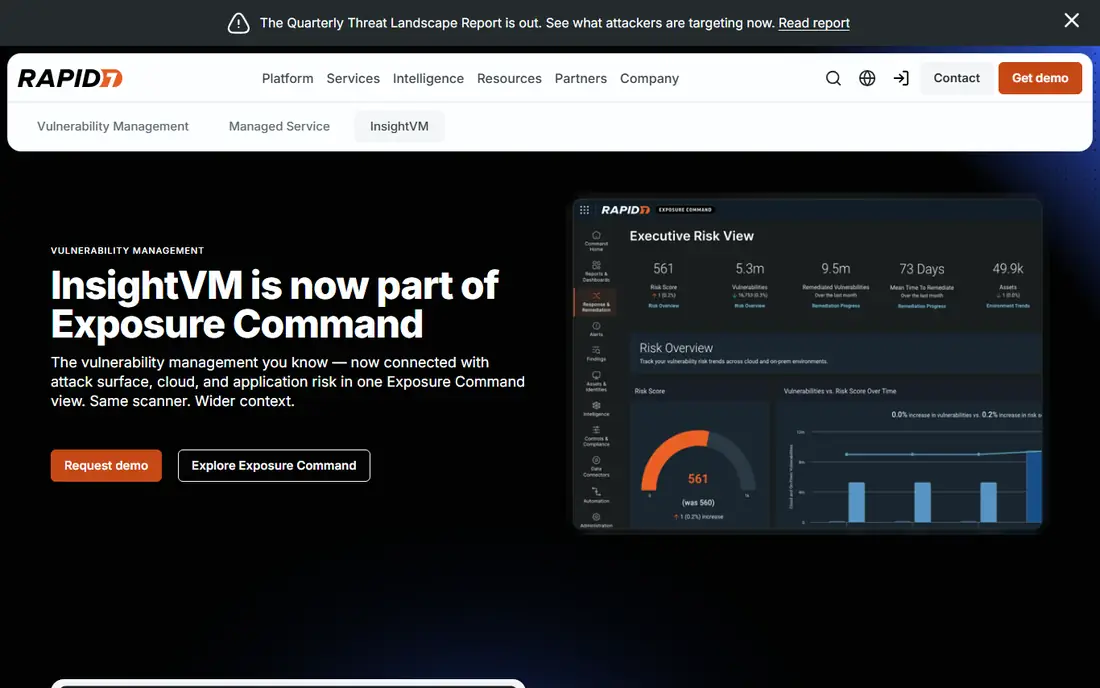
Rapid7 InsightVM focuses on a question that raw scan lists miss: which findings matter most right now? It scores risk using vulnerability severity, exploit availability, and asset importance, then shows remediation projects with owners and progress. That view helps a security lead defend a patching order to other teams.
InsightVM is also quote-based, and pricing varies by deployment size, so budget talks come before a firm number. It works best with scheduled scans, clean asset groups, and a team that follows through on remediation projects. Pick InsightVM when your main problem is not finding vulnerabilities, but deciding which of hundreds of findings to fix first.
What we like- Live dashboards and risk scoring that reflect real exposure
- Good remediation tracking and project views
- Integrates with Rapid7 detection and cloud tools
Watch out for- Pricing needs a sales quote
- Best results need regular scan scheduling and asset grouping
How we chose
We compared vendor documentation, pricing pages, and public reviews on G2, Capterra, and Reddit, and we checked each tool for a real network security role, from discovery to detection to vulnerability scanning. We favored a mix of free open source tools and paid platforms, because many teams use both: free tools for daily visibility and a paid scanner for formal assessments. Prices shown are current public list prices, and where a vendor publishes no list price, we wrote See website.
Start with inventory, then detection, then scanning
A team that cannot list its hosts and services cannot secure them. Run Nmap for inventory, add Wireshark for troubleshooting, then add intrusion detection and a vulnerability scanner. Each layer answers a different question, and skipping inventory makes later reports hard to trust.
Plan for alerts, logs, and fixes, not just purchase
Free tools cost staff time for tuning, log storage, and alert review. Paid tools cost money plus staff time for patching and reporting. Before you buy, decide who reviews alerts each day, how long logs are kept, and how fixes are tracked. A tool with no owner becomes shelfware, no matter how good its feature list looks.
Check permissions, placement, and scope before any scan
Only scan networks you own or have written permission to scan, and agree on timing for production systems. Place intrusion detection where it can see the traffic it must protect, and keep sensitive captures and logs under access controls. These steps protect the team legally and keep security work from breaking the network it is meant to protect.
Frequently asked questions
What is the best free network security tool to start with?
Start with Nmap for discovery and Wireshark for packet analysis, because together they show what is on the network and what it sends. Add Snort or Suricata for intrusion detection once you have time to tune rules. Free tools reward skill, so pair them with documentation and a small lab first.
Do I need a paid scanner if I use Nmap?
Nmap finds hosts, ports, and services, but it is not a full vulnerability scanner. Nessus, Qualys VMDR, and InsightVM check for known vulnerabilities, misconfigurations, and compliance gaps with updated plugins and clearer remediation guidance. Many teams use Nmap for inventory and a paid scanner for formal assessments.
What is the difference between Snort, Suricata, and Zeek?
Snort and Suricata are intrusion detection and prevention tools that raise alerts on suspicious traffic patterns. Zeek is a network monitoring tool that records detailed logs for later analysis. Many teams run Zeek alongside Snort or Suricata, so alerts come with full context.
How often should I scan my network?
Scan after major changes, such as new servers, firewall changes, or software upgrades, and run scheduled scans at least monthly for most small and mid-sized networks. Continuous monitoring tools such as Qualys VMDR suit larger teams with frequent change. The right frequency depends on how often your network changes and what data it holds.
Can these tools replace a firewall or endpoint protection?
No. Network security tools add visibility, detection, and assessment, but they do not replace firewalls, endpoint protection, patching, or access controls. Treat them as layers: firewalls control traffic, endpoint tools protect devices, and the tools here find gaps and attacks across the network.
Should a small business buy Nessus or use only free tools?
A small business with skilled staff can start with free tools and add Nessus when it needs formal reports, compliance checks, or repeatable scans for clients or auditors. If no one has time to tune free tools, a paid scanner with clearer reports may cost less in staff time than it costs in license fees.
Sources we checked (8)
- https://wireshark.org
- https://nmap.org
- https://snort.org
- https://suricata.io
- https://zeek.org
- https://tenable.com/products/nessus
- https://qualys.com
- https://rapid7.com/products/insightvm
Is your product missing or out of date?
We review this list regularly. Vendors can request a listing, send updated pricing or ask about featured placement.

Shihab Mia · Founder, Rankite
Shihab has 5+ years in B2B and SaaS SEO. He writes Rankite's software buying guides from pricing pages, documentation and public user reviews. More about Shihab.