How we make this list: we compare pricing pages, product documentation and public user reviews. Ratings come from G2, Capterra or Trustpilot, with the date we checked them.
Key takeaways
- Arc stops working on December 22, 2026, with accounts deactivated that day and data deleted within 30 days, so migration is urgent, not optional.
- Dia is the easiest switch because The Browser Company built an Arc importer that moves passwords, bookmarks, extensions, history, and tabs.
- Zen Browser is the closest free, open-source match for Arc sidebar look and feel, while Vivaldi is the most mature and deeply customizable option.
- Every browser here is free to download, so the choice rests on layout, extension ecosystem, and how much you trust the vendor roadmap.
Quick comparison
| Tool | Best for | Starting price | Free plan |
|---|
 Dia Dia | Easiest Arc migration | Free plan | Yes |
 Zen Browser Zen Browser | Closest free Arc look and feel | Free | Yes |
 Vivaldi Vivaldi | Deep customization | Free | Yes |
 Brave Brave | Privacy and ad blocking | Free | Yes |
 Firefox Firefox | Independent engine privacy | Free | Yes |
 Microsoft Edge Microsoft Edge | Microsoft 365 productivity | Free | Yes |
 Opera Opera | Built-in tools and sidebar | Free | Yes |
 Floorp Floorp | Firefox-based workspaces | Free | Yes |
Is your product missing or out of date?
We review this list regularly. Vendors can request a listing, send updated pricing or ask about featured placement.
The best arc browser alternatives
Starting priceFree plan
Free planYes

Dia is the official successor from The Browser Company, and it is the simplest transition for Arc users. Its built-in Arc importer moves passwords, bookmarks, extensions, history, and tabs, with Spaces becoming Profiles and Folders becoming Tab Groups. Dia also brings back pinned tabs and split view, which were core Arc features.
The catch is pricing clarity. Guides report that Dia pricing page lists its first paid tier at both 10 dollars and 20 dollars per month in different places, and the free tier drops Arc AI features entirely. Vendor trust is also a live question, since The Browser Company was acquired by Atlassian in 2025 and then shut Arc down. Dia fits Arc users who want the least friction, and who accept an AI-first direction.
What we like- One-click Arc importer
- Spaces become Profiles
- Same company as Arc
Watch out for- Paid tier pricing is unclear
- AI-first direction may not suit everyone
- Vendor trust questions
Starting priceFree
Free planYes
Zen Browser is the nearest open-source match for Arc. It is Firefox-based, with a vertical sidebar, workspaces, split view, and a Compact Mode that hides the sidebar until needed. Glance gives quick previews of links without opening full tabs. Guides call Zen the frequent recommendation for Arc refugees, and it is free with no paid tier gating core features.
The trade-offs are beta status and a smaller extension ecosystem than Chromium browsers. Firefox extensions cover most common needs, but some Chrome-only tools will not work. Zen fits Arc users who want the sidebar look without an AI subscription or a corporate roadmap, and who value open source over polish.
What we like- Free and open source
- Arc-style sidebar and workspaces
- Split view and Glance previews
Watch out for- Still in beta
- Firefox extension ecosystem is smaller
- Newer project with less history
Starting priceFree
Free planYes
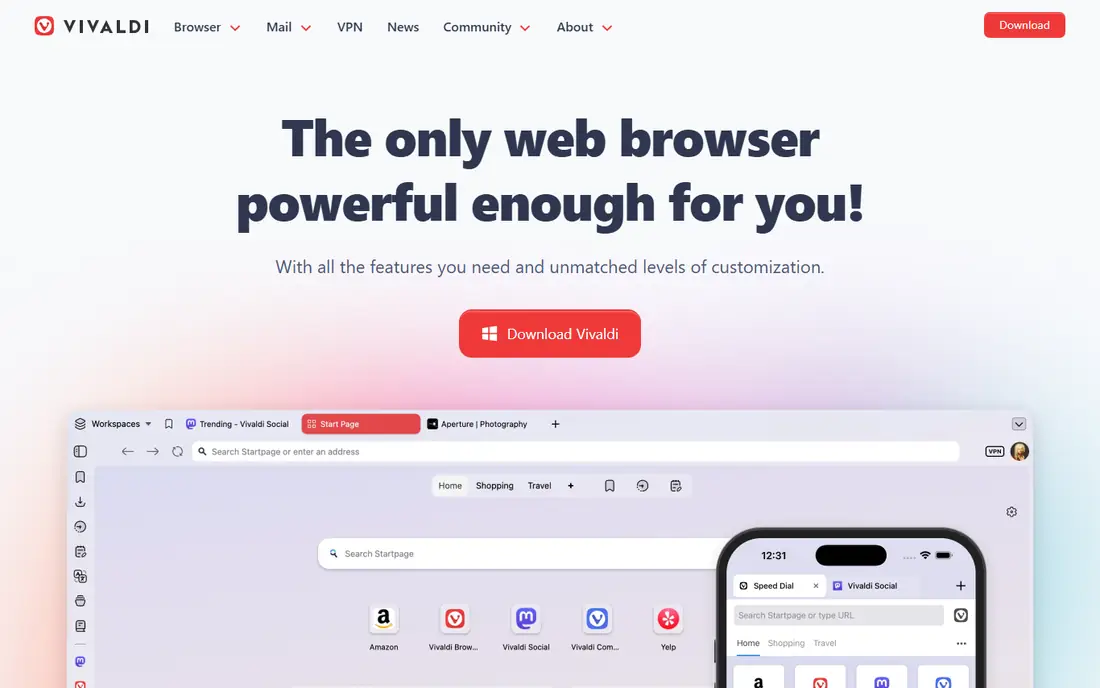
Vivaldi is the most mature alternative here, a Chromium browser available since 2016 with no built-in generative AI. It offers tab stacking, tab tiling, Workspaces, a command palette, and deep interface customization, which lets power users shape the layout close to their Arc setup. Chrome extensions work, so migration from Arc extension lists is straightforward.
The feature depth can overwhelm new users, and the interface is busier than Arc calm design. Vivaldi fits power users who want a stable, customizable browser that is not betting its future on AI, and who are willing to spend an afternoon tuning settings to match their workflow.
What we like- Tab stacking and tiling
- Workspaces
- Command palette
- Stable since 2016
Watch out for- Feature depth can overwhelm
- No built-in generative AI
- Interface is busy
Starting priceFree
Free planYes
Brave is a privacy-first Chromium browser with built-in ad and tracker blocking, so most sites load faster without extensions. It supports Chrome extensions, offers profiles and tab groups, and includes an optional AI assistant for users who want it. Brave needs no mandatory account for basic browsing.
Brave does not copy Arc sidebar layout, so Arc users who loved Spaces will miss that structure. Its rewards and crypto features also clutter settings for users who do not want them, though both can be turned off. Brave fits Arc users who care more about privacy and blocking than about sidebar layout, and who want a mainstream Chromium browser.
What we like- Built-in ad and tracker blocking
- Chromium extensions
- Optional AI assistant
Watch out for- No Arc-style sidebar
- Rewards and crypto features clutter settings
- Sync is simpler
Starting priceFree
Free planYes
Firefox is the independent-engine option, built on Gecko rather than Chromium, with strong privacy protections from a non-profit foundation. Containers let users keep separate logins for work and personal accounts in one window, and customization runs deep through settings and extensions. Firefox works without a mandatory account.
Firefox has no native vertical tabs, so Arc sidebar fans need an extension to approximate that layout. Some web apps also behave better in Chromium browsers, though Firefox compatibility is strong for most sites. Firefox fits users who want to avoid Chromium dominance, and who value privacy and containers over Arc-style layout.
What we like- Independent Gecko engine
- Strong privacy protections
- Containers for separate logins
Watch out for- No native vertical tabs
- Extension ecosystem is smaller
- Performance varies by site
Starting priceFree
Free planYes
Microsoft Edge is the mainstream Chromium browser for Microsoft 365 users. It offers vertical tabs, Collections for saving research, sleeping tabs that cut memory use, and deep integration with Microsoft 365 apps and Copilot. Chrome extensions work, and sync across Windows, Mac, and mobile is solid.
Microsoft account pressure and prominent AI features annoy some users, and Edge strengths lean Windows-centric even though Mac and mobile versions exist. Edge fits Arc users who already live in Microsoft 365, and who want a stable, well-supported browser with vertical tabs and good memory management.
What we like- Vertical tabs
- Collections
- Sleeping tabs
- Microsoft 365 integration
Watch out for- Microsoft account pressure
- AI features are prominent
- Windows-centric strengths
Starting priceFree
Free planYes
Opera is a feature-packed Chromium browser with a sidebar that holds messengers, grouped tabs, and workspaces, which comes closest among mainstream browsers to Arc organization ideas. A built-in VPN, ad blocker, and battery saver round out the package, and Chrome extensions work through an add-on.
Opera ownership by a Chinese consortium raises privacy questions for some users, and the built-in VPN is a browser proxy rather than a full device VPN, so it protects only browser traffic. Opera fits Arc users who want sidebar tools and workspaces without leaving the mainstream, and who accept the VPN limits.
What we like- Sidebar with messengers
- Grouped tabs
- Built-in VPN
- Workspaces
Watch out for- Owned by a Chinese consortium
- VPN is a proxy, not full VPN
- Smaller extension catalog
Starting priceFree
Free planYes
Floorp is a Firefox-based power browser with workspaces, split view, and side panels, giving Arc-style organization on the Firefox engine. It supports Firefox extensions, runs on Windows, Mac, and Linux, and costs nothing. Floorp suits users who want Firefox privacy with more workspace features than stock Firefox provides.
The community is smaller than Firefox or Vivaldi, and polish trails mainstream browsers, with updates following Firefox releases. Floorp fits Arc users who like Firefox engine but want workspaces and panels built in, and who are comfortable with a smaller project.
What we like- Workspaces and split view
- Side panels
- Firefox extension support
- Free
Watch out for- Smaller community
- Less polish than mainstream browsers
- Updates trail Firefox
How we chose
We compared these browsers on Arc-like organization features, extension ecosystem, engine, privacy defaults, platform coverage, and migration ease. Guides from October 2026 shaped the Arc shutdown dates and Dia importer details, and we flagged the Dia pricing conflict rather than picking one figure. We favored free browsers, since every Arc user can switch without paying, and we weighed layout similarity against maturity and trust.
We also weighed the shutdown deadline. Arc accounts deactivate on December 22, 2026, and data deletes within 30 days after that, so the best alternative is the one a user will actually migrate to before then. Dia wins on friction, Zen wins on look, and Vivaldi wins on maturity, and the ranking depends on which of those matters most to the reader.
What to check before you switch browsers
Export Arc data before December 22, 2026
Arc accounts deactivate on December 22, 2026, and data deletes within 30 days after. Export passwords, bookmarks, and history well before the deadline, and confirm the export file opens in the new browser. Do not wait until the final week, when importer tools and support queues will be busiest. Set aside an evening for the move, and keep Arc installed until the new browser feels familiar. Test sync on a second device before relying on it daily.
Test your must-have extensions first
Install the new browser alongside Arc and test every extension you depend on, especially password managers, tab managers, and developer tools. Chromium browsers share Chrome extensions, while Firefox-based browsers need Firefox versions, and some tools have no equivalent. A missing extension is the most common reason migrations stall.
Recreate Spaces as profiles, workspaces, or tab groups
Arc Spaces have no exact copy anywhere, so map each Space to the closest feature in the new browser: Dia Profiles, Zen workspaces, Vivaldi Workspaces, or tab groups elsewhere. Recreate one Space at a time and check that pinned tabs, themes, and profiles carry over before deleting the Arc original.
Frequently asked questions
When does Arc shut down?
Arc stops working on December 22, 2026, when accounts deactivate and data deletes within 30 days after. New Arc accounts stopped being issued on October 22, 2026. Arc Search on iOS continues as a browser but loses sign-in and sync features.
What is the closest free alternative to Arc?
Zen Browser is the closest free match, with an Arc-style sidebar, workspaces, split view, and Compact Mode, all open source. Dia is closer in migration ease but ties users to The Browser Company roadmap. Vivaldi is more mature but needs more tuning to feel Arc-like.
Can I import my Arc data into another browser?
Yes, through Dia one-click importer for the easiest path, or through standard exports for other browsers. Dia importer moves passwords, bookmarks, extensions, history, and tabs. Other browsers accept bookmark and password exports, though Spaces and Boosts need manual recreation.
Is Dia really free?
Dia offers a free tier that covers core browsing and Arc importer features, with paid tiers for AI features. Guides report conflicting paid-tier figures, listing both 10 dollars and 20 dollars per month in different places, so confirm current pricing on Dia page before paying.
Should I pick a Chromium or Firefox browser?
Pick Chromium when extension compatibility and web app support matter most, since Chrome extensions and most sites target Chromium. Pick Firefox when privacy, an independent engine, and containers matter more, and when you accept a smaller extension catalog. Both engines serve Arc migrants well.
Sources we checked (12)
- https://www.dia.com
- https://zen-browser.app
- https://vivaldi.com
- https://brave.com
- https://www.mozilla.org
- https://www.microsoft.com
- https://www.opera.com
- https://floorp.app
- http://pandromeda.com/software/best-arc-browser-alternatives-dia-vs-zen-vs-vivaldi
- https://macfolio.com/blog/best-arc-browser-alternatives-for-mac
- https://tidbits.com/2026/10/26/the-browser-company-kicks-arc-to-the-curb-on-22-december-2026/
- https://www.lilachbullock.com/arc-browser-alternatives/
Is your product missing or out of date?
We review this list regularly. Vendors can request a listing, send updated pricing or ask about featured placement.

Shihab Mia · Founder, Rankite
Shihab has 5+ years in B2B and SaaS SEO. He writes Rankite's software buying guides from pricing pages, documentation and public user reviews. More about Shihab.