How we make this list: we compare pricing pages, product documentation and public user reviews. Ratings come from G2, Capterra or Trustpilot, with the date we checked them.
What is the best Maya alternative in 2026?
Blender is the best Maya alternative for most people in 2026. It is free and open source, it covers modeling, rigging, animation, sculpting and rendering in one package, and it is now used in professional film and game pipelines. Buyers who need an Autodesk workflow should look at 3ds Max first, while motion graphics artists should look at Cinema 4D and effects artists should look at Houdini.
Key takeaways
- Blender costs nothing and now handles most of the work Maya does, from character rigging to final rendering.
- 3ds Max is the closest Autodesk match for game art and architectural visualization, at the same subscription price as Maya.
- Cinema 4D is the easiest of the paid tools to learn, and it leads for motion graphics and broadcast design.
- Houdini is the strongest choice for procedural work, simulation and visual effects, with an Indie license at 299 dollars per year.
- ZBrush is the best pick when sculpting detail matters more than a full animation pipeline.
- Modo, SketchUp Pro and Daz Studio cover lower cost modeling, architecture and character work.
How much does Maya cost, and why do people look for an alternative?
Maya costs 255 dollars per month or 2,010 dollars per year for a commercial subscription, based on Autodesk list pricing checked 16 November 2026. An Indie license costs 330 dollars per year for artists and studios with gross annual revenue under 100,000 dollars. The price is the main reason people search for an alternative, along with the subscription-only model and the learning curve.
Maya remains the standard in film and animation studios, so the decision is rarely about quality. It is about cost, team size and pipeline. A solo artist or a small studio can often do the same work in Blender or a cheaper tool and keep the difference. A studio that hires Maya artists or exchanges Maya files with clients has a weaker case for switching. The guides below compare the real options on price, workflow and fit, so you can match the tool to the work you actually do.
Which Maya alternative is best for animation?
For character animation, Blender and 3ds Max are the strongest options. Blender has a capable rigging system, a graph editor, a non-linear animation editor and a grease pencil for 2D work inside 3D scenes. 3ds Max has CAT and Biped rigging tools and a long history in game animation. Cinema 4D is easier to learn for motion graphics, but its character animation toolset is thinner than Maya. Houdini can animate, but it is built for procedural and effects work, not for hand-keyed character performance.
If your work is mostly character animation for film or games, test Blender first. If you animate for games and need the Autodesk pipeline, 3ds Max is the safer paid choice. If you animate logos, titles and product shots, Cinema 4D will get you there faster.
Which Maya alternative is free?
Blender is the only full professional alternative that is completely free. Daz Studio is also free, but it is a character posing and rendering tool, not a general modeling and animation package. Houdini Apprentice is free for learning, but it watermarks renders and cannot be used commercially. SketchUp has a free web version, but it is aimed at architecture and design, not character work.
Blender is free in the full sense. There is no paid tier, no locked feature and no watermark. The Blender Foundation funds development through donations, grants and corporate memberships, and the software is released under the GPL license. That makes it the default answer for students, freelancers and small studios.
The 8 best Maya alternatives
| Tool |
Best for |
Starting price |
Free plan |
| Blender |
Free all-round 3D for animation, modeling and rendering |
Free |
Full app free |
| Autodesk 3ds Max |
Game art and archviz in an Autodesk pipeline |
2,010 dollars per year |
30-day trial |
| Maxon Cinema 4D |
Motion graphics and broadcast design |
109 dollars per month |
14-day trial |
| Houdini |
Procedural modeling, simulation and VFX |
299 dollars per year (Indie) |
Apprentice for learning |
| ZBrush |
High detail character and creature sculpting |
49 dollars per month |
14-day trial, free iPad base app |
| Modo |
Modeling and look development for product and game artists |
719 dollars per year |
30-day trial |
| SketchUp Pro |
Fast architectural and interior modeling |
399 dollars per year |
Free web version |
| Daz Studio |
Posing and rendering 3D characters |
Free |
Full app free |
Quick comparison
| Tool | Best for | Starting price | Free plan |
|---|
 Blender | Free all-round 3D for animation, modeling, sculpting and rendering | Free, open source | The full application is free, with no paid tier |
 Autodesk 3ds Max | Game art and architectural visualization inside an Autodesk pipeline | 255 dollars per month or 2,010 dollars per year; Indie 330 dollars per year | 30-day trial; free for students and educators |
 Maxon Cinema 4D | Motion graphics, broadcast design and product visualization | 109 dollars per month, or 839 dollars per year (69.92 dollars per month billed annually) | 14-day trial; free for students and educators |
 Houdini | Procedural modeling, simulation and visual effects | Indie 299 dollars per year; Core 1,475 dollars per year; FX 3,505 dollars per year | Houdini Apprentice is free for learning, with watermarked renders and no commercial use |
 ZBrush | High detail character and creature sculpting | 49 dollars per month or 399 dollars per year | 14-day trial on desktop; ZBrush for iPad has a free base version |
 Modo | Modeling and look development for product and game artists | 719 dollars per year | 30-day trial |
 SketchUp Pro | Fast architectural, interior and product modeling | Pro 399 dollars per year; Go 129 dollars per year; Studio 858.96 dollars per year | Free web version with basic modeling tools |
 Daz Studio | Posing and rendering 3D characters without modeling from scratch | Free; Daz+ 69 dollars per year; Premier 199 dollars per year | The full application is free |
Is your product missing or out of date?
We review this list regularly. Vendors can request a listing, send updated pricing or ask about featured placement.
How we picked
We compared pricing pages, product documentation and public user reviews on 16 November 2026. Prices are list prices from the vendor pricing page or store, in US dollars unless a vendor lists euros. We favored tools with a real user base, a current release and a clear workflow overlap with Maya. Prices change, so check the vendor page before you buy. Last verified 16 November 2026.
#1Blender
Best for: Free all-round 3D for animation, modeling, sculpting and rendering4.6/5 on
G2 (319 reviews, checked Oct 2026)
Visit blender.org
Starting priceFree, open source
Free planThe full application is free, with no paid tier
Blender is the closest free replacement for Maya, and for many artists it is now a replacement in full rather than a compromise. It covers polygon modeling, sculpting, rigging, character animation, cloth and fluid simulation, compositing and video editing in a single download. The Cycles renderer produces production quality images, and the Eevee real-time renderer is fast enough for previz and look development. The 5.x releases added a new viewport compositor, better geometry nodes and faster playback, which closed several gaps with commercial tools. Blender also reads and writes FBX, Alembic, USD and glTF, so it fits into mixed pipelines. The main cost is learning time. Artists coming from Maya should expect several weeks before they work at full speed, and studios should budget for pipeline scripts and training.
What we like- Free with no watermark or locked feature
- Strong modeling, rigging, sculpting and rendering in one app
- Large community and add-on library
- Cycles and Eevee render engines included
Watch out for- Interface and workflow differ from Maya, so experienced Maya artists need retraining
- Industry pipeline tools and studio support are thinner than Autodesk
#2Autodesk 3ds Max
Best for: Game art and architectural visualization inside an Autodesk pipeline4.5/5 on
G2 (43 reviews, checked Oct 2026)
Visit autodesk.com
Starting price255 dollars per month or 2,010 dollars per year; Indie 330 dollars per year
Free plan30-day trial; free for students and educators
3ds Max is the most direct Autodesk alternative to Maya, and for many buyers it is a lateral move rather than a downgrade. It shares the same subscription price, the same account system and a similar material and rendering workflow, so teams already on Autodesk have little to relearn on the business side. Its strengths are polygon modeling, the modifier stack and architectural visualization. The modifier stack lets artists build complex forms non-destructively, and the material editor and Arnold renderer are shared with Maya. Game studios use 3ds Max heavily for environment art, props and hard surface models, and the tool has deep support for baking, retopology and export to game engines. The case against it is simple: it costs the same as Maya, so it only makes sense when the workflow fits better. It is also Windows only, which rules out Mac-based teams.
What we like- Same vendor and file compatibility as Maya
- Strong polygon modeling and modifier stack
- Widely used in games and archviz
- Large plugin ecosystem
Watch out for- Same subscription price as Maya, so it saves no money
- Windows only
- Character animation toolset is thinner than Maya
#3Maxon Cinema 4D
Best for: Motion graphics, broadcast design and product visualization4.6/5 on
G2 (136 reviews, checked Oct 2026)
Visit maxon.net
Starting price109 dollars per month, or 839 dollars per year (69.92 dollars per month billed annually)
Free plan14-day trial; free for students and educators
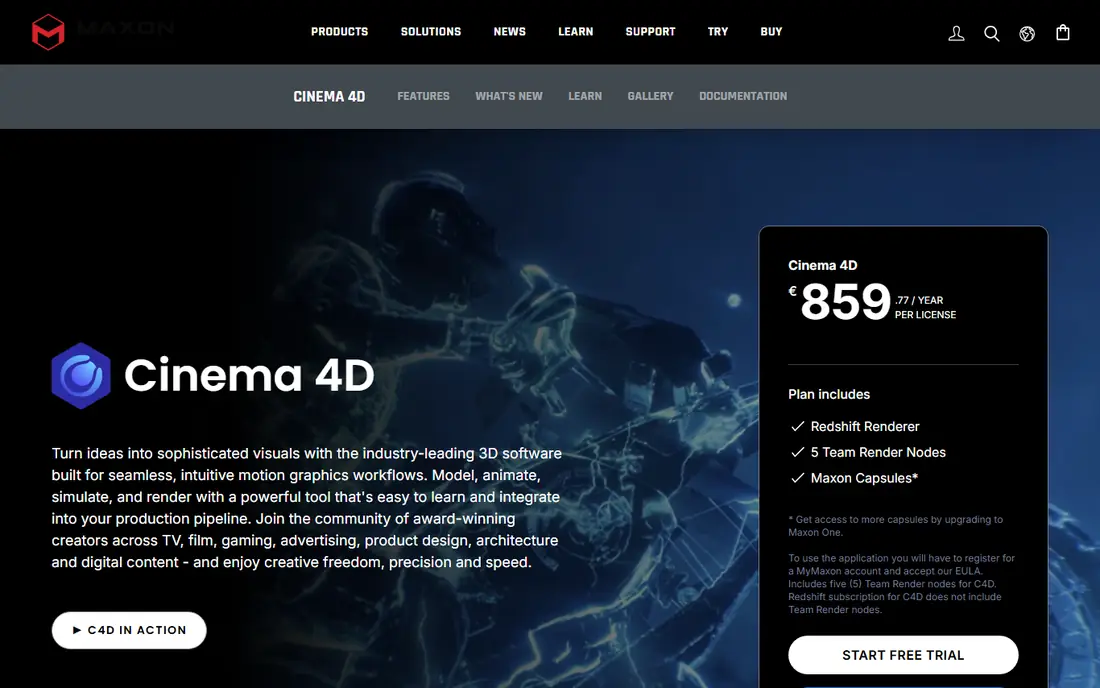
Cinema 4D is the best Maya alternative for motion graphics and the easiest paid tool on this list to learn. Its MoGraph toolset, with cloners, effectors and fields, lets designers build complex animations from simple rules, and it is the standard tool for broadcast graphics, title sequences and product animation. The interface is cleaner than Maya, and new users typically produce client-ready work faster. Cinema 4D also integrates well with After Effects, which matters for motion design teams. The trade-off is depth. Character rigging and animation are workable but not as deep as Maya, and large simulation work belongs in Houdini. The price is lower than Maya on the annual plan, at 839 dollars per year against 2,010 dollars, but it is still a subscription with no perpetual license.
What we like- Easiest of the paid tools to learn
- Excellent MoGraph toolset for motion graphics
- Stable and fast for client work
- Redshift renderer included in Maxon One
Watch out for- Character animation and rigging are thinner than Maya
- Subscription cost adds up over time
- Simulation tools are lighter than Houdini
#4Houdini
Best for: Procedural modeling, simulation and visual effects4.5/5 on
G2 (35 reviews, checked Oct 2026)
Visit sidefx.com
Starting priceIndie 299 dollars per year; Core 1,475 dollars per year; FX 3,505 dollars per year
Free planHoudini Apprentice is free for learning, with watermarked renders and no commercial use
Houdini is the best Maya alternative when the work is procedural, simulated or effects driven. Its node-based workflow treats every model, material and animation as a network of operations, which means artists can build a city, a crowd or a destruction sequence from rules and change the result by adjusting a parameter. That approach is powerful for film and game effects, and it is why Houdini is the standard for smoke, fire, water and destruction. The Indie license at 299 dollars per year makes it affordable for freelancers and small studios with revenue under 100,000 dollars. The learning curve is real. Artists used to pushing vertices directly will find the node graph slow at first, and the interface assumes a technical mindset. Character animation is possible but not the reason to buy Houdini.
What we like- Best procedural and simulation toolset in the industry
- Node-based workflow scales to huge scenes
- Indie license is affordable for small teams
- Strong film and VFX adoption
Watch out for- Steep learning curve, especially for artists used to direct modeling
- Character animation is not its strength
- FX pricing is high for large studios
#5ZBrush
Best for: High detail character and creature sculpting4.7/5 on
G2 (104 reviews, checked Oct 2026)
Visit zbrush.com
Starting price49 dollars per month or 399 dollars per year
Free plan14-day trial on desktop; ZBrush for iPad has a free base version
ZBrush is the best Maya alternative for sculpting, and the only tool on this list that is purpose built for organic detail. It lets artists sculpt characters, creatures and props with tens of millions of polygons, using brushes that behave like clay tools. Film and game studios use it for nearly every hero character, and its DynaMesh, ZRemesher and Polypaint tools cover the full sculpting workflow from rough blockout to textured final model. The subscription costs 49 dollars per month or 399 dollars per year, and it includes ZBrush for iPad, which has a free base version with a paid tier at 9.99 dollars per month or 89.99 dollars per year. ZBrush is not a Maya replacement on its own. It has no real animation or rendering pipeline, so most buyers pair it with Blender, Maya or 3ds Max.
What we like- Best sculpting brush engine available
- Handles tens of millions of polygons
- Standard in film and game character pipelines
- ZBrush for iPad included in the subscription
Watch out for- Not a full 3D package, so it needs a companion tool for animation and rendering
- Interface is unusual and takes time to learn
- Subscription only, with no perpetual license for new buyers
#6Modo
Best for: Modeling and look development for product and game artists4.3/5 on
G2 (86 reviews, checked Oct 2026)
Visit foundry.com
Starting price719 dollars per year
Free plan30-day trial
Modo is a capable Maya alternative for artists who spend most of their time modeling. Its direct modeling workflow is fast, with mesh fusion for boolean work, a procedural modeling stack and a solid UV toolset. Product designers and game artists use it for hard surface models, packaging and look development, and its built-in renderer is good enough for product shots without a separate render engine. The price of 719 dollars per year is well below Maya, and the perpetual license history means many users still own older versions outright. The case against Modo is momentum. The community is smaller than Blender or Maya, tutorials are thinner, and Foundry has slowed feature development in recent years. Buyers should check that the current version covers their workflow before committing, and they should confirm the price at publication, since the 719 dollar figure comes from a 2023 release note and is the latest vendor-corroborated figure available.
What we like- Fast direct modeling workflow
- Good mesh fusion and procedural modeling tools
- Strong rendering with built-in mPath
- Lower cost than Maya
Watch out for- Smaller community and fewer tutorials than Blender or Maya
- Development pace has slowed
- Animation toolset is lighter than Maya
#7SketchUp Pro
Best for: Fast architectural, interior and product modeling4.5/5 on
G2 (1,326 reviews, checked Oct 2026)
Visit sketchup.com
Starting pricePro 399 dollars per year; Go 129 dollars per year; Studio 858.96 dollars per year
Free planFree web version with basic modeling tools
SketchUp Pro is the best Maya alternative for architecture, interiors and fast concept modeling. It is far easier to learn than Maya, and most users can model a room or a building in their first session. The 3D Warehouse library holds millions of ready-made models, from furniture to full buildings, which speeds up early design work. The Pro plan at 399 dollars per year adds the desktop app, LayOut for documentation and solid modeling tools, while the Studio plan at 858.96 dollars per year adds V-Ray rendering. The limits are clear. SketchUp is not a character animation tool, it has no sculpting workflow, and its rendering needs an extension for professional results.
What we like- Very fast to learn
- Huge 3D Warehouse library of ready models
- Strong for architecture and interiors
- Good LayOut documentation tools
Watch out for- Not built for character animation or organic sculpting
- Limited rendering without extensions
- Modeling precision is lower than CAD tools
#8Daz Studio
Best for: Posing and rendering 3D characters without modeling from scratch4.6/5 on
Capterra (9 reviews, checked Oct 2026)
Visit daz3d.com
Starting priceFree; Daz+ 69 dollars per year; Premier 199 dollars per year
Free planThe full application is free
Daz Studio is a free Maya alternative for artists who need characters rather than a modeling tool. It ships with ready-made figures, clothing, hair and poses, and artists can pose a character, light a scene and render it in minutes. That makes it useful for comics, book covers, storyboards, previz and illustration, where the goal is a finished image rather than a custom model. The application itself is free, and the Daz+ plan at 69 dollars per year and Premier at 199 dollars per year add marketplace discounts and extra content. The trade-off is control. Daz Studio is not a general modeler, so artists who need a custom creature or a specific prop will hit its limits quickly.
What we like- Free
- Large marketplace of ready characters, clothing and poses
- Fast character posing and rendering
- Good for comics, illustration and previz
Watch out for- Not a general modeling tool
- Heavy reliance on paid marketplace content
- Characters can look generic without custom work
Frequently asked questions
Is Blender really a full replacement for Maya?
For most freelancers and small studios, yes. Blender covers modeling, rigging, animation, sculpting, simulation and rendering in one free package, and its feature set is close to Maya in most areas. Large film studios still use Maya for pipeline reasons, including existing tools, hired talent and client file exchange.
What is the cheapest Maya alternative?
Blender and Daz Studio are free, with no paid tier required for the full application. Houdini Indie at 299 dollars per year is the cheapest paid professional option, and it is aimed at effects work. SketchUp Pro at 399 dollars per year is the cheapest paid general modeling option on this list.
Which Maya alternative is best for games?
3ds Max is the strongest choice for game art inside an Autodesk pipeline, with deep support for modeling, baking and engine export. Blender is the best free choice, and it is now widely used in indie and mid-size game studios. ZBrush is the standard companion for character sculpting in both cases. Choose 3ds Max if your studio already uses Autodesk, and Blender if you want to keep costs down.
Can I open Maya files in these alternatives?
No tool opens a Maya scene file directly. Export from Maya to FBX for models and animation, or to Alembic for cached geometry, and rebuild rigs, shaders and lights in the new tool. USD export is improving and works well between Blender, Houdini and other modern tools. Budget time for this conversion, especially on rigged characters.
Do any of these alternatives run on Mac?
Blender, Cinema 4D, Houdini, ZBrush, Modo, SketchUp Pro and Daz Studio all run on macOS. 3ds Max is Windows only, which is a real limitation for Mac-based teams. Blender and Cinema 4D are the strongest Mac options for general 3D work.
Sources we checked (10)
- https://www.autodesk.com/products/maya/overview
- https://www.autodesk.com/products/3ds-max/overview
- https://www.blender.org
- https://www.maxon.net/en/cinema-4d
- https://www.sidefx.com/products/houdini/
- https://www.zbrush.com
- https://www.foundry.com/products/modo
- https://www.sketchup.com
- https://www.daz3d.com
- https://rankite.com/blog/blender-alternatives
Is your product missing or out of date?
We review this list regularly. Vendors can request a listing, send updated pricing or ask about featured placement.

Shihab Mia · Founder, Rankite
Shihab has 5+ years in B2B and SaaS SEO. He writes Rankite's software buying guides from pricing pages, documentation and public user reviews. More about Shihab.