How we make this list: we compare pricing pages, product documentation and public user reviews. Ratings come from G2, Capterra or Trustpilot, with the date we checked them.
What is Kafka management software
Kafka management software gives a team a visual console over Apache Kafka clusters instead of the command line. It shows topics, partitions, consumer groups, schemas and connectors in one place, and it lets operators create topics, reset offsets, inspect messages and set access rules without touching a broker directly. The best tools add monitoring, alerting, role based access control and an audit log, so a platform team can hand Kafka to product teams without handing over the keys to the whole cluster.
Direct answer: Conduktor is the top pick for most teams because its free Community edition covers 50 users and 3 clusters, and its Team edition publishes a clear price of $1,200 per seat per year. Kpow is the best per cluster alternative for large teams, at $4,500 per cluster per year with 100 users included. Start with AKHQ or Kafbat UI if the budget is zero and the team is comfortable running open source software.
Key takeaways
- Conduktor Console is the most complete paid console, with a free Community edition for up to 50 users and 3 clusters.
- Kpow charges per cluster, not per seat, so it stays cheaper once a team averages four or more users per cluster.
- AKHQ and Kafbat UI are free under Apache 2.0 and cover the core console work, including topic browsing, consumer groups and schema registry views.
- Confluent Control Center is bundled with Confluent Platform, so it only makes sense for teams already running Confluent.
- Lenses adds a SQL interface and data catalogue, which suits analysts more than the engineers who run the cluster.
How we picked
We compared eight tools on five points: topic and consumer group management, multi cluster support, access control and audit, monitoring and alerting, and pricing transparency. A tool scored well when its console worked against any Kafka distribution, not only the vendor's own cloud. Prices come from vendor pricing pages and vendor published comparisons, checked 21 November 2026. Where sources disagree on a price, both figures are printed and the conflict is flagged. Prices are search verified; vendor homepages were not individually opened in the browser for this guide.
Comparison table
| Tool | Best for | Starting price | Free plan |
| Confluent Control Center | Confluent Platform users | Bundled, quote only | No standalone free plan |
| Conduktor | Most teams | $1,200 per seat per year | Community, 50 users, 3 clusters |
| Kpow | Large teams, many clusters | $4,500 per cluster per year | Community, 10 users, 3 clusters |
| Lenses | Analysts and data teams | $4,000 per year | Community, 5 users |
| AKHQ | Free open source console | Free | Free, Apache 2.0 |
| Kafbat UI | Free console with RBAC | Free | Free, Apache 2.0 |
| Offset Explorer | Desktop Kafka browsing | $139 per user | Free for personal use |
| Klaw | Self service topic requests | Free | Free, open source |
A small team should start with a free console and pay only when governance becomes a real need. AKHQ and Kafbat UI both run as a single container, connect to any Kafka cluster, and cover topics, consumer groups, schemas and connectors. The difference is access control: Kafbat UI ships role based access control, six identity provider types, server side masking and an audit log at no cost, while AKHQ keeps its governance features lighter. A team of five engineers can run either one for nothing and add Conduktor Community later if it needs approval workflows and federated ownership.
Do you need a paid Kafka console
A paid console earns its price when more than one team shares a cluster. The paid features that matter are role based access control, data masking, audit logs, alerts and approval workflows for topic and schema changes. Conduktor Team adds those at $1,200 per seat per year, and Kpow Enterprise adds them at $4,500 per cluster per year with 100 users included. If only two or three engineers touch Kafka, the free tools cover the work and the paid licence buys features nobody uses. If fifty engineers need read access, per cluster pricing from Kpow is far cheaper than per seat pricing from Conduktor.
How to choose Kafka management software for your stack
Choose by distribution first. Confluent Control Center only works with Confluent Platform, so teams on Amazon MSK, Aiven, Redpanda or self managed Kafka need a vendor neutral console such as Conduktor, Kpow, AKHQ or Kafbat UI. Next, check the deployment model: a desktop tool such as Offset Explorer suits one engineer, while a central web console suits a team. Finally, price the licence against the real user count, not the cluster count. Per seat pricing grows with every engineer who needs a login, while per cluster pricing stays flat as the team grows.
Quick comparison
| Tool | Best for | Starting price | Free plan |
|---|
 Conduktor | Most teams that want a complete Kafka console with governance | $1,200 per seat per year for Console Team Edition, or $125 per seat per month | Console Community free for up to 50 users and 3 clusters |
 Kpow | Large teams that want per cluster pricing with many users | $4,500 per cluster per year for Enterprise, with 100 users included | Community Edition free for up to 3 clusters and 10 users |
 Confluent Control Center | Teams already running Confluent Platform | Quote only; bundled with Confluent Platform enterprise licence, not sold separately | No standalone free plan; Confluent Cloud Basic starts at $0 |
 Lenses | Analysts and data teams that want a SQL interface over Kafka | $4,000 per year for DevX Team, covering up to 15 users on a single cluster | Community free for up to 5 users, with basic authentication only |
 AKHQ | Teams that want a free open source Kafka console | Free | Free under Apache 2.0, no paid tier |
 Kafbat UI | Teams that want a free console with access control built in | Free | Free under Apache 2.0, no paid tier, no seat or cluster cap |
 Offset Explorer | Individual engineers who want a desktop Kafka browser | $139 per user for 1 to 10 users, $128 for 11 to 20, $119 for 21 to 50, plus $46 per licence per year after the first year | Free for personal use; 30 day evaluation for other use |
 Klaw | Teams that want self service topic and schema requests | Free | Free, open source |
Is your product missing or out of date?
We review this list regularly. Vendors can request a listing, send updated pricing or ask about featured placement.
These eight tools cover the main ways teams manage Kafka in 2026, from free open source consoles to paid governance platforms.
#1
Conduktor
Best for: Most teams that want a complete Kafka console with governance
Visit conduktor.io
Starting price$1,200 per seat per year for Console Team Edition, or $125 per seat per month
Free planConsole Community free for up to 50 users and 3 clusters

Conduktor Console is the most polished Kafka management tool in this guide. It covers topics, schemas, connectors, consumer groups and monitoring in one web interface, and it adds federated ownership, guardrails and audit logs on the paid tiers. The Community edition is free for up to 50 users and 3 clusters, which covers many small teams without payment. The Team edition costs $1,200 per seat per year, or $125 per seat per month, and adds unlimited clusters, advanced insights and ownership workflows. The weakness is the billing model: a hundred engineers at list price costs $120,000 a year before Gateway, which is licensed separately per cluster.
What we like- Published per seat pricing, free Community edition is generous, strong governance and approval workflows, works with any Kafka distribution
Watch out for- Per seat pricing grows fast with large teams, Gateway is licensed separately per cluster with a three cluster minimum, Enterprise pricing is quote only
Starting price$4,500 per cluster per year for Enterprise, with 100 users included
Free planCommunity Edition free for up to 3 clusters and 10 users
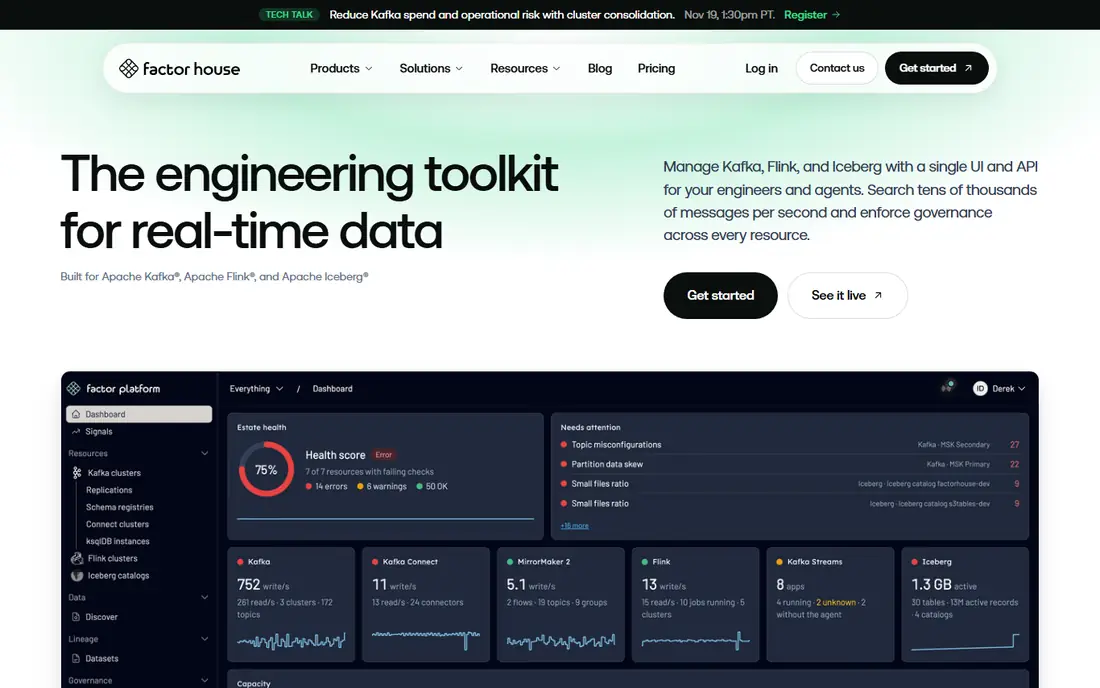
Kpow, from Factor House, is the control plane for teams that count clusters rather than seats. It connects directly to the cluster as an ordinary Kafka client, so there is no proxy layer and nothing sits in the data path. Enterprise starts at $4,500 per cluster per year with 100 users included, which makes it cheaper than per seat rivals once a team averages four or more users per cluster. Three clusters cost $13,500 a year at list price. The Community edition is free for up to 3 clusters and 10 users, which suits a small platform team. The trade off is that the governance features, including role based access control, data masking, single sign on and the audit log, are held back for Enterprise.
What we like- Per cluster pricing stays flat as the team grows, published price with no contact only tier, connects as an ordinary Kafka client with nothing inline, 30 day trial
Watch out for- Community edition caps at 10 users, RBAC, masking, SSO and audit log are Enterprise only, no free tier for larger teams
#3
Confluent Control Center
Best for: Teams already running Confluent Platform
Visit confluent.io
Starting priceQuote only; bundled with Confluent Platform enterprise licence, not sold separately
Free planNo standalone free plan; Confluent Cloud Basic starts at $0
Confluent Control Center is the management console that ships with Confluent Platform. It gives operators a single view of brokers, topics, connectors, schemas and stream lineage, with alerting and health checks built in. Because it is bundled with the Confluent Platform enterprise licence and is not sold separately, its cost is whatever the platform licence costs, which is quote based. For teams already on Confluent, it is the obvious choice and costs nothing extra. For teams on any other distribution, it is not an option at all, and a vendor neutral console such as Conduktor or Kpow is the right pick instead.
What we like- Deepest integration with Confluent Platform, built in monitoring and stream lineage, no extra installation for Confluent users
Watch out for- Only works with Confluent Platform, no published standalone price, useless for Amazon MSK, Aiven or self managed Kafka
#4
Lenses
Best for: Analysts and data teams that want a SQL interface over Kafka
Visit lenses.io
Starting price$4,000 per year for DevX Team, covering up to 15 users on a single cluster
Free planCommunity free for up to 5 users, with basic authentication only
Lenses is a Kafka governance and data exploration platform with a different focus from the consoles above. Its standout is SQL Studio, a SQL interface for querying topics without writing consumer code, plus a data catalogue and lineage views. The DevX Team tier starts at $4,000 a year, covers up to 15 users on a single cluster, and adds single sign on, SAML and role based access control. The Community edition is free for up to 5 users but has basic authentication only, with no single sign on and no role based access control. Replication through K2K is priced separately, from $1,000 a month for Enterprise. Lenses suits data teams; engineers who run the cluster will find Conduktor or Kpow more direct.
What we like- SQL Studio lets analysts query topics without writing consumer code, data catalogue and lineage visualisation, published entry price
Watch out for- Team tier caps at 15 users on one cluster, Multi Kafka Enterprise is quote only, heavy deployment footprint with an agent on every cluster, replication is a separate paid ladder
#5
AKHQ
Best for: Teams that want a free open source Kafka console
Visit akhq.io
Starting priceFree
Free planFree under Apache 2.0, no paid tier
AKHQ is a free open source Kafka console licensed under Apache 2.0, with no paid tier and no seat or cluster cap. It covers the daily work: browsing topics and messages, managing consumer groups, viewing schemas and connectors, and resetting offsets. It deploys as a single container and connects to any Kafka distribution, including Amazon MSK and Confluent Cloud. The limits are the usual open source ones: no vendor support contract, and governance features such as approval workflows and data masking are lighter than in Conduktor or Kpow.
What we like- Free at any team size, covers topics, consumer groups, schemas and connectors, lightweight single container deployment, active open source community
Watch out for- No commercial support contract, governance features are lighter than paid consoles, interface is functional rather than polished
#6
Kafbat UI
Best for: Teams that want a free console with access control built in
Visit kafbat.io
Starting priceFree
Free planFree under Apache 2.0, no paid tier, no seat or cluster cap
Kafbat UI is the free console that closes the gap AKHQ leaves open. It is free under Apache 2.0 with no paid tier, no seat cap and no cluster cap, and it ships role based access control, six identity provider types, server side masking and a built in audit log at no cost. That makes it the strongest free option for a team that needs access control but cannot pay for Conduktor or Kpow. It covers topics, consumer groups, schemas and connectors against any Kafka distribution. The trade off is support: there is no vendor to call when something breaks, and the community is smaller than AKHQ's. For a team with in house Kafka skills, that is a fair exchange for a full featured console at zero licence cost.
What we like- Free with role based access control, six identity provider types, server side masking and audit log included, no paid tier to grow into
Watch out for- No commercial support contract, smaller community than AKHQ, fewer governance workflows than paid platforms
#7
Offset Explorer
Best for: Individual engineers who want a desktop Kafka browser
Visit kafkatool.com
Starting price$139 per user for 1 to 10 users, $128 for 11 to 20, $119 for 21 to 50, plus $46 per licence per year after the first year
Free planFree for personal use; 30 day evaluation for other use
Offset Explorer, formerly known as Kafka Tool, is a desktop application that runs on each engineer's machine rather than on a shared server. It browses topics, partitions, consumer groups and messages, and it is the fastest way for one engineer to look inside a cluster. Pricing is a purchase per named user: $139 for 1 to 10 users, $128 for 11 to 20, and $119 for 21 to 50, plus $46 per licence a year after the first 365 days. It is free for personal use, with a 30 day evaluation for other use. The limit is that it is a personal tool, not a team platform: there is no shared view, no access control and no audit log, so it suits individual engineers rather than platform teams.
What we like- One time purchase rather than a subscription, runs on the engineer's own machine, simple to install with no server to run
Watch out for- Desktop only, so no shared team view, no role based access control, no central audit log, per user pricing adds up across a team
Starting priceFree
Free planFree, open source
Klaw, from Aiven, takes a different angle from the other tools here: it is a self service governance layer for Kafka. Developers request topics, schemas, connectors and access through a web interface, and platform owners approve or reject them, with an audit trail of every decision. It is free and open source, which makes it a good companion to a free console such as AKHQ or Kafbat UI. The combination gives a team both a console for looking at the cluster and a workflow for changing it safely. The limit is scope: Klaw is not a full monitoring console, so teams that need deep metrics and alerting should pair it with Kpow, Conduktor or their cloud provider's monitoring.
What we like- Self service request and approval workflow for topics and schemas, free open source, built for platform teams that hand Kafka to product teams
Watch out for- Focused on governance requests rather than a full console, needs other tooling for deep monitoring, smaller ecosystem than the big consoles
Frequently asked questions
What is the best free Kafka management software
AKHQ and Kafbat UI are the best free Kafka management tools. Both are free under Apache 2.0 with no seat or cluster cap, and both cover topics, consumer groups, schemas and connectors against any Kafka distribution. Kafbat UI is the stronger pick when access control matters, because it ships role based access control, masking and an audit log at no cost. AKHQ is the simpler pick when the team only needs a console for browsing and basic operations.
How much does Conduktor cost
Conduktor Console Community is free for up to 50 users and 3 clusters. The Team edition costs $1,200 per seat per year, or $125 per seat per month, and adds unlimited clusters, advanced insights, federated ownership and governance workflows. The Enterprise edition is a custom contract with volume pricing, a service level agreement and dedicated support. Conduktor Gateway is licensed separately, per cluster, with a three cluster minimum and no published price.
Is Kpow cheaper than Conduktor
Kpow is cheaper than Conduktor once a team averages four or more users per cluster. Kpow Enterprise costs $4,500 per cluster per year with 100 users included, so three clusters cost $13,500 a year however many engineers use them. Conduktor Team costs $1,200 per seat per year, so fifty engineers cost $60,000 a year. For a small team with few users, Conduktor Community is free and Kpow Community caps at 10 users, so the free tiers decide the answer.
Does Confluent Control Center work with Amazon MSK
No, Confluent Control Center only works with Confluent Platform. It is bundled with the Confluent Platform enterprise licence and is not sold separately, so it cannot manage Amazon MSK, Aiven, Redpanda or self managed Kafka clusters. Teams on those distributions should use a vendor neutral console such as Conduktor, Kpow, AKHQ or Kafbat UI, all of which connect to any Kafka distribution.
What is the difference between Kafka management and Kafka monitoring
Kafka management covers changing and controlling the cluster: creating topics, managing consumer groups, setting access rules and approving schema changes. Kafka monitoring covers watching the cluster: broker health, partition lag, throughput and alerts. Most tools in this guide do both to some degree, but Conduktor, Kpow and Klaw lean toward management and governance, while a dedicated monitoring stack leans toward metrics and alerting.
Sources we checked (8)
- https://www.conduktor.io/pricing
- https://www.conduktor.io/console/team-edition
- https://www.factorhouse.io/articles/best-kafka-management-tools/
- https://www.factorhouse.io/resources/kafka/comparisons/kpow-vs-lenses/
- https://www.factorhouse.io/resources/kafka/comparisons/conduktor-vs-confluent-control-center/
- https://akhq.io
- https://kafbat.io
- https://www.klaw-project.io
Is your product missing or out of date?
We review this list regularly. Vendors can request a listing, send updated pricing or ask about featured placement.

Shihab Mia · Founder, Rankite
Shihab has 5+ years in B2B and SaaS SEO. He writes Rankite's software buying guides from pricing pages, documentation and public user reviews. More about Shihab.